AuctionHousePlus
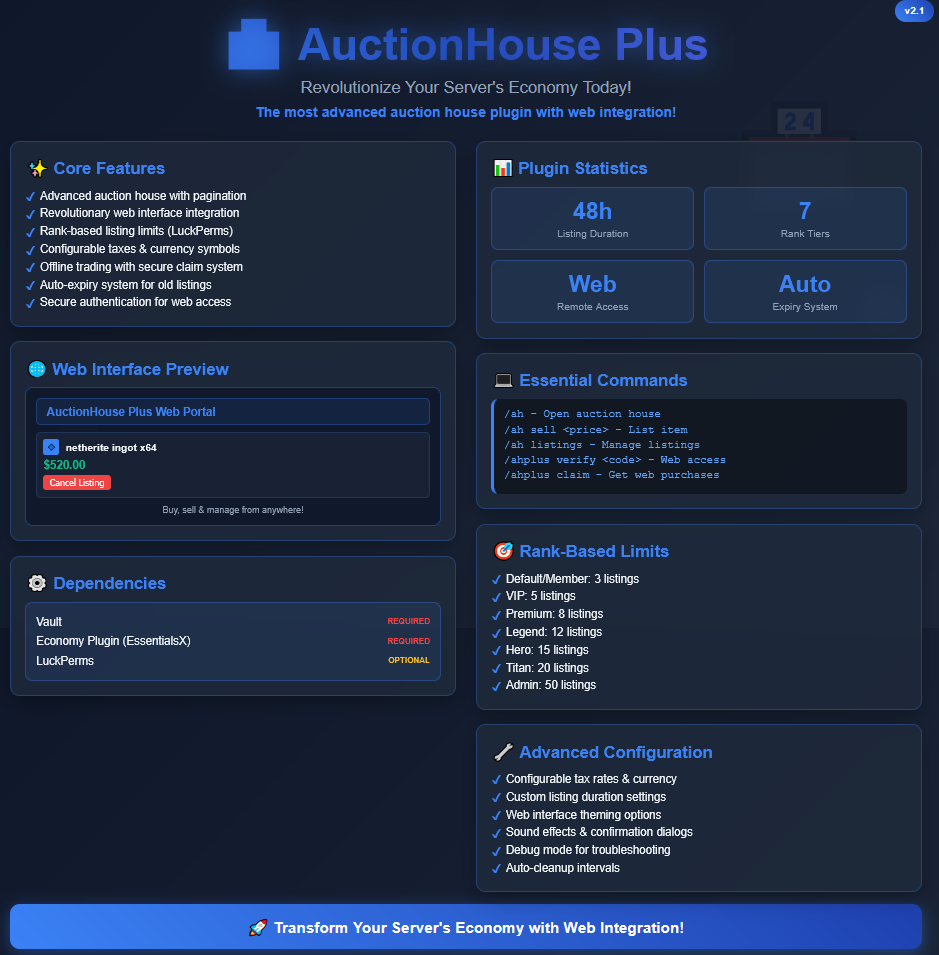
Main page:
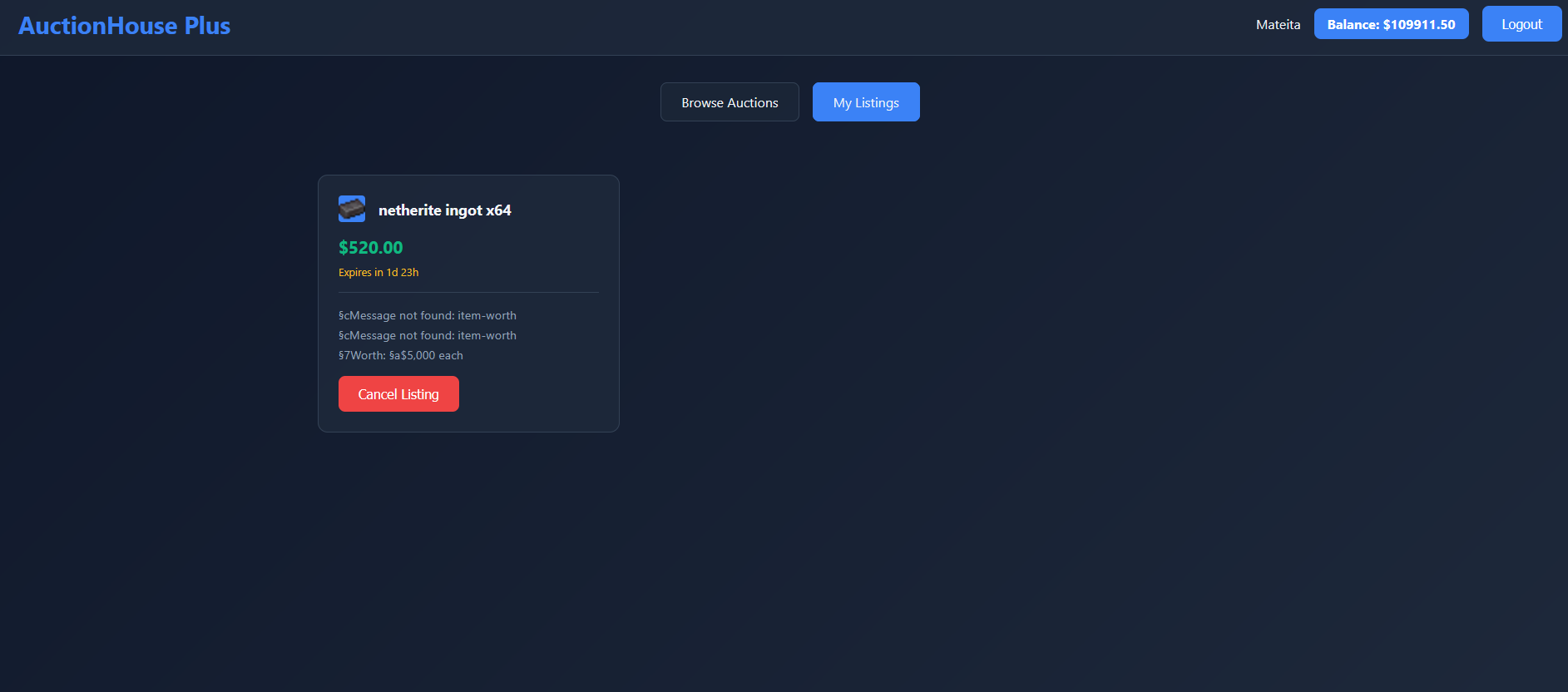
Advertisement:
[](https://www.spigotmc.org/resources/%E2%9C%A8%E3%80%90%E2%98%85-player%E2%9C%A6console-%E2%98%85%E3%80%91%E2%9C%A8-%E2%8E%AE-remote-admin-panel-50-off-%E2%8E%AE-velocity-support-file-managing-%E2%9B%8F%EF%B8%8F.126241/)
Text Version
# AuctionHousePlus – Revolutionize Your Server Today!
**The most advanced auction house plugin with web integration!**
## What does this plugin do?
AuctionHousePlus transforms your server’s economy with a powerful, feature-rich auction house system that goes beyond basic trading. Players can buy, sell, and manage items through both in-game commands AND a sleek web interface optionally!
## ✨ Key Features
** Advanced Auction House** – Complete buying/selling system with pagination
** Web Interface** – Revolutionary web portal for managing auctions remotely and buying stuff
** Rank-Based Limits** ( Needs Luckperms ) – Different auction limits based on player ranks
** Economy** – Configurable taxes for auctioning, currency symbols, and Vault integration –
** Offline Trading** – Buy/sell even when offline with secure claim system when you come back
**⏰ Auto-Expiry** – Cleans old listings easily
**️ Secure Authentication**
– Player verification system for web access through commands in-game for an actual confirmation of owning the accounts
## Dependencies
– **Vault** (Required) – Economy integration
– **Vault hook like EssentialsX** (Required) – Economy integration
– **LuckPerms** (Required) – For rank-based auction limits
## ⚙️ Configuration (v2.0)
“`
# AuctionHouse Configuration
# Prefix for all plugin messages
prefix: “&8[&6AuctionHouse&8] &r”
# Web expansion settings
web-expansion:
# Enable the web interface for AuctionHouse Plus
enabled: false
# Message shown when web expansion is disabled but someone tries to use web commands
disabled-message: “&cWeb expansion is currently disabled on this server.”
# Economy settings
currency-symbol: “$”
enable-tax: true
tax-rate: 0.05
# Default listing settings (fallback if no rank limit is found)
listing-duration-hours: 48
max-listings-per-player: 3
# Rank-based auction limits
rank-limits:
default: 3 # Default group
member: 3 # Member group
vip: 5 # VIP group
premium: 8 # Premium group
legend: 12 # Legend group
hero: 15 # Hero group
titan: 20 # Titan group
admin: 50 # Admin group
# Advanced settings
advanced:
# Enable debug mode for troubleshooting
debug-mode: false
# Auto-cleanup expired listings interval (minutes)
cleanup-interval: 60
# Maximum items per auction house page
items-per-page: 45
# Enable auction house sound effects
sound-effects: true
# Enable confirmation dialogs for purchases
confirm-purchases: true
# Enable confirmation dialogs for cancellations
confirm-cancellations: true
“`
The newest update adds a new webpage.
It can be enabled in config
AuctionHouse by ilius
# ⚡ AuctionHouse ⚡
**A fast, clean auction house for Paper 1.20+**
   
—
### 📦 Browse Listings
Scroll through pages, hover for details.

### ✅ Buy with Confidence
Confirmation screen before every purchase.

### 💰 Sell in Seconds
One command, confirm, listed.

### 🔍 Find What You Need
Filter by category, price, seller, or keyword.

### 📊 Price History
Bar chart with weekly paging and trends.

### 📋 Container Preview
Right-click shulkers to peek inside before buying.

—
## ✨ What’s Included
### For Players
– **Clean GUI** — Everything runs through inventory menus, no chat spam
– **Buy & Sell Confirmation** — Review before money moves
– **Mailbox** — Bought items and expired listings go to your mailbox, nothing gets lost
– **Container Preview** — See what’s inside shulkers before buying
– **Seller Info** — Right-click a listing to check the seller’s stats and other items
– **10 Categories** — Weapons, Armor, Tools, Blocks, Food, Potions, Redstone, Decoration, Mob Drops, Misc
– **Filters & Search** — Narrow down by category, price, seller, or keyword
– **Price History** — Real bar chart with weekly views, highs/lows, and trend arrows
– **Datapack Items** — Custom items show up correctly with their own price history
### For Server Owners
– **Listing Fees & Tax** — Flat fee, percentage, sales tax — all configurable
– **Vault + More** — Works with Vault, PlayerPoints, EssentialsX, XP economy
– **LuckPerms** — Set listing limits, expiry times, and fees per rank
– **SQLite / MySQL / MariaDB** — SQLite out of the box, switch to MySQL whenever
– **Import Tool** — Migrate from CrazyAuctions, zAuctionHouse, Fadah, or Akarian
– **Everything is Configurable** — Messages, GUIs, icons, features — change whatever you want
– **Discord Webhooks** — Get notified when items are listed or sold
– **PlaceholderAPI** — Placeholders for scoreboards and tab lists
– **WorldGuard** — Restrict the AH to certain regions
– **Folia Support** — Works on Folia out of the box
– **Anti-Exploit** — Atomic SQL, transaction locks, drag protection, dupe prevention
—
## 🔗 Part of the ilius Economy Ecosystem
AuctionHouse is the player-to-player marketplace of the ilius economy stack. Pair it with:
– [**EconomyProvider**](https://modrinth.com/plugin/economyprovider-by-ilius) — Modern Vault economy with banknotes, baltop GUI, and transaction logging
– [**EconomyShop**](https://modrinth.com/plugin/economyshop) — Server shop with dynamic pricing, chest shops, and categories
All three plugins integrate seamlessly — same config style, same database support, same Discord. Use one or all three.
—
## ⌨️ Commands
**Player**
| Command | Description |
|—|—|
| `/ah` | Open the auction house |
| `/ah sell [amt]` | List the item in your hand |
| `/ah search ` | Search listings |
| `/ah cancel ` | Cancel your listing |
| `/ah active` | View your listings |
| `/ah claim` | Claim mailbox items |
| `/ah help` | Show commands |
**Admin**
| Command | Description |
|—|—|
| `/ah admin reload` | Reload config |
| `/ah admin forcecancel ` | Remove any listing |
| `/ah admin return ` | Return items to player |
| `/ah admin stats` | Market statistics |
| `/ah admin lookup ` | Inspect a listing |
| `/ah admin transactions [player]` | Transaction log |
| `/ah admin purge ` | Clear old records |
| `/ah admin import` | Import from other plugins |
—
## 🔑 Permissions
| Permission | Description | Default |
|—|—|—|
| `auction.use` | Open the AH | true |
| `auction.sell` | List items | true |
| `auction.buy` | Buy items | true |
| `auction.cancel` | Cancel own listings | true |
| `auction.admin` | Admin commands | op |
| `auction.admin.reload` | Reload config | op |
—
## 📥 Setup
1. Drop the jar in `plugins/`
2. Restart
3. Edit `plugins/AuctionHouse/config.yml` if you want
4. `/ah admin reload` and you’re good
**Want MySQL instead of SQLite?** Open `config.yml`, set `storage.type` to `mysql`, then fill in `host`, `port`, `database`, `username`, and `password` under the `storage.mysql` section. Restart and you’re done.
—
## 📦 Requirements
– **Paper 1.20+** (or Purpur, Folia, etc.)
– **Vault** + an economy plugin
– **Optional:** LuckPerms, PlaceholderAPI, WorldGuard, [EconomyProvider](https://modrinth.com/plugin/economyprovider-by-ilius), [EconomyShop](https://modrinth.com/plugin/economyshop)
—
## 💬 Need Help?
Join the [Discord](https://discord.gg/ns3q9ejGwR) or open an issue.
—
## 🚀 Pro Edition — Available Now
Everything above, plus:
– **Buy Orders** — Full order book matching engine with escrow and market demand GUI
– **Admin Dashboard** — Live stats, module toggles, and moderation tools
– **Sell Wizard** — Guided listing with auction types and price suggestions
– **Bulk Listings** — List and buy partial stacks
– **Quantity Selector** — Pick exactly how much to buy
– **Sale Limits** — Per-player and per-group caps
– **CSV Export** — Dump transactions for external analysis
– **Price Deviation Guards** — Block manipulation attempts automatically
– **Price Drop Notifications** — Alert players when items hit their target price
### [» Get AuctionHouse Pro on BuiltByBit «](https://builtbybit.com/resources/auctionhouse-pro.103563/)
—
*Part of the ilius economy ecosystem. Built for servers that take their economy seriously.*
Auctioneer-
# Auctioneer
[](https://github.com/Garsooon/Auctioneer/releases/latest)
[](https://github.com/Garsooon/Auctioneer/releases)
[](https://github.com/Garsooon/Auctioneer/stargazers)
**Auctioneer** is a simple chat-based auction plugin for Minecraft Beta 1.7.3, built on [Project Poseidon](https://github.com/retromcorg/Project-Poseidon).
It lets players auction off items they’re holding, with configurable settings and economy support.
—
## Features
– Start auctions with `/auction `
– Live bidding through chat
– Configurable auction time, bid time increases and item blacklist
– Optional minimum bid increase (after first bid)
—
## Requirements
– [Project Poseidon](https://github.com/retromcorg/Project-Poseidon)
—
## Installation
1. Download `Auctioneer.jar` from the [releases](https://github.com/Garsooon/Auctioneer/releases).
2. Drop it into your `plugins` folder.
2.1. If updating from a previous version either regenerate your config file by deleting it in
`plugins/Auctioneer/config.yml` or adding the new config.yml text and value
3. Make sure [Poseidon](https://github.com/retromcorg/Project-Poseidon) is installed.
4. Restart your server.
—
## Usage
– **Start an auction**:
`/auction `
Begins an auction for the item you are holding.
A 5$ as the minimun bid increase will increase every bid by 5$
A 5% will increase by 5% of the starting bid.
– **Place a bid**:
Type your bid amount in chat during an active auction.
`/bid `
– **Auction rules**:
– Only one auction can run at a time.
– Minimum bid increment applies only after the first bid.
– Blacklisted items cannot be auctioned.
—
## Configuration
The config file (`plugins/Auctioneer/config.yml`) lets you adjust:
– Auction duration
– Blacklisted items
– Minimum bid increase
—
## Development
This plugin is designed for Minecraft Beta 1.7.3 and was designed for Project Poseidon. It may not work with other server types or newer versions.
—
## Building
You can build the plugin using Maven:
“`bash
mvn clean package
“`
If you get issues with building try installing the Economy libraries you need into your IDE or Local Maven Repo
Auction HouseX
Take your server’s economy to the next level with a fast, competitive, and player-driven auction house inspired by top-tier SMP servers.
This plugin allows players to buy, sell, and flip items instantly through a clean and responsive GUI. Built specifically for Paper servers, it’s optimized for performance and designed to handle even the most active economies.
💰 Features
⚡ Fast & Optimized GUI – Smooth and lag-free browsing
🛒 Player Listings – Sell any item easily
🔍 Search & Filters – Find exactly what you need
⏳ Item Expiration – Automatic cleanup of old listings
📊 Sorting Options – Price, newest, and more
🔒 Secure Transactions – No dupes, no exploits
⚙️ Configurable – Customize limits, taxes, and settings
🧩 Paper Support – Built for modern servers
😎Type smarter, not harder—use 6m, 2k, 1b instead of long numbers.
🧠 Perfect For
SMP servers
Economy-based servers
PvP & competitive servers
Skyblock / survival economies
🚀 Performance
Built with performance as a priority:
Minimal lag impact
Efficient item handling
Scales with large playerbases
📌 Requirements
Paper (recommended)
Vault (for economy support)
Auction House Plugin

# Auction House Plugin
Use /ah to open the auction house.
### Requirements:
– [Vault](https://www.spigotmc.org/resources/vault.34315/)
– Any Ecomony Plugin (for example [Essentials](https://modrinth.com/plugin/essentialsx) or [BetterEconomy](https://www.spigotmc.org/resources/bettereconomy.96690/))
Admins on the server can also use
/ah admin [opens the ah, but if you click on an item you can delete it from the ah]
/ah ban [make a player unable to use /ah]
For the commands a description is provided in-game. If you aren’t op on the server and want to use permissions to access these commands, the current permission is called “auctionhouse.moderator”
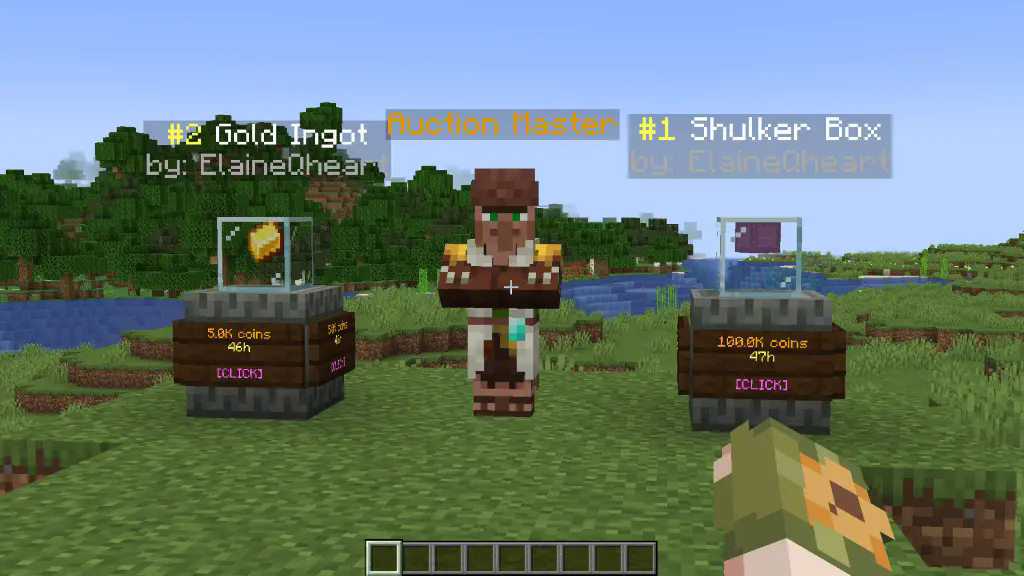
*To set up an auction use /ah sell *
config.yml
“`
tax: 0.01 # 1% tax
auction-setup-time: 30 # the time it takes to put an item on auction
default-max-auctions: 10
sold-message: true # send a message to the player when one of their auctions is sold
auto-collect: false # automatically gives the money to the player when an auction is bought and removes it from the ah
partial-selling: false # allows players to select the amount of items they want to buy of an auction
admin-permission: “auctionhouse.moderator”
display-update: 20 # 20 ticks = 1 second, how frequently the item displays are updated; can be set to 1 for instant updates
auction-announcements: true # announce when someone puts an item on auction (players can toggle this with /ah announce)
bin-auctions: true # BIN = Buy It Now [/ah sell ]
bin-auction-duration: 172800 # the time an auction lasts in seconds (60*60*48 = 172800)
min-bin: 1 # the minimum sell price
bid-auctions: true # enables actual auctions by typing [/ah bid ]
bid-auction-duration: 7200 # the time a bidding auction lasts in seconds (60*60*2 = 7200)
min-bid: 1 # the minimum bid price
last-bid-extra-time: 60 # if the auction time is less than this when a bid is placed, it’s set to this
bid-increase-percent: 25 # how much each bid has to increase at least
“`
Example of permissions.yml file
“`
# the default auction slots and duration can be edited in the config.yml file
# by default this is empty. To add ranks/permissions, add them like so:
auction-slots:
vip: 12
mvp: 15
custom.example.permission: 50
auction-duration:
vip: 259200 # 60*60*24*3 = 3 days
mvp: 345600 # 60*60*24*4 = 4 days
custom.example.permission: 432000 # 5 days
“`
colour codes used in the messages.yml
“`
# §k obfuscated
# §l bold
# §m strikethrough
# §n underline
# §o italic
# §r reset
# &n new line
# §0: Black
# §1: Dark Blue
# §2: Dark Green
# §3: Dark Aqua
# §4: Dark Red
# §5: Dark Purple
# §6: Gold
# §7: Gray
# §8: Dark Gray
# §9: Blue
# §a: Green
# §b: Aqua
# §c: Red
# §d: Light Purple
# §e: Yellow
# §f: White
“`
layout.yml
“`
# You can replace any character with another or even remove a line to change the layout. The spaces between the characters are there to make it clearer. The characters are defined down below.
ah-layout:
– ‘# # # # # # # # #’
– ‘# . . . . . . . #’
– ‘# . . . . . . . #’
– ‘# . . . . . . . #’
– ‘# # # # # # # # #’
– ‘s o # p r n # f m’
my-ah-layout:
– ‘# # # # # # # # #’
– ‘# . . . . . . . #’
– ‘# . . . . . . . #’
– ‘# . . . . . . . #’
– ‘# # # # # # # # #’
– ‘b o # p r n # d i’
‘#’:
==: org.bukkit.inventory.ItemStack
DataVersion: 4325
id: minecraft:black_stained_glass_pane
count: 1
components:
minecraft:tooltip_display: ‘{hide_tooltip:1b}’
schema_version: 1
s:
==: org.bukkit.inventory.ItemStack
DataVersion: 4325
id: minecraft:oak_sign
count: 1
schema_version: 1
active-search:
==: org.bukkit.inventory.ItemStack
DataVersion: 4325
id: minecraft:spruce_sign
count: 1
schema_version: 1
o:
==: org.bukkit.inventory.ItemStack
DataVersion: 4325
id: minecraft:hopper
count: 1
schema_version: 1
p:
==: org.bukkit.inventory.ItemStack
DataVersion: 4325
id: minecraft:arrow
count: 1
schema_version: 1
r:
==: org.bukkit.inventory.ItemStack
DataVersion: 4325
id: minecraft:nether_star
count: 1
schema_version: 1
n:
==: org.bukkit.inventory.ItemStack
DataVersion: 4325
id: minecraft:arrow
count: 1
schema_version: 1
m:
==: org.bukkit.inventory.ItemStack
DataVersion: 4325
id: minecraft:ender_chest
count: 1
schema_version: 1
b:
==: org.bukkit.inventory.ItemStack
DataVersion: 4325
id: minecraft:arrow
count: 1
schema_version: 1
i:
==: org.bukkit.inventory.ItemStack
DataVersion: 4325
id: minecraft:paper
count: 1
schema_version: 1
f:
==: org.bukkit.inventory.ItemStack
DataVersion: 4325
id: minecraft:powered_rail
count: 1
schema_version: 1
d:
==: org.bukkit.inventory.ItemStack
DataVersion: 4325
id: minecraft:golden_carrot
count: 1
schema_version: 1
bin-filter-bin:
==: org.bukkit.inventory.ItemStack
DataVersion: 4325
id: minecraft:gold_ingot
count: 1
schema_version: 1
bin-filter-auctions:
==: org.bukkit.inventory.ItemStack
DataVersion: 4325
id: minecraft:gold_block
count: 1
schema_version: 1
locked-slot:
==: org.bukkit.inventory.ItemStack
DataVersion: 4325
id: minecraft:barrier
count: 1
schema_version: 1
back-to-my-auctions:
==: org.bukkit.inventory.ItemStack
DataVersion: 4325
id: minecraft:arrow
count: 1
schema_version: 1
anvil-search-paper:
==: org.bukkit.inventory.ItemStack
DataVersion: 4325
id: minecraft:paper
count: 1
schema_version: 1
cancel:
==: org.bukkit.inventory.ItemStack
DataVersion: 4325
id: minecraft:red_banner
count: 1
schema_version: 1
collect-expired-item:
==: org.bukkit.inventory.ItemStack
DataVersion: 4325
id: minecraft:red_dye
count: 1
schema_version: 1
cancel-auction:
==: org.bukkit.inventory.ItemStack
DataVersion: 4325
id: minecraft:red_concrete
count: 1
schema_version: 1
command-block-info:
==: org.bukkit.inventory.ItemStack
DataVersion: 4325
id: minecraft:structure_block
count: 1
schema_version: 1
admin-cancel-auction:
==: org.bukkit.inventory.ItemStack
DataVersion: 4325
id: minecraft:red_concrete
count: 1
schema_version: 1
admin-expire-auction:
==: org.bukkit.inventory.ItemStack
DataVersion: 4325
id: minecraft:red_dye
count: 1
schema_version: 1
confirm:
==: org.bukkit.inventory.ItemStack
DataVersion: 4325
id: minecraft:green_banner
count: 1
schema_version: 1
choose-item-buy-amount:
==: org.bukkit.inventory.ItemStack
DataVersion: 4325
id: minecraft:oak_hanging_sign
count: 1
schema_version: 1
dirt:
==: org.bukkit.inventory.ItemStack
DataVersion: 4325
id: minecraft:dirt
count: 1
schema_version: 1
turtle-scute-confirm:
==: org.bukkit.inventory.ItemStack
DataVersion: 4325
id: minecraft:turtle_scute
count: 1
schema_version: 1
cannot-afford:
==: org.bukkit.inventory.ItemStack
DataVersion: 4325
id: minecraft:armadillo_scute
count: 1
schema_version: 1
collect-sold-item:
==: org.bukkit.inventory.ItemStack
DataVersion: 4325
id: minecraft:diamond
count: 1
schema_version: 1
bid-history:
==: org.bukkit.inventory.ItemStack
DataVersion: 4325
id: minecraft:filled_map
count: 1
schema_version: 1
bid-explanation:
==: org.bukkit.inventory.ItemStack
DataVersion: 4325
id: minecraft:gold_ingot
count: 1
schema_version: 1
submit-bid:
==: org.bukkit.inventory.ItemStack
DataVersion: 4325
id: minecraft:gold_nugget
count: 1
schema_version: 1
cannot-afford-bid:
==: org.bukkit.inventory.ItemStack
DataVersion: 4325
id: minecraft:armadillo_scute
count: 1
schema_version: 1
top-bid:
==: org.bukkit.inventory.ItemStack
DataVersion: 4325
id: minecraft:gold_block
count: 1
schema_version: 1
collect-auction:
==: org.bukkit.inventory.ItemStack
DataVersion: 4325
id: minecraft:gold_block
count: 1
schema_version: 1
collect-coins:
==: org.bukkit.inventory.ItemStack
DataVersion: 4325
id: minecraft:gold_nugget
count: 1
schema_version: 1
own-bid:
==: org.bukkit.inventory.ItemStack
DataVersion: 4325
id: minecraft:poisonous_potato
count: 1
schema_version: 1
sounds:
click: “UI_STONECUTTER_SELECT_RECIPE”
open-enderchest: “BLOCK_ENDER_CHEST_OPEN”
close-enderchest: “BLOCK_ENDER_CHEST_CLOSE”
break-wood: “BLOCK_WOOD_BREAK”
experience: “ENTITY_EXPERIENCE_ORB_PICKUP”
villager-deny: “ENTITY_VILLAGER_NO”
open-shulker: “BLOCK_SHULKER_BOX_OPEN”
close-shulker: “BLOCK_SHULKER_BOX_CLOSE”
“`
## Q&A
**Q:** Can I customize messages and GUI texts?
**A:** Yes, edit the messages.yml file in the plugin folder. You can change the currency from “coins” to whatever you like under “placeholders” in the messages.yml file.
**Q:** How do I update the config with new options?
**A:** The plugin automatically adds missing config options when updated, without overwriting your custom settings.
**Q:** How do I spawn that Auction Master Villager and the item displays and how do I remove them?
**A:** If you are op, then you can do /ah summon which you can tab-complete. To remove them, simply punch them while being in creative mode and being op on the server.
**Q:** The Auction Master Villager and the item displays disappear after a while
**A:** If you do something like /kill @e, of course they will be removed. Also, if you use /teleport @e, they will be moved.
**Q:** How do I report bugs or request features?
**A:** You can join my new [discord server](https://discord.gg/ePTwfDK6AY)
and contact me directly.
Auction House

[](https://modrinth.com/mod/auction-house)
[](https://github.com/TechPro424/Auction-House)
[](https://modrinth.com/mod/fabric-api)

**This mod requires Fabric API.**
**This mod is in a highly experimental state. Do not use it on production servers.**
Auction House is a server-side mod to add your items to an “auction house” where the item can then be sold to the highest bidder at any point in time.
Use the `/sell` command to add your items to the Auction House and `/auctionhouse` to access the Auction House.
**This mod also has an “analytics” feature (controlled by the `analyticsEnabled` config option, enabled by default).**
This feature basically sends data about the items in the Auction House to a website that converts it into neat graphs.
These graphs can be viewed by going to `https://auction-house-api.onrender.com/view//` where `server_name` is the name set in the configuration file.
To see how your items’ data is being used, go to https://github.com/Rafayel08/minecraft-auction-house-api (this is the repository that houses the source code for the analytics and graph generation)
## Credits
– Huge shoutout to [robotkoer](https://modrinth.com/user/robotkoer) for creating and maintaining the [Fabulously Optimized](https://modrinth.com/modpack/fabulously-optimized) modpack, as it was the only way I could play Minecraft properly! Without this modpack, I would have never played MC Java, and as a result, never gotten into modding the game.
– Another huge shoutout to [Kaupenjoe](https://www.youtube.com/@ModdingByKaupenjoe/) for his [Java Introduction](https://www.youtube.com/playlist?list=PLKGarocXCE1FeXvEogpjz4SvHxF_FJRO6) and [Minecraft Fabric Modding Tutorial](https://www.youtube.com/playlist?list=PLKGarocXCE1EMYzuBUTYjHnFeBrRFbesk) playlists! They’re a great resource for anyone who wants to get started with Minecraft modding.
– Thanks a lot to the Fabric community on [Discord](https://discord.gg/v6v4pMv) and [GitHub Discussions](https://github.com/orgs/FabricMC/discussions) and to [Kaupenjoe’s community on Discord](https://url.kaupenjoe.net/discord) for helping me out with the various issues I had when making this mod and tolerating my stupid mistakes.
AstraMarket
# Auction plugin for EmpireProjekt.ru
## No-Lag, Free, Live Database reload during server runtime without lags!

Advantages:
– [x] Sorting: Name, Date, Type, Player
– [x] Grouping by players
– [x] Min and Max prices
– [x] Max amount per player
– [x] Broadcast when auction created
– [x] Sounds on click, open, sold etc.
– [x] Permissions
– [x] Customizable buttons
– [x] Fully translatable
– [x] Runtime config and database reload
– [x] Custom currency support
| Command | Description | Permission |
|:———————————-|:————————————————|:————————|
| ️`/amarket` | Open market | astra_market.command |
| ️`/amarket open [PLAYER]` | Open market [of player] | astra_market.command |
| ️`/amarket expired [PLAYER]` | Open expired menu [of player] | astra_market.command |
| ️`/amarket players` | Open player list who have active slots | astra_market.command |
| ️`/amarket sell ` | Sell items on market | astra_market.sell |
| ️- | Allows player to sell up to N items at one time | astra_market.sell_max.N |
| ️`/amarketreload` | reload plugin | astra_market.reload |
### Configuring configs
At first launch there will be created config.yml
If plugin can’t read config there will be created config.default.yml. The error also will be displayed in console, so
you will understand why the config couldn’t be parsed.
“`yaml
auction:
use_compact_design: true
max_auction_per_player: 5
min_price: 10
max_price: 1000000
tax_percent: 0
announce: true
max_time_seconds: 604800000
# The vault id of currency you want to use
currency_id: null
sounds:
open: “ui.button.click”
close: “ui.button.click”
click: “ui.button.click”
fail: “entity.villager.no”
success: “block.note_block.chime”
sold: “block.note_block.chime”
buttons:
back:
material: “IRON_DOOR”
custom_model_data: 0
previous:
material: “PAPER”
custom_model_data: 0
next:
material: “PAPER”
custom_model_data: 0
sort:
material: “SUNFLOWER”
custom_model_data: 0
aauc:
material: “DIAMOND”
custom_model_data: 0
expred:
material: “EMERALD”
custom_model_data: 0
border:
material: “BLACK_STAINED_GLASS_PANE”
custom_model_data: 0
players_slots:
material: “PLAYER_HEAD”
custom_model_data: 0
“`
### Configuring database
The database can be changed in runtime after reloading plugin.
“`yaml
# There’s 3 types of database
configuration:
type: “MySql”
host: “0.0.0.0”
port: 3006
user: “user_name”
password: “password”
name: “rating_database”
# Or
configuration:
type: “H2”
name: “file_name”
# Or
configuration:
type: “SQLite”
name: “file_name”
“`
More plugins from AstraInteractive [AstraInteractive](https://github.com/Astra-Interactive)
AssassinContracts
AssassinContracts is a Minecraft plugin that allows players to anonymously place hit contracts on other players. Assassins receive these contracts in secret and are rewarded with money, loot, or other server-defined rewards upon a successful kill. All interactions are handled through simple commands—no menus or GUIs—making it lightweight and easy to use in PvP or roleplay-focused servers.
This plugin is ideal for adding stealth, danger, and player-driven conflict to your world. It encourages strategy, betrayal, and bounty hunting while keeping things fair through built-in protections like cooldowns and IP checks. A live contract list and PlaceholderAPI support make tracking and integrating contracts easy.
You need Vault for economy support. PlaceholderAPI is optional but recommended. Built for Paper 1.21.4.
Artisan Tools
# What does this mod add?
The mod adds a progression system for tools: craft, upgrade, and enhance them with Styles that boost specific parameters. Now featuring a Stamina system, Altar for crafting, deep style customization, and full addon support.
## Features:
### Core Progression
– Tools gain XP and level up through use
– Upgrade tool level and quality at an anvil
– Unlock Styles upon reaching level 5
#### Style System
– Style Templates are now separate items with unique textures — apply them to tools to activate bonuses
– Pre-built Styles (configurable): Abundance, Harvester, Excavator, Terraformer, Berserk
– Create custom Styles with flexible modifiers:
– Stats: damage, mining_speed, movement_speed, max_health, stamina, durability_loss, extra_drops, lifesteal, heal
– Custom (for addons): aoe_mining, aoe_radius, aoe_allowed_blocks, auto_replant
– Triggers: base, on_mine, on_hit, on_kill, tick
– Conditions: health_below (and more via config)
### New Systems
– ⚡ Stamina: Actions now consume stamina; regeneration is configurable
– 🪨 Altar Block:
– Custom recipe craft
– Crouch to interact and begin channeling XP
– Insert Amethyst + accumulate 100 XP to craft a Revival Stone
– Visual XP progress bar for easy tracking
– 💰 XP Refund: Breaking the altar returns accumulated experience
– 🧩 Addon Support: Full API for custom modifiers, styles, and tool tags
– 🏷️ Tag System: Group tools via **data/artisantools/tags/item/mining_tools.json**
### Utilities
– 🔧 Debug Commands: **/artisan level|progress|style** for testing
– 🌍 Localization: **EN – RU – DE – ES – PT – CN**
### Using a stone
To use the stone: sneak, hold the tool in your off-hand, stone in main hand, then right-click an anvil.


Artefact Smp
🌟 Artefact – RPG Items & Dynamic Arenas
Transform your server with 11 legendary artifacts, automatic PvE arenas, and a mystical fragment economy!
✨ Key Features
⚔️ 11 Unique Artifacts
3 Legendary Weapons: Bloody Sword (combo damage), Teleporting Bow, Void Blade (armor pierce + shadow strike)
3 Magical Armors: Sixth Sense Helmet (ESP), Wind Boots (double jump + no fall damage), Mirage Cape (invisibility dodge)
5 Mystic Items: Time Orb (slow enemies), Soul Amulet (regeneration stacks), Storm Staff (lightning + rain speed), Link Stone (waypoint teleport), Nature Heart (plant growth + passive regen)
🏛️ Dynamic Arena System
Auto-spawn every 30 minutes (50% chance)
5 progressive waves with custom-named mobs
Protected chest unlocks only after defeating all waves
Spectacular 4-phase particle animations
Auto-cleanup and terrain restoration
💎 Fragment Economy
Earn Mystical Fragments from arena chests
Open Artifact Shop GUI by right-clicking a fragment
Artifacts are server-synced: once purchased, removed from all players’ shops
🎮 How It Works
An arena spawns randomly with a server broadcast
Players approach → wave system starts
Defeat 5 waves of mobs
Chest unlocks → collect fragments
Buy artifacts for 5 fragments each
Use your powers to dominate PvE & PvP
📋 Commands
/giveartefact [item] # Give specific artifact
/giveartefact all # Give all artifacts
/arena # Force spawn arena (admin)
/togglecooldown # Toggle cooldowns (admin)
/reloadartefact # Reload plugin (admin)
⚙️ Requirements
Minecraft: 1.21.8
Server: Spigot or Paper
Dependency: WorldEdit 7.2.0+
Schematic: totem.schem (must contain a chest)
🚀 Installation
Download Artefact.jar
Install WorldEdit
Place totem.schem in plugins/WorldEdit/schematics/
Start your server
Customize chest loot inside the schematic
🎯 Perfect For
✅ PvE / Adventure servers
✅ Survival servers with progression
✅ Mini-game or Event servers
🔥 Highlights
No Pay-to-Win — all obtainable in-game
Lag-free particle animations
Full multi-world support
Anti-grief protection
Crash recovery (restores terrain)
Plug & play — zero configuration required
💬 Support
Found a bug?
Open an issue including:
Plugin version
Minecraft version
Relevant logs
Version: 1.0.0
License: MIT
Developer: Ocer