allows you to limit armor stands, so you can fix TPS drops caused by a high number of ArmorStands in your server!
Can be used in all modalities and is fully and easily configurable thanks to its intuitive configuration file.
This plugin was created with the express purpose of fixing LAG problems caused by other plugins that generate and do not
remove custom Armor Stands within a single block!
Later we also thought of adding other functions to avoid lagging machines caused by Armor Stands, like this one in the
picture
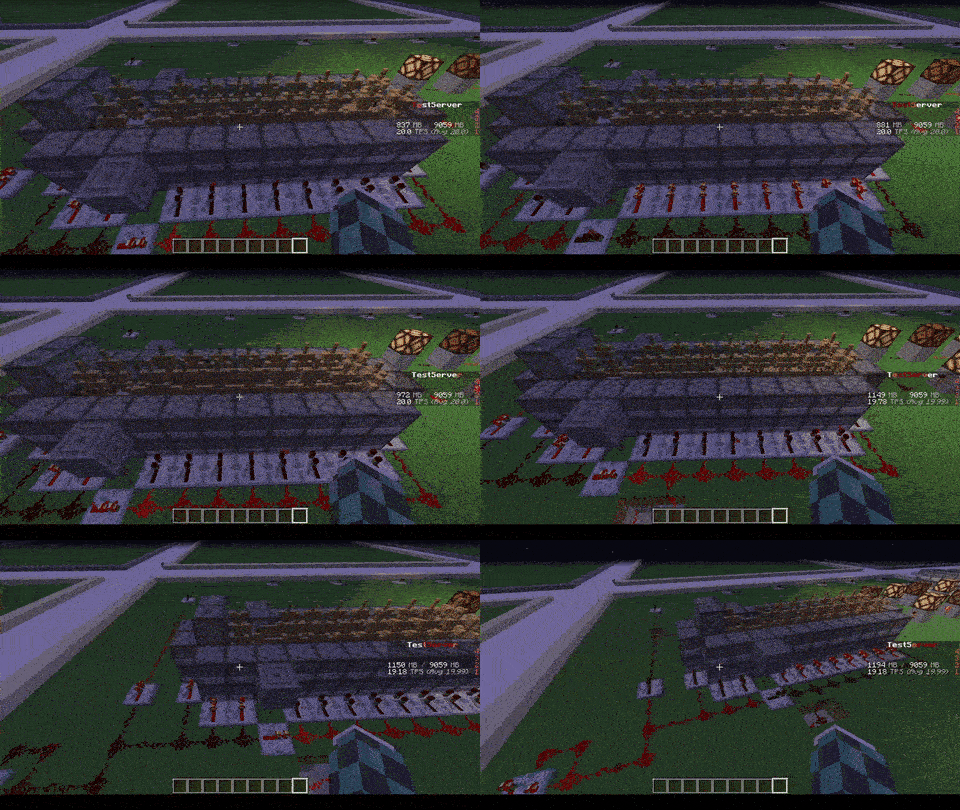
## Feature
* The most important function is that of removing CUSTOM Armor Stands ( created by other plugins ) that exceed the
preset limit in a single block or chunk!
* Set Armor Stand limit in a Block and/or a Chunk
* Check the world name, armor stand type and its name to avoid unwanted removal
* Timer that checks every X minutes in the loaded chunks the number of Armor Stands inside the chunk or in the single
block
* Check TPS status and if too low check and remove the Armor Stands in a sigle block or chunk ( this check is also
performed only on loaded chunks )
* Ability to limit players to placing a maximum of Armor Stands per chunk
* Ability to disable that the Armor Stand can be moved by the pistons or blocks connected to it depending on the number of same chunk Armor Stands
* Ability to disable that Armor Stand can move in the water depending on the number of same chunk Armor Stands
* Ability to disable that Armor Stand can be spawned through dispensers
* Customized notification ( inGame, Discord, Telegram and Console ) of when Armor Stands are removed due to limit
violation
* [NEW] Folia Support!
* No Dependency!
* Open Source!
* **/asl** – *Simple reload of the config file (Perms: `armostandlimiter.reload`)*
* **/asl check ** – *Simple command to control how many Armor Stands there are in a chunk or location in the
world (Perms: `armostandlimiter.check`)*
* **/asl clear ** – *Simple command to remove all Armor Stands there are in a chunk or location in the
world (Perms: `armostandlimiter.check`)*
* **/asl test** – *Simple command to test the notifications (Perms: `armostandlimiter.test`)*
If you have a problem with this plugin, please contact me either via PM, [Discord](https://discord.gg/5ykB943), or the discussion section before / instead of leaving a review first! Not (only) because I don’t like bad reviews for things I can and will fix/add quickly, but primarily because it is simply much easier to communicate via any one of those ways than via the review section!
This is a very simple plugin that allows you to combine an elytra with a chest plate in a smithing table (or an anvil, if configured).
The result will be an armored elytra.
Armored elytras offer the same amount of protection as a diamond chest plate and they can have the same enchantments as well. This means that you can add protection, fire protection etc to the armored elytra as well.
By default, you can only see the elytra when a player wears an armored elytra. However, you will be able to see both the armor and the elytra at the same time if you install [THIS](https://modrinth.com/mod/armored-elytra) Fabric mod on the client!
## **List of features:**
– Combine an elytra with any type of chest plate armor to create an armored elytra! It will have the same amount of armor as the type of armor it was combined with!
– Supports enchantments.
– Configurable list of allowed enchantments (and curses).
– Configurable repair cost.
– Permissions for giving / wearing / crafting different tiers of armored elytras.
– Add enchantments using enchanted books.
– Receive notification when the plugin is out-of-date.
– Permissions support.
– Configurable messages, elytra names and elytra lores.
– Uninstaller for when you no longer want to use this plugin.
I am always looking to improve upon this plugin, so if you have any tips, ideas or requests, let me know! I’ll be happy to help!
NOTE: Armored elytras will remain in the world even after uninstalling this plugin, please use the uninstall feature if you want to uninstall this plugin.
NOTE2: By default, this plugin checks if there are any updates available. If the version you are using is found to be outdated, you will receive a message in the console (and upon logging in if you have the armoredelytra.admin permission node). The update checking can be disabled in the config file.
If you encounter a bug or a problem, please contact me first before leaving a review, then I’ll try my hardest to fix it as soon as possible.
If you like this plugin, please don’t forget to let me know in the review section, it really does help me keep motivated to provide support for this plugin!
## **Permissions:**
**armoredelytra.wear.**
Allows you to wear armored elytras of a specific tier.
**armoredelytra.craft.**
Allows you to craft armored elytras of a specific tier.
**armoredelytra.give.**
*/ArmoredElytra [receiver] *
Allows you to give armored elytras of a specific tier. Will be given to the player that issued the command if no target is specified.
**armoredelytra.admin**
With this node you will receive a notification if the plugin is out of date upon joining the server.
Available armor tiers: leather, gold, chain, iron, diamond.
## **Translations:**
View translations
– (2.4.13) [Spanish](https://pim16aap2.nl/ArmoredElytra/Translations/es_AR.txt) (es_AR), provided by @legionparley.
– (2.4.13) [German](https://pim16aap2.nl/ArmoredElytra/Translations/de_DE.txt) (de_DE), provided by @Eldoria.
– (2.4.14) [Polish](https://pim16aap2.nl/ArmoredElytra/Translations/pl_PL.txt) (pl_PL), provided by @aronreich.
– (2.4.14) [Russian](https://pim16aap2.nl/ArmoredElytra/Translations/ru_RU.txt) (ru_RU), provided by @DarkSumrak.
Got your own translation? Let me know!
Note that translations created for older versions may still work. If there are any missing translations you’ll be notified in the log.
# **Uninstalling this plugin:**
If you decide you no longer want to use this plugin, simply removing the ArmoredElytra.jar from your plugins directory will not get rid of any Armored Elytras on your server. Instead, you should enable the uninstall feature of this plugin in the config.
The way this feature works is by checking player inventories upon login and chest inventories when they are accessed and removing any Armored Elytras it can find. This means that you will need to keep this plugin installed to keep it uninstalled… Though it won’t affect server performance much, if at all, as pretty much the entire plugin is disabled while in uninstall mode.
This paper plugin adds server-side compatibility with the [**Armor Poser**]([https://modrinth.com/mod/armor-poser](https://modrinth.com/mod/armor-poser)) mod.
Armor Poser is a mod that adds a GUI for armor stands for easy posing of armor stands. The Armor Poser plugin listens for incoming packets from the mod, processes them and sends the appropriate responses required for the Armor Poser functionality.
For questions feel free to join my Discord.
[](https://discord.gg/2srq4DHsWw)
## Want to support us? ##
-Mrbysco
-ShyNieke
ArmadilloSleeper
## Prevent TPS drops
Make the typical Armadillo XP Farms more optimized!
With ArmdilloSlepper, all Armadillos that are in a XP Farm will be forced into sleep to make Performance much better!
> **Please use [ProtocolLib](https://www.spigotmc.org/resources/protocollib.1997/) to get the best Experince!**
### Should ArmadilloSleeper support Bukkit/Spigot ?
**Awnser** [here](https://d0de37b3aa514097a1a997a4531a5229.elf.site/)
The Plugin will simply just deactivate AI,Gravity, Sounds and more to make the TPS
more Stable.
Slash Commands:
– **/as version** | Displays the Version of the Plugin
– **/as wake** | Wake up Armadillos that are in sleep
– **/as show** | Show all Armadillos with Glowing **RED=SLEEP GREEN=AWAKE**
> **If you like the Plugin please consider
> Following or/and Donating to my Kofi! :D**
ArenaRegen
**Introduction:**
ArenaRegen is an advanced plugin used for saving maps/regions and regenerating them to their saved forms, perfect for PvP and Practice servers.
**Server Software Support:**
1. Paper
2. Folia
3. Bukkit
4. Spigot
5. and More
**Features:**
Support for multiple arena creation and management
Auto-Regeneration of arena after each duel
Scheduled Auto-Regeneration
Highly customizable config
Multiple regeneration modes
World Edit support
Easily pairable with other plugins
Very easy to use
**Commands**
– /arenaregen help – Show help menu
– /arenaregen setpos1 – Set first position for arena
– /arenaregen setpos2 – Set second position for arena
– /arenaregen create – Create new arena
– /arenaregen save – Save/Update existing arena
– /arenaregen delete – Delete arena
– /arenaregen regen – Manually regenerate arena
– /arenaregen settime
Aqua Kingdoms
AquaKingdoms
The ultimate kingdom management plugin for Paper 1.21+
Build your empire, declare wars, unlock skills, and dominate the server with this feature-rich kingdoms plugin. AquaKingdoms provides a deep, RPG-inspired experience for community-driven servers.
🏰 Core Features
Kingdom Hierarchy: Create and manage kingdoms with customizable roles: Owner, Officer, and Member.
Territory Protection: Chunk-based claiming system to protect your land from griefers.
Kingdom Economy: A shared Bank System allows members to pool resources for upgrades and expansions.
Progression System: Earn XP to level up your kingdom, unlocking higher member limits and more claims.
Diplomacy: Form Alliances to build together or declare Enemies to prepare for battle.
⚔️ PvP & Warfare
Kingdom Wars: Declare war with specific objectives. Track kills and earn rewards for victory.
Siege System: High-stakes gameplay. Attack and breach enemy claims during active war periods.
Kingdom Shields: Protect your hard work! Purchase temporary protection (12h, 24h, or 48h).
Outposts: Capture and hold neutral zones across the map to earn resource bonuses, extra XP, and passive income.
📈 Progression & RPG Elements
9 Kingdom Skills: Unlock passive perks including Mining Fortune, Battle Hearts, and XP Mastery.
Daily Challenges: Keep your members active with auto-generated tasks that reward XP and money.
Kingdom Quests: Multi-stage story quests that reward exclusive titles and rare items.
Prestige System: Reach the endgame? Reset your progress for permanent, powerful bonuses.
🎮 Quality of Life
✨ Modern UI: Intuitive, beautiful GUI menus for every feature—no more command memorization.
💬 Kingdom Chat: Keep your strategies private with a dedicated team chat toggle.
📊 Leaderboards: Compete for the top spot with integrated kingdom rankings and achievements.
🗳️ Elections: Give your members a voice with a built-in democratic voting system.
“`
/k create Start your own kingdom
/k menu Open the main graphical interface
/k war Initiate a formal war declaration
/k skills Open the Kingdom Skill Tree
/k challenges View active daily challenges
/k quests View available story quests
/k prestige Open the Prestige progression menu
“`
AQQBot is a plugin for interconnecting QQ groups and servers based on the Onebot v11 protocol, which allows users to perform many operations through QQ groups (e.g., binding game accounts, querying server status).
## Function
– **Account Binding**: Players need to bind their accounts in the QQ group before they can enter the server
– **Information query**: Players can send specific commands in the QQ group to query the account’s game status (e.g. walking distance), and also query the server status (e.g. server tps)
– **Chat interconnection**: messages sent by players in the QQ group will be forwarded to the server, and at the same time, messages sent by players in the server will be forwarded to the QQ group as well
## Features
– **Lightweight**: plugin size is only less than 600kb
– **Highly customizable**: you can freely switch on and off the various functions built into the plugin, just by editing the configuration file
– **Strong compatibility**: the plugin supports all servers based on Spigot/Paper and Velocity
## Installation
1. install a backend based on the Onebot v11 protocol (e.g. Lagrange.OneBot, LLOneBot)
2. Enable forward WS (Websocket) forwarding on these backends and memorize the port numbers.
3. Install the plugin, turn on the server and edit the bot.yml file:
“`yaml
# Positive Websocket Configuration
ws:
# host address
host: “localhost”
# port
port: 3001
# Plugin-enabled group number
groups:
– “114514”
“`
– Change `ws.host` (host address) here to the address of the server where your backend is located (if your backend and server are on the same server, you don’t need to change it).
– Change `ws.port` here to the port number you just memorized.
– Change `114514` in `groups` here to the QQ group number you want to enable bots.
Next, Restart the server, if there is no error and warning, the connection is successful.
## License
This plugin is open source based on LGPL-2.1 agreement, please abide by the agreement, the final interpretation right belongs to *alazeprt* all rights reserved.
April Fools Demo
# April Fools Demo
Shows the Minecraft demo screen when joining a server on April Fools.
## Supported versions
This plugin should technically work on all versions between 1.7.10 and 1.21. However, I have only tested it on Paper 1.21.11 with a client of the same version.
## How it works
You can trigger several demo messages through a Game Event packet. Value `0` shows this screen, and values `101` through `104` show instructions on how to play the game (i.e. how to move, take a screenshot, among others) in the chat. For more information, check out the [Minecraft wiki](https://minecraft.wiki/w/Java_Edition_protocol/Packets#Game_Event).
This plugin uses [packetevents](https://modrinth.com/plugin/packetevents) to send packets to the player. It is already included in the final JAR file.
## Changing the text
If you think showing this to users could be somewhat misleading, you’re [definitely not the first one](https://twitter.com/WilburJaywright/status/2015590650675146802). However, the demo screen text, like pretty much any other piece of text in the game, can be modified using a resource pack. As such, you can change the following keys using a resource pack and send it to players **before they join the server**:
“`json
{
“demo.help.buy”: “Purchase Now!”,
“demo.help.fullWrapped”: “This demo will last 5 in-game days (about 1 hour and 40 minutes of real time). Check the advancements for hints! Have fun!”,
“demo.help.inventory”: “Use the %1$s key to open your inventory”,
“demo.help.jump”: “Jump by pressing the %1$s key”,
“demo.help.later”: “Continue Playing!”,
“demo.help.movementMouse”: “Look around using the mouse”,
“demo.help.movementShort”: “Move by pressing the %1$s, %2$s, %3$s, %4$s keys”,
“demo.help.title”: “Minecraft Demo Mode”
}
“`
Apps! The Next-Gen GUI Plugin

# _A Frontend for Plugins_
More Clips


Screenshots


## Features
### An Intuative GUI
Apps provides a much more natural way to use plugins with displaying text, icons, items, and blocks right in front of the player. You no longer have to memorize dozens of commands or hover over countless items in a ChestGUI to see what they do.
### Essential Apps
Apps currently comes with 12 apps out of the box. Including:
📣 **Announcements** – Server staff can create posts that will then be displayed for all users on the home screen of Apps.
🏠 **Homes** – Players can create home locations on the server and teleport to and from those homes.
🌀 **Warps** – Server staff can create warp locations on the server that players can then teleport to and from.
📈 **Market** – Players can list items for sale through the market that then can be purchased by other players.
🎒 **Kits** – Server staff can create kits for players to collect. Kits can be customized with different items the player recieves, commands to be run once the kit is collected, cooldown times before a player can collect the kit again (or set a kit to be collected only once), and a price of the kit.
✈️ **Teleport** – Players can send requests to other players on the server to teleport to each other, which can either be accepted or rejected by the other player.
### Public API
Apps offers a public API that 3rd party plugin developers can integrate into their projects allowing them to create apps for their plugins that seemlessly integrate into Apps.
## Overview
My goal with this project is to provide a framework for plugin developers to create intuitive and beautiful front ends that players and server staff can interact with to use their plugins. Hopefully this will be able to replace the need to memorize dozens of commands or the less than perfect ChestGUI solution. However, there’s still plenty of work to do before I achieve that goal. Currently I’ve put together this demo that has four simple plugins built (Homes, Warps, Player Teleportation, Market) in that demonstrates the project’s capabilities. Hope you enjoy!
### Permissions
– apps.home – Allows players to use the Home system
– apps.warp – Allows players to use the Warp system
– apps.teleport – Allows players to use the Teleport system
– apps.market – Allows players to use the market system
– apps.preferences – Allows players to customize their preferences for Apps
– apps.spawn – Allows players to teleport to Spawn
– apps.recipe – Allows players to use the Recipes App
– apps.kit – Allows players to collect kits through the Kits app
– apps.tutorial – Allows players to use the Tutorial
– apps.pong – Allows players to play the Pong app
– apps.player – Allows players to use all the plugin systems
– apps.admin – Allows staff to access admin settings
## Installation
Apps can be installed as simply as adding the jar to your plugins folder. If you want to use the “Market” app in Apps, you will need to add the optional dependency, [Vault](https://www.spigotmc.org/resources/vault.34315/).
## Languages
Apps is created in English with Spanish, French, and German translations as well. Apps will get the player’s locale and automatically switch the language to that locale if it is currently supported. If your locale is not supported, Apps will default to English.
## Credits
Turkish translation by Fy7r
API
### API
A library for simplifying writing plugins for Paper and Folia
## Features of API
– Ability to create .yml configuration files faster
– Ability to create language .json files
And other minor functions
This plugin is required for the following plugins to work.
– [Economy](https://modrinth.com/project/laimcraft_economy)
This API is not recommended for plugin development, but I wrote it and it will be needed for my plugins.
There is no documentation for this API and it is intended solely to enable some plugins written by me to work.