ATP Safe Creeper
# ATP Safe Creeper
**ATP友好苦力怕** 数据包
*(Languages adjustable: **Chinese** or **English**)*
Link:[Github](https://github.com/MC3156 “Github”) [MCMOD](https://www.mcmod.cn/author/31605.html “访问mcmod百科”) [CurseForge](https://www.curseforge.com/minecraft/data-packs/atp-safe-creeper “CurseForge”) [Modrinth](https://modrinth.com/user/Dreamy_Blaze “Modrinth”)
## Usage
How to install a datapack?
Link:
[MinecraftWiki](https://minecraft.wiki/w/Tutorial:Installing_a_data_pack “Tutorial:Installing a data pack”)
[MC中文wiki](https://zh.minecraft.wiki/w/Tutorial:%E5%AE%89%E8%A3%85%E6%95%B0%E6%8D%AE%E5%8C%85 “教程:安装数据包”)
*Execute the following commands in-game:*
“`mcfunction
/function safe_creeper:atp_sc
“`
After opening the menu, clicking the option text below will copy the corresponding command to the chat bar (scoreboard).

## Functions
*The `mobGriefing` gamerule controls mob-block interactions, but disabling it doesn’t just prevent creeper terrain damage – it also affects most other mobs’ behaviors, including villagers’ farming activities. Therefore, when “Creeper Terrain Protection” is enabled, the `mobGriefing` rule will remain active.*
*Additionally, the following features are configurable:*
– *Ghast Fireball Terrain Protection (Prevents ghast fireballs from destroying blocks)*
– *Creeper Explosion Fireworks (Replaces explosions with firework displays)*
– *Ghast Fireball Fireworks (Converts ghast attacks into visual fireworks)*
– *Natural Creeper Sounds (Uses hurt sounds for ambient creepers)*
– *Powered Creeper Spawning (Customizable spawn chance `0-100%`)*
ATP miner
# ATPminer
**ATP高能连锁** 数据包
*(Languages adjustable: **Chinese** or **English**)*
Link:[Github](https://github.com/MC3156 “View Github”) [MCMOD](https://www.mcmod.cn/author/31605.html “View mcmod”) [CurseForge](https://www.curseforge.com/minecraft/data-packs/atp-miner “View CurseForge”) [Modrinth](https://modrinth.com/user/Dreamy_Blaze “View Author Modrinth”)
> *This datapack provides players with convenient chain-mining and tree-felling mechanics, featuring the core functions of most “vein mining” mods while offering additional expansion options and highly customizable configurations. Burn your ATP!*
## Usage
How to install a datapack?
Link:
[MinecraftWiki](https://minecraft.wiki/w/Tutorial:Installing_a_data_pack “Tutorial:Installing a data pack”)
[MC中文wiki](https://zh.minecraft.wiki/w/Tutorial:%E5%AE%89%E8%A3%85%E6%95%B0%E6%8D%AE%E5%8C%85 “教程:安装数据包”)
—
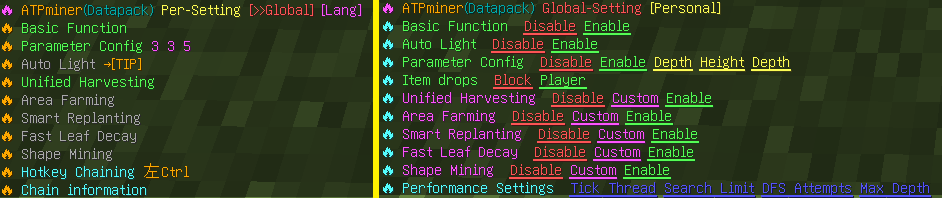
⚡*Use the following command to open personal settings*
*(Global settings can be configured on the right side of personal settings, provided you have command permissions)*
“`mcfunction
/trigger ATPminer
“`
⚡*Use the following command to open parameter settings*
“`mcfunction
/trigger ATPminer_config
“`
*To modify supplementary configuration files (such as adding blocks, joint groups, tools, crops, etc.), please go to **file_description.txt***
## Function
*1. Chain harvesting is compatible with item components and enchantments like **Fortune**, **Unbreaking**, and **Silk Touch**. When the tool’s durability is low, chain harvesting will stop automatically.*
*2. Most blocks require a hotkey to trigger chain reactions (to prevent excessive destruction). When the “Hotkey Chain” enforcement is not enabled, the following blocks automatically chain by default: **Ores, (stripped) logs, flowers/plants, corals, fungi, crops, mature cocoa pods, cacti, sugar cane, bamboo, melon stems, mature sweet berry bushes**. After **1.21.2**, you can use **Left Ctrl** or **Left Shift** as hotkeys (When “Hotkey Chaining” is disabled, Shift takes priority. **Enable Ctrl for anti-ghost-touch!**)*
*3. When a large number of blocks are detected, asynchronous chaining will be enabled (processing a fixed number of blocks per game tick with visible diffusion effects) to prevent lag. The asynchronous chaining will automatically stop if the player: Switches tools, Teleports, or Exits the game.*
*4. After installing the datapack, all features are optional by default—meaning each player can individually choose whether to enable specific expanded functionalities. This behavior can be modified in **Global Settings**.*
*5. Compatibility Notes: Not supported on some server software (e.g., **Folia**); Incompatible with some plugins (if they modify command syntax); Not compatible with land protection plugins.*
*6. Technical Details: Namespace: `vmn`; Command Storage: `dp_vmn:1`; Scoreboard Prefix: `dp_vmn.`; Entity Tag Prefix: `dp_vmn_`; Uses 2 `trigger` scoreboard objectives.*
### 🔥 Unified Harvesting
*When enabled, this feature allows mining or harvesting by groups (e.g., all connected ores). The same effect applies to logs, leaves, crops, corals, dyed blocks, sculk, prismarine, and 35 built-in vanilla block groups.*
*For example, you can efficiently clear sculk shriekers, sculk sensors, and convert them into massive amounts of experience orbs.*

### 🔥 Smart Replanting
– *Automatically replants saplings when chopping trees.*
– *Automatically replants seeds when harvesting crops.*
– *Tree replanting **requires Unified Harvesting mode to be disabled**. It supports thin trees and 2×2 giant trees but does not support mangroves or azalea trees.*
– *Crop replanting works with Unified Harvesting by detecting dropped seeds and planting them in tilled soil.*
*Empower your tree farms and crop fields with automation!*
”)
### 🔥 Fast Leaf Decay
*Prevents leaves from awkwardly floating mid-air. This only applies to leaves left behind by chained tree felling and does not interfere with other mechanics (e.g., TNT-based tree farms).*
*(If leaves are not decaying, check if nearby logs are still supporting them. Once all connected logs are removed, all leaves in the area will decay.)*
 & Fast Leaf Decay”)
### 🔥 Area Farming
*Turn your hoe into a super hoe!*
*Supports tilling in an adjustable range from **1×1 to 9×9**. Players can modify the “width radius” to define the farmland size.*
– In “Flat Mode,” an offhand water bucket will automatically hydrate the farmland center.
– Supports one-click area crop planting, which works best when combined with Smart Replanting.
– In Creative Mode, this feature does not consume resources or tool durability.

### 🔥 Shape Mining
*Mine in structured cubic shapes!*
*Players can customize width, height, and depth to control the mined cube size. The maximum supported area is **9×9×9**, making it ideal for creating underground tunnels, caves, or excavation projects.*

### 🔥 Auto Lighting
*When enabled, torches will automatically be placed in dark areas or at night (if torches are available in the inventory or in Creative Mode).*
*Useful for cave lighting, platform lighting, and hands-free visibility!*

AtomShulkers
# AtomShulkers
Plugin that allows you to open shulker boxes in your hands. This plugin is meant to be as simple as possible, it is fully vanilla-friendly, has no configuration, commands, or permissions.

## Metrics
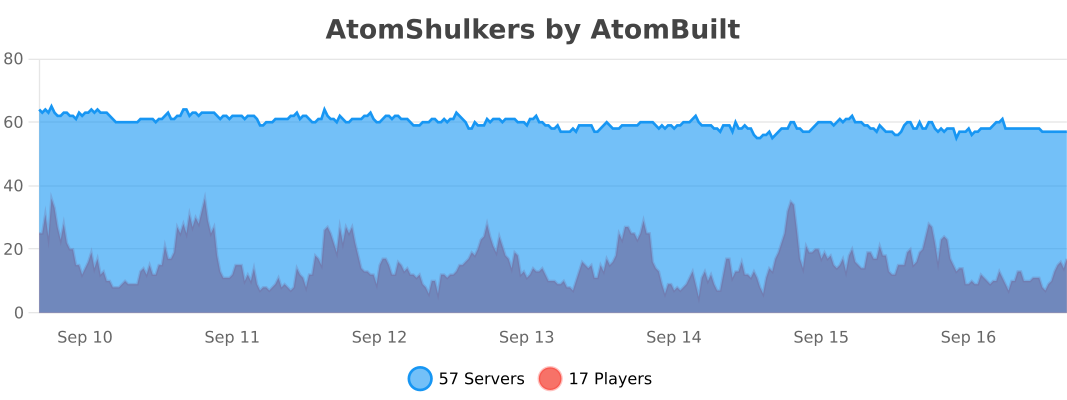
This plugin collects anonymous server statistics through [bStats](https://bstats.org), an open-source statistics service for Minecraft software. You can opt out in plugins/bStats/config.yml.
## Support
Join the [AtomBuilt’s Discord Server](https://discord.gg/eu2BY7cjYm) for community support.
## Report Issue
Please, report all related issues in the project’s [GitHub repository](https://github.com/atombuilt/atom-shulkers/issues).
AtomicsLib
⚛️What is AtomicsLib?
AtomicsLib is a high-performance **utility library for datapack developers** that provides powerful backend systems so you can focus on building mechanics instead of rewriting infrastructure.
Designed for scalability, multiplayer safety, and predictable execution.
—
🔧 Core Features
– 🎯 Raycasting engine
– ⏱️ Entity-based scheduler
– 🏃 Movement detection
– ❤️ Combat-focused damage detection
– 🧮 Optimized math utilities
—
⚡ Built for Developers
AtomicsLib is **not a gameplay pack** — it’s infrastructure.
Use it to power:
– abilities
– weapons
– AI systems
– cooldowns
– advanced mechanics
– large datapack frameworks
—
📚 Full Documentation
The complete Developer API, usage examples, and deep technical explanations are hosted on Discord:
👉 **[Documentation & Developer API](https://discord.gg/R4Peaw8qTb)**
If you plan to build with AtomicsLib, joining the Discord is strongly recommended.
—
**Build mechanics — not scaffolding.**
Atomics Client
# 🟢 Atomics Client
> A customizable Minecraft PvP client focused on clean visuals, totem pop customization, combat overlays, useful PvP info, and quality-of-life features.
—
## ✨ Overview
Atomics Client gives you control over the visuals and tools that matter most during PvP.
Customize totem pops, shield positioning, fire overlays, projectile trails, PvP stat displays, zoom, fullbright, macros, streamer mode, and more, all through a clean in-game settings menu.
Most settings update live without needing to restart your game.
—
## 🎨 Features
### 🔹 Totem Customization
Fully customize how your Totem of Undying looks and behaves.
– Real-time hue shifting for the totem texture
– Works in:
– Inventory
– Hotbar
– In-hand view
– Pop animation
– Updates instantly in-game
– Supports custom pop visuals and sizing
—
### 💥 Pop Overlay Controls
Fine-tune the totem pop overlay to match your exact style.
– Adjust totem pop size and scale
– Customize overlay timing
– Control how long pop visuals stay on screen
– Built-in preview tools
– Configure pop particles and sounds
—
### 🧩 Retexture System
Replace the totem with another Minecraft item for a custom look.
Supported in:
– Inventory
– Hotbar
– In-hand view
– Pop overlay
—
### 🛡️ Advanced Visual Controls
Control important first-person PvP overlays.
– Fine-tune shield positioning
– Idle / down shield
– Blocking / up shield
– Full 3D offset and rotation controls
– Adjust fire overlay height
– Enable or disable individual visual tweaks
– Optional shield warning overlay
—
### 🪣 Empty Bucket Overlay
Make empty buckets easier to see during gameplay.
– Optional empty bucket overlay
– Works in:
– Inventory
– Hotbar
– In-hand view
– Helps improve visibility during fast-paced PvP
—
### ⚔️ PvP Stats Display
View useful combat information directly in-game.
– Shows combat info near players
– Displays win-odds style estimates
– Tracks active opponents
– Supports real-health based calculations when available
– Includes improved opponent and death detection
– Helps give quick information during fights
—
### 📊 Stats Tracking
Track your PvP performance over time.
– Session stats
– All-time stats
– Recent match history
– Win/loss tracking from server messages
– Stats graphs and visual displays
– Timeframe dropdowns for graph views
—
### 🔭 Zoom
A simple built-in zoom feature for better visibility.
– Hold to zoom
– Scroll while zooming to adjust zoom strength
– Smooth and easy to use in-game
—
### 💡 Full Bright
Improve visibility in dark areas.
– Toggleable fullbright
– Useful for caves, arenas, and low-light maps
—
### 🌙 Time Changer
Change the client-side time of day.
– Adjust how the world appears locally
– Useful for cleaner visuals and visibility
– Does not affect the server
—
### 🏹 Projectile Trails
Add visual trails to projectiles.
– Makes projectile movement easier to see
– Adds cleaner visual feedback during gameplay
—
### 🎥 Streamer Mode
Protect names while recording or streaming.
– Masks player names
– Helps keep streams and videos cleaner
– Useful for public servers and content creation
—
### 💣 TNT Timer
Track nearby TNT timing more easily.
– Displays TNT timer information
– Helps with awareness during TNT-based gameplay
—
### 📏 Reach Display
See reach information after hits.
– Displays reach distance
– Useful for reviewing hits and combat spacing
—
### 💬 Auto GG
Automatically send a GG message after matches.
– Toggleable Auto GG
– Useful for duels and PvP servers
—
### ⌨️ Chat Macros
Create quick chat or command shortcuts.
– Multiple configurable macros
– Supports up to 12 macro keybinds
– Send messages or commands instantly
—
### 🎥 Dual Spectate Camera
Spectate two players at once with a smoother camera system.
– Tracks two players at the same time
– Auto-fills nearby player pairs
– Configurable distance, padding, and smoothing
– Optional forced third-person mode
—
### 🎛️ Clean Settings UI
Atomics Client includes an organized in-game settings menu built for quick editing.
– Tab-based layout
– Searchable settings
– Scrollable sections
– Collapsible setting groups
– Dedicated keybinds tab
– Clean labels and organized categories
—
## ⚡ Performance
Atomics Client is designed to stay smooth during gameplay.
– Lightweight systems
– Cached PvP calculations
– Reduced render overhead
– Live setting updates
– Built for real PvP scenarios
—
## 🎯 Why Atomics Client?
Most client mods focus on one small feature.
Atomics Client combines visual customization, PvP overlays, combat info, stats tracking, and quality-of-life tools into one clean Fabric mod.
✔ Fully customizable visuals
✔ Live updates with no restart
✔ Clean or flashy — your choice
✔ PvP-focused overlay tools
✔ Useful combat and stat displays
✔ Built-in zoom, fullbright, macros, and streamer tools
✔ Designed for real gameplay
—
## 🧪 Compatibility
– Minecraft: `1.21.11`
– Loader: `Fabric`
– Requires: `Fabric API`
—
## 🚀 Planned Features
– Preset system
– More advanced particle editor
– More animation effects
– More overlays and visual tweaks
– More PvP stat customization
– Server-specific PvP calculation presets
– More quality-of-life tools
—
## 💬 Final Note
Atomics Client is built for players who want more control over how their game looks, feels, and plays.
Whether you want clean PvP visuals, flashy totem pops, better overlays, useful stats, or simple client-side tools, Atomics Client gives you the settings to customize your experience.
AtomGuard

# AtomGuard
### Keep your Minecraft server safe from hackers, bots, and crashes.
**Works with Paper 1.21.4 and Velocity 3.x**
[](https://github.com/ATOMGAMERAGA/AtomGuard/actions)
[](https://github.com/ATOMGAMERAGA/AtomGuard/releases)
[](https://adoptium.net)
[](https://github.com/ATOMGAMERAGA/AtomGuard/blob/main/LICENSE)
> **AtomGuard is a free, open-source security plugin that protects your Minecraft server from attacks, exploits, and cheaters — so you can focus on building your community.**
[**⬇️ Download**](https://github.com/ATOMGAMERAGA/AtomGuard/releases) · [**📖 Setup Guide**](#-getting-started) · [**❓ FAQ**](#-faq) · [**🤝 Contribute**](https://github.com/ATOMGAMERAGA/AtomGuard/blob/main/CONTRIBUTING.md)
—
## 💡 Why AtomGuard?
Running a Minecraft server is fun — until someone tries to ruin it. Bot attacks that flood your server with fake players, exploits that crash everyone out, duplication glitches that destroy your economy… the list goes on.
AtomGuard handles all of that for you. Just drop it in your plugins folder and your server is protected. No complicated setup, no networking degree required.
### Here’s what it protects you from:
🛡️ **Bot & DDoS Attacks** — Automatically detects and blocks waves of fake players and connection floods before they slow your server down.
🚫 **VPN & Proxy Abuse** — Stops banned players from rejoining on a VPN. Uses 7 different detection methods for accuracy, and won’t accidentally block your real players.
🔧 **Crash Exploits** — Fixes 44+ known Minecraft exploits that hackers use to crash servers, including book crashes, NBT attacks, and packet exploits.
♊ **Duplication Glitches** — Prevents item duplication bugs that can wreck your server’s economy.
⚡ **Lag Machines** — Limits redstone, explosions, pistons, and entities so players can’t build devices that lag your server.
🌍 **Country Filtering** — Allow or block players from specific countries if you want a region-locked community.
🔐 **Login Protection** — Blocks brute-force password attacks and prevents the use of common passwords (works with AuthMe).
—
## ✨ Feature Highlights
### 🤖 Smart Bot Detection
AtomGuard doesn’t just look at one thing — it scores each connecting player across **8 different signals** like connection speed, client type, join pattern, and username. Players that score low enough get through instantly. Suspicious ones get a quick math challenge. Obvious bots get blocked.
Your regular players won’t even notice it’s running.
### ⚔️ Adaptive DDoS Protection
The **SmartThrottle Engine** automatically adjusts its defenses based on how bad an attack is:
`🟢 Normal` → `🟡 Elevated` → `🟠 High` → `🔴 Critical` → `⛔ Lockdown`
During a serious attack, it locks down new connections while making sure your verified players can still get in. Once the attack stops, everything goes back to normal automatically.
### 🧠 Threat Intelligence
AtomGuard learns your server’s normal traffic patterns over 7 days. When something unusual happens — like a sudden spike in connections at 3 AM — it automatically ramps up protection. This means fewer false alarms and faster response to real threats.
### 🏅 Player Trust Score
The more a player plays on your server without causing trouble, the more AtomGuard trusts them. Veteran players skip most checks entirely, which means faster logins for your loyal community and stricter checks for newcomers.
| Tier | Who | What Happens |
|:—|:—|:—|
| 🆕 **New** | Just joined | Full security checks |
| 📅 **Regular** | Been around a while | Standard checks |
| ✅ **Trusted** | Clean track record | Skips attack-mode checks |
| ⭐ **Veteran** | Long-time player | Skips bot & VPN checks too |
### 🍯 Honeypot
AtomGuard can run a fake Minecraft server on a different port. When bot scanners find it and try to connect, their IP gets instantly banned from your real server. It’s like a trap for attackers.
### 🔬 Attack Reports
After every attack, AtomGuard saves a detailed report — what happened, when, how many IPs were blocked, and which defenses did the work. You can review these anytime to understand what your server faced.
—
## 📦 What You’ll Need
| What | Version | Required? |
|:—|:—:|:—|
| ☕ Java | 21 or newer | ✅ Yes |
| 📄 Paper server (or a fork like Purpur) | 1.21.4 | ✅ Yes |
| 📦 PacketEvents plugin | 2.6.0+ | ✅ Yes (for the core plugin) |
| 🚀 Velocity proxy | 3.x | Only if you use a proxy |
| 🗄️ MySQL database | 8.0+ | Optional — for persistent data |
| 🔄 Redis | 7.x | Optional — for multi-server sync |
| 🌍 MaxMind license key | — | Only if you want country filtering |
—
## 🚀 Getting Started
### Option 1: Paper Server (most people start here)
**Step 1** — Download [PacketEvents](https://www.spigotmc.org/resources/packetevents-api.80279/) and put it in your `plugins/` folder.
**Step 2** — Download [AtomGuard-core.jar](https://github.com/ATOMGAMERAGA/AtomGuard/releases) and put it in the same `plugins/` folder.
**Step 3** — Start (or restart) your server. AtomGuard will create its config files automatically.
**Step 4** — Customize the settings in `plugins/AtomGuard/config.yml` if you want — but the defaults work great out of the box!
### Option 2: Velocity Proxy
If you run a Velocity network, install the proxy module for network-wide protection:
**Step 1** — Download [AtomGuard-velocity.jar](https://github.com/ATOMGAMERAGA/AtomGuard/releases) and put it in your proxy’s `plugins/` folder.
**Step 2** — Start (or restart) your proxy. Config files are created automatically.
**Step 3** — Edit `plugins/atomguard-velocity/config.yml` to your liking.
**Step 4** *(optional)* — Enable the Redis section in both configs if you want the proxy and backend servers to share ban lists and threat data.
> 💡 **Tip:** You can run both modules together! The Velocity module stops threats at the network edge, while the Core module handles in-game exploits on each server.
—
## 💻 Commands
All commands require the `atomguard.admin` permission unless noted otherwise.
| Command | What it does |
|:—|:—|
| `/atomguard status` | See which modules are running and their stats |
| `/atomguard reload` | Reload the config without restarting *(needs `atomguard.reload`)* |
| `/atomguard stats` | View the statistics dashboard |
| `/ag intel status` | Check current threat level |
| `/ag trust info ` | Look up a player’s trust score |
| `/ag replay list` | Browse past attack reports |
| `/ag honeypot status` | Check if the honeypot is active |
| `/panic` | 🚨 Emergency lockdown — blocks ALL new connections *(needs `atomguard.panic`)* |
### Permissions
| Permission | What it does |
|:—|:—|
| `atomguard.admin` | Full access to all commands |
| `atomguard.bypass` | Player skips all security checks (give this to your staff) |
| `atomguard.notify` | Player receives in-chat alerts when exploits are blocked |
| `atomguard.reload` | Can reload the config (nothing else) |
| `atomguard.panic` | Can trigger emergency lockdown |
—
## 🌐 How VPN Detection Works
Instead of relying on a single provider (which can be inaccurate), AtomGuard queries **7 providers at the same time** and only blocks a player if at least **2 providers agree** the IP is a VPN or proxy. This dramatically reduces false positives — your players on normal internet connections won’t get blocked.
See the 7 providers
| # | Provider | How it checks |
|:—:|:—|:—|
| 1 | Local Blocklist | Your own custom IP list |
| 2 | CIDR Blocker | IP range rules |
| 3 | DNSBL | Spamhaus, DroneBL, and custom DNS blocklists |
| 4 | IPHub | Commercial VPN/proxy database |
| 5 | ProxyCheck.io | Real-time proxy detection API |
| 6 | AbuseIPDB | Checks IP abuse history |
| 7 | IPApi | Checks if the IP belongs to a hosting/datacenter provider |
Clean IPs are cached so returning players aren’t checked again.
—
## 🔧 Technical Details
These sections are for server admins who want to know exactly what’s happening under the hood.
🛡️ Velocity Proxy Module — Full Details
The Velocity module intercepts connections at the proxy level before they ever reach your backend servers.
#### Connection Protection
– **SYN Flood Detector** — blocks IPs exceeding the connection threshold per second
– **Slowloris Detector** — identifies slow-drip connection drain attacks
– **Traffic Anomaly Detector** — Z-score, slow-ramp, and pulse attack detection
– **Connection Fingerprinter** — protocol + hostname + timing fingerprint to detect bot armies
– **Subnet Analyzer** — coordinated botnet detection at /24 and /16 level
– **Sliding-Window Rate Limits** — enforced at per-IP, per-subnet, and global levels
– **Verified Player Shield** — guarantees a slot for clean players during Critical/Lockdown
– **Attack Session Recorder** — full session log with JSON export
#### Bot Scoring Breakdown
| Signal | Weight |
|:—|:—:|
| Connection Speed | `20%` |
| Join Pattern | `20%` |
| Handshake Validity | `15%` |
| Client Brand | `15%` |
| Geo / Country | `10%` |
| Username Pattern | `10%` |
| Protocol Version | `10%` |
**Score thresholds:** < 40 = pass, 40–60 = flagged, 60–75 = CAPTCHA challenge, 75–90 = kick, 90+ = auto-ban.
**Additional layers:** Brand analyzer (whitelists Fabric, Forge, Lunar, Badlion, LabyMod, OptiFine, Sodium), nickname blocker (regex patterns, length limits, special-character analysis), verified player cache (48-hour bypass for clean players).
#### Chat & Command Protection
Chat rate limiting, duplicate message detection, tab-complete flood blocking, command spam prevention, server-switch abuse prevention, packet size limits, crash loop detection (3+ disconnects in 30s), and short session flagging (< 3s).
#### Account Protection
IP reputation scoring (decays over time, rewards clean logins), auto-ban engine with grace periods, temporary ban manager, Mojang account verification, and hot-reloadable JSON blacklists/whitelists.
#### Kernel-Level Blocking (IPTables)
Can push bans directly to `iptables`, `ip6tables`, or `nftables` — blocked traffic never even reaches the JVM. Subnet banning at `/24` level. Auto-cleanup on startup and shutdown.
#### Country / Geo Filtering
MaxMind GeoIP2 integration — whitelist or blacklist entire countries. Automatic weekly database updates.
#### Password Security (AuthMe)
Temporary ban after 5 failed logins, 10,000+ known weak passwords blocked, password similarity detection across the same IP.
🔨 Core Plugin — Full Details
The core plugin runs on each Paper server and handles in-game security with 44+ modules.
#### Packet & Network Exploits
Invalid packet filtering at the Netty pipeline level, oversized packet blocking, offline packet injection prevention, packet timing & delay abuse detection.
#### NBT & Item Attacks
Nested NBT depth limiting, oversized NBT payload detection, bundle crash prevention, item sanitization on all inventory operations.
#### World & Chunk Crashers
Book & lectern exploit fix, map label crash fix, item frame crash fix, sign exploit prevention, chunk crash protection.
#### Duplication Fixes
Bundle duplication, inventory click duplication, cow & mule duplication, general dupe prevention engine.
#### Performance Limiters
Redstone circuit rate limiting, explosion limiter, piston limiter, falling block limiter, per-chunk entity limiter.
#### AtomShield™ Behavioral Analysis
Analyzes 9 signals per player: connection rate, gravity validation, packet timing, ping & handshake, protocol, username pattern, first-join behavior, post-join behavior, and heuristic profiling. Builds real-time behavioral profiles. Attack Mode auto-activates when TPS drops or connection floods are detected.
#### Threat Intelligence Engine
168-hour EMA traffic profile (7-day rolling baseline), Z-score anomaly detection across 3 threat levels, 3-minute confirmation window before escalation (prevents false positives), auto attack-mode on critical anomaly. Command: `/ag intel `
#### Player Trust Score
EMA-weighted formula: playtime + clean sessions + violation history. Persistent storage via `trust-scores.json`. Command: `/ag trust `
#### Forensic Analysis
Attack snapshots with UUID, timeline, peak rate, blocked IPs, and per-module stats. 4 severity levels (LOW/MEDIUM/HIGH/CRITICAL). Auto-export to `forensics/attack-.json`. Command: `/ag replay |export>`
#### Honeypot Module
Fake TCP Minecraft server (SLP protocol) that lures bot scanners. Auto-blacklists probing IPs. Command: `/ag honeypot `
⚡ Integrations
| Integration | What it does |
|:—|:—|
| **MySQL + HikariCP** | Persistent database storage with connection pooling |
| **Redis Pub/Sub** | Sync bans, threat data, and trust scores across your entire network |
| **Discord Webhooks** | Get instant Discord notifications when attacks happen |
| **Web Panel** | Browser-based dashboard with live stats |
| **Config Migration** | Automatic config upgrades when you update — with backups |
| **Async Logging** | All logging happens off the main thread with 7-day rotation |
| **Hot Reload** | Change settings without restarting your server |
—
## 🔌 Developer API
Want to integrate with AtomGuard or build on top of it? There’s a full API available.
See API documentation
### Maven Dependency
“`xml
com.atomguard
AtomGuard-api
1.2.2
provided
“`
### Quick Examples
“`java
// Check an IP’s reputation score
IReputationService rep = AtomGuardAPI.getInstance().getReputationService();
int score = rep.getScore(player.getAddress().getAddress());
// Enable or disable a module at runtime
IModuleManager modules = AtomGuardAPI.getInstance().getModuleManager();
modules.setEnabled(“bot-koruma”, false);
// Access trust scores, forensics, and intelligence
AtomGuardAPI.getInstance().getTrustScoreManager();
AtomGuardAPI.getInstance().getForensicsManager();
AtomGuardAPI.getInstance().getIntelligenceEngine();
// Listen for events
@EventHandler
public void onExploitBlocked(ExploitBlockedEvent event) {
String module = event.getModuleName();
Player player = event.getPlayer();
}
“`
### Available Events
| Event | When it fires |
|:—|:—|
| `ExploitBlockedEvent` | An exploit is blocked |
| `AttackModeToggleEvent` | Attack mode turns on or off |
| `PlayerReputationCheckEvent` | A player’s reputation is evaluated |
| `ModuleToggleEvent` | A module is toggled |
| `ThreatScoreChangedEvent` | A player’s threat score changes |
| `HoneypotTrapEvent` | An IP hits the honeypot |
| `IntelligenceAlertEvent` | Threat level changes |
| `AttackSnapshotCompleteEvent` | A forensic report is finalized |
—
## ❓ FAQ
**Will this slow down my server?**
Nope. AtomGuard is designed to be lightweight. Heavy operations like VPN lookups and logging happen on separate threads so your server’s performance isn’t affected.
**Will it block my regular players?**
Very unlikely. The VPN system requires 2 out of 7 providers to agree before blocking, and the bot detection uses a scoring system — not a simple on/off switch. Players using legitimate clients will pass through without noticing.
**Does it work with cracked / offline-mode servers?**
Yes, but some features like Mojang account verification won’t apply. Bot detection, DDoS protection, and exploit fixes work regardless of online/offline mode.
**Can I use just the Velocity module or just the Core plugin?**
Absolutely. They work independently. Use both together for maximum protection, or just the one you need.
**How do I update?**
Just replace the jar file and restart. AtomGuard automatically migrates your config to the new version and creates a backup of the old one.
**I’m getting false positives — players are being blocked incorrectly.**
Try adjusting the bot detection threshold in your config, or add trusted IPs to the whitelist. The default settings are tuned for most servers, but every community is different.
**Where do I get help?**
Open an issue on [GitHub](https://github.com/ATOMGAMERAGA/AtomGuard/issues) — we’re happy to help!
—
[**📂 GitHub**](https://github.com/ATOMGAMERAGA/AtomGuard) · [**🐛 Report a Bug**](https://github.com/ATOMGAMERAGA/AtomGuard/issues) · [**🤝 Contribute**](https://github.com/ATOMGAMERAGA/AtomGuard/blob/main/CONTRIBUTING.md)
Made with ❤️ by **ATOMLAND Studios**
ATMOSPHERICS


# 📋Features
### 📁All presets are saved in a folder -`minecraft/config/ambientfog`
compatible with **”ModMenu”** (but not recommended for use, as there is a hotkey `”B”` for convenience)

———————————————————————————————-
Features in text form
– ✨Real-time per-biome customization for fog, sky, clouds, and haze
– 🔄Smooth transitions between biomes
– ☄️Falling comets customization
– 🌙Separate day and night atmosphere settings
– ⭐Star customization
– ☁️Story Mode Clouds
– ⚙️Dedicated settings menu for Story Mode Clouds
– ☁️Solid clouds without shading
– 🧭User-friendly menu with real-time viewing
– 📊Live info panel
– 📚Preset library
– ✏️Settings copy editor
– 🌌Biome teleport menu for easier setup
– 🎨Create your own resource pack with a preset
– 📁Preset import and export


**⚙️(The current hotkey is **”B”**, but you can change it in the game settings)**

## ✨OWN CUSTOM ATMOSPHERICS PRESET
**Also, you can create your own resource pack with a custom Atmospherics preset!**
### 📁 How to create a preset:
“`
assetsatmosphericspresetyour_preset.json
“`
### 🖼️ How to add a preview:
“`
assetsatmosphericspresetyour_preset.png
“`
(.jpg and .jpeg formats are also supported)
> ⚠️ Important: the preview file name must exactly match the preset name!
>
> 📚 Your preset will automatically show up in the Preset Library within the menu.
>
> 📢 You can also publish your RP-preset on **Modrinth** or **CurseForge**!
> (Don’t forget to add this mod as a required dependency when uploading your RP-preset)
SMC
### [- Story Mode Clouds -](https://modrinth.com/resourcepack/story-mode-clouds)
###


Atmospheric Phenomena
🧾 About:
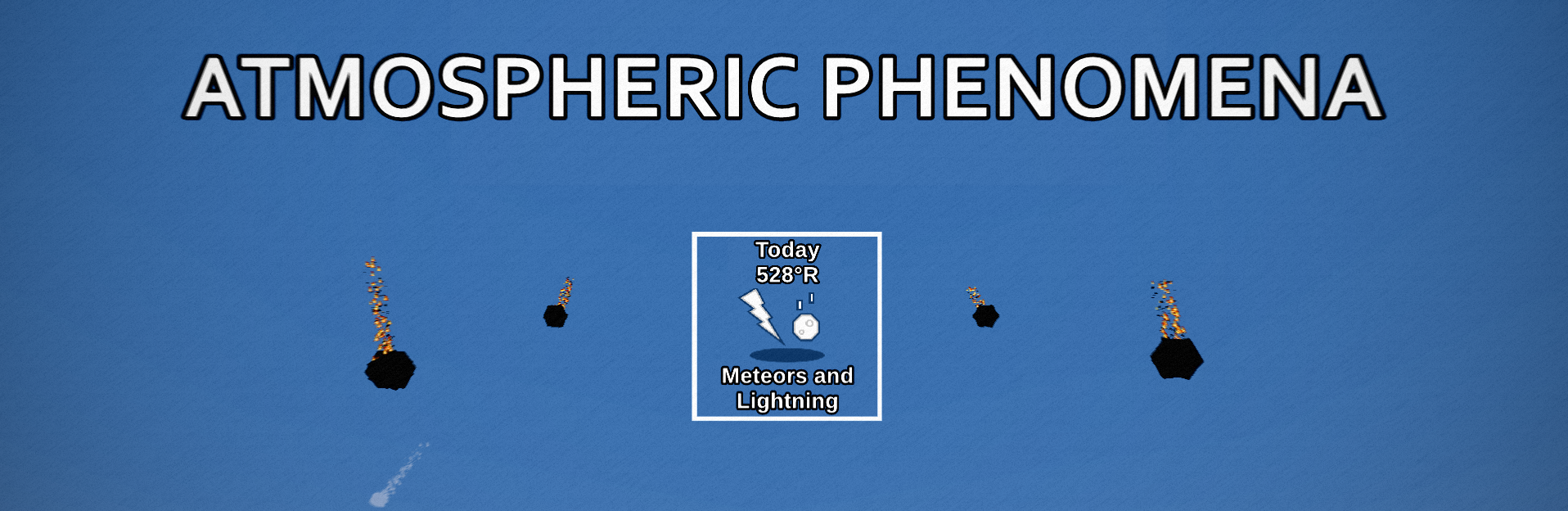
Atmospheric Phenomena adds exciting mechanics from the world surface up to upper limits of the atmosphere. A variety of new blocks can be obtained by discovering meteorite impact craters and harnessing the energy from lightning to vitrify blocks.
The mod is currently for Neoforge on 1.20.4.
🌎 Features:
Meteorites and Craters
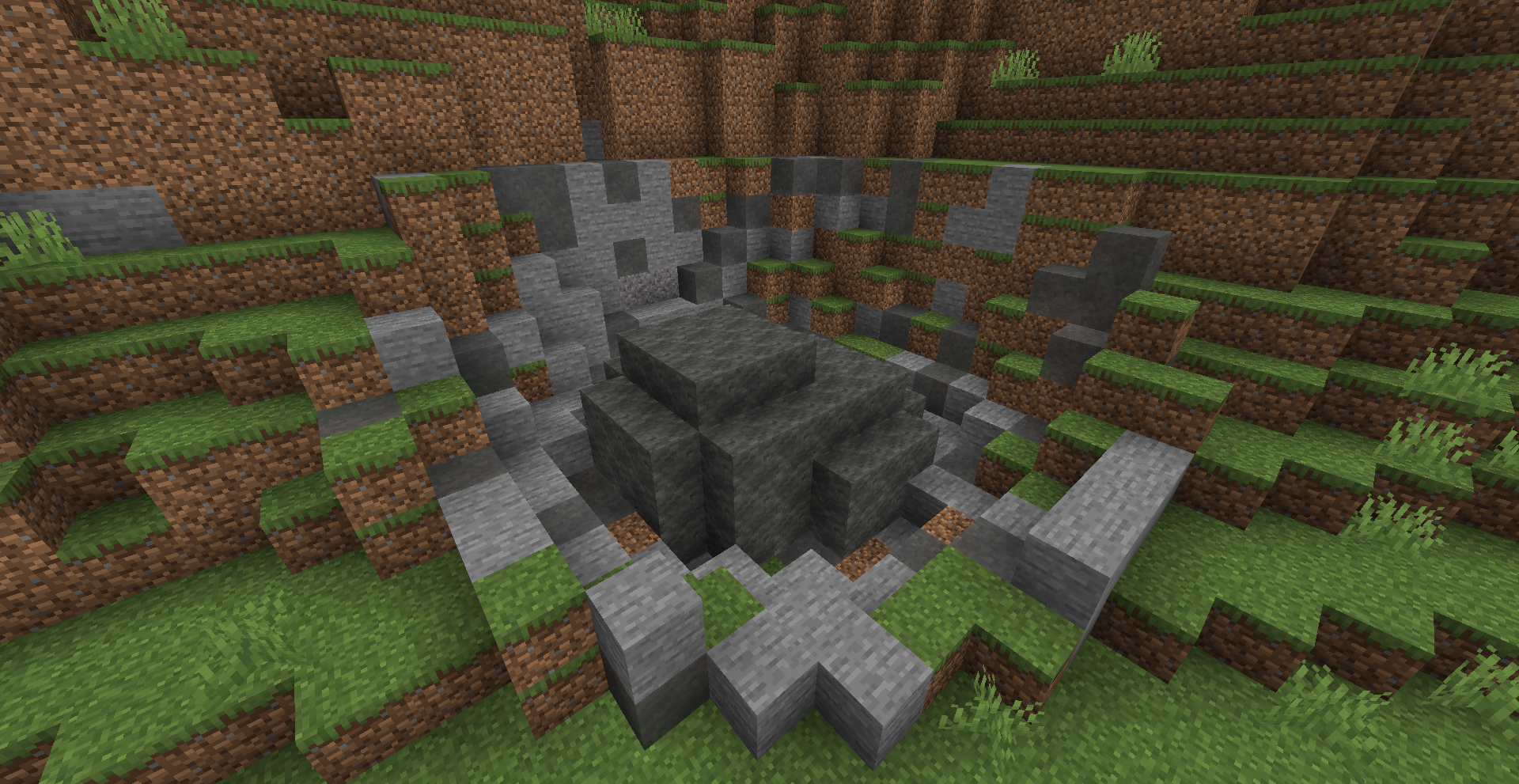
Impact craters can be found across the landscape, indicating historic meteoric events. Some of these craters may be completely filled in, with their meteorite remnants completely buried beneath the surface. There are 7 new types of meteor blocks in addition to several vanilla variants. These blocks can be chiseled or made into bricks. Some meteorites contain a core made out of another material that can generally be used as an ore or gemstone. Meteorites are currently only found in the Overworld.
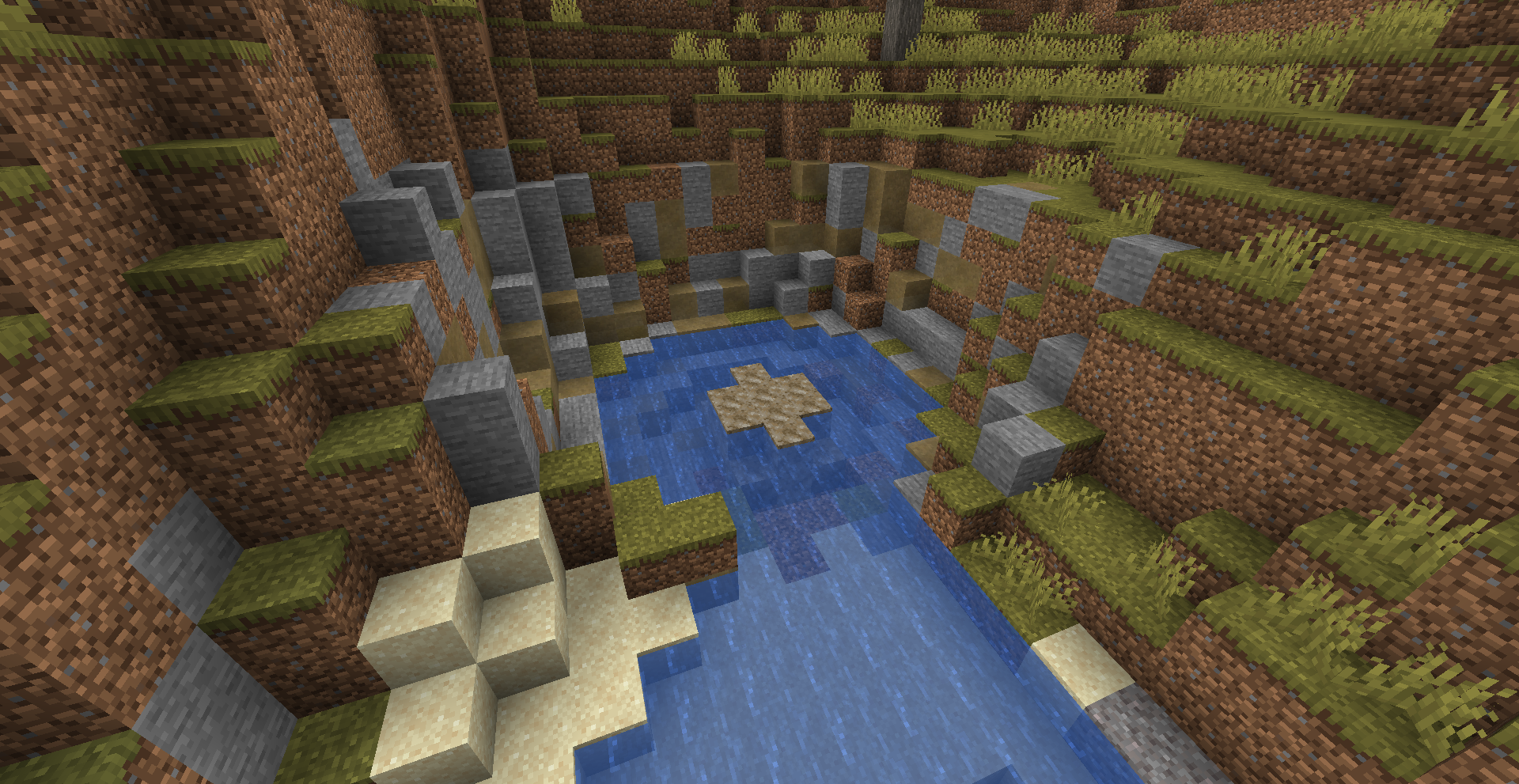
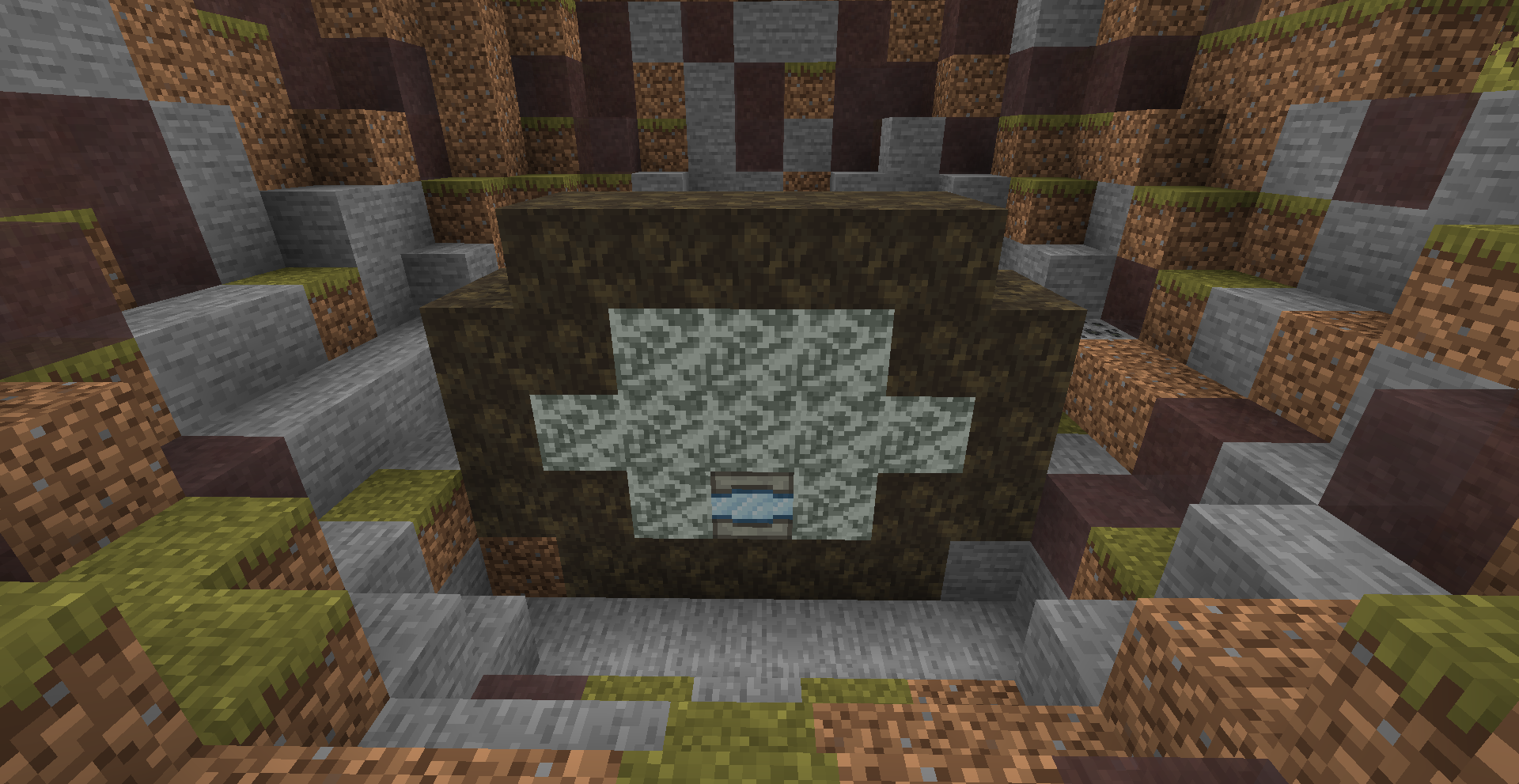
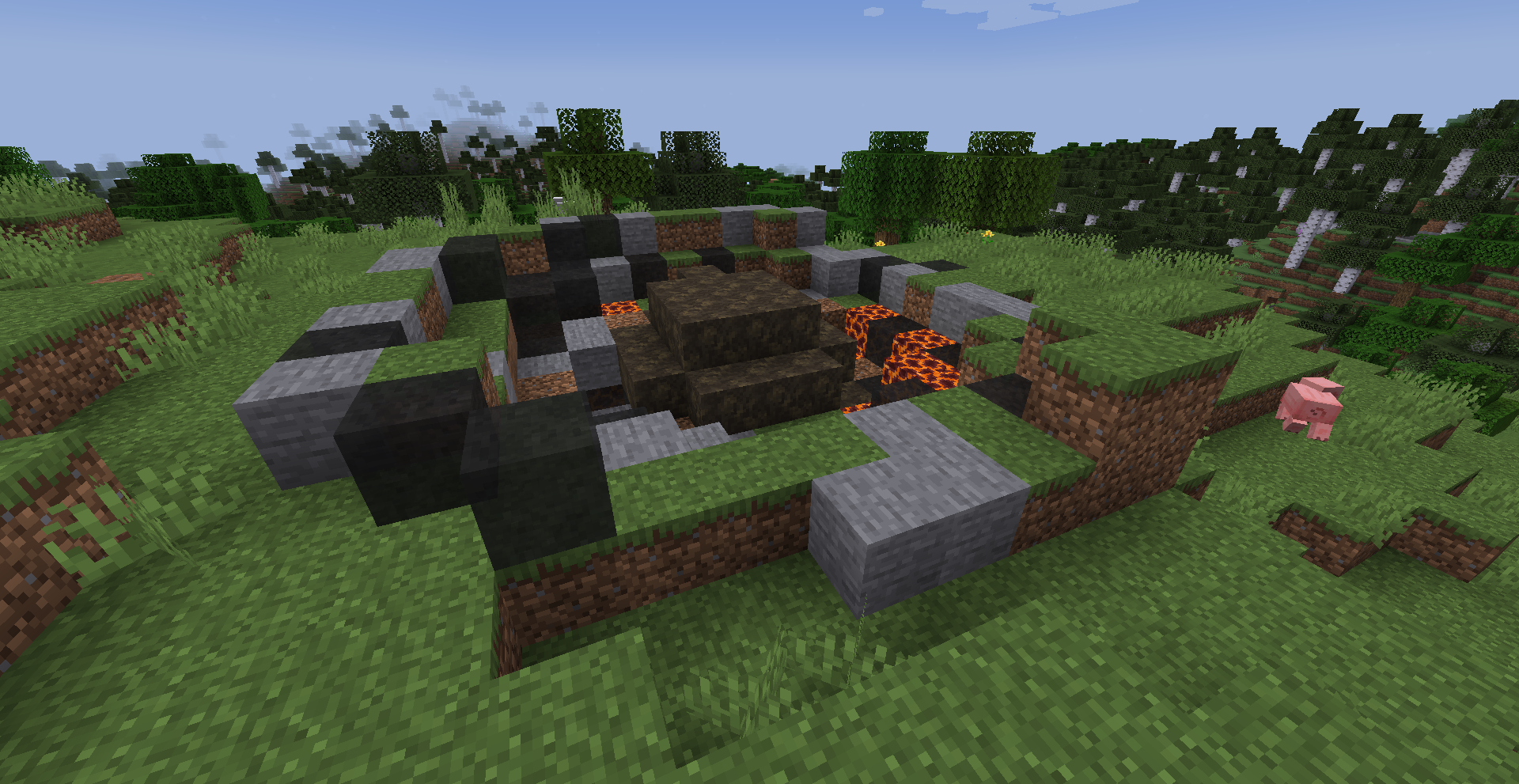
Falling Meteoroids
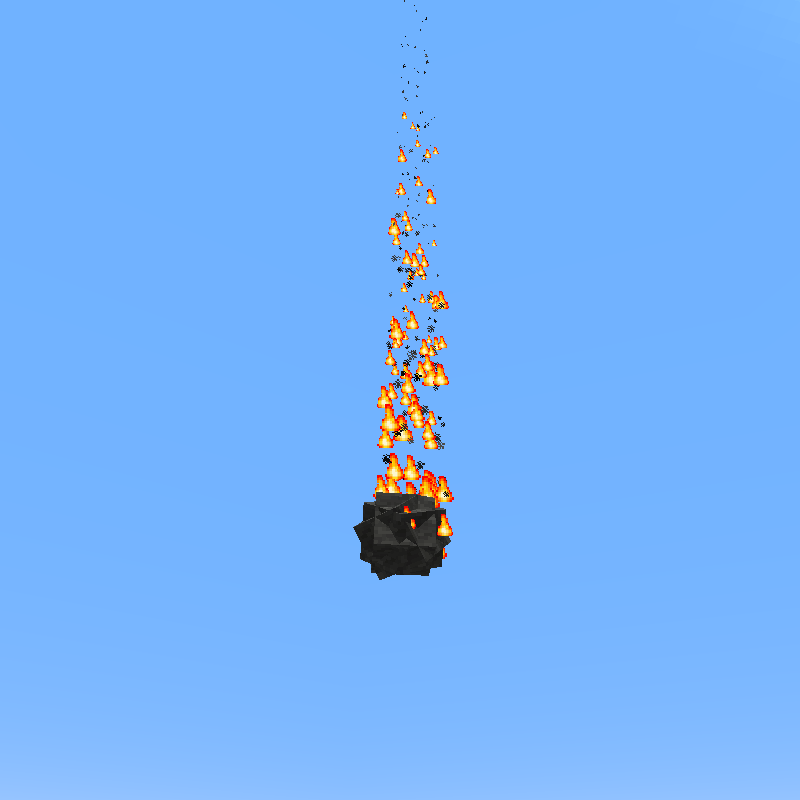
Not all meteorites are found in holes on the ground. Some are still coming down from the sky! Falling meteors and comets will occasionally dot the skies using settings from the config. Some meteoroids will burn up in the atmosphere and explode like a firework. Others will make it to the ground and create impact craters upon landing. Craters can turned off using the new Gamerule “createImpactCraters” set to false.

Capsules
Storage containers originating from inside meteoroids with a custom loottable. They have 16 slots of storage and can be carried while retaining their contents. Hoppers are the only way to move items in and out of the container as they have no gui.

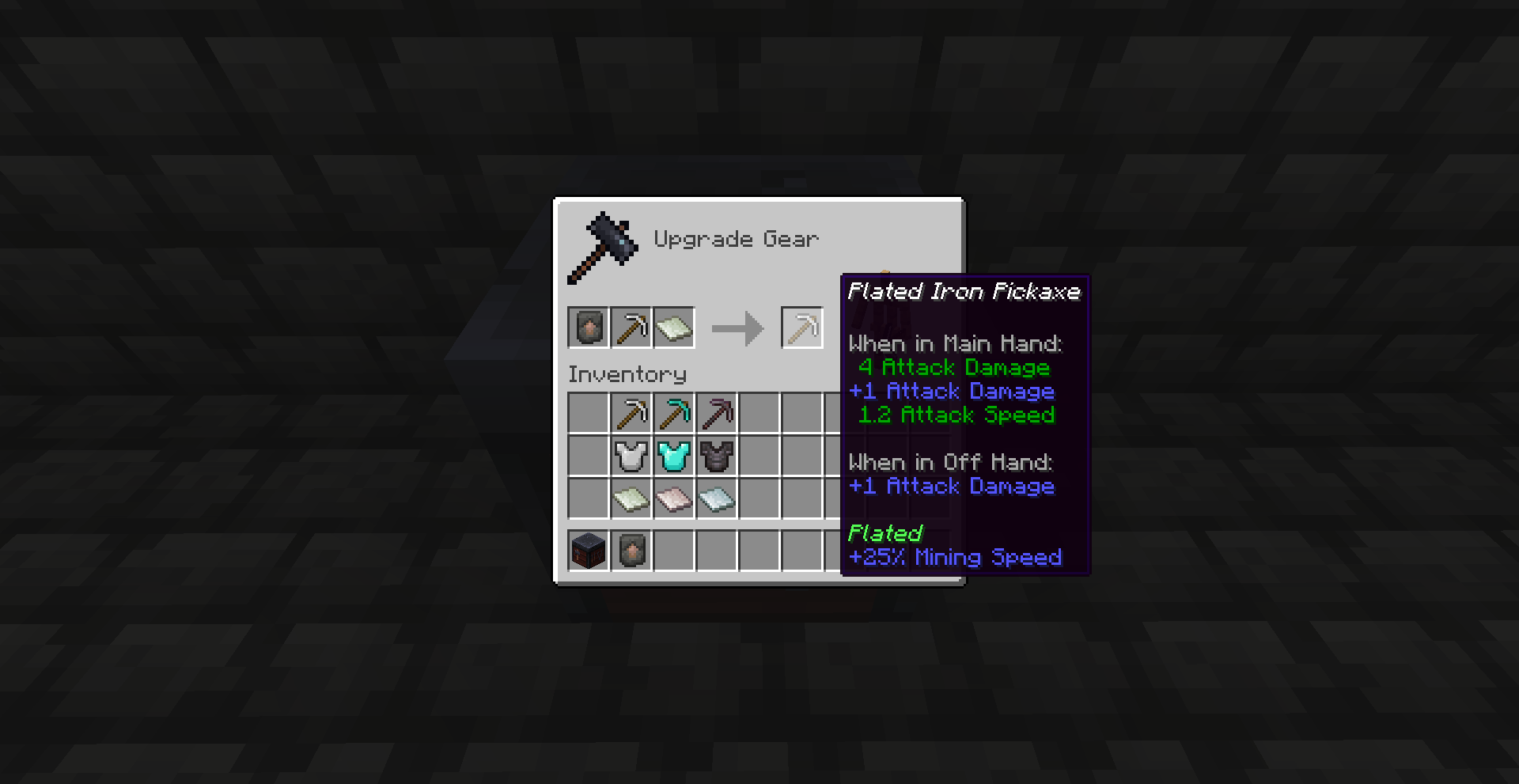
Smithing Upgrade
One item found naturally inside capsules is the Otherworldly Upgrade smithing template. This template can be used to apply bonuses to existing equipment using the new meteoric materials.
Lightning Effects
Lightning heats up the ground to significant temperatures which causes earthen material to vitrify. Sand is turned to glass; dirt and stone into fulgurites; and logs will start burning. The energy of a lightning strike can be directed along the ground using conductive blocks (generally metal) and dissipate the energy into adjacent blocks. Dissipated energy will vitrify blocks, but that energy can also be stored in certain blocks and used at a later time.
Join the Phyrene Studios Discord for more info on Atmospheric Phenomena and our other projects!

Atmospheric Expansion
# Atmospheric Expansion
An add‑on for Modern Industrialization that turns your world into a survival gauntlet—no air, no mercy.
## Description
The entire Overworld, Nether, and End have gone airless. To survive, you must design, build, and power Atmosphere Generators that force oxygen back into selected areas. Expand your life‑support network with pipes, then explore, automate, and industrialize without choking.
## Features
### Thermolitic Reactor
The Thermolytic Reactor applies intense heat-driven decomposition to smelt and refine a wide range of ores and raw materials in one continuous process. By harnessing thermolytic reactions, it not only yields purified metals and minerals but also captures and vents high-purity oxygen as a valuable byproduct—perfect for powering your factories and breathing life back into hostile, airless worlds.
### Atmosphere Generator
The Atmosphere Generator employs high‑pressure separation and compressor technology to establish stable, breathable air pockets in oxygen‑deprived areas, delivering pure oxygen within a fixed radius. Seamlessly integrated with your power grid, it continuously sustains life‑support coverage, enabling safe expansion and exploration in hostile, airless environments.
### Oxygen Tank
The Wearable Oxygen Tank is a portable life‑support unit that straps directly to your armor, storing and dispensing pressurized oxygen on the move. Engineered for durability and efficiency, it can be refilled inside your Atmosphere Generators and delivers a steady supply of breathable air wherever your adventures take you.
### Mob Spawning
Spawn mechanics have been overhauled for greater challenge and immersion: hostile mobs now only spawn below set altitudes, forcing you to light and secure deeper caverns, while passive animals can appear even in dark areas
ATM10 IceandFire bone fix
Fix for ATM10 where a mod interaction prevents Ice and Fire: Community Edition dragons from dropping dragon bones.
This datapack restores bone drops from living dragons when killed.
It does not currently fix pre-generated dragon skeletons, they will still only give skulls.
Tested on ATM10 (NeoForge 1.21.1).
No balance changes, recipes, or progression altered, only the dragon loot table.