Auto-fishing mod
Simple mod to automatically fish for you. Will reel in and recast your rod.
Works with FABRIC. Needs the usual setup.
Works in the background, minecraft does not need to be in focus. You can also do things like type or adjust settings whilst it works for you.
// Allows use with multiple rods
// Break protection
// Works on multiplayer servers
// Adjustable recast delay
AutoFish Fix
# **Disclaimer**
This mod is a **client-side** mod.
If a server bans the use of client-side mods, **do not use this mod**.
If you choose to use this mod anyway and are banned, I am **not responsible**.
**Ask server admin/staff** if this mod is allowed before using it.
—
## AutoFishing Info:
This mod does one simple thing:
It makes autofishing easier on servers by casting the rod when you interact with a **note block**, as long as your line
is not already cast.
This is useful for autofish farms involving a note block to keep the rod from reeling in then
typically an **iron trapdoor** will briefly block your line of sight, allowing you to cast again.
### Why?
Sometimes, due to server lag or other reasons, the rod may be used twice when interacting with the iron trapdoor. This
leaves the rod reeled in, and you’re just left hitting a note block for no reason.
Could I have just altered the design of the farm to avoid this? Probably.
But I’m lazy and this was a fun little project to learn some mod development.
—
## Additional Resources:
**GitHub**: https://github.com/ShockFox05/Autofish-Fix-1.21.X
**Modrinth**: https://modrinth.com/mod/autofish-fix
##### Ending Notes
I have no clue if this works on other versions, I have not tested it, I’m sure I will find out when I try to use it on
other versions. Feel free to try it on other versions and let me know if it works.
—
# License
[Autofish Fix](https://github.com/ShockFox05/Autofish-Fix-1.21.X) © 2025 by [ShockFox05](https://github.com/ShockFox05)
is licensed under [CC BY-NC-SA 4.0](https://creativecommons.org/licenses/by-nc-sa/4.0/).


AutoFeedShulker
[](https://www.ashcraft.cz/)
The AutoFeedShulker plugin introduces a unique auto-feeding system through a special shulker box. When a player receives this custom shulker (via the /giveshulker command), it comes pre-configured with a distinct lore indicating its functionality: “Special Shulker for auto-feeding.” [More detailed description here.](https://ashsource.ashkiano.com/resource-detail/24)
Check out AshSource for more plugins and resources [ashsource.ashkiano.com](https://ashsource.ashkiano.com/)
Are you a developer?
Join AshSource to share your work with a growing community! Get started now at [ashsource.ashkiano.com](https://ashsource.ashkiano.com/)
AutoFeedFabric
# Auto Feed Mod
## Introduction
AutoFeeder is a Minecraft client-side mod for Fabric 1.21.6 that automatically feeds nearby cows, sheep, and pigs. With a one-key toggle, it greatly improves farming efficiency.
## Features
– Automatically detects and feeds nearby cows, sheep, chicken,and pigs
– Press `F6` to toggle auto-feeding on or off
– Press `F7` to toggle crop replanting on or off
– Press `F8` to open the AutoFeeder configuration GUI
– On-screen messages indicate when features are toggled
## Installation
1. Install [Fabric API](https://modrinth.com/mod/fabric-api) (make sure the version matches your game version).
2. Download this mod’s `.jar` file and place it in the `.minecraft/mods/` folder.
3. Launch the game and enter a world to start using the mod automatically.
## Usage
– Auto-feeding is **disabled by default**.
– Crop replanting is **enabled by default**.
– Press `F6` to toggle auto-feeding. A message like “Auto-feeding enabled/disabled” will appear in the bottom-left corner of the screen.
– Just keep wheat (for cows and sheep) or carrots (for pigs) in your hotbar and walk near animals to feed them automatically.
– Right-click mature crops to harvest and replant them automatically. Supports wheat, carrots, potatoes, and nether wart.
## Notes
– This is a **client-side mod only**, no need to install it on the server.
– Only supports **Fabric 1.21.6** and the corresponding Fabric API.
– Currently supports **cows, sheep, and pigs** only.
## FAQ
1. **Game crashes or fails to start?**
– Ensure both Fabric API and this mod are version 1.21.6.
– Check for conflicts with other mods; try running this mod alone.
2. **Auto-feeding doesn’t work?**
– Make sure the correct food is in your hotbar and you’re near the animals.
– Check if you’ve toggled auto-feeding off using `F6`.
3. **Kicked from server due to too many packets?**
– Make sure to **right-click mature crops with the correct seed/item** in hand. Otherwise, excessive packets may cause disconnection from servers.
AutoFarm
Плагин добавляющий возможность создать автоферму на сервере. В конфиге плагина можно выставить цену за каждое растение. Также можно включить или выключить настройку отвечающую за то, чтобы растение появлялось сразу большим. Можно настроить задерку с которой растение будет засаживаться.
Команды:
/autofarm reload – перезагрузить плагин
/autofarm setpos1 – поставить первую точку
/autofarm setpos2 – поставить вторую точку
/autofarm addregion – создать регион фермы
/autofarm removeregion – удалить регион фермы
/autofarm editregion – редактировать регион фермы
/autofarm getsalary – получить зарплату (если в конфиге стоит manual)
/af = /autofarm
A plugin that adds the ability to create an autofarm on the server. In the plugin config, you can set the price for each plant. You can also enable or disable the setting that is responsible for the plant appearing immediately large. You can configure the delay with which the plant will be planted.
Commands:
/autofarm reload – reload the plugin
/autofarm setpos1 – set the first point
/autofarm setpos2 – set the second point
/autofarm addregion – create a farm region
/autofarm removeregion – delete a farm region
/autofarm editregion – edit a farm region
/autofarm getsalary – get salary (if manual is set in config)
/af = /autofarm
AutoEnchant
# AutoEnchant
A datapack to make you’re enchanting live way easier!
# General Features
AutoEnchant Datapack implements a AutoEnchanter that enchants a item with a specific enchantment how many times you want, so the enchantment in the table don’t gets lost and it’s its every time the same.
# How to use
It is relatively simple:
1. Throw an enchanted book with an enchantment of your choice on a normal enchantment table to turn it into an AutoEnchanter
2. Right-click on the enchanter with the item you want to enchant
3. Wait until the item is enchanted with the enchantment you throw on the table
4. Your item gets dropped, be careful to don’t loose it!
Every time you enchant it costs 5xp levels
If you did not understand this, a tutorial is implemented in the datapack, just type `/trigger autoen_tutorial` in the chat
## Uninstall Datapack
To uninstall AutoEnchant just type `/function autoenchant:uninstall_autoen/uninstall`, with command permissions, in the chat or remove the AutoEnchant datapack file from your datapack folder
To reinstall just type `/datapack enable “file/AutoEnchant”` and `/reload` in the chat but this only works if you dont removed the datapack file from your datapack folder
AutoEat

# AutoEat – Stay full, stay alive!
**AutoEat** automatically eats for you when your hunger drops, so you can keep mining, fighting, and building without interruptions.
Supports **Fabric**, **Forge**, **Quilt**, and **NeoForge**, with updates for newer Minecraft versions.
## ✨ Features
– **Smart auto-eat** – configurable hunger threshold or “eat until full”
– **Panic mode** – prioritizes premium food when your health is low
– **Pause on hit** – optionally stop eating when damaged, with cooldown
– **Force-place support** – place blocks mid-eat, AutoEat resumes after a short cooldown
– **Offhand support** – optionally use offhand first, compatible with fishing rods
– **Food priority** – per-food allow/block list with search, filters (Danger, Super, Normal), and mass toggle
– **Clean UI** – toggle key (`H`), settings menu (`J`), advanced settings sliders, and optional toast notifications
– **Client-side only** – no server installation required
– And More
## 🔧 Requirements
– **Minecraft**: Supported versions are listed in each release
– **Loaders**:
– Fabric Loader (requires Fabric API)
– Quilt *(planned)*
– Forge
– NeoForge
– **Java**: 17 & 21+
## 📖 Usage
1. Press `J` to open settings and configure thresholds, panic health, and per-food blacklist.
2. Toggle AutoEat on/off with `H` (toast notification optional).
3. Enjoy uninterrupted adventures!
## ⬇️ Download
[](https://modrinth.com/mod/autoeat)
[](https://www.curseforge.com/minecraft/mc-mods/autoeat)




## 📜 License & Permissions
– License: **All Rights Reserved**
– Redistribution is not allowed outside of Modrinth/CurseForge without permission.
– Modpack usage is allowed as long as you link back to this project.
## 🤝 Credits
– Author: **Zynwro**
– Contact: [linktr.ee/zynwro](https://linktr.ee/zynwro)
AutoCrop
# **AutoCrop Plugin**
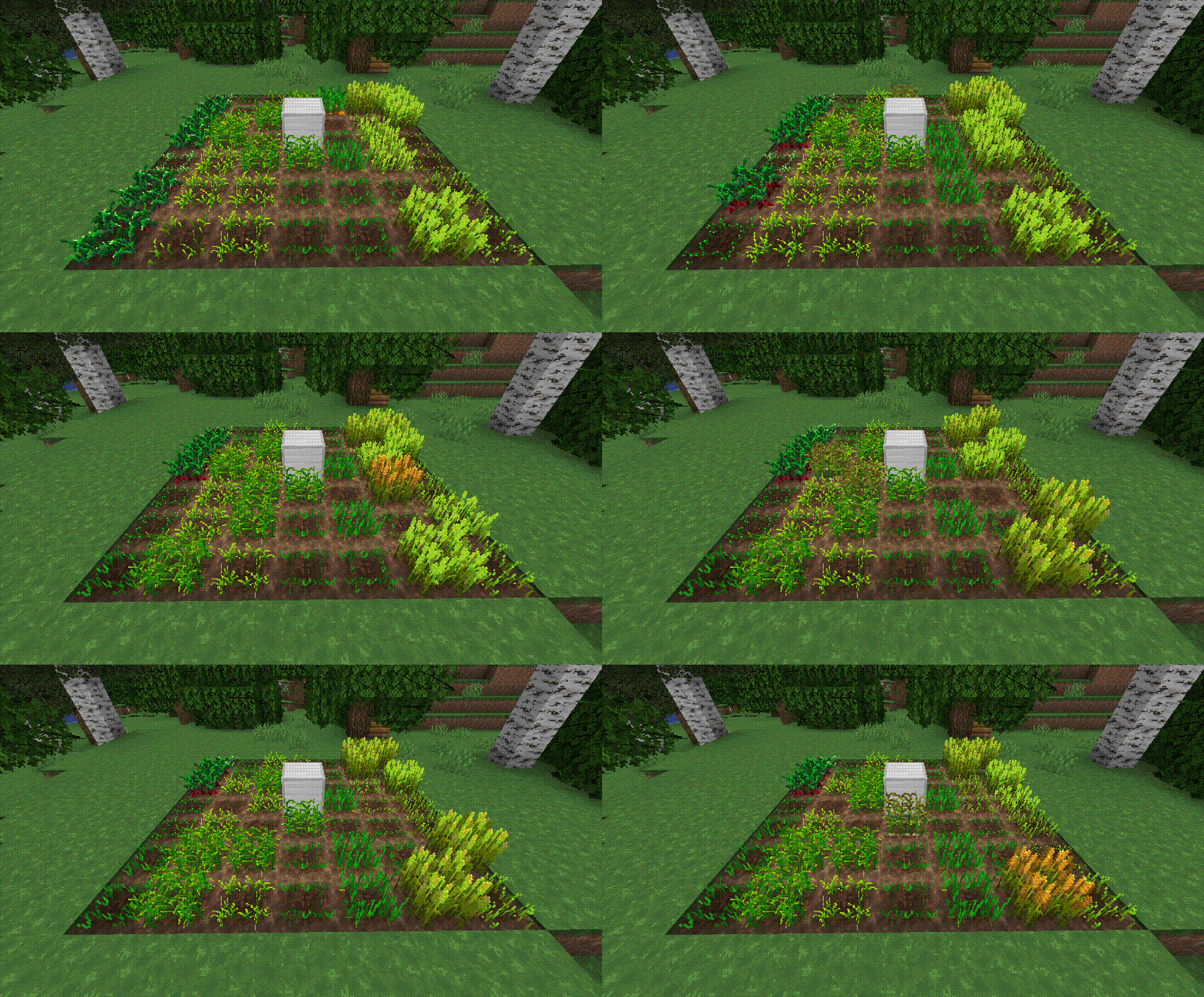
The **AutoCrop** plugin is a powerful and intuitive tool designed to automate the tedious process of sowing and harvesting crops. With this plugin, players can streamline their farming operations and focus on enjoying other aspects of gameplay. It automatically prepares the land, plants seeds, and harvests ripe crops, storing them neatly in the farm inventory.
***
## **Getting Started**
Follow these simple steps to set up and start using the **AutoCrop** plugin:
1. **Craft a Farm Block**
Gather the necessary materials and craft a farm block. The exact recipe may vary depending on your server’s configuration or modpack.
2. **Place the Farm Block**
Install the farm block on your chosen plot of land. Ensure the location is suitable for farming activities.
3. **Start the Farm**
Open the farm block menu and activate the **AutoCrop** feature. The farm block will automatically prepare the land for sowing if it’s placed on dirt. If placed on another block type, ensure you add dirt blocks to the farm’s inventory.
4. **Plant the Seeds**
Add the seeds you wish to grow into the farm block inventory. The plugin currently supports crops like wheat, potatoes, carrots, and beetroot, with more planned in future updates.
***
## **Modes**
The **AutoCrop** plugin includes two modes, each requiring specific materials for proper operation:
1. **Seed Mode**
* Requires: Dirt blocks, seeds (e.g., wheat, carrot, potato, beetroot).
This mode automates the planting and harvesting of standard crops.
2. **Cactus Mode**
* Requires: Sand blocks, cactus.
This mode automates the growth and harvesting of cactus plants.
***
## **Supported Crops**
1. Potatoes
2. Beetroot
3. Wheat
4. Carrots
5. Cactus
_More crops coming soon!_
***
## **Permissions**
* `autocrop.admin` – Allows access to administrator commands.
* `autocrop.use` (default: true) – Allows players to use the AutoCrop functionality.
***
## **Commands**
* `/autocrop admin getcropblock` – Obtain a farm block.
* `/autocrop admin reload` – Reload the plugin configuration.
***
## **Continuous Development**
**AutoCrop** is not just a plugin; it’s an evolving project! Regular updates are released to add new features, improve performance, and enhance the overall user experience. Stay tuned for exciting updates to make your farming more enjoyable!
Support the developers by [buying them a coffee](https://www.patreon.com/PluginDEV)! Your contributions help them continue delivering quality tools for the gaming community.

AutoCompressor Pro
💎 AutoCompressor Pro
Version 1.0.4 – New Features!
Upgrade your server experience with **Auto Compressors!** This plugin allows players to automatically compress items while mining with a single item, all managed through an intuitive GUI system. **No need for any configeraition** just pure efficiency.
Creating an **Auto Compressor** example:
– Want to create a Diamond Auto Compressor?
1. Use /addtier, call it “Diamond”, and assign a group or create one (group choice only matters if you dont want the best Auto Compressor to comp all tiers below).
2. Use /settarget to set what item/block is needed for the comp.
3. Right-click the block/item to be the target.
4. use /setcomp and right click the item you want to be the compresser of the auto compressor, you can make it any item you want.
5. Use /comp to equip or remove from activity your Auto Compressor.
6. Use /opcomp to see all of your auto comps and get the tier you want players to receive as the Auto Compressor item.
AutoCompressor | Commands & Permissions
🛠 Administrative Commands
Setup and manage the compression system directly in-game.
### Commands:
– **`/comp`** → **Main Player Menu**. Opens the GUI for players to **insert or collect** their Auto Compressors to start mining. (Permission: **Default**)
– **`/opcomp`** → **Admin Tier List**. Opens a GUI of all available Auto Compressors to **obtain the activator items**. (Permission: **`autocompressor.opcomp`**)
– **`/settarget`** → **Define Input**. Sets the specific block or item that must be mined to trigger compression. (Permission: **`autocompressor.setcompsettarget`**)
– **`/setcomp`** → **Define Output**. Sets the reward item a player receives and the required ratio (e.g., 64). (Permission: **`autocompressor.setcompsettarget`**)
– **`/addtier`** → **Create New Tier**. Creates a named tier (like “Diamond”) and assigns it to a functional group. (Permission: **`autocompressor.addtier`**)
Upcoming Features:
– Better GUI
– cleaner auto compressors layout
Support:
– For questions or problems, contact me on Discord: veber #veberyotam, or use the comment section. Thank you!
AutoCompressor
## Features:
– Creating custom autocompressor recipes linked to an activator item
– All players can enable and disable AutoCompressors that they have unlocked for themself
– Admins can give activator items and revoke autocompresors from players
– **Easy setup with no writing in files required!**
##
### Commands:
– **/auc** (or /auc help) – Show all commands
– **/auc create ** – Create an autocompressor hold the item in your hand that you want to use as the activator item and set the custom autocompressor id for the autocompressor
– **/auc createrecipe [input item amount] [output item amount]** – Create a recipe that can be added to a autocompressor later hold the input item in your main hand and the output item in your offhand the input item amount is how many input items it takes to get the resulting output item amount (defaults to 64 -> 1)
– **/auc asignrecipe ** – Asign a created recipe to an autocompressor
– **/auc activator ** – Give yourself or another player an activator item
– **/auc type ** – Choose the type of AutoCompressor an AutoCompressor is, **Permenant** (default) – Right click activator item to claim it permenatly player’s can toggle it on and off with the /toggle command, **Inventory** – Works only when the activator item is in the players inventory cannot claim the activator item, **Offhand** – Works the same way as the inventory type except the activator item only works when its in the players inventory
– **/auc list** – Lists all the autocompressor id’s that you have add to the server
– **/auc listrecipes ** – Lists all the recipes for a specific autocompressor
– **/auc remove ** – Delete a specific autocompressor
– **/auc removerecipe ** – Delete a specific recipe from an autocompressor using the recipe id
– **/auc deleterecipe ** – Compltely delte a recipe id and remove it from all autocompressors
– **/auc revoke ** – Revoke an autocompressor from a player that has already unlocked an autocompressor
– **/auc toggle ** – Enable or disable an autocompressor that you have already unlocked admins can enable and disable other players unlocked autocompressors
– **/auc listtoggled** – List the autocompressors that you have unlocked and enabled or disabled
##
### Permissions:
– **autocompressor.*** – Get all permissions for the AutoCompressor plugin
– **autocompressor.create** – /auc create command
– **autocompressor.createrecipe** – /auc createrecipe command
– **autocompressor.removerecipe** – /auc removerecipe command
– **autocompressor.remove** – /auc remove command
– **autocompressor.activator** – /auc activator command
– **autocompressor.setactivator** – /auc setactivator command
– **autocompressor.listrecipes** – /auc listrecipes command
– **autocompressor.list** – /auc list command
– **autocompressor.revoke** – /auc revoke command
– **autocompressor.type** – /auc type command
– **autocompressor.deleterecipe** – /auc deleterecipe command
– **autocompressor.toggle** – /auc toggle command (enabled to all by default)
– **autocompressor.listtoggled** – /auc listtoggled command (enabled to all by default)
– **autocompressor.adminhelp** – See the admin help menu when you get sent the help menu
– **autocompressor.help** – /auc help command (enabled to all by default)
##
Heres a very laggy stitched together tutorial video I made if you are having any issues using the autocompressor plugin:
If anyone makes a better plugin video send it to me in the comments I geuss and ill put it here
##