Assorted Core
# Assorted Core [Forge/Fabric]
### Versions 7.0.0 and newer now require [Assorted Lib](https://modrinth.com/mod/assorted-lib)
Adds an assortment of items and blocks to be used by the other Assorted Mods. This is currently optional as only Assorted Tools adds support for the materials added.
Documentation can be found at: https://assortedmods.com/core
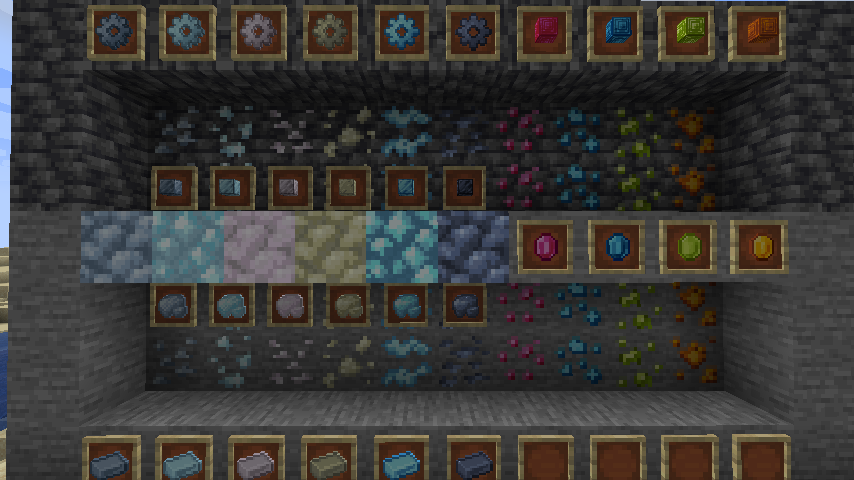
Currently adds many new ores and materials to be used by other Assorted mods.
Adds the following ores:
– Tin
– Copper
– Silver
– Aluminum
– Nickel
– Platinum
– Lead
– Ruby
– Amethyst
– Sapphire
– Topaz
Add the following alloys:
– Bronze
– Electrum
– Invar
– Steel
Adds two machines, 4 tiers each for processing:
– Basic Alloy Forge, Intermediate Alloy Forge, Advanced Alloy Forge, Expert Alloy Forge
– Basic Grinding Mill, Intermediate Grinding Mill, Advanced Grinding Mill, Expert Grinding Mill
Adds dusts, nuggets, gears, and storage blocks for each new metal. The gems each have a storage block as well.
All items and blocks are tagged so they can be used interchangeably with other mods that add the same mods.
World Generation:
All ore world generation can be controlled via the config file.
AssetMover
### Allows mod developers to download assets and use them on the client; specified via Minecraft versions or URLs.
– The assets will show in `.minecraft/assetmover` folder after it is downloaded (as it is a pseudo resource pack).
– Fully compatible in-dev.
– If you are using Java 8u52 or similarly old Java 8 builds, please install [CensoredASM](https://legacy.curseforge.com/minecraft/mc-mods/lolasm)
Dependency of [Subaquatic](https://modrinth.com/mod/subaquatic) and [Extra Sounds Legacy](https://www.curseforge.com/minecraft/mc-mods/extra-sounds-legacy)!
Icon [licensed under MIT by mcassets.cloud](https://github.com/InventivetalentDev/mcasset.cloud/blob/master/LICENSE)
AssembleiaSMP
## Explore
Our **modpack** features a **wide variety of biomes**, some challenging and others enchanting. In our world, you can find, make friends, build **clans**, and overthrow **clans**. It’s filled with magic and **terrifying mobs**; discover your **inner power**. Exude the energy that lies within you with the mod **LightWithin**!
## Voice chat
Our modpack features the **simple voice chat mod**, which allows you to talk with your partners using your **microphone**, whether near or far.
## Factions
Create your own **faction** that allows you to **build an empire of your very own**, fight your enemies with your friends, and make it **burn**.
## Dimensions and Biomes
Explore a **variety of biomes**, new **dimensions**, new **bosses**, and a brand new **environment**.
_Terralith, Better Nether, and Better End._
## And MUCH MORE!
Download the modpack and test it for yourself!
### Note:
The mods in this modpack **aren’t within our domain**; credits to the creators.
AsmodeusCore [Galacticraft Addons Library]
# [Main Page is on CurseForge!](https://legacy.curseforge.com/minecraft/mc-mods/asmodeuscore) Developed and Maintained by BlesseNtumble.
# About :
Library for mods created by BlesseNtumble.
List mods using this API:
– GalaxySpace
– Interstellar: ExoPlanets
– StarMaker
Discord: https://discord.gg/8EHZdFZ
Patreon: https://www.patreon.com/blessentumble
– Modification of the add-on is forbidden!
– Forbidden steal code or assets.
– Release or post mod on any other site without link on this page.
ASJCore
ASJCore is an API/library mod. Except helper and utility methods, it also includes Kotlin JDK 8 stdlib, [GloomyFolken’s HookLib](https://github.com/GloomyFolken/HookLib), VamigA’s WorldEngine, as well as a bunch of fixes and patches improving vanilla Minecraft.
AsieLib
# AsieLib (with fixed Bleeding Pipe vulnerability)
This repository is a fork of [AsieLib](https://github.com/Vexatos/AsieLib) for Minecraft 1.7.10 containing an **important security vulnerability fix** and a few other improvements.
## Security vulnerability fix in this fork
This fork fixes the serious [Bleeding Pipe](https://blog.mmpa.info/posts/bleeding-pipe) vulnerability (only for this mod itself, not for others – many mods are affected!) by simply removing the affected method, only leaving an error message explaining that.
This means it might break mods that use the affected `Base64#decodeToObject` method. However, to my knowledge, at least none of asie’s popular mods utilize it.
**Please make sure that you’re not affected through other mods.** A good start is to also install the [serializationisbad](https://github.com/dogboy21/serializationisbad) mod and/or check out their [list of affected mods](https://github.com/dogboy21/serializationisbad/blob/master/docs/mods.md).
If AsieLib is the only affected mod that you’re using, switching to this fork should suffice.
## Other improvements of this fork
– **Fixed the bug** of Showcase lids (from the [Statues Mod](https://modrinth.com/mod/statues-mod)) never closing (asiekierka/Statues#15) (thanks @TCLProject)
– Fixed potential issues with other blocks that have inventories that use AsieLib (thanks @TCLProject)
– Added a Simplified Chinese localization (thanks @M3MEMonster)
## License
The license is the same as in the original version and can be found [here](https://wiki.vexatos.com/wiki:licensing).
Ashen’s Datapack Athenaeum
What It Is:
# ADA is a datapack built for easier datapack making.
## Features:
– 100+ scoreboards to store data and statistics.
– Tons of tags to make datapacks easier to make.
– Tons of predicates for easier datapack making.
– Raycasting engine to make guns, longer sight, etc.
– Projectiles with motion engine to make custom projectiles easily.
– Create custom blocks instantly with block displays.
– Customizable settings.
– Command to clear the chat.
– Test dummys.
– Command to delete all entities from the world except for certain entities such as block – displays, armor stands, players, etc.
– Math, such as multiplication, division, logarithm, and more.
– Randomizers
– And more!
## How To Use:
Players
Drag this datapack in the datapack folder with any other datapacks that require this one.
Creators
Use this datapack in your datapack folder and make your own datapack in the same folder. This datapack allows you to make your own datapack and use the tags, predicates, engines, and more from my datapack (without copying code). When you publish your datapack, make sure you leave a link to this datapack, because your datapack will require this one to be installed. Look below for tutorials.
## License:
– You may not redistribute this project.
– You may use in YouTube videos as long as you leave some form of credit.
– You may use in public servers.
– You may not copy or steal code from this project.
– If you have any questions about license, please ask below.
## Tutorials:
Getting Started
Inside of your load file, put this string of code to detect if ADA is installed:
“`
execute if score check installed matches 1 run say My Datapack
“`
Create a new mcfunction file, you will then run this mcfunction if ADA is installed from your load file using this line of code:
“`
execute if score check installed matches 1 run function [namespace]:[mcfunction]
“`
Inside of [namespace], put your namespace. Inside of [mcfunction], put your new mcfunction file name.
Custom Blocks
First create a custom block display model using block display studio. Click the link [HERE](https://eszesbalint.github.io/bdstudio/editor) to use it.
Once you’ve created your custom model, make a new mcfunction file called place. Inside of the place.mcfunction file, put your summon command for your custom model. After your summon command, put this command:
“`
function ub:block_displays/apply_block/block
“`
Run your place function in a Minecraft world, and enjoy your custom block!
Gun
First, create a new scoreboard that detects when you right click a carrot on a stick:
“`
scoreboard objectives add shoot minecraft.used:carrot_on_a_stick
“`
Inside of your tick file, put this command:
“`
execute as @a at @s if score @s shoot matches 1.. at @s run function ub:raycast/classic/start_raycast
“`
The command will detect if the score shoot matches 1 and it will shoot a bullet. To reset the score after you shoot, use this command:
“`
execute as @a at @s if score @s shoot matches 1.. run scoreboard players set @s shoot 0
“`
You are now finished with the gun, if you want to see bullet trails use this command:
“`
/function ub:settings/raycast/trail/on
“`
Boat Launcher
First, create a new scoreboard that detects when you right click a warped fungus on a stick:
“`
scoreboard objectives add launch minecraft.used:warped_fungus_on_a_stick
“`
Inside of your tick file, put this command:
“`
execute as @a at @s if score @s launch matches 1.. at @s run function ub:custom_projectiles/custom/throw {custom_projectile:”minecraft:boat”}
“`
The command will detect if the score launch matches 1 and it will shoot a boat. To reset the score after you shoot, use this command:
“`
execute as @a at @s if score @s launch matches 1.. run scoreboard players set @s launch 0
“`
Enjoy Launching Boats!
You can replace “minecraft:boat”, with any entity you want.
YouTube Rank
You can give yourself YouTube rank by typing the command below:
“`
function ub:ranks/give_rank {rank:”youtuber”}
“`
All Ranks
owner
helper
user
streamer
master
expert
killer
bot
afk
banned
noob
# Thank you for using ADA!
Ash API
An API that provides an abstraction layer between the two main Minecraft mod loaders (Fabric and NeoForge).
It is meant to be used with a multi-loader development environment such as Jared’s [MultiLoader-Template](https://github.com/jaredlll08/MultiLoader-Template).
## Mods using Ash API
– [Armor Visibility](https://modrinth.com/mod/armor-visibility)
– [Flourish](https://modrinth.com/mod/flourish)
– [Shuffle](https://modrinth.com/mod/shuffle)
– [Transparent](https://modrinth.com/mod/transparent)
## Implemented APIs
Full documentation of all implemented APIs will be available soon. Currently, Javadocs are available within the code.
As of v1.0.0 it provides APIs for:
– KeyMappingRegistry
– ClientTickEvents
– UseBlockEvent
– ModLoader
– ResourceLoader
– ModOptions
– ModOptionsScreen
A changelog is available [here](https://github.com/Trikzon/ash-api/blob/1.19.4/CHANGELOG.md).
Features are currently added in order of what I need for my mods, however it is intended that Ash API will be usable by any developer using a multi-loader development environment.
Pull requests are highly appreciated. However, please discuss them in my [Discord](https://discord.gg/aUwZKagWh2) first.
—
Report any issues on [GitHub](https://github.com/Trikzon/ash-api/issues). Chat on [Discord](https://discord.gg/aUwZKagWh2) in the `#ash-api` channel.
Support the development of my mods on [Ko-fi](https://ko-fi.com/X7X8D56YI).
[](https://ko-fi.com/X7X8D56YI)
Art’s CLA (NLAM)

No longer actively maintained.
# Purpose
Art’s CLA lets server admins (or, the player in single-player worlds) use a loot table to have chickens lay any item or block in its item state. This won’t place blocks to build random constructions (although, that does sound interesting).
# Directions for Use
## Setup
1. Install this datapack.
2. Install additional datapack with a chickenslayanything:laid_by_chicken loot table. (There is a rather unimpressive default in this pack.)
3. Ensure that the secondary datapack is enabled **after** this pack so its loot table overrides the default.
## Adding the Loot Table
Adding a loot table is done by adding a loot table, which can be added by another datapack that add _chickenslayanything:laid_by_chicken_. The file is located at:
“`
data/
chickenslayanything/
loot_table/
laid_by_chicken.json
“`
## In-Game Usage
1. Place a hopper (or multiples).
2. Get a chicken to stay on the hoppers using your method of choice.
3. Keep other chickens at least 16 blocks away.
# Notes
## Code Basis
This datapack is a modification of [helmo2019](https://modrinth.com/user/helmo2019)’s [Chickens Lay Anything](https://modrinth.com/datapack/chickens-lay-anything). My additions only add some abuse protection.
## Abuse Reduction
Since chickens are easy to breed, allowing them to lay valuable items could easily be abused. To prevent this, the chickens have to be at least 16 blocks apart, or they just lay eggs.
Allowing chickens to drop items all over isn’t generally problematic, but loot tables that produce a large number of items could begin to cause random lag spikes from entity processing. This is addressed by ensuring the drops aren’t left on the surface – they have to be on a hopper.
## Version Numbering
Please note that the version numbering has changed twice. First to indicate compatibility with MC versions, then to indicate pack changes within the same MC version. Current version numbering is v– (e.g. v1.1.0-1.21.3 is version 1.1.0 of the pack and was written using MC 1.21.3).
# Known Issues
– Prior to v1.1.0-1.21.3, chickens standing on the edge of two hoppers (possibly other similar cases) will ay an egg rather than the expected items. This was caused by the egg being laid over the hopper which was not set to cooldown. The logic says if a chciken is standing on a hopper, disable it so the egg stays available for turning into items. The fix was to disable all hoppers in a 3 by 3 grid.
– Prior to “v1.21.3 – Distance Check Fixed”, the check for minimum distance to another chicken was accidentally disabled during testing.
# Support and Links
## Bug Reporting and Update Notifications
To report bugs and to keep up to date with new versions and additional packs from me, please join our [Discord](https://discord.gg/bK92yTbxj3).
## Links
Check out my other packs on [Modrinth](https://modrinth.com/user/Artecie).
Help support ongoing development at [Patreon](https://www.patreon.com/artecie) or [Ko-Fi](https://ko-fi.com/artecie).
Watch development (generally troubleshooting) and gameplay with the packs in use on my [Twitch Channel](https://twitch.tv/artecie).
Artificial Enchantments API
# Artificial Enchantments
A shared plugin library for Paper 1.21+ servers that lets other plugins create **real, client-visible custom enchantments** — no lore hacks, no packet trickery.
## What It Does
Artificial Enchantments is a **server-side library** that multiple plugins can depend on simultaneously. Instead of every enchantment plugin shipping its own (conflicting) enchantment system, they all hook into this one shared registry.
**For players:** Enchantments show up natively in the client — you see them in item tooltips, anvil interfaces, and the enchantment table. They look and feel like vanilla enchantments because they *are* registered in the native Paper registry.
**For server owners:** Install this once, and any plugin that depends on it Just Works™. No conflicts, no duplicate listeners, no “why does my sword have 3 different lore-based sharpness enchantments” headaches.
## Requirements
– **Paper 1.21+** (Purpur and Folia supported)
– **Java 21+**
## Installation
1. Download the latest release from the **Files** tab on this page.
2. Drop `artificial-enchantments-x.x.x.jar` into your server’s `plugins/` folder.
3. Start (or restart) your server.
4. Install any plugin that depends on Artificial Enchantments.
That’s it. There is no configuration file — this is a library, not a plugin with commands or settings.
## Why This Exists
Most custom enchantment plugins before 1.21 used one of two approaches:
– **Lore-based:** Fake enchantments stored in item lore. Looks janky, breaks constantly, incompatible with other plugins.
– **Shaded registries:** Each plugin ships its own copy of an enchantment library. They conflict with each other, duplicate event listeners, and corrupt each other’s state.
Artificial Enchantments solves this by sitting **between** the server and enchantment plugins as a single, shared authority. Every plugin that uses it talks to the same registry, the same event dispatch spine, and the same native Paper enchantment system.
## Compatibility
| Platform | Status |
|—|—|
| Paper | ✅ Supported |
| Purpur | ✅ Supported |
| Folia | ✅ Supported |
| Spigot | ❌ Not supported (requires Paper 1.21+ API) |
## For Plugin Developers
If you’re building a plugin that uses Artificial Enchantments, check out the [GitHub repository](https://github.com/modpotato-plugins/artificial-enchantments) for:
– API documentation
– Gradle/Maven setup instructions
– Code examples
– Javadoc reference
**Do not shade this library into your plugin.** It must remain a separate plugin JAR in the `plugins/` folder. Every dependent plugin references it via `compileOnly`.
## Support
– **Bug reports & feature requests:** [GitHub Issues](https://github.com/modpotato-plugins/artificial-enchantments/issues)
– **Source code:** [GitHub](https://github.com/modpotato-plugins/artificial-enchantments)
## License
MIT License