Artillery Strike
_What would the player of Minecraft and War Thunder do? Of course, he or she will play War Thunder in Minecraft._
## How to use it?
You can summon the artillery strike in Minecraft. After loading the datapack, click the red text or enter the command
“`
/trigger artillery_support
“`
to get into the interface. There are two ways to choose the position: inputting the x and z axis or firing at the player directly.

## Attention
– DO NOT reload the datapack when the artillery strike is in progress.
– You can use it in the server, but there may be some unknwon bugs.
Arrow Rain
## Features
– Summon a rain of flaming arrows on any player
– Fully configurable radius, density, height, and damage
– Follow mode or Static mode, arrows chase the player or stay locked to a spot
– English & Spanish language support out of the box
– `/arrowrain list` to see all active rains at a glance
– `/arrowrain stop` to cancel a rain at any time
– Op only, players cannot use this command without permission
– Arrows cannot be picked up
– Built specifically for **Folia**, fully region-scheduler compatible
– Simple `config.yml` with sensible defaults
– Tab complete on all arguments
—
## Commands
| Command | Description |
|——–|————-|
| `/arrowrain ` | Start a basic arrow rain |
| `/arrowrain [notify] [follow/static] [radius] [density]` | Full syntax with all options |
| `/arrowrain stop ` | Stop an active arrow rain early |
| `/arrowrain list` | List all currently active arrow rains |
### Argument Breakdown
– **player** — The target player’s username
– **seconds** — How long the rain lasts (capped by `max-duration` in config)
– **notify** — `true` or `false`, whether the target sees messages (default: `false`)
– **follow/static** — `follow` tracks the player as they move, `static` locks to their starting position (default: `follow`)
– **radius** — Override the spread radius in blocks (default: from config)
– **density** — Override arrows per second (default: from config)
### Examples
“`
/arrowrain NamedFlame 30
/arrowrain NamedFlame 60 true
/arrowrain NamedFlame 60 false static
/arrowrain NamedFlame 60 false follow 10 20
/arrowrain stop NamedFlame
/arrowrain list
“`
—
## Config
“`yaml
# Max seconds a rain can last
max-duration: 300
# Default spread radius in blocks
default-radius: 24
# Height above player arrows spawn from
default-height: 28
# Damage per arrow
arrow-damage: 4.0
# Arrows per second
default-density: 10
# Language: en or es
language: en
“`
All messages are fully customizable in `config.yml` under the `messages` section.
—
## Language Support
Arrow Rain supports **English** and **Spanish** out of the box. Just set `language: es` in your `config.yml` and restart!
—
## Compatibility
| | |
|-|-|
| **Minecraft** | 1.21.11 (should work on most 1.21.x builds) |
| **Server Software** | Folia |
| **Java** | 21+ |
| **Permission** | Op only |
> This plugin was built and tested on Folia 1.21.11. It is not guaranteed to work on Paper, Spigot, or other server software yet!
—
## Coming Soon
– Paper & Spigot support
– Multiple rain types (poison, explosive, lightning arrows and more)
– More language support
—
## Links
– [NGP Discord](https://discord.gg/VqXsafQAMd)
– [bStats](https://bstats.org/plugin/bukkit/Arrow%20Rain%20NGP/30064)
—
*Made by NGP*
ArmsRace
# 🔫 Arms Race (Mini-Game Mod)
**⚠️ EARLY ALPHA / EXPERIMENTAL:** *This mod is currently in early development. Core mechanics work, but full compatibility with other mods is still being tested. Bug reports and feedback are highly appreciated!*
Welcome to **Arms Race** — a fully customizable, server-side friendly mini-game mod for NeoForge!
Bring the classic “Gun Game” experience to your Minecraft server. Players battle each other to upgrade their weapons. The first player to get a kill with the final weapon on the list wins the match!
This mod is an independent core. It relies on vanilla mechanics, meaning it can technically issue ANY item as a weapon (Vanilla swords, bows, etc.).
### ✨ Current Features
* **Customizable Arenas:** Create multiple arenas via a simple JSON config.
* **Team Support:** Set up Free-For-All or Team Deathmatch modes.
* **Custom Weapon & Armor Ladders:** Define your own progression list using item IDs. You can configure automatic armor equipping and extra items (like ammo or shields) for each level!
* **Dynamic UI:** Built-in clean Scoreboard to track kills, lobby status, and warmup timers.
* **Safe Environment:** Configurable block-breaking protection and spawn point management.
### 🚀 Roadmap / Planned Features
Since the mod is in its early stages, here is what is planned for the future updates:
* **🔫 Weapon Mods Compatibility:** Thorough testing and guaranteed support for heavy gun mods like **Timeless and Classics Zero (TaC:Z)** and **Vic’s Point Blank**.
* **🌐 Cross-Loader Support:** Porting the mod to **Fabric** (potentially using Architectury API) and updating to other Minecraft versions.
* **🔌 Plugin Compatibility:** Ensuring seamless work with popular server plugins (e.g., LuckPerms, economy, and anti-cheats).
* **🏆 End-Game Polish:** Fancy victory screens, post-match statistics, and rewards.
### 📜 Commands (Requires OP / Permission Level 2 for setup)
* `/armsrace create ` – Creates a lobby based on the config template.
* `/armsrace join` – Joins an available lobby.
* `/armsrace leave` – Leaves the current lobby.
* `/armsrace start` – Force starts the game (bypasses the warmup).
* `/armsrace setteam ` – Moves a player to a specific team.
* `/armsrace reload` – Reloads the JSON config without restarting the server!
### 🛠️ Configuration Guide
When you run the mod for the first time, it will generate an advanced default configuration file located at `config/armsrace_arenas.json`.
The config allows deep customization of weapons, team spawns, armor progression, and even specific inventory slots!
**Example Configuration:**
“`json[
{
“templateId”: “vanilla”,
“lobbyCoord”: { “x”: 137.0, “y”: -54.0, “z”: 0.0 },
“maxPlayers”: 10,
“warmupTime”: 60,
“teams”:[
{
“teamId”: “1”,
“colorCode”: “§b”,
“spawns”:[ { “x”: 143.0, “y”: -57.0, “z”: 28.0 } ]
},
{
“teamId”: “2”,
“colorCode”: “§a”,
“spawns”:[ { “x”: 80.0, “y”: -60.0, “z”: 8.0 } ]
}
],
“weapons”:[
{
“item”: “minecraft:wooden_sword”
},
{
“item”: “minecraft:iron_sword”,
“additionalItems”:[
{ “item”: “minecraft:grass_block”, “count”: 3, “slot”: 2 }
]
},
{
“item”: “minecraft:diamond_sword”
}
],
“armor”:[
{ “helmet”: “minecraft:iron_helmet”, “level”: 0 },
{ “chestplate”: “minecraft:iron_chestplate”, “level”: 1 }
],
“additionalItems”:[
{ “item”: “minecraft:cobblestone”, “count”: 54, “slot”: 7 }
]
}
]
“`
#### Advanced Parameters Explained:
`lobbyCoord` – The waiting area where players spawn before the match starts or after they leave.
`weapons` – The progression ladder. You can now define additionalItems for specific weapon levels (e.g., giving 30 rounds of ammo only when a player reaches the AK-47 level!).
`armor` – Equip players with specific armor pieces at specific levels.
`additionalItems` (Global) – Items given to all players at the start of the match and on every respawn (like building blocks or food). Define the count and the exact inventory slot.
Armor Durability HUD
I’m going to update this mod in the future. Now compatible with Minecraft Java 1.21 to 1.21.11
[**Join my discord server to vote new features to this mod!**](https://discord.gg/DDgHVFQf3j)
[**Join the server from here to get special rank! This link is valid until May 12, 2026**](https://discord.gg/CNzcSrUQ)
This mod has advantages. One of them is when in pvp match or playing cpvp and armor health is going down, then you will know when to heal them. You can also put horizontal mode on.
# [**How to use ARMOR DURABILITY HUD**](https://www.youtube.com/watch?v=69y8R_E1ysI&list=PLkcDIO3OJTf6D4_XFpKhVUrzVHt7iehN3)
## **Please like, subscribe and comment on that video to support my mod creation + mod updates. Thank You So Much!!!**
This mod shows armor durability
You can change the armor hud place from GUI and toggle it.
If you wont have armor/armors equipped, then this mod will show you empty slot/slots.
GUI key {N} [You can edit the key from settings]
Important!
Don’t delete, edit, remove the file called armor-hud-config.json, if you dont know what you are doing!
If you think that Armor hud doesnt work, check keybinding settings that is the N keybind binded to some other key If yes just change it.
— Programmed by NSI21 —
— Please report any bugs and tell me your suggestions for this mod —
Arka Manhunt
🔥 **Arka Manhunt (1.21+) — Advanced Multiplayer Manhunt Plugin** 🔥
Take your Minecraft Manhunt experience to the next level with **Arka Manhunt**, a fully-featured and highly customizable plugin built for intense, competitive gameplay.
—
## ⚔️ Core Gameplay
* 🏃 **Multiple Runners & Hunters** (no player limit)
* 🐉 Runners win by defeating the Ender Dragon
* 🏹 Hunters win by eliminating ALL runners
* ⚡ Smooth and balanced gameplay system
—
## 🧠 Smart Features
### 🎯 Advanced Compass System
* Track **multiple runners**
* Right-click to **switch targets**
* Shows **live distance + target name**
* Works across all dimensions
—
### 💬 Team Chat System
* 🔵 Runners chat only with runners
* 🔴 Hunters chat only with hunters
* 🟢 **Join/Leave, Death & Advancements visible to ALL players**
—
### ☠️ Elimination System
* Dead runners become **spectators**
* No respawn abuse
* Game continues until all runners are eliminated
—
### 🔄 Reconnect System
* Players can safely rejoin
* Automatically restores:
* team
* items
* role
—
### ⏱️ Grace Period System
* Hunters frozen at start
* Runners get a head start
* Fully configurable
—
### 🧭 /back Command (Balanced)
* Only for hunters
* Teleport to last death location
* Includes:
* cooldown
* combat restriction
* warmup system
* Designed to prevent abuse
—
### 🎨 Team Name Colors
* 🔵 Runners = Blue name tags
* 🔴 Hunters = Red name tags
* Easy visual identification during gameplay
—
## ⚙️ Admin Control
* `/manhunt start`
* `/manhunt stop`
* `/manhunt graceperiod`
* `/manhunt list`
Full permission support included.
—
## 🚀 Why Arka Manhunt?
Most Manhunt plugins are basic.
This one is built for:
* ✔ Competitive servers
* ✔ YouTube-style Manhunt challenges
* ✔ Smooth multiplayer experience
* ✔ Balanced gameplay (no exploits)
—
## 📦 Version
* Minecraft **1.21+**
* Paper / Spigot supported
—
## 💡 Note
This is a **feature-rich, performance-optimized plugin**.
For best experience, test with multiple players.
—
## ⭐ Support & Feedback
Found a bug or want new features?
Drop your feedback and help improve Arka Manhunt!
—
🔥 **Download now and start your ultimate Manhunt!** 🔥
Aries Better Manhunt
Better Manhunt is a simple but powerful manhunt plugin for Minecraft. If you love playing Minecraft Manhunt with your friends, this plugin will make the game even better! It adds some extra features like headstarts and a distance counter for the hunter’s compass.
# What is Minecraft Manhunt?
Minecraft Manhunt is a fun game mode where one player (the speedrunner) tries to beat the game while other players (the hunters) try to stop them. The hunters have a tracking compass that points to the speedrunner.
# Features of Better Manhunt
This plugin adds extra features to make Manhunt more exciting and fair for all players:
### 🎯 Distance Counter
• The hunter’s compass shows the distance to the speedrunner.
• This helps hunters know how far they are from their target.
### 👾 Headstart Option
• The speedrunner can get a headstart before the hunters start tracking them.
• You can set the headstart time to make the game more balanced.
### ⚡ Simple Commands
“`
/manhunt start- Start the game.
/manhunt stop- Stop the game.
/manhunt headstart [time] – Set headstart time.
/manhunt join – Join as hunter.
/manhunt runner – Join as runner
/manhunt list – List all players and their roles
“`
# 🛠️ How to Install Better Manhunt
Installing this plugin is super easy:
1. Download the plugin (make sure you get the latest version!).
2. Place the plugin file in the plugins folder of your Minecraft server.
3. Restart your server.
4. Use the commands to set up the game and start playing!
# 🎮 Why Use Better Manhunt ?
More balanced gameplay – Headstarts help make the game fair. Easier tracking – The compass distance counter makes hunting better. Fun & simple – Easy to install and use with simple commands.
If you and your friends love Minecraft Manhunt, this plugin will make it even better! Try it now and enjoy a more exciting manhunt experience! 🚀
ArenaSpleef

[](https://modrinth.com/plugin/battlearena)
A spleef plugin using [BattleArena](https://github.com/BattlePlugins/BattleArena)
ArenaSpleef is the classic spleef plugin that dates back to the early days of Minecraft, but features multiple modes!
## Spleef Modes
– **Classic**: The classic spleef mode where players are given a shovel to break blocks and knock other players into the void.
– **Splegg**: A spleef mode where players are given an egg cannon to shoot eggs at the ground to break blocks.
– **Decay**: A spleef mode where blocks decay underneath the player. This is commonly played as “TNT Run”, but any block can be used.
– **Bow Spleef**: A spleef mode where players are given a bow to shoot arrows at the ground to break blocks.
## Requirements
– A Paper server (or other derivative) running 1.19.4 or above
– The [BattleArena](https://modrinth.com/plugin/battlearena) plugin
## Map Creation
1. The first step follows the same steps as outlined in the BattleArena [Map Creation](https://docs.battleplugins.org/books/user-guide/page/map-creation) documentation. For ArenaSpleef, you will use the **/spleef** command to initiate the map creation.
2. Once you have created a map, you now need to set the spleef layers. Run **/spleef layer add
ArenaRegenerator

# ArenaRegenerator




# **ArenaRegenerator Plugin**
ArenaRegenerator is a plugin for Minecraft servers that handles arena saving, resetting, and full minigame logic using WorldEdit or FAWE.
This plugin manages and regenerates WorldEdit or FAWE-defined arenas. Includes full minigame support (e.g., lobby, countdown, game state, win detection) and interactive signs for easy use.
## **Table of Contents**
1. [Features](#features)
2. [Dependencies](#dependencies)
3. [Installation](#installation)
4. [Usage](#usage)
* [Interactive Signs](#interactive-signs)
* [Commands and Permissions](#commands-and-permissions)
5. [Example Configuration](#example-configuration)
6. [Data Storage](#data-storage)
7. [Building from Source](#building-from-source)
8. [Support & Contribution](#support–contribution)
## **Features**
* Arena Management:
– Save WorldEdit selections as arenas.
– Instantly clear or regenerate arenas.
– List, delete, and view detailed information for saved arenas.
* Minigame System:
– **Lobby System**: Players can join an arena’s lobby and wait for enough players.
– **Countdown**: A configurable countdown begins when the minimum player count is met.
– **Game Start**: Players are moved from the lobby to game spawn points, inventories are cleared (configurable), and game mode is set.
– **Game End**: Game ends after a set duration or when a win condition (e.g., last player standing) is met. Players are teleported out, their state is restored (configurable), and the arena is reset.
– **Spectator Mode**: Players leaving the arena boundaries during a game can be moved to spectator mode.
– **Configurable Rules**: Set minimum/maximum players, game duration, lobby countdown, items and game mode on join, what blocks can be broken or placed, and damage prevention per arena.
* Interactive Signs:
– Regenerate arenas on click with `[RegenArena]` signs
– Join minigame arenas with `[JoinArena]` signs
– Leave minigame arenas with `[LeaveArena]` signs
### /arena save and /arena info

### /arena clear and /arena regen

### Arena Regen Signs

### Join Arena Signs
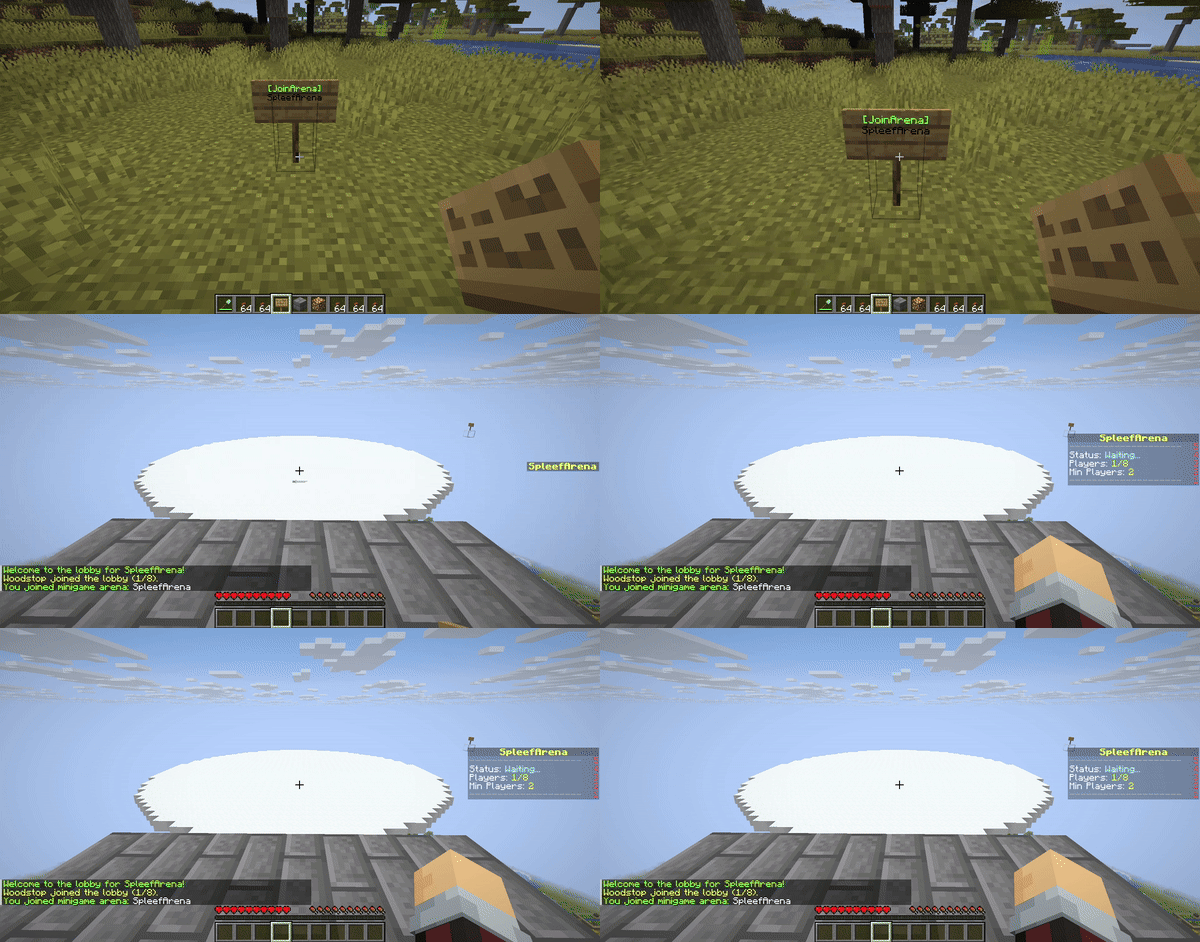
### Minigame Logic
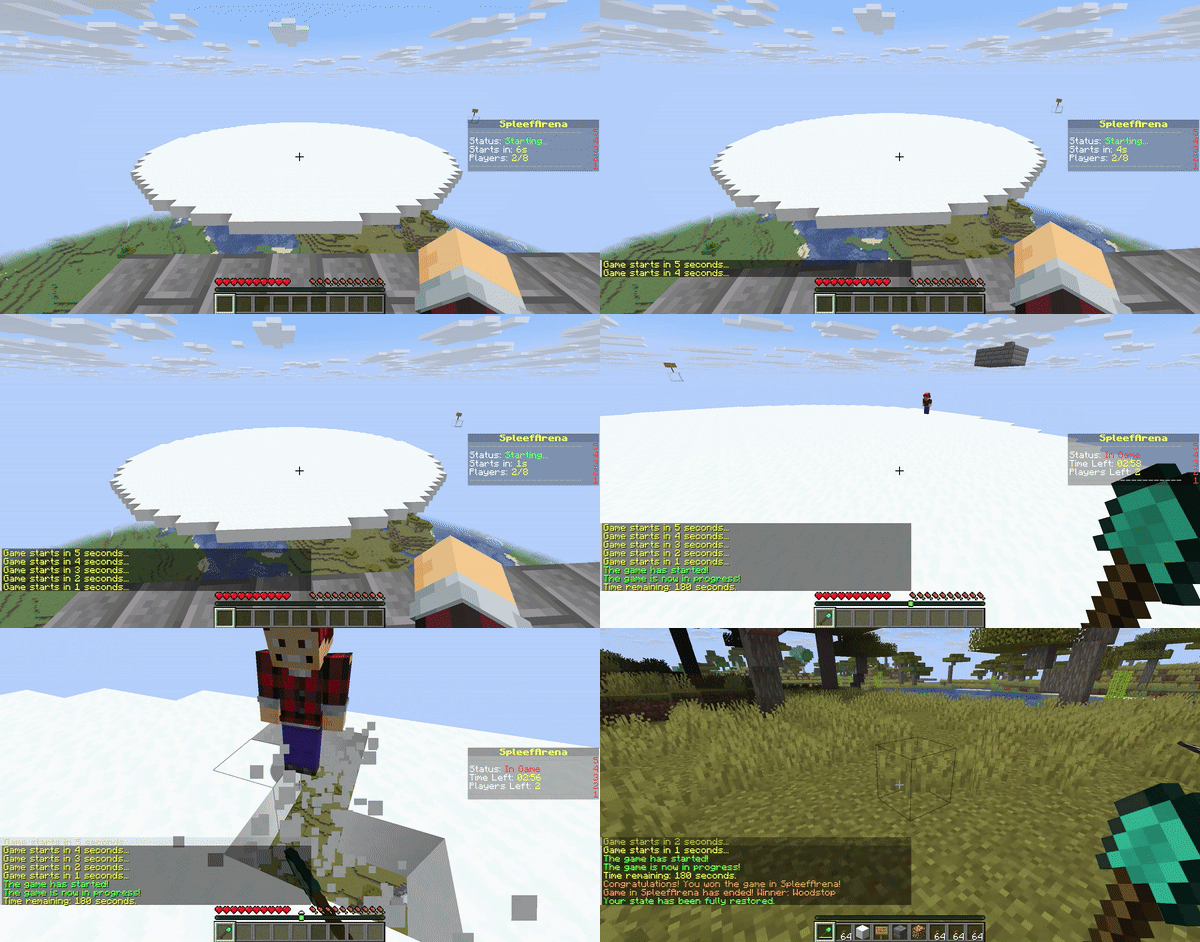
## **Dependencies**
This plugin requires either **WorldEdit** or **FastAsyncWorldEdit (FAWE)** to be installed on your server.
* [Download WorldEdit](https://dev.bukkit.org/projects/worldedit/files)
* [Download FAWE](https://www.spigotmc.org/resources/fastasyncworldedit.13932/)
**Important:** Only install ONE of these plugins (WorldEdit or FAWE) on your server. Having both can cause conflicts.
## **Installation**
1. Download the latest `ArenaRegenerator-X.X.X.jar` from the [releases](https://github.com/Woodstop/ArenaRegenerator/releases) page (or compile it yourself).
2. Download either **WorldEdit** or **FastAsyncWorldEdit (FAWE)** that is compatible with your server version.
3. Place both `ArenaRegenerator-X.X.X.jar` and your chosen WorldEdit/FAWE JAR into your server’s plugins/ folder.
4. Restart server.
## **Usage**
### **Interactive Signs**
Create signs to automatically regenerate arenas, join minigames, or leave minigames.
1. Place sign.
2. Line 1: `[RegenArena]` or `[JoinArena]` or `[LeaveArena]`.
3. Line 2: Your exact arena name.
4. Players with appropriate permissions can click to use.
5. Default 10-second cooldown; `arenaregenerator.sign.bypass` overrides.
## **Commands and Permissions**
Commands use the `/arena` prefix. An alias `/ar` is also available. Replace `` with your desired name for the arena.
`` can be either `lobby`, `exit`, `spectator`, or `game`.
| **Permission Node** | **Description** | **Command** |
|————————————–|———————————————————————-|——————————————————-|
| `arenaregenerator.regen` | Allows use of the regen function | `/arena regen ` |
| `arenaregenerator.save` | Allows saving an arena | `/arena save ` |
| `arenaregenerator.list` | Allows listing saved arenas | `/arena list` |
| `arenaregenerator.delete` | Allows deleting an arena | `/arena delete ` |
| `arenaregenerator.clear` | Allows clearing an arena without deleting the schematic | `/arena clear ` |
| `arenaregenerator.info` | Allows viewing info about the current arena | `/arena info ` |
| `arenaregenerator.select` | Allows selecting a region for an arena | `/arena select ` |
| `arenaregenerator.setspawn` | Allows setting lobby, exit, spectator, and game spawns for minigames | `/arena setspawn [spawnName]` |
| `arenaregenerator.delspawn` | Allows deleting spawn points for minigames | `/arena delspawn [spawnName]` |
| `arenaregenerator.join` | Allows joining minigame arenas | `/arena join ` |
| `arenaregenerator.leave` | Allows leaving minigame arenas | `/arena leave` |
| `arenaregenerator.reload` | Allows reloading the plugin configuration | `/arena reload` |
| `arenaregenerator.sign.create.regen` | Allows players to create `[RegenArena]` signs | *Create sign with tags* |
| `arenaregenerator.sign.create.join` | Allows players to create `[JoinArena]` signs | *Create sign with tags* |
| `arenaregenerator.sign.create.use` | Allows players to create `[LeaveArena]` signs | *Create sign with tags* |
| `arenaregenerator.sign.use.regen` | Allows players to use `[RegenArena]` signs | *Click `[RegenArena]` sign* |
| `arenaregenerator.sign.use.join` | Allows players to use `[JoinArena]` signs | *Click `[JoinArena]` sign* |
| `arenaregenerator.sign.use.leave` | Allows players to use `[LeaveArena]` signs | *Click `[LeaveArena]` sign* |
| `arenaregenerator.sign.bypass` | Allows players to bypass sign cooldowns | *Click signs repeatedly* |
| `arenaregenerator.sign.break` | Allows players to break interactive signs | *Break sign block* |
## **Example Configuration**
“`
# ArenaRegenerator Plugin Configuration
# Cooldown in seconds for using ArenaRegenerator signs (e.g., [JoinArena], [RegenArena]).
# Set to -1 to disable the cooldown entirely.
sign-use-cooldown-seconds: -1
# Minigame Arena Configurations
# Define settings for each arena that will function as a minigame.
minigames:
# Example Arena Configuration
arena_1:
enabled: false # Whether this arena can be used as a minigame
min-players: 2 # Minimum players required to start the game
max-players: 8 # Maximum players allowed in the arena
game-duration-seconds: 180 # How long the game lasts (e.g., 3 minutes)
lobby-countdown-seconds: 10 # Countdown before game starts when min players met
# Player State Restoration
# If true, players’ inventory, health, food, game mode, and exact location
# will be saved before joining and restored upon leaving/game end.
# If an exit spawn is defined, this will override the player’s last location.
restore-player-state-on-exit: true
# Whether players’ inventories are cleared when joining the game
clear-inventory-on-join: true
# Specify items to give on join as a list of “MATERIAL_NAME” or “MATERIAL_NAME:AMOUNT”
give-item-on-join:
– DIAMOND_SHOVEL
– STONE_AXE:1 # Example: a stone axe with quantity 1
– LEATHER_HELMET
– LEATHER_CHESTPLATE
– LEATHER_LEGGINGS
– LEATHER_BOOTS
– COOKED_BEEF:16 # Example: 16 cooked beef
game-mode-on-join: SURVIVAL # SURVIVAL, ADVENTURE, CREATIVE, SPECTATOR
# List of materials that players are allowed to break in this arena
breakable-blocks:
– SNOW_BLOCK
– ICE
– GLASS
# List of materials that players are allowed to place in this arena
placeable-blocks:
– COBBLESTONE
– DIRT
– SAND
prevent-damage: true # Prevent any damage to the players
item-drops: true # Allow item drops from blocks
prevent-item-durability-loss: true # Prevent items from losing durability
winner-rewards: # Gives players rewards for winning the game. Use %player% to specify the winning player.
commands:
– “give %player% diamond 3”
– “eco give %player% 100”
“`
## **Data Storage**
The plugin stores:
* Arena Metadata and Spawn Points: Located in `plugins/ArenaRegenerator/arenas.json`. This file contains the origin, world, and all configured lobby, exit, spectator, and named game spawn points for each arena.
* Schematic Files: Located in `plugins/ArenaRegenerator/schematics/`. These are the WorldEdit schematic files (.schem) for each saved arena.
* Minigame Configurations: Located in `plugins/ArenaRegenerator/config.yml`. This file defines the rules and settings for which saved arenas function as minigames (e.g., min/max players, game duration, specific game rules).
## **Building from Source**
To build from source:
1. Clone repository.
2. Ensure Java 21 and JAVA_HOME are set.
3. Build with Maven (`mvn clean package`).
The compiled JAR will be in the `target/` directory.
## **Support & Contribution**
If you encounter issues, have suggestions, or wish to contribute, visit the [GitHub repository](https://github.com/Woodstop/ArenaRegenerator).
ArenaParkour

[](https://modrinth.com/plugin/battlearena)
A parkour plugin using [BattleArena](https://modrinth.com/plugin/battlearena)
ArenaParkour is a parkour plugin using BattleArena, allowing you to create your own parkour courses with configurable checkpoints. Supports creating parkour minigames, or integrating into existing areas (i.e. lobby parkours).
## Parkour Templates
ArenaParkour includes a couple templates for pre-made parkour games. These are the parkour minigame, which act as a standard minigame for parkour, and the lobby parkour which is less of a minigame but sits in an existing lobby.
You can find these modes in the [templates](https://github.com/BattlePlugins/ArenaParkour/tree/master/templates) folder.
## Requirements
– A Paper server (or other derivative) running 1.19.4 or above
– The [BattleArena](https://modrinth.com/plugin/battlearena) plugin
## Map Creation
1. The first step follows the same steps as outlined in the BattleArena [Map Creation](https://docs.battleplugins.org/books/user-guide/page/map-creation) documentation. For ArenaParkour, you will use the **/parkour** command to initiate the map creation.
2. Once you have created a map, you now need to set the parkour checkpoints. Run **/parkour checkpoint add
ArenaPaintball

[](https://modrinth.com/plugin/battlearena)
A paintball plugin using [BattleArena](https://modrinth.com/plugin/battlearena)
ArenaPaintball is a paintball plugin for BattleArena, offering multiple configuration options and features. This is one of the easiest BattleArena extensions to configure, with no additional setup instructions required.
## Paintball Modes
ArenaPaintball includes a handful of templates which use the paintballs configured in the config.yml.
You can find these modes in the [templates](https://github.com/BattlePlugins/ArenaPaintball/tree/master/templates) folder.
## Requirements
– A Paper server (or other derivative) running 1.19.4 or above
– The [BattleArena](https://modrinth.com/plugin/battlearena) plugin
## Map Creation
Map creation follows the same steps as outlined in the BattleArena [Map Creation](https://docs.battleplugins.org/books/user-guide/page/map-creation) documentation. For ArenaPaintball, you will use the **/paintball** command to initiate the map creation.
## Configuration
The default configuration for Paintball can be found in **plugins/ArenaPaintball/arenas/paintball.yml**. This can be modified in any way. See the [Arena Configuration](https://docs.battleplugins.org/books/user-guide/page/arena-configuration) page for more details.
You can configure custom paintballs in the **plugins/ArenaPaintball/config.yml** file.
Full documentation for ArenaPaintball can be found on the [BattleDocs](https://docs.battleplugins.org/books/additional-gamemodes/chapter/paintball) website.
## Links
– Website: [https://www.battleplugins.org](https://www.battleplugins.org)
– Discord: [BattlePlugins Discord](https://discord.com/invite/J3Hjjb8)
– Donate: [BattlePlugins Patreon](https://patreon.com/battleplugins)