Auto Stack
**AutoStack** is a lightweight Paper 1.21.1 plugin that continuously scans all loaded worlds and merges identical dropped item entities within a configurable radius. Each player can override this with /autostack
**AutoStack** is a lightweight Paper 1.21.1 plugin that continuously scans all loaded worlds and merges identical dropped item entities within a configurable radius. Each player can override this with /autostack
AutoRollback – Automatic & Manual Rollback System
AutoRollback is a lightweight rollback system designed to keep your server safe, stable, and recoverable at all times. With simple commands and automatic hourly rollback points, you can instantly revert grief, mistakes, or unwanted changes with ease.
⭐ Key Features
/rollback – Instantly rollback your world to a previous saved state.
/setrollback – Manually create a rollback point at any time.
/autosetrollback – Automatically creates a rollback point every 1 hour, letting you restore your server instantly when something goes wrong.
/rollbacksettings – Edit and customize all rollback settings to fit your server’s needs.
/rollbackfeedback – Send feedback directly to the developer — and receive responses right back inside your server.
/help or /rollback help – Built-in help system that explains every command clearly.
🎯 Perfect For
Survival servers • SMPs • Creative worlds • Anti-grief protection • Safe server testing • Quick backups
⚡ Why AutoRollback?
Whether it’s griefers, accidental TNT explosions, or server experiments gone wrong, AutoRollback ensures you’re always just one command away from restoring everything back to normal.
# content:
This datapack replants your crops after you harvest them!!
it is as simple as that
nothing more to say
we keep it simple, staright to the point and save you time by automaticly replanting your crops

## 
– /auto – autopickup.pickup.mined (Enables auto pickup)
– /auto reload – autopickup.admin (Reloads config)
– /autodrops – autopickup.pickup.entities (Mob drops)
– /autosmelt – autopickup.pickup.mined.autosmelt (Auto Smelt)
– autopickup.pickup.mined.autoenabled (Automatically enables when a player joins the server)
– autopickup.pickup.entities.autoenabled (Automatically enables when a player joins the server)
– autopickup.pickup.mined.autosmelt.autoenabled (Automatically enables when a player joins the server)
## 
– Automatically pickup blocks & exp
– Supports mob drops & entity exp
– Auto smelt for blocks
– Stays enabled on relog/server restart
– Custom Messages (Hex Support)
– Hex Example: �AAFF
– Disable permissions
– [PAPI Placeholders](https://www.spigotmc.org/resources/autopickup-1-17-support.70157/update?update=408142)
– [bStats](https://bstats.org/plugin/bukkit/AutoPickup/5914)
– [Dev Builds](https://github.com/MrButtersDEV/AutoPickup/releases)
– [Support Discord](https://discord.gg/ncHH4FP)
“`yaml
ConfigVersion: 1.4
#############################################################################################################
# _ _____ _ _ #
# / | | | __ (_) | | #
# / _ _ | |_ ___ | |__) | _ ___ | | __ _ _ _ __ #
# / / | | | | | __| / _ | ___/ | | / __| | |/ / | | | | | ‘_ #
# / ____ | |_| | | |_ | (_) | | | | | | (__ | < | |_| | | |_) | #
# /_/ _ __,_| __| ___/ |_| |_| ___| |_|_ __,_| | .__/ #
# | | #
# |_| #
#############################################################################################################
# By: BUTTERFIELD8 & The Zircon Network #
# Discord: https://discord.gg/ncHH4FP #
#############################################################################################################
#Message Prefix
msgPrefix: "&8[&5Auto&d&oPickup&8]"
#Toggle Message - /auto
msgAutoPickupEnable: "&7You have&a enabled &7auto pickup."
msgAutoPickupDisable: "&7You have&c disabled &7auto pickup."
#Toggle Message - /autosmelt
msgAutoSmeltEnable: "&7You have&a enabled &7auto smelt."
msgAutoSmeltDisable: "&7You have&c disabled &7auto smelt."
#Toggle Message - /drops
msgAutoMobDropsEnable: "&7You have&a enabled &7auto drops."
msgAutoMobDropsDisable: "&7You have&c disabled &7auto drops."
#Toggle Message - /fishingdrops
msgAutoFishingDropsEnable: "&7You have&a enabled &7auto fishing drops."
msgAutoFishingDropsDisable: "&7You have&c disabled &7auto fishing drops."
#Aditional toggling messages
msgAutoEnable: "&7Auto pickup has been automatically&a enabled&7."
doAutoEnableMSG: true
msgEnabledJoinMSG: "&7Auto pickup has been automatically&a enabled&7."
doEnabledOnJoinMSG: true
#Reload Config Message
msgReload: "&cReloaded Config"
#Fully Inventory Message
msgFullInv: "&7Your inventory is full!"
doFullInvMSG: true
titlebar:
doTitleBar: false
line1: "&cWarning"
line2: "&7Inventory is full!"
#This is most useful for prison servers! -- This setting is not normally recommended
#This feature voids any extra blocks broken when /auto is enabled and the inventory is full!
voidOnFullInv: false
#If set to true AutoPickup will ignore XP drop calculations from when using a silk spawner plugin.
usingSilkSpawnerPlugin: true
#If set to true mobs will naturally drop XP
ignoreMobXPDrops: false
#Plase does not have permission
msgNoperms: "&cYou don't have permission to use this command"
#Require Permissions | Do players require permission to run commands?
requirePerms:
autopickup: true
auto-reload: true
```
“`yaml
#############################################################################################################
# _ _____ _ _ #
# / | | | __ (_) | | B L A C K L I S T . Y M L #
# / _ _ | |_ ___ | |__) | _ ___ | | __ _ _ _ __ #
# / / | | | | | __| / _ | ___/ | | / __| | |/ / | | | | | ‘_ #
# / ____ | |_| | | |_ | (_) | | | | | | (__ | < | |_| | | |_) | #
# /_/ _ __,_| __| ___/ |_| |_| ___| |_|_ __,_| | .__/ #
# | | #
# |_| #
#############################################################################################################
# By: BUTTERFIELD8 & The Zircon Network #
# Discord: https://discord.gg/ncHH4FP #
# Material Names: https://hub.spigotmc.org/javadocs/spigot/org/bukkit/Material.html #
# Entity Names: https://hub.spigotmc.org/javadocs/spigot/org/bukkit/entity/EntityType.html #
#############################################################################################################
#Set to "true" if you would like to enable the blacklist
doBlacklisted: false
doBlacklistedEntities: true
doAutoSmeltBlacklist: false
#By listing blocks below you are adding them to the blacklist therefore causing them to drop to the ground.
Blacklisted:
- DIRT
- SAND
BlacklistedEntities:
- PLAYER
BlacklistedFishing: []
BlacklistedWorlds:
- example
#These materials will be ignored when auto smelt is enabled. Only items that can be smelted should be added.
AutoSmeltBlacklist:
- OAK_LOG
```
“`yaml
#############################################################################################################
# _ _____ _ _ #
# / | | | __ (_) | | P A P I . Y M L #
# / _ _ | |_ ___ | |__) | _ ___ | | __ _ _ _ __ #
# / / | | | | | __| / _ | ___/ | | / __| | |/ / | | | | | ‘_ #
# / ____ | |_| | | |_ | (_) | | | | | | (__ | < | |_| | | |_) | #
# /_/ _ __,_| __| ___/ |_| |_| ___| |_|_ __,_| | .__/ #
# | | #
# |_| #
#############################################################################################################
# By: BUTTERFIELD8 & The Zircon Network #
# Discord: https://discord.gg/ncHH4FP #
#############################################################################################################
papi:
enabled:
true: "&aEnabled"
false: "&cDisabled"
```
A mod to port pause-while-empty-seconds server property to older versions.
Unlike some other mods, executeing commands while the server is paused still works.
When the server is paused the world tick gets skiped, after unpausing evereything continues as usual. It save peformance if the server has a lot chunk loaders.
#### Easy configuration with commands:
– `/pause status` – shows if pausing is enabled and the delay.
– `/pause set delay
– `/pause set enabled
– `/pause reload` – reload the config from file.
**You can configure every setting individually in `auto-pause.json`**
### If you want support for a spesific version just make a isues on github
### [中文](#ch-section) [English](#en-section)
# 自动冻结
## 功能介绍
### 基础功能
1. **自动暂停和恢复游戏**
当服务器中无人游玩时,自动暂停游戏,节省服务器资源和电费。当有玩家上线时,自动恢复游戏。
2. **可配置的日志记录**
可通过`settings.yml`文件配置“在日志中和控制台记录在线人数的时间间隔”。
3. **可配置的玩家检测频率**
可通过`settings.yml`文件配置“检测玩家人数并冻结/解冻游戏的频率”。
## 配置文件
“`yaml
# 配置文件
# 设为0即禁用
# 单位:游戏刻 tick (1/20s)
# 在日志中和控制台记录在线人数的时间间隔
logPlayerCountInterval: 0
# 监测玩家人数而冻结/解冻游戏的频率
# 该值越小 对游戏公平性影响越小 <=10t 几乎不可能作弊
# 该值不宜 >20t
playerCountCheckInterval: 10
“`
## 同作用 其他加载器的类似模组
### Fabric: Tick Stasis
[Modrinth](https://modrinth.com/mod/tick-stasis “链接”)
## Features
### Basic Features
1. **Automatic Game Pausing and Resuming**
Automatically pause the game when no players are online to save server resources and electricity. Resume the game automatically when a player joins.
2. **Configurable Logging**
You can configure the “interval for logging the number of online players in the logs and console” through the `settings.yml` file.
3. **Configurable Player Detection Frequency**
You can configure the “frequency for checking player counts and freezing/unfreezing the game” through the `settings.yml` file.
## Configuration File
“`yaml
# Configuration File
# Set to 0 to disable
# Unit: game tick (1/20s)
# Interval for logging the number of online players in the logs and console
logPlayerCountInterval: 0
# Frequency for checking player counts to freeze/unfreeze the game
# The smaller the value, the less impact on game fairness <=10t almost impossible to cheat
# It is not recommended to set this value >20t
playerCountCheckInterval: 10
“`
## Similar Modules for Other Loaders
### Fabric: Tick Stasis
[Modrinth](https://modrinth.com/mod/tick-stasis “Link”)
# AutoFishing
A simple lightweight mod that automates the fishing process.
## Setup
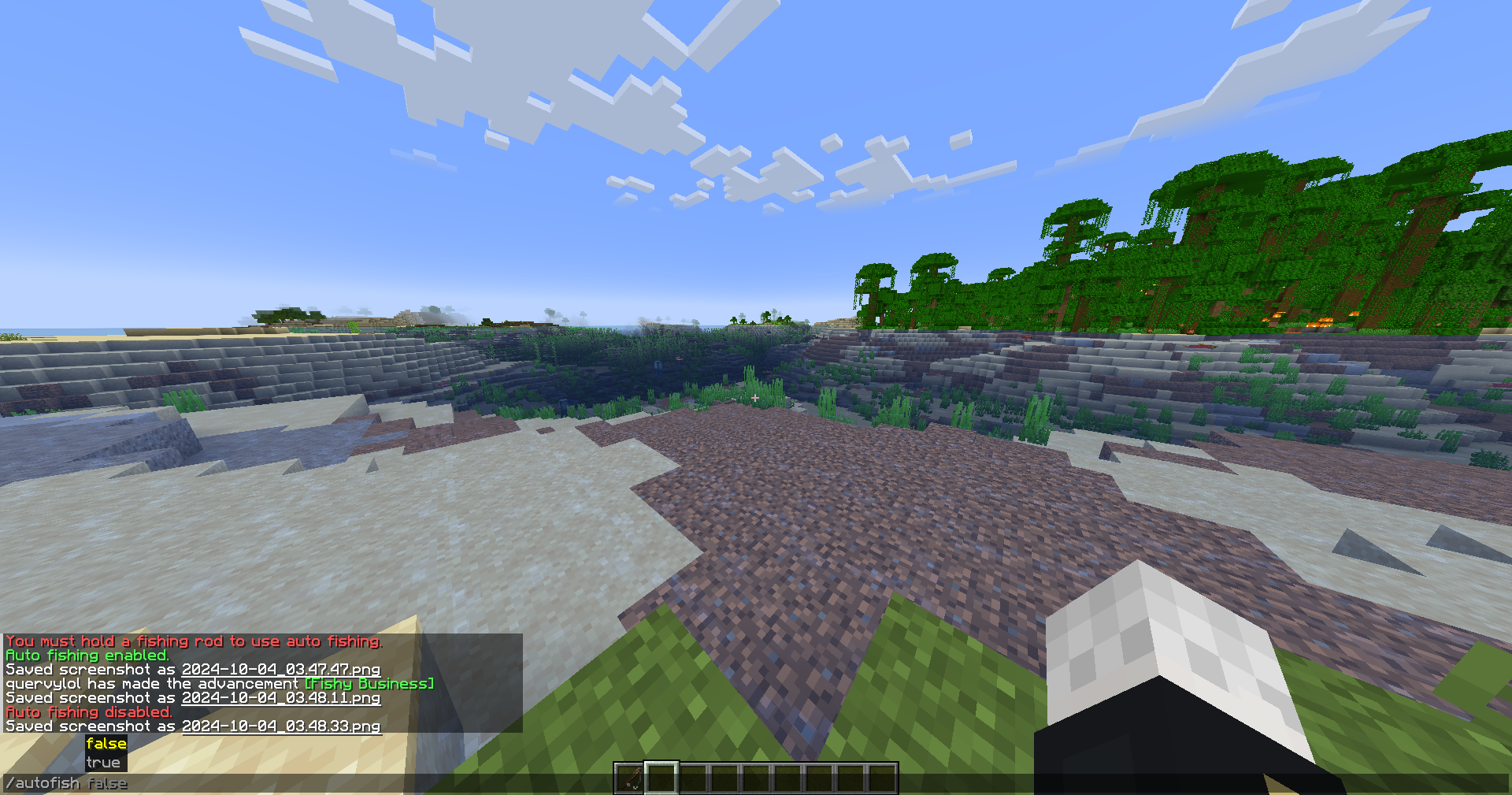
– `/autofish true` will start the auto fishing mod. Do `/autofish false` to disable.
– `/delay (ticks)` is a command where you can set the delay of the rod being recasted. The default value is 20 ticks, or 1 second on a 20 tps server. 1 tick is equal to 50ms.
– `/inventorycheck true` will stop the auto fishing mod if a GUI opens. `/inventorycheck false` will keep the auto fishing mod running if a GUI opens. The default value is set to false.
## Key notes
– You need to hold a fishing rod in order to active auto fishing.
– Swapping from the fishing rod to a different item will automatically disable the auto fishing.
– Reeling in manually, your right mouse button, will automatically disable the auto fishing.
– The delay is reccomended to be set to 10-20.
### Contact
Incase you have any issues, here’s my contact information
– [Github](https://github.com/quervyloll)
– [Discord](https://discord.com/users/659196853291712532)
Auto Eater Mod
=================
This is a simple client mod to stop worrying about eating all the time, selecting the food and eating. It detects whenever the foodbar falls below a certain threshold, selects food in your hotbar, and starts eating, and selects back the slot you had. You can add items to a blacklist to prevent eating unwanted items.
# Features
– Killswitch with hotkey:
Lets you turn Auto Eater on or off instantly by pressing `,` without opening the config screen. Useful when you want full manual control for combat, building, or other precise actions.
– Customizable Food Blacklist:
Prevents specific foods from being eaten automatically. This is useful for rare, valuable, or dangerous foods like golden apples or suspicious stew.
– Auto hunger threshold:
The threshold can automatically adapt to your food supply instead of using one fixed hunger value. In `Auto (min)` it prefers the least nutritious available food, and in `Auto (max)` it prefers the most nutritious food.
– Return to previous selected slot when done:
After auto-eating, the mod switches you back to the hotbar slot you were using before it started.
– Auto Eating cancelation with cooldown:
Auto-eating can be canceled by scrolling away or by pressing left click, and the mod then stays inactive for a configurable amount of time. Getting hit also cancels the mod for safety.
– Include Inventory:
If no food is available in the hotbar, auto-eater will search through your inventory and pull out food to your last hotbar slot, and auto-eat it.
#### Want to see a feature implemented? Please make a [feaure request](https://github.com/nicolas-reig/Auto-Eater/issues/new?labels=feature%20request).
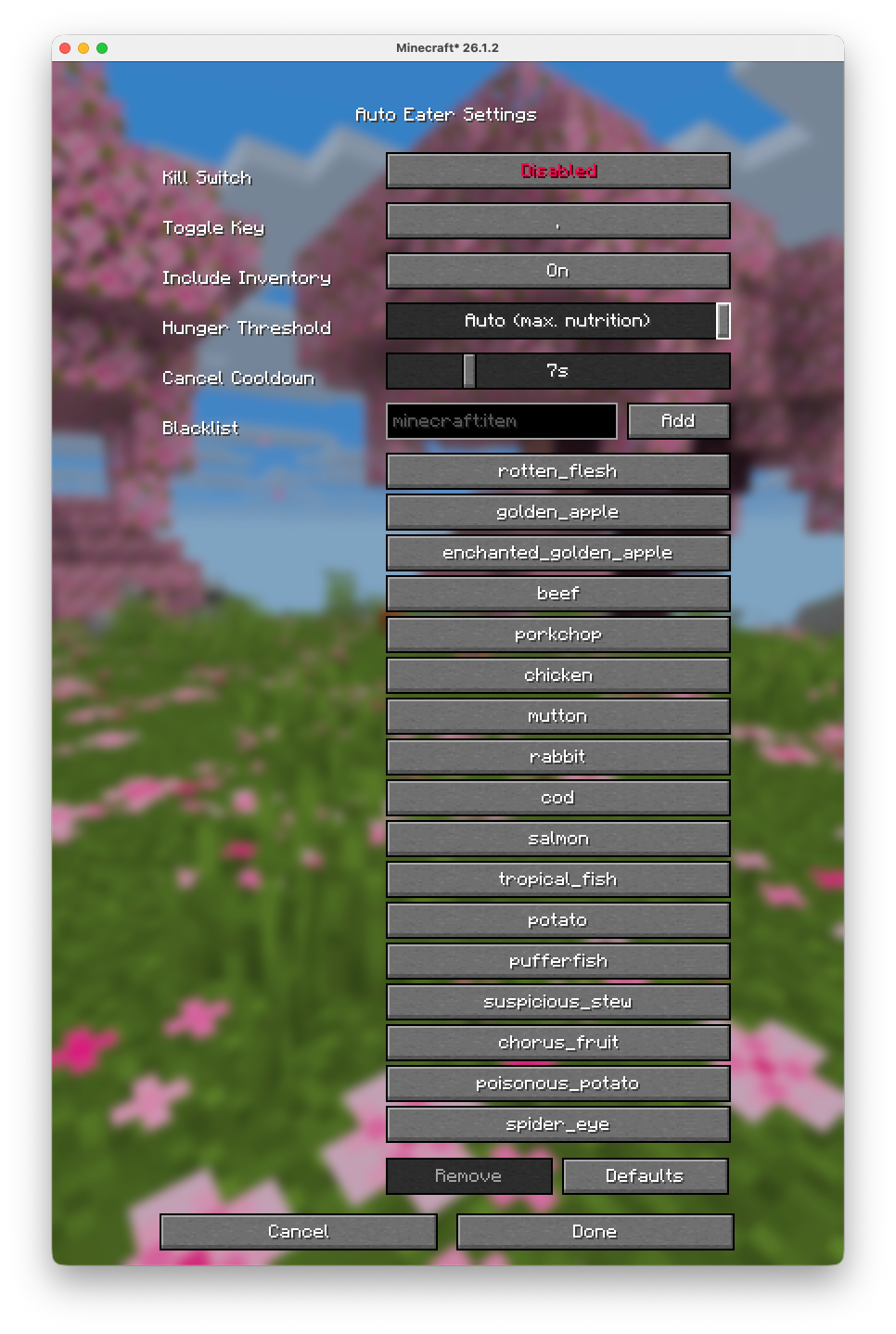
# Config
Configurations are available through the mod menu.
Some servers use plugins that turn your inventory into a UI (for example shops, menus, or other item-based interfaces).
In those cases, Auto-Eater can mistakenly try to eat UI items or interfere with menu interactions.
On large servers that use that tipe of interfaces (e.g. Hypixel), it is recommended to turn Auto-Eaeter off while using those plugin/UIs.
# [GitHub Source](https://github.com/nicolas-reig/Auto-Eater)
This plugin was directly inspired by [Auto Trasher](https://www.spigotmc.org/resources/auto-trasher-keep-your-inventory-clean-1-8-1-16.46037/) but with some tweaks…
# How does it work?
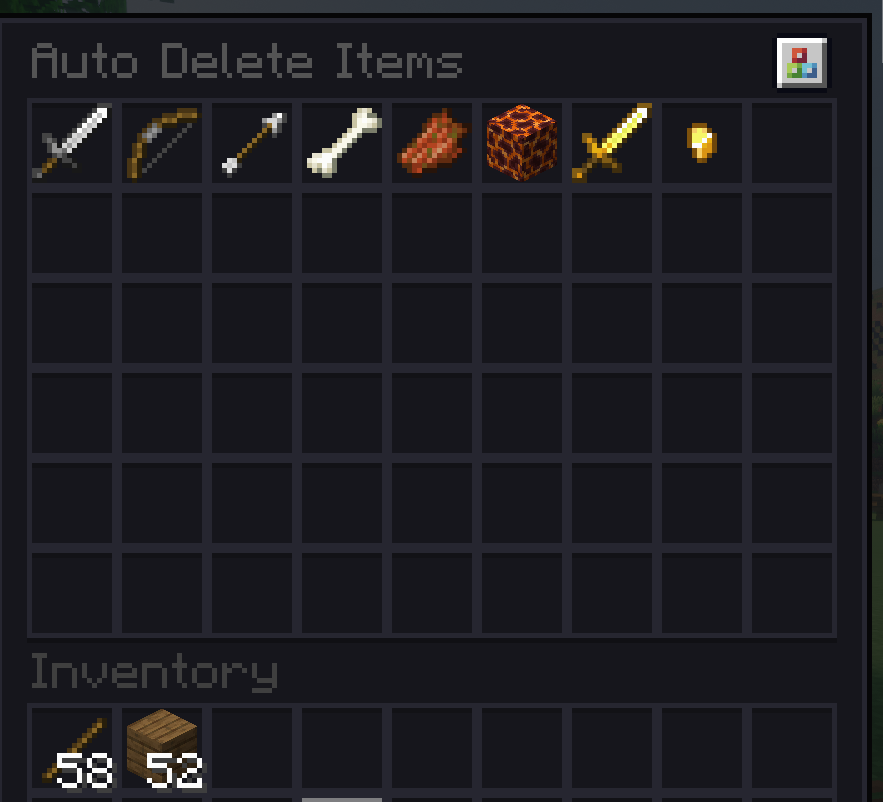
Simple, you run the command “/adi” and a UI will open, that looks like a big Chest, and you will be able to drag and drop ONE of the items you want to be deleted automatically when you pick them up. To remove one, you simply right click on it.
# Features:
– Up-to-date and modern 1.21.x auto-trash plugin.
– This plugin by default IGNORES the durability condition. Meaning that if you add a golden sword, and then you pick up a half-durability golden sword, it will still be deleted. Most of the auto-trash old plugins did not work according to durability. So you ended up with 10 different durability swords on you even thou you did not want to.
– I made this plugin able to work with other drop-to-inventory plugins like Drop2Inventory, SDI, etc. So even thou technically you will still get those items in your inventory, they will get instantly deleted.
– Commands “/adi on/off” to enable/disable the plugin function individually per player.
– Saves added items per player, so it wont reset after the leave the server.
# Installation:
– Just drop the .jar into your plugins foldr. Restart the server. test the plugin by running /adi.
# Configuration:
– You can change the UI size, sound effects, and durability detection.
_______________________________________________________________________________
cya!

# AutoClutch Datapack – Embrace the Fall!
**Tired of splattering to your death from unexpected heights? Worry no more! The AutoClutch Datapack seamlessly integrates a suite of clutch functionalities to enhance your Minecraft survival experience.**
## Key Features:
– **Water Clutch:** Never fear a fall again! When you’re plummeting, AutoClutch automatically places water below you, cushioning your landing and preventing fall damage.
– **Optional Message:** If you have at least 4 water buckets in your inventory, you’ll receive a message confirming the AutoClutch activation.
– **Boat Clutch (Craft & Place):** No boat, no problem! When falling without a boat but with enough planks (minimum 5), AutoClutch crafts a boat and places it below you for a smooth water landing.
– **Ladder Clutch (Craft & Place):** Missing a ladder during a descent? AutoClutch comes to the rescue! With enough sticks (minimum 7) in your inventory, it crafts a ladder and places it strategically below you, allowing you to climb back to safety.
– **Enderpearl Clutch (Universal):** AutoClutch ensures your survival even in the treacherous End dimension. If you have an ender pearl and start falling towards the void, AutoClutch throws it in a safe direction (checking all sides and top) to teleport you back to solid ground.
## Additional Notes:
**AutoClutch ensures your survival after a successful fall by granting you a brief burst of instant health.**
**This datapack is compatible across all dimensions, including the Nether and the End.**
**Embrace the thrill of exploration without the fear of fatal falls! Install the AutoClutch
Datapack today and experience a more forgiving and dynamic Minecraft adventure!**
> **Please note: This datapack modifies player health (instant health effect). Ensure it’s allowed on your server or in your singleplayer world.**
## Current Issues – To be resolved
– **The datapacks clutches may not work because of some normal minecraft settings.**
– **Sometime the clutches don’t work.**
– **Errors with datapack activation.**
## Links
**All links given as image. Click image to use as link!**
**Give More Suggestions And Ideas For More New Features On The Discord Suggestions Sections!**
[](https://discord.gg/uYjttvug)
[](https://www.curseforge.com/minecraft/data-packs/auto-clutch)
[](https://modrinth.com/datapack/auto-clutch)
[](https://creations-inventostarz.pages.dev)