Ashen’s Datapack Athenaeum
What It Is:
# ADA is a datapack built for easier datapack making.
## Features:
– 100+ scoreboards to store data and statistics.
– Tons of tags to make datapacks easier to make.
– Tons of predicates for easier datapack making.
– Raycasting engine to make guns, longer sight, etc.
– Projectiles with motion engine to make custom projectiles easily.
– Create custom blocks instantly with block displays.
– Customizable settings.
– Command to clear the chat.
– Test dummys.
– Command to delete all entities from the world except for certain entities such as block – displays, armor stands, players, etc.
– Math, such as multiplication, division, logarithm, and more.
– Randomizers
– And more!
## How To Use:
Players
Drag this datapack in the datapack folder with any other datapacks that require this one.
Creators
Use this datapack in your datapack folder and make your own datapack in the same folder. This datapack allows you to make your own datapack and use the tags, predicates, engines, and more from my datapack (without copying code). When you publish your datapack, make sure you leave a link to this datapack, because your datapack will require this one to be installed. Look below for tutorials.
## License:
– You may not redistribute this project.
– You may use in YouTube videos as long as you leave some form of credit.
– You may use in public servers.
– You may not copy or steal code from this project.
– If you have any questions about license, please ask below.
## Tutorials:
Getting Started
Inside of your load file, put this string of code to detect if ADA is installed:
“`
execute if score check installed matches 1 run say My Datapack
“`
Create a new mcfunction file, you will then run this mcfunction if ADA is installed from your load file using this line of code:
“`
execute if score check installed matches 1 run function [namespace]:[mcfunction]
“`
Inside of [namespace], put your namespace. Inside of [mcfunction], put your new mcfunction file name.
Custom Blocks
First create a custom block display model using block display studio. Click the link [HERE](https://eszesbalint.github.io/bdstudio/editor) to use it.
Once you’ve created your custom model, make a new mcfunction file called place. Inside of the place.mcfunction file, put your summon command for your custom model. After your summon command, put this command:
“`
function ub:block_displays/apply_block/block
“`
Run your place function in a Minecraft world, and enjoy your custom block!
Gun
First, create a new scoreboard that detects when you right click a carrot on a stick:
“`
scoreboard objectives add shoot minecraft.used:carrot_on_a_stick
“`
Inside of your tick file, put this command:
“`
execute as @a at @s if score @s shoot matches 1.. at @s run function ub:raycast/classic/start_raycast
“`
The command will detect if the score shoot matches 1 and it will shoot a bullet. To reset the score after you shoot, use this command:
“`
execute as @a at @s if score @s shoot matches 1.. run scoreboard players set @s shoot 0
“`
You are now finished with the gun, if you want to see bullet trails use this command:
“`
/function ub:settings/raycast/trail/on
“`
Boat Launcher
First, create a new scoreboard that detects when you right click a warped fungus on a stick:
“`
scoreboard objectives add launch minecraft.used:warped_fungus_on_a_stick
“`
Inside of your tick file, put this command:
“`
execute as @a at @s if score @s launch matches 1.. at @s run function ub:custom_projectiles/custom/throw {custom_projectile:”minecraft:boat”}
“`
The command will detect if the score launch matches 1 and it will shoot a boat. To reset the score after you shoot, use this command:
“`
execute as @a at @s if score @s launch matches 1.. run scoreboard players set @s launch 0
“`
Enjoy Launching Boats!
You can replace “minecraft:boat”, with any entity you want.
YouTube Rank
You can give yourself YouTube rank by typing the command below:
“`
function ub:ranks/give_rank {rank:”youtuber”}
“`
All Ranks
owner
helper
user
streamer
master
expert
killer
bot
afk
banned
noob
# Thank you for using ADA!
Ars Polymorphia
# Ars Polymorphia
 ;
;
Adds [Polymorph](https://www.curseforge.com/minecraft/mc-mods/polymorph) support for [Ars Nouveau](https://www.curseforge.com/minecraft/mc-mods/ars-nouveau)’s Storage Lecterns, allowing you to craft items that use the same ingredients from the Storage Lectern’s terminal.
When a group of ingredients matches more than one recipe, a button will appear above the output slot. Pushing this button will show a list of all possible results and selecting one will change the crafting output to match. Polymorph will also remember the last selection as long as the ingredients don’t change, so repeated crafting actions are possible on the same selection.
Ars Énergistique
# Ars Énergistique
Ars Énergistique is an add-on mod providing integration between [Applied Energistics 2](https://modrinth.com/mod/ae2) and [Ars Nouveau](https://modrinth.com/mod/ars-nouveau), allowing for deeper interaction between ME networks and Ars magic setups.
**Features:**
– Dedicated ME Source storage (+ cells)
– Full compatibility between ME network devices and Source-based machines
– **ME Source Acceptor**: Allows for the conversion of Source to AE energy for *powering* networks
– Support for budding Certus Quartz blocks and clusters for the Amethyst Golem
– …and more still to come.
Ars Additions
An Ars Nouveau addon focused on small tweaks and quality of life additions.
### Structures
* Ruined Warp Portals – A Warp Portal variant of the Ruined Portals that include an Explorer’s Warp Scroll to help you discover new places.
* Nexus Tower – A wizard tower that allows for easier teleportation around your world.
### Glyphs
* Retaliate (Form) – Cast a spell targeting the entity that last hit you within the last 5 seconds.
* Mark (Effect) – Store a reference to a target block or entity inside a Reliquary
* Recall (Form) – Use a reference from a Reliquary to cast a spell on the target block or entity
### Functionality
* (Stabilized) Warp Index – Allows remote access to your Storage Lecterns. The upgraded versions allows cross-dimensional access.
* Ender Source Jar – An Ender Chest for Source. Place one in your base to fill up with source and take another with you to access it anywhere.
* Codex Entry (Lost, Ancient variants) – Teaches a random glyph of it’s corresponding tier. Tier 1 is obtainable in basic dungeon loot. Higher tiers are unobtainable by default.
* Ritual of Arcane Permanent – A ritual to chunkload your surrounding area, fully configurable and disabled by default.
* Unstable Reliquary – An item used with the Mark and Recall glyphs, to store references to blocks, entities or players.
* Wixie Enchanting Apparatus – Use a Wixie Charm on an Enchanting Apparatus to convert it into a Wixie Enchanting Apparatus. This can be used to automate Enchanting Apparatus recipes including applying enchantments.
### Decoration
* Ars-themed Lanterns – Standard Lanterns with Ars themed casings – Golden, Archwood, Sourcestone, Polished Sourcestone
* Magelight Lanterns – Hollowed lanterns that contain Magelights inside – Golden, Archwood, Sourcestone, Polished Sourcestone, Regular, Soul
* Chains – Chains to match the new lantern types – Golden, Archwood, Sourcestone, Polished Sourcestone
* Sourcestone Walls – Adding walls to match a few of the Sourcestone variants.
* Cracked Sourcestone – A cracked variant of Sourcestone to allow some weathering in your builds.
* Snoozebuncle – A beautiful new painting created by Ars Nouveau’s own artist Gootastic.
[Textures by Eru](https://eruslinks.carrd.co/)
[](https://bisecthosting.com/Jarva)
ArrowPicked
# RU
Мод позволяет вывести на экран стрелу, которая находится в вашем арбалете, если тот находится у вас в хот баре.
## Зависимости мода:
> – Cloth-Config API | [Скачать](https://modrinth.com/mod/cloth-config)
> – ModMenu | [Скачать](https://modrinth.com/mod/modmenu)
## Настройки мода:
Настройка позиции стрелы:
> Стрелу можно поставить как вам удобно, горизонтально или вертикально.
> Также можно изменить размер стрелы на любое число пикселей от 4 до 64.
# EN
The mod allows you to display the arrow that is in your crossbow, if it is in your hot bar.
## Mod Dependencies:
> – Cloth-Config API | [Download](https://modrinth.com/mod/cloth-config)
> – ModMenu | [Download](https://modrinth.com/mod/modmenu)
## Mod Settings:
Adjusting the arrow position:
> – The arrow can be placed as you like, horizontally or vertically.
> – You can also change the size of the arrow to any number of pixels from 4 to 64.
Armour Bundles
# Armor Bundles
Small mod that adds an item to allow quickly swapping between armour sets.
## Using an Armor Bundle
To use an Armor Bundle, you need to fill it with armour. This can be done either through the inventory like a regular
bundle,
or by crouch right-clicking with an armour set equipped. To then equip the armour in the bundle, you can either press
one of the two
keybinds to cycle between Armor Bundles in your inventory, or you can right-click while holding one. The bundle will
attempt to automatically store
any currently equipped armour items into a relevant bundle if possible.
Each bundle can store 4 individual stacks of items.
Bedrock Armorstands
## What is this?
Designed to implement full functionality of bedrock armorstands into java servers
## Features
– Works out of the box with no setup required
– Place an armorstand and it has arms by default
– Shift + Right-Click an armorstand to change its pose just like bedrock edition
## Compatability
Versions of the plugin for…
– 26.1+ minecraft versions are compiled with Java 25 which the server must run
– 1.21-1.21.11 minecraft versions are compiled with Java 21 but supports Java 25
## Installation
Download the latest version then drag and drop the jar into your plugins folder.
Then restart.
Armor Status
# 🛡️ Armor Status
Armor Status is a lightweight, client-side mod that displays your armor durability and status in real time with a clean, minimal HUD. No more surprise armor breaks — stay informed at a glance.
# ✨ Features
– Real-time armor durability display
– Clean and unobtrusive HUD
– Lightweight & performance-friendly
– Great for Survival, Hardcore, and PvP
– Client-side only
# 📜 License
Free to use. No modifying, selling, or reuploading.
# 🌐 Socials
– Modrinth: https://modrinth.com/user/MineBoost
– GitHub: https://github.com/ShirjeelPlays
– Discord: https://discord.gg/KbG9bs5pzQ
Armor Rack
One of the complaints about bundles when they were first announced was that they couldn’t hold multiple unstackable items, such as an armor set.
This mod addresses that issue by adding an upgraded armor stand which retains its items when broken, similar to a shulker box. When the armor stand is placed down again it will have the armor equipped.
Additionally, shift-right clicking the armor stand will swap all your armor with the armor on the item.
*Note: This video is outdated. The items now dynamically render all the equipped armor, as seen in the screenshots.*
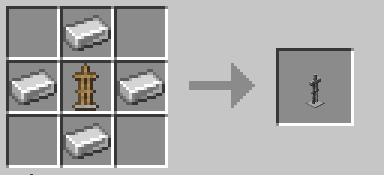
## Crafting Recipe
## Other Usage Information
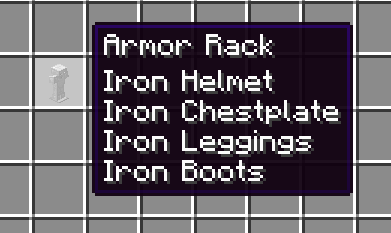
– The item and its tooltip will display what items are equipped
– Empty armor racks will stack to 16 but armor racks containing items or pose data will be unstackable
– Breaking the armor rack with an empty hand or inventory slot will place the item directly into your hand or inventory in that order
– Hand Items and all armor stand NBT flags work the same and will also be saved to the item
– Curse of binding armor on the player cannot be swapped and will be ignored
– If the dynamic item rendering causes issues or you simply prefer 2D sprites, you can enable the 2D Armor Racks resource pack
– As of 2.0.0, should be compatible with all armor stand pose editors
Armor Pod
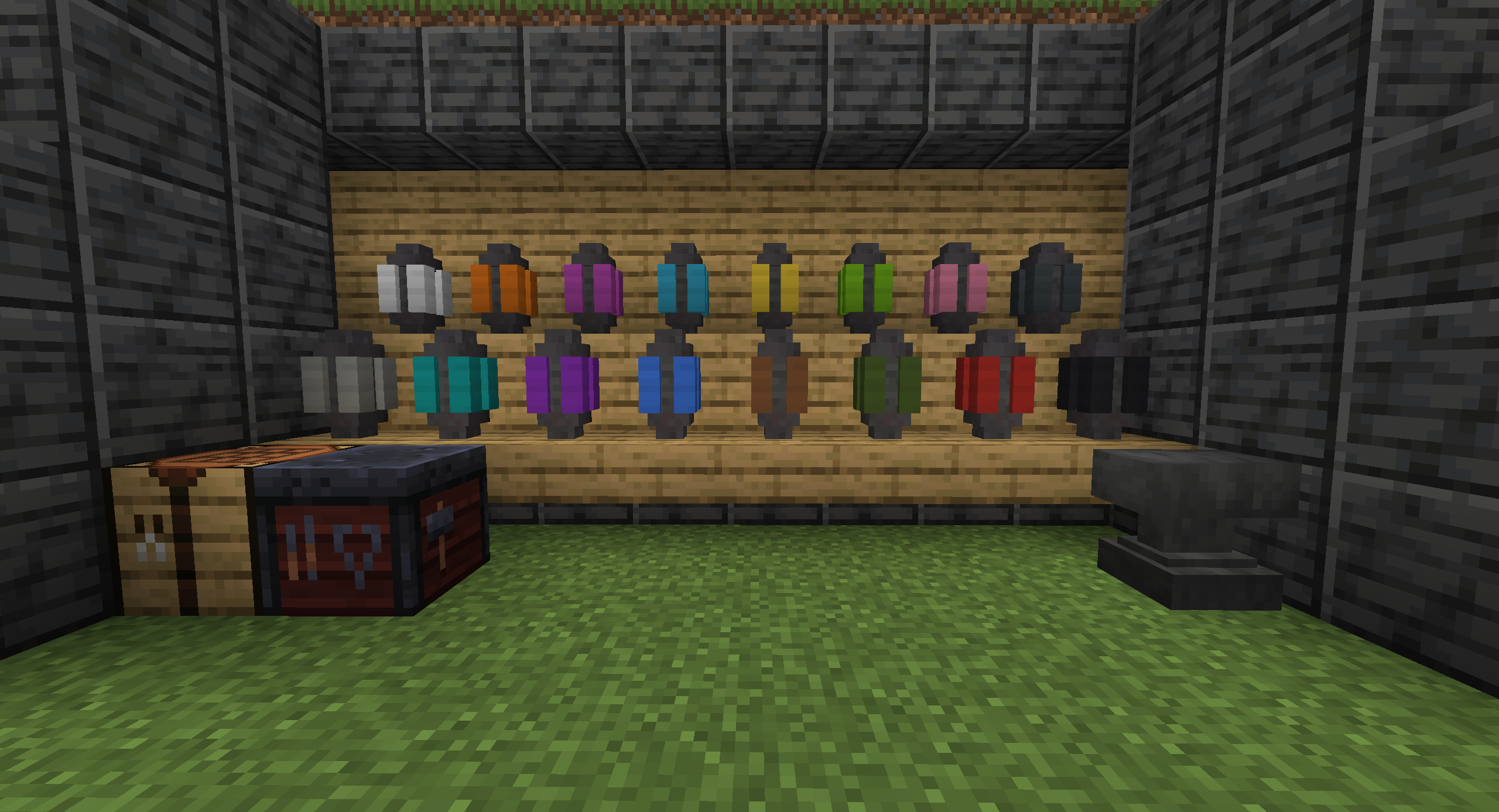
This mod provides a simple block that is able to hold a single set of armor, when placed in the world and activated by a player the armor pod will swap whatever is currently being worn with the contents of the pod.
The pod itself can be accessed in world as a block or as an item when held by the player by sneak-clicking.
When in world the pod has a partially implemented locking feature with doors that can opened or closed by sneak-clicking the block.
Color variants can be crafted in the smithing table using any pod with the desired dye.