Atlas
# Looking for Atlas for newer versions? Try TheDeathlyCow’s [NovoAtlas](https://modrinth.com/mod/novoatlas), a port of Atlas to newer Minecraft versions!
# Atlas

atlas is a data-driven image-based world generator. give the mod a heightmap and biome map image, and you can incorporate it into a [datapack dimension](https://minecraft.wiki/w/Data_pack)!
### how to use
– create or find a grayscale heightmap. save it as a png with 8bpc, RGBA encoding. the image should be saved in a datapack– see the example below for more details.

– create a copy of the image and paint over it with whatever colors you like. each color corresponds to a different biome. do not mix or blend the colors. save this image with the same encoding to your datapack (see the Github for more information).

– create a datapack and put your dimension file in as normal. **an example dimension file, along with an explanation of the parameters, can be found [here](https://github.com/itsmiir/atlas/tree/1.19/example).**
– load up the world! if something has gone wrong, you’ll get a datapack error in your logs.

if you’re still having trouble, send a message in the [discord](https://discord.gg/6p27K23zSa) `#help-and-support` channel.
### some tips:
– when you’re drawing the biomes, it may be helpful to be able to see the heightmap as a [contour map](https://en.wikipedia.org/wiki/Contour_line). you can emulate this in your preferred photo editor by selecting a black pixel and then using “select by color” with varying thresholds to get varying contour lines of your map.
– if your maps are not the same size, you might have regions of void that are mapped to biomes, or regions of terrain that are just your default biome. you can use this to save yourself some time!
– your map will be centered at 0,0. up in the image is north. if your map is an uneven number of pixels, the last pixel on the south and/or east side will be cut off.
– if `starting_y` in your dimension is less than your dimension’s `min_y`, you can create areas of void. use this to create non-rectangular maps!
– anything outside of the world will be void, but certain hardcoded structures may still spawn, depending on what features are in your default biome.
ATL Tier Tagger
## 🏷️ ARISE TIER TAGGER
**ARISE TIER TAGGER** is a lightweight and highly customizable Fabric mod that displays player PvP tiers directly inside in-game nametags. It is designed for competitive Minecraft gameplay, where quick recognition of player skill matters. Instead of relying on scoreboards, chat commands, or external overlays, this mod integrates tier information seamlessly into the core gameplay experience.
—
## ⚔️ Purpose
In PvP environments, knowing your opponent’s skill level is important—but most systems make this information hard to access during fights. ARISE TIER TAGGER solves this by embedding tier data directly into nametags, making it:
* Instantly visible
* Easy to understand
* Fully integrated into gameplay
This allows players to focus on combat without distractions.
—
## 🔥 Features
### 🧩 Real-Time Tier Display
* Displays PvP tiers (such as **HT1, HT2, LT3**) directly in player nametags
* Updates dynamically
* Works smoothly in multiplayer
—
### 🎯 Custom Format System
* Fully customizable nametag format
* Example:
HT1 | Legend_008 👑
* Supports:
* Tier prefix (HT1)
* Player name
* Custom suffix (Legend_008)
* Icons and symbols
—
### 🎨 Visual Styling & Icons
* Clean pixel-style visuals that match Minecraft
* Supports tier-based icons like crowns, gems, or swords
* Designed to stay readable during PvP fights
—
### ⚙️ In-Game Configuration Menu
* Simple and user-friendly config menu
* Switch between different tier lists
* Customize display format without editing files
* Toggle features easily
—
### 🧠 Gamemode-Based Tier Support
* Store multiple tier categories (Crystal PvP, Sword PvP, etc.)
* Select which tier list to display
* Perfect for servers with multiple PvP modes
—
### 🚀 Optimized Performance
* Lightweight and efficient
* Minimal impact on FPS
* Built specifically for Fabric
—
## 🎮 Use Cases
* Competitive PvP servers
* Practice servers
* Private friend groups with rankings
* Tier-based PvP communities
* Content creation and showcases
—
## 🔌 Compatibility
* Fabric Loader
* Client-side usage
* Works with most PvP and HUD mods
—
## 💡 Why Use This Mod?
This mod improves gameplay by making player skill visible at all times. It removes the need for external systems and keeps everything inside the game, creating a smoother and more competitive PvP experience.
—
## 🏁 Summary
ARISE TIER TAGGER enhances Minecraft PvP by displaying player tiers directly in nametags, making skill levels clear, customizable, and easy to read during gameplay.
ATHENA
# Overview
ATHENA is an easy-to-use and informative event debugger for server owners and plugin developers alike, with aims at being end-user friendly and robust.
### Requirements
– Java 16
– Minecraft 1.17 or newer
– Paper, or any of its forks.
## Commands
– `/athena listen ` – start listening to a specific event. If this fails, you need to include the full package.
– `/athena listeners ` – lists all the plugins listening to a given event, or all of the active listeners in a given plugin.
– `/athena stop [Event Name]` – stops listening to a specific event, or all of them if you specify nothing.
– `/athena lookup ` – finds the source of a command, as well as its permission to run.
## Permissions
– `athena.command.stop` – access to `/athena stop`.
– `athena.command.lookup` – access to `/athena lookup`.
– `athena.command.listen` – access to `/athena listen`.
– `athena.command.listeners` – access to `/athena listeners`.
## Important notes and disclaimers
ATHENA is made with usability, stability and detail in mind. However, performance is not necessarily a priority with the plugin. Whilst I have applied the majority of my knowledge to make the plugin as optimised as possible, it is not recommended to run ATHENA when you don’t need it. The plugin uses a considerable amount of reflection to function and collect data from events, which in itself can take a hit on performance. In addition, whilst ATHENA does not (or at least tries to not) interfere with individual plugin listeners, it may have an impact on how optimised they may appear in Paper’s Timings. If you are measuring event performance using Timings and ATHENA, it is recommended to take separate measurements (e.g. /timings paste first, then use ATHENA to see completion times on one occasion).
If you are a server owner measuring listener durations, you should only be concerned about performance if a single listener exceeds 40ms of completion time. A single tick in Minecraft takes 50ms, hence why 20 TPS is an important number to aim for in servers. Please do not nag plugin developers if their listeners’ time simply takes the longest; some plugins need to carry out more tasks than others. In addition, a spark/profiling report as well as timings may be more helpful than a single snippet from ATHENA.
If ATHENA is unable to listen to a specific event or crashes when you attempt to do so, please open an issue with the event. If it is an event from a plugin, please send the class of the event where possible.
If ATHENA experiences an error, it should still let the listeners it has control over run so it should not have an impact on other plugins’ functionality.
Events that execute asynchronously may not be able to pick up the plugin source.
PRs and suggestions on how to improve the plugin – including its performance – are more than welcome.
ATG12’s Overlay
This pack can help you in any gamemode:
Features:
– Low fire
– Side shield
– Blue cobwebs
– Better Sword (Reducing the sword a little so it doesn’t take over the whole screen)
– Smaller Utils (Food, Wind Charges etc.)
– Buckets have better viewmodels
– No Food Eating Particles
– Unobstructive Particles
– No Explosion Particles
– Better textures of potions
– Ore Borders
– Cleaner GUI (Hotbar, inventory etc.)
– Density and Breach maces have custom textures (Need Variants CIT Mod)
– No Explosion sounds
– Cleaner Obsidian
– Bow and Crossbow charging animations
– Smaller In-hand totem and smaller pop animation
– Cleaner Glint
**Credits for some of the textures:**
• Sharpness 500k Texture pack
• JokingPvP Overlay
Creator’s Discord Username: realatg12_
Atena Global Quests
# Full Description
Atena Global Quests is a Forge mod for Minecraft 1.20.1 focused on long-term server progression.
Instead of opening every dimension from day one, the mod lets you gate major milestones like the Nether and the End behind global community quests. Players must work together to gather resources, explore, build, play, and contribute to server-wide objectives before new progression stages are unlocked.
On top of that, the mod also adds personal weekly and monthly quests, giving each player their own repeatable challenges and rewards without interfering with the global chapter system.
# Main Features
– Server-wide global quests that unlock dimensions
– Personal weekly quests with rotating objectives
– Personal monthly quests with harder long-term goals
– Custom quest tree GUI with panning and zoom
– Manual item delivery for shared community objectives
– Automatic tracking for playtime, distance, block breaking, block placing, fishing, kills, crafting, and XP level gains
– Server announcements for contributions, completed quests, and unlocked chapters
– Server-side quest sync for global chapter data
– JSON-based global quest configuration for easy server customization
# Global Progression
The mod is built around large chapter-based goals.
Typical chapter examples include:
– Delivering modded resources such as Create components, Mekanism materials, AE2 parts, or – – – Botania items
– Reaching shared playtime milestones
– Walking millions of blocks as a community
– Breaking and placing huge amounts of blocks
– Completing enough objectives to unlock the Nether
– Completing a second endgame chapter to unlock the End
– This makes progression feel like a true server event instead of a solo speedrun.
# Personal Quests
In addition to global goals, each player receives their own rotating quest set.
Weekly quests are designed around normal server activity:
– Fishing
– Mining
– Crafting modded machines
– Staying online
– Defeating a boss
Monthly quests are larger-scale challenges:
– Killing bosses multiple times
– Killing large numbers of hostile mobs
– Earning hundreds of XP levels over time
– These quests are individual, reward the player directly, and reset automatically with their weekly or monthly cycle.
# Designed for Modpacks
Atena Global Quests works especially well in heavily modded servers and modpacks. It is built to support progression tied to actual modded content rather than only vanilla milestones, making it ideal for community-focused survival servers.
If you want your server to feel more cooperative, more event-driven, and more rewarding over time, this mod is made for that.
atc

***AdminTools Connect*** is a plugin that allows connections with the ATC
protocol.
The ATC protocol is a peer to peer remote console over https. That means
it does not require any open ports to function.
It is obviously developed for [admintools.app](https://admintools.app).
For more technical info consult the
[admintools documentation on ATC](https://docs.admintools.app/admin%20tools%20connect/what-is-it/).
## How do I use it?
1. Download and install the **Admin Tools Connect** plugin from either *modrtinth* or *spigot*.
2. Open [admintools.app](https://admintools.app) and go to add server.
3. Choose `ATC` and input the name you want for that server. Then press the `generate server id and copy` button.
4. Paste that command in your minecraft server.
5. You now should be able to connect to it by clicking on the server card.
async enchantlimiter
**AsyncEnchantLimiter | High-Performance Enchantment Enforcement**
**Built for Folia & modern Paper servers – No more lag from over-enchanted items.**

AsyncEnchantLimiter is a powerful plugin that prevents players from utilizing items with enchantments exceeding defined limits. Engineered from the ground up for speed, it is specifically designed for Folia and high-performance Paper environments where traditional limiters often cause thread contention or TPS drops.

—
## Technical Features
**Intuitive Management Interface**
Manage every enchantment limit directly in-game. The paginated GUI ensures changes stay synchronized across the server instantly.

**Streamlined Notifications**
No chat spam. Players receive a single, clean notification when an item is downgraded, ensuring they understand the enforcement without cluttering their view.

—
## Core Advantages
– **Native Folia Support**: Fully compatible with Folia’s region scheduler, ensuring thread-safe operations.
– **Asynchronous Processing**: Heavy lifting—such as file I/O and inventory scanning—is offloaded from the main thread to maintain 20.0 TPS.
– **Ubiquitous Enforcement**: Monitors item interaction across hold, click, equip, and trade events.
– **Villager Trade Correction**: Automatically scans and fixes illegal enchantment levels in villager trades upon generation.
– **Modern Aesthetic**: Features a clean pink and gray theme with custom small-caps typography for a premium look.
## Documentation
**Control & Utility**
– **Custom Max Levels**: Define specific caps for every enchantment (e.g., Sharpness 5, Protection 4).
– **Anvil Intelligence**: Blocks illegal combinations at the source.
– **Global Loot Scanning**: Automatically validates items from fishing, mob drops, and world chests.
– **Bypass Permissions**: Grant specific groups the ability to exceed limits for testing or special roles.
**Command Registry**
| Command | Alias | Description | Permission |
| :— | :— | :— | :— |
| `/enchantlimiter` | `/el` | Open the main menu. | `enchantlimiter.admin` |
| `/el gui` | | Open the limit editor. | `enchantlimiter.admin` |
| `/el reload` | | Reload all configs. | `enchantlimiter.admin` |
## Getting Started
Drop the JAR into your plugins folder and restart. The configuration is designed for readability and quick adjustments:
“`yaml
settings:
enforce-on-hold: true # Check items as players hold them
fix-villager-trades: true # Auto-fix broken villager trades
notify-player: true # Let players know when an item is fixed
silent-mode: false # Set to true to fix items without any messages
limits:
sharpness: 5
efficiency: 5
protection: 4
Async Anticheat
[dashboard link](https://asyncanticheat.com/)

## What if your anticheat ran somewhere else?
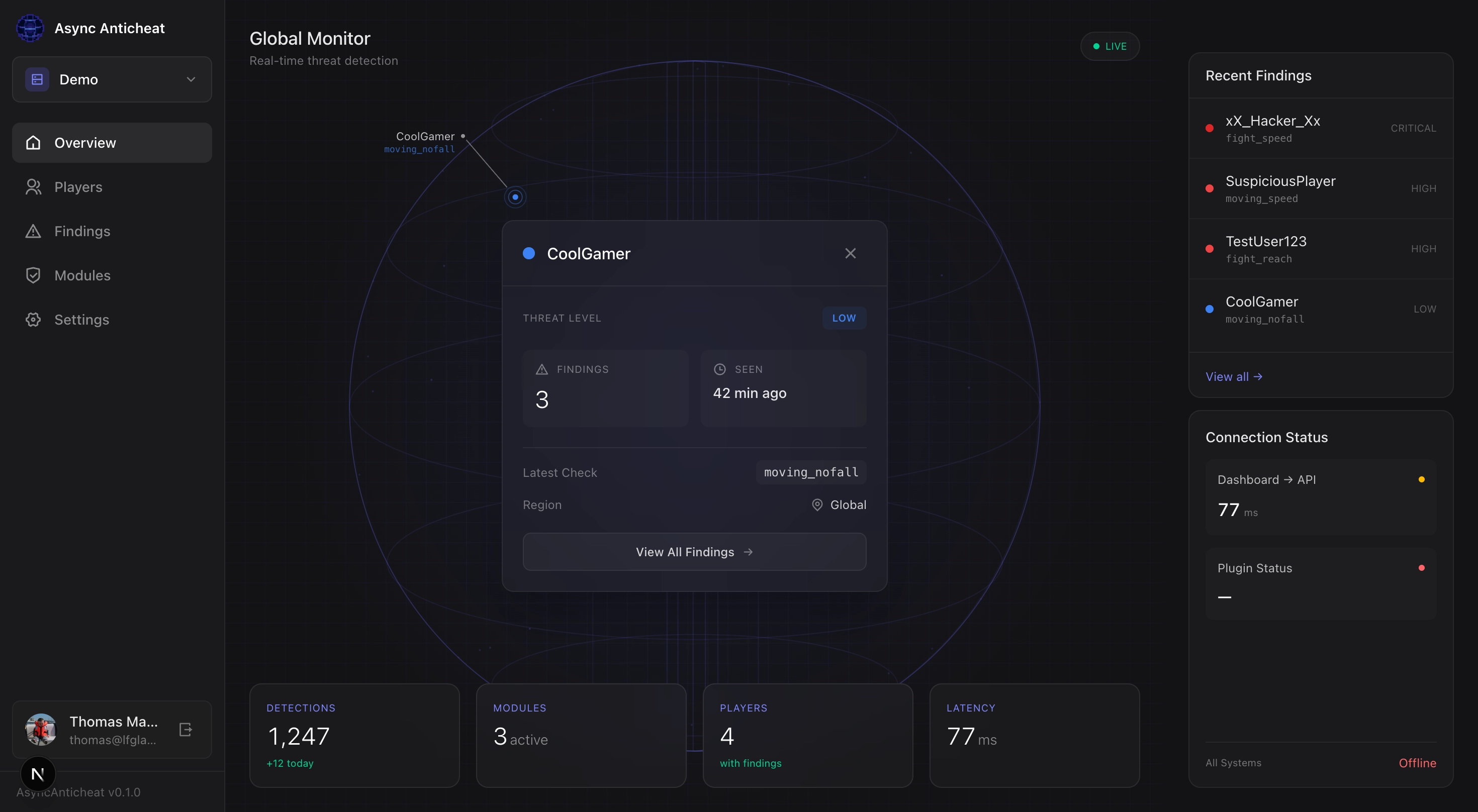
AsyncAnticheat moves detection off-server. The plugin only captures packets; all detection runs in the cloud. That means **no TPS impact from detection** and a clean, real-time dashboard to review evidence.
## How it works (fast version)
1. **Plugin** captures packets (PacketEvents, shaded)
2. **Batches** and uploads asynchronously
3. **Cloud API** dispatches to detection modules
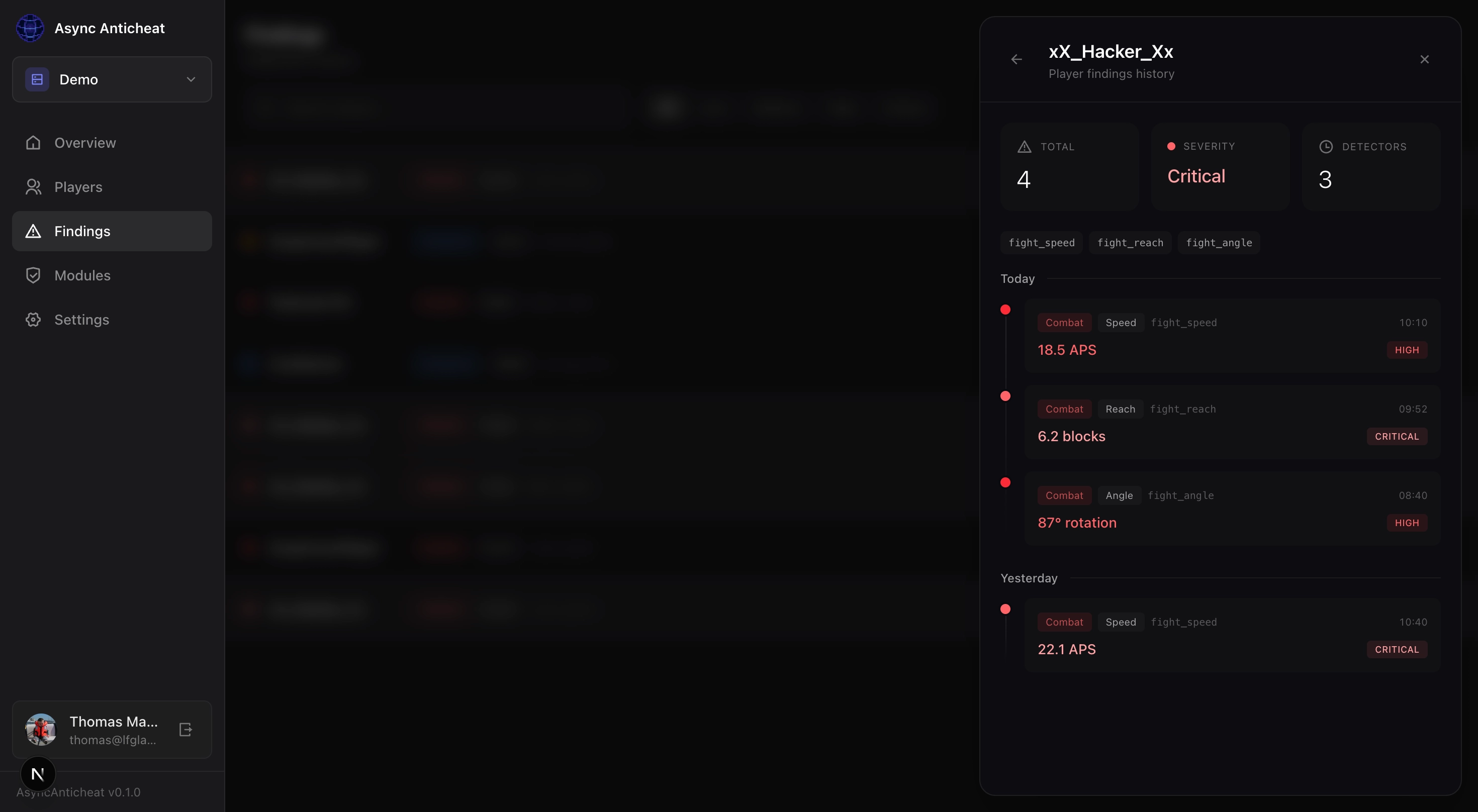
4. **Dashboard** shows findings in real-time
Your server never runs any detection logic.
## Dashboard
## Detection coverage
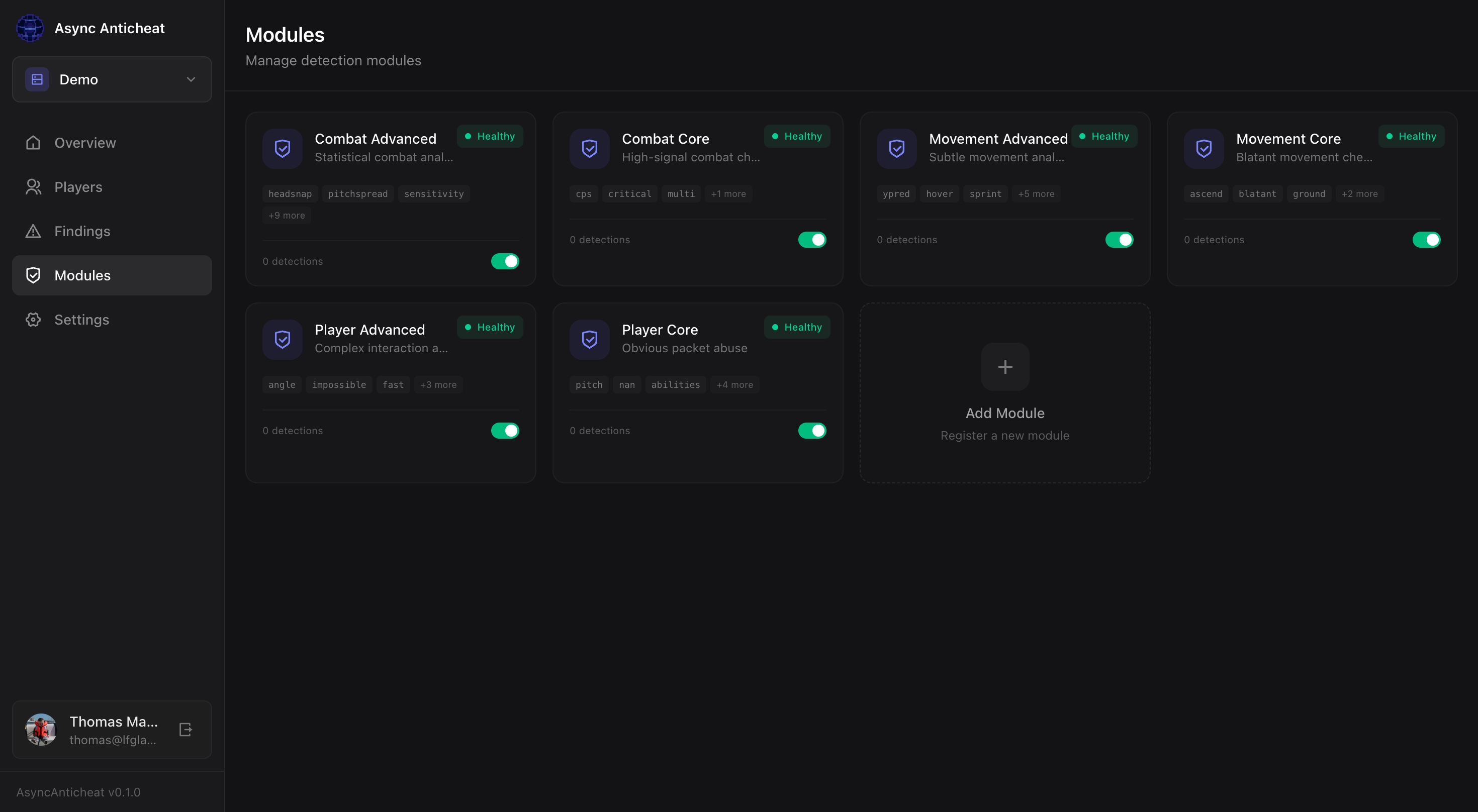
Async Anticheat architecture is open so you can create your own private modules running on your own machines and connect them to your dashboard. I created 6 default modules, two per category:
– **Movement:** speed, fly, nofall, phase, step, timer
– **Combat:** reach, killaura, velocity, autoclicker
– **Interaction:** scaffold, nuker, fastplace, inventory
Core = obvious cheats, low false positives
Advanced = statistical analysis
You can enable them from the modules tab, and toggle on/off individual checks.
## Open Beta status
**Working**
– Packet capture + detection pipeline
– Web dashboard with real-time findings
– False positive reporting
**Not yet**
– Automatic kicks/bans (detection only for now)
– In-game alerts
– AAC may produce false positives or miss some detections.
## Supported platforms
Paper/Spigot 1.18+, Folia 1.19.4+. Java 21 required.
Bungee/Velocity: install AsyncAnticheat on each backend server (not the proxy).
## Getting started (2 minutes)
1. Download: https://github.com/oraxen/asyncanticheat/releases
2. Drop the JAR into `plugins/`
3. Start the server
4. Click the dashboard link in console
5. Sign in (GitHub / Discord / Email)
## For anticheat developers
I’m building an API so custom checks can plug into the same pipeline. See [the relevant docs](https://asyncanticheat.com/docs/modules).
What it means is if you have an existing anticheat, you can port your checks to an AsyncAC module, this way your users will save performances, you will be able to keep your code private and the community will benefit from your experience.If you need help or have any questions, let me know.
## Pricing
You can host everything yourself, or use my own dashboard. **During the beta, I’ll host everything for free** so I can get your feedback and improve the checks. In the future, I plan to fund the project by selling some advanced modules, but **if you’ve contributed** to the project (by reporting bugs, false positives, suggesting improvements, etc), **you will keep access for free** as a thank you.
## Links
– Website: https://asyncanticheat.com
– Docs: https://asyncanticheat.com/docs
– Dashboard: https://asyncanticheat.com/dashboard
– GitHub: https://github.com/oraxen/asyncanticheat
– Discord: http://JOIN_LINK_HERE
## FAQ
**Will this affect TPS?**
Detection runs off-server; the plugin only captures + forwards packets asynchronously. I could not measure any impact on performances during my testings. Bandwith usage was also very limited as packets are highly compressed.

**What data is collected?**
Movement/combat/block/inventory packets + UUID/session identifiers. No chat messages or server config. Data is retained for 7 days, then purged.
**Why no auto bans yet?**
I need more data to ensure there are no false positives; I want to wait until I have more feedback.
## Get involved
This is an open beta, your feedback is precious to me and I will remember it.
– Found a false positive? Report it through the dashboard.
– Cheater slipped through? Report and undetected cheat on the player page.
– Have any feature idea? Feedback is welcome
Async Locator Refined
### This mod is a port of the original version.
I have obtained the [creator’s permission](https://github.com/thebrightspark/AsyncLocator/issues/19) to port it.
**For versions 1.20.1 or earlier, download the original mod [here](https://modrinth.com/mod/async-locator)**
—–
Modifies vanilla behaviour when locating features to run asynchronously, mitigating associated lag.
This is currently implemented for:
– Locate structure command when executed by a user
– Locate biome command when executed by a user **(v1.5.0+)**
– Villager explorer map trade offers
– Dolphin treasure finding
– Exploration map in chests
This mod is only required to be installed server side! So clients only need this installed if they want it for single player.
**This alone only works for vanilla (see list above). Other
mods may need to implement usage of this mod themselves to make use of
the async functionality.**
# Incompatibilities
Mods that affect vanilla’s structure locating features may impact Async Locator’s functionality.
Right now, the list below states other mods that I’m aware of:
– [Structure Essentials](https://www.curseforge.com/minecraft/mc-mods/structure-essentials-forge-fabric)
Has been seen that on startup only one of either Async Locator’s or
Structure Essentials’ locating improvements will work. No real issues
otherwise, but only one of the mods are required.
# Mod Integration
Other mods can also use Async Locators as a dependency to implement the asynchronous locating into their own code.
To do so, please use [CurseMaven](https://www.cursemaven.com/) or [Modrinth Maven](https://support.modrinth.com/en/articles/8801191-modrinth-maven) to add this mod to your build.gradle, and then make use of the [AsyncLocator class](https://github.com/Alvaro842DEV/AsyncLocator-Refined/blob/main/Common/src/main/java/brightspark/asynclocator/AsyncLocator.java) and/or [logic classes](https://github.com/Alvaro842DEV/AsyncLocator-Refined/tree/main/Common/src/main/java/brightspark/asynclocator/logic).
Async Locator
### Looking for later versions?
[Check out Alvaro842DEV’s port for 1.21+](https://modrinth.com/mod/async-locator-refined)
—
Modifies vanilla behaviour when locating features to run asynchronously, mitigating associated lag.
This is currently implemented for:
* Locate command when executed by a user
* Villager explorer map trade offers
* Dolphin treasure finding
* Exploration map in chests (v1.1.0+)
This mod is only required to be installed server side! So clients only need this installed if they want it for single player.
**This alone only works for vanilla (see list above). Other mods may need to implement usage of this mod themselves to make use of the async functionality.**
## Incompatabilities
Mods that affect vanilla’s structure locating features may impact Async Locator’s functionality.
Right now, the list below states other mods that I’m aware of:
* [Structure Essentials](https://www.curseforge.com/minecraft/mc-mods/structure-essentials-forge-fabric)
Has been seen that on startup only one of either Async Locator’s or Structure Essentials’ locating improvements will work. No real issues otherwise, but only one of the mods are required.
## Mod Integration
Other mods can also use Async Locators as a dependency to implement the asynchronous locating into their own code.
To do so, please use [CurseMaven](https://www.cursemaven.com/) or [Modrinth Maven](https://docs.modrinth.com/docs/tutorials/maven/) to add this mod to your `build.gradle`, and then make use of the [AsyncLocator class](https://github.com/thebrightspark/AsyncLocator/blob/HEAD/Common/src/main/java/brightspark/asynclocator/AsyncLocator.java) and/or [logic classes](https://github.com/thebrightspark/AsyncLocator/tree/HEAD/Common/src/main/java/brightspark/asynclocator/logic).