

1.1.0
beta

Advanced Accessory System
Allows any item to be placed in the head slot, so you can show off all kinds of ridiculous hats to others—and some hats can do more than just be shown off.
 8
8
Advanced Accessory System
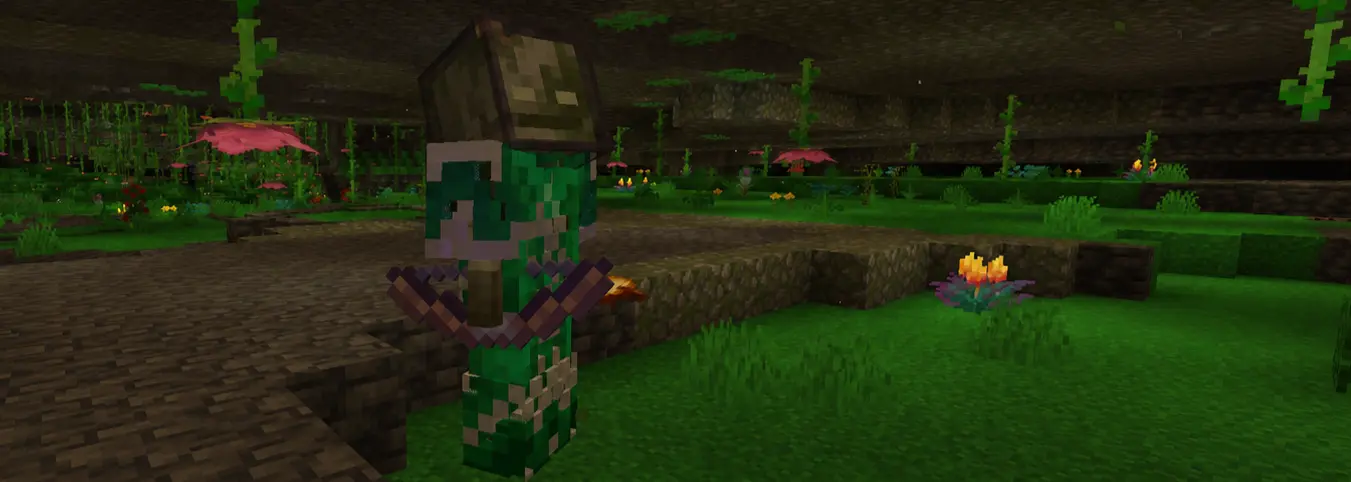
一只害怕被阳光晒黑而头戴遮光玻璃的洞穴沼骸 A cave bogged that wears tinted glass on its head because it’s afraid of getting tanned by the sun.
中文页面
先进的饰品系统
Cosmetic Armor 在原版MC中你需要通过指令来获取可放置于盔甲插槽的其他物品,本模组也仅是解除了这一限制(目前只是头盔插槽),至于物品放在头上的呈现效果还需要依赖资源包(没有经过调整的头戴模型可能看起来只是掉落物模型,或者直接内嵌在脑袋里)。 强烈建议与Cosmetic Armor模组搭配,这个模组为四个部位增加了一个饰品盔甲位,这样你就可以同时佩戴盔甲和那些乱七八糟的帽子了。(下面的演示均搭配该模组) <img width="1920" height="1009" alt="2026-04-06_14 56 36" src="https://github.com/user-attachments/assets/c3a99731-1910-47aa-b3cb-342138bae4fb" /> (这是农夫乐事里的厨锅,模型展示效果由自制资源包实现)(没打指令)
附加功能
隐形盔甲
能够隐藏对应部位的盔甲模型,仅此而已,不会影响盔甲的其他属性。可以防止盔甲遮挡帅气的皮肤与帽子。 在配置界面中控制你想要隐藏的部位。
潜影盒帽子
当潜影盒戴在头上时,你可以按下 *B*键(默认) 来掀开它与 <span style="color:red">你 的 头 盖 骨</span> ,可以很方便地拿取潜影盒里的物品。 别人也能通过右键你来拿取你头上的潜影盒里的东西,警惕身边的人。
可以坐上去的帽子
经MC帽子协会认证,某些帽子的结构高度契合大多生物的屁股,所以利用它们运输生物再合适不过了。 <img width="1920" height="1081" alt="2026-04-06_15 42 26" src="https://github.com/user-attachments/assets/b837de2e-bc3b-468d-b77d-a53bf9425c80" /> <img width="1920" height="1081" alt="2026-04-06_15 46 42" src="https://github.com/user-attachments/assets/4ccece67-41ab-4d06-9ad6-33f30d46f793" /> 叠罗汉也没问题 <img width="1920" height="1081" alt="2026-04-06_15 57 04" src="https://github.com/user-attachments/assets/75519ed7-fb71-4ed8-b146-dfaec899ccb7" /> 已知问题: - ~~玩家作为乘客时,其碰撞箱尺寸不会改变。所以乘客和载体都是玩家时,载体会因为乘客的碰撞箱过大而挡住视线,导致无法与周围交互(还可能失手打死头上的那个家伙)。~~ 现在玩家坐在另一个玩家头上时,TA的碰撞体积会缩小。但对其他生物不起作用,比如僵尸、骷髅等等。同时玩家载体无法攻击任何实体乘客。
鞍类
以 AAS_saddle 为例,将它戴在头上后,其他人就可以右键你并坐在你的头上。 鞍类帽子默认为 *鞍* 、 *挽具*。在配置文件的AAS_saddle中配置鞍类帽子 如果骑在你头上的那个家伙想赖着不走,只需要将那顶帽子摘下来,TA就会感觉屁股不舒服而不得不下来了。船类帽子同理。
船类
以 AAS_boat 为例,将它戴在头上后, *2*格(默认) 内的允许实体将自动坐上你的帽子,只有配置文件内的允许实体才能坐在你的帽子上(在配置文件的AAS_boat对象中编辑)。 船类帽子默认为 *所有原版船* 、 *矿车*。在配置文件的AAS_boat中配置船类帽子 如果有人以此骚扰你,只要重重地给TA来一拳就能打碎TA的帽子。(仅限船类帽子)
扔
史蒂夫强壮的大臂能轻松抡起数以吨计的黄金,其他东西自然不在话下。如果有什么东西坐在你的帽子上了,你可以 - 直接扔 - 按下 *左Shift + Q*(默认) 将坐在你头上的东西以 *0.8格/tick*(默认) 的速度扔出去 - 先蓄力再扔 - 当某实体允许蓄力扔时,可按下 *左Shift*(默认)进行蓄力,蓄力时的加速度大小为 *0.08格/tick^2*(默认) ,蓄力时长为 *40tick*(默认),基础速度为0。现实里的1秒等于20tick,0.08格/tick^2 也就是 1.6格/秒^2 。
配置
按下 *Z + C*(默认) 来打开游戏内的配置界面,能在这里管理大多数配置项。配置文件位于 `/config/advanced-accessory-system.json`,部分配置需要在这里修改。
ID配置
allowed:存放实体ID的数组,以玩家和村民的ID为例 ``` { "allowed": [ "minecraft:player", "minecraft:villager" ] } ``` - 支持通配符,以原版所有实体和某模组所有船为例 ``` { "allowed": [ "minecraft:*" ] } ```
- excluded:用来排除通配符ID所包含的ID,以排除minecraft:*中的minecraft:zombie和minecraft:pig为例 ``` { "allowed": [ "minecraft:*" ], "excluded": { "minecraft:*": [ "minecraft:zombie", "minecraft:pig" ] } } ```
整合包模式
将配置文件中的modpack的值改为true可以隐藏配置界面中与参数配置相关的项,false则反之。
兼容性
- 兼容Cosmetic Armor - 需要安装Collective、malilib和Mod Menu
--- 遵循MIT协议使用
English page
Advanced Accessory System
Cosmetic Armor In vanilla Minecraft, you need commands to obtain other items that can be placed in armor slots. This mod simply removes that restriction as well (currently only for the helmet slot). As for how items look when worn on your head, that still depends on resource packs. Head models that have not been adjusted may look like dropped-item models, or may be embedded directly inside your head. It is strongly recommended to use this mod together with Cosmetic Armor. That mod adds a cosmetic armor slot for each of the four armor parts, allowing you to wear armor and all sorts of random hats at the same time. (All demonstrations below are shown with that mod installed.) <img width="1920" height="1009" alt="2026-04-06_14 56 36" src="https://github.com/user-attachments/assets/c3a99731-1910-47aa-b3cb-342138bae4fb" /> (This is the Cooking Pot from Farmer's Delight. The displayed model effect is implemented with a custom resource pack.) (No commands used.)
Additional Features
Invisible Armor
Allows you to hide the armor model for the corresponding body part. That's all it does; it does not affect any other armor attributes. This prevents armor from covering up your stylish skin and hats. You can control which parts you want to hide in the configuration screen.
Shulker Box Hat
When a shulker box is worn on your head, you can press the *B* key (default) to open it along with <span style="color:red">your skull</span>, making it very convenient to access the items inside the shulker box. Other people can also access the items in the shulker box on your head by right-clicking you, so watch out for the people around you.
Hats You Can Sit On
Certified by the Minecraft Hat Association, certain hats have structures that fit most creatures' butts extremely well, making them perfect for transporting mobs. <img width="1920" height="1081" alt="2026-04-06_15 42 26" src="https://github.com/user-attachments/assets/b837de2e-bc3b-468d-b77d-a53bf9425c80" /> <img width="1920" height="1081" alt="2026-04-06_15 46 42" src="https://github.com/user-attachments/assets/4ccece67-41ab-4d06-9ad6-33f30d46f793" /> Stacking is no problem either. <img width="1920" height="1081" alt="2026-04-06_15 57 04" src="https://github.com/user-attachments/assets/75519ed7-fb71-4ed8-b146-dfaec899ccb7" /> Known issue: - ~~When a player is the passenger, their hitbox size does not change. So when both the passenger and the carrier are players, the carrier's view may be blocked by the passenger's oversized hitbox, making it impossible to interact with the surroundings (and you might accidentally kill the guy on your head).~~ Now, when a player sits on another player's head, their collision box will shrink. However, this does not work for other mobs, such as zombies, skeletons, and so on. Also, a player carrier cannot attack any entity passenger.
Saddle Type
Using a AAS_saddle as an example, after you wear it on your head, other players can right-click you and sit on your head. Saddle-type hats are *Saddle* and *Harness* by default. Configure saddle-type hats in AAS_saddle in the configuration file. If the guy riding on your head refuses to leave, simply take off that hat, and their butt will feel uncomfortable enough that they will have to get down. Boat-type hats work the same way.
Boat Type
Using a AAS_boat as an example, after you wear it on your head, allowed entities within *2* blocks (default) will automatically sit on your hat. Only allowed entities in the configuration file can sit on your hat (edit this in the AAS_boat object in the configuration file). Boat-type hats are *all vanilla boats* and *minecarts* by default. Configure boat-type hats in AAS_boat in the configuration file. If someone uses this to harass you, just give them a heavy punch to break their hat. (Boat-type hats only.)
Throwing
Steve's mighty arms can easily swing around tons of gold, so naturally, anything else is no problem. If something is sitting on your hat, you can - Throw it directly - Press *Left Shift + Q* (default) to throw whatever is sitting on your head at a speed of *0.8 blocks/tick* (default). - Charge up first, then throw - When an entity allows charged throws, you can hold *Left Shift* (default) to charge. The charging acceleration is *0.08 blocks/tick^2* (default), the charge duration is *40 ticks* (default), and the base speed is 0. One second in real life equals 20 ticks, so 0.08 blocks/tick^2 is 1.6 blocks/second^2.
Configuration
Press *Z + C* (default) to open the in-game configuration screen, where you can manage most configuration options. The configuration file is located at `/config/advanced-accessory-system.json`; some settings need to be modified there.
ID Configuration
allowed: An array that stores entity IDs, using player and villager IDs as examples. ``` { "allowed": [ "minecraft:player", "minecraft:villager" ] } ``` - Wildcards are supported. For example, all vanilla entities and all boats from a certain mod: ``` { "allowed": [ "minecraft:*" ] } ```
- excluded: Used to exclude IDs included by wildcard IDs. For example, excluding minecraft:zombie and minecraft:pig from minecraft:*: ``` { "allowed": [ "minecraft:*" ], "excluded": { "minecraft:*": [ "minecraft:zombie", "minecraft:pig" ] } } ```
Modpack Mode
Set the value of modpack in the configuration file to true to hide configuration-screen items related to parameter settings; set it to false to do the opposite.
Compatibility
- Compatible with Cosmetic Armor - Requires Collective, malilib, and Mod Menu to be installed
--- Licensed under the MIT License
Gallery
Versions
1.0.0
beta