

4.0.0
release
AdvancedBanZ
AdvancedBanZ is a updated fork of the original AdvancedBan plugin by Leoko.
 172
172
AdvancedBanZ
*# Please note: This is a fork of the original AdvancedBan or AdvancedBanX plugin. Do not request support in the official AdvancedBan Discord; instead, seek help on the GitHub repository's issues page.*
Description
AdvancedBanZ is a fork of AdvancedBanX, which itself is a modernized update of the original AdvancedBan plugin developed by Leoko. It is an all-in-one punishment system supporting warnings (warn), temporary warnings (tempwarn), mutes, temporary mutes (tempmute), bans, temporary bans (tempban), IP bans (ipban), and kicks. The plugin also provides a player history feature to view past punishment records.
The plugin supports configurable time and message templates, automatically calculating and increasing punishment durations based on specific reasons. AdvancedBanZ provides complete message files, allowing you to freely modify and translate all prompts, and includes a detailed main configuration file with numerous practical options.
Currently, AdvancedBanZ supports Bukkit (Spigot/Paper) and BungeeCord platforms, and supports both MySQL and local file storage for data persistence.
Installation Steps
1. Download the plugin from *Modrinth*. 2. Place the plugin into your `plugins` folder (applicable for both Bukkit and BungeeCord). 3. Reload or restart your server. 4. Use `/advancedban` to check if the plugin loaded successfully. 5. Configure as needed and start using it.
> Optional Tip: If you encounter issues connecting to the database, try adjusting the MySQL version to 5.X.
Command Reference
View All Commands
Legend: - `[Required] <Optional>`: `|` means "or", `-s` indicates a silent punishment (does not notify others)
- `/kick<-s> [Player] <Reason | @LayoutName>` Kick a player
- `/ban /mute /warn /note <-s> [Player] <Reason | @LayoutName>` Ban / Mute / Warn a player, or add a note to them
- `/banip <-s> [Player/IP] <Reason | @LayoutName>` Ban a player's IP (if a player name is entered, the cached IP is used)
- `/tempban /tempmute /tempwarn <-s> [Player] [Xmo|Xd|Xh|Xm|Xs|#TimeLayout] <Reason | @LayoutName>` Issue a temporary punishment with a specified duration or auto-calculated duration based on a time layout
- `/tempipban <-s> [Player/IP] [Xmo|Xd|Xh|Xm|Xs|#TimeLayout] <Reason | @LayoutName>` Temporarily ban a player's IP (Alias: `/tipban`)
- `/change-reason [ID] [New Reason]` Modify the reason based on the punishment ID
- `/change-reason [ban/mute] [Player] [New Reason]` Modify the reason for a player's current ban or mute
- `/unban /unmute [Player]` Unban or unmute a player
- `/unwarn /unnote [ID]` Remove a warning or note
- `/unwarn /unnote clear [Player]` Remove all warnings or notes for a player
- `/unpunish [ID]` Remove any type of punishment record
- `/warns /notes <Player>` View your own or another player's list of warnings/notes
- `/check [Player]` Get player status: UUID / IP / Country / Ban Status / Mute Status / Warning Count / Note Count
- `/banlist <Page>` View all currently active punishments
- `/history [Player] <Page>` View a player's historical punishment records (requires permission `ab.history`)
- `/advancedban reload` Reload message files and some settings
- `/advancedban help` Display all commands and their brief descriptions
- `/systemprefs` Display system information helpful for configuration
Permission Nodes
All Permissions
```yaml ab.kick.use - /kick ab.kick.exempt - Exempt from being kicked ab.notify.kick - Receive kick notifications
ab.ban.perma - /ban ab.ban.temp - /tempban ab.ban.undo - /unban ab.ban.exempt - Exempt from being banned ab.notify.ban - Receive ban notifications ab.undoNotify.ban - Receive unban notifications
ab.notify.tempban - Receive temporary ban notifications
ab.ipban.perma - /ipban ab.ipban.temp - /tempipban ab.notify.ipban - Receive IP ban notifications
ab.tempipban.exempt - Exempt from temporary IP bans ab.notify.tempipban - Receive temporary IP ban notifications
ab.mute.perma - /mute ab.mute.temp - /tempmute ab.mute.undo - /unmute ab.mute.exempt - Exempt from being muted ab.notify.mute - Receive mute notifications ab.undoNotify.mute - Receive unmute notifications
ab.notify.tempmute - Receive temporary mute notifications
ab.warn.perma - /warn ab.warn.temp - /tempwarn ab.warn.undo - /unwarn ab.warn.exempt - Exempt from being warned ab.notify.warn - Receive warning notifications ab.undoNotify.warn - Receive unwarn notifications
ab.notify.tempwarn - Receive temporary warning notifications
ab.note.use - /note ab.note.undo - /unnote ab.note.exempt - Exempt from having notes added ab.notify.note - Receive note notifications ab.undoNotify.note - Receive note removal notifications
ab.all.undo - /unpunish
ab.warns.own - /warns (view self) ab.warns.other - /warns PLAYER (view others)
ab.notes.own - /notes (view self) ab.notes.other - /notes PLAYER (view others)
ab.check - /check ab.check.ip - Also display IP
ab.changeReason - /change-reason ab.banlist - /banlist ab.history - /history ab.reload - /advancedban reload ab.help - /advancedban help ab.systemprefs - /systemprefs ```
Limiting Punishment Durations
By default, users can punish others indefinitely as long they have the corresponding permission. You can set maximum punishment durations via `ab.tempban/tempmute/tempwarn.dur.X`.
In the configuration file, there is a section named `TempPerms` that can be used to define the maximum punishment duration for different IDs. For example:
```yaml 1: 3600 ```
This means a user with the permission `ab.tempban.dur.1` can only ban for a maximum of 3600 seconds (i.e., 1 hour). The unit is seconds. If a user has multiple such permissions, the one with the higher number takes precedence. See `config.yml` for more details.
Hierarchical Exemption Permissions
For servers with large teams and complex hierarchies, you may need finer control over who can punish whom.
To do this, you can assign exemption level permissions to users in the following format:
```yaml ab.TYPE.exempt.X ```
Where: - `TYPE` can be: ban, tempban, ipban, tempipban, warn, tempwarn, kick, mute, tempmute - `X` is an integer from 1 to 10 (10 is the highest privilege)
If X is not specified (i.e., just `ab.TYPE.exempt`), it is equivalent to `ab.TYPE.exempt.11`, meaning complete immunity.
> Note: Exemption permissions only take effect when the target player is online (unless using LuckPerms!) > Users of the same level cannot punish each other.
Examples: - A user with `ab.ban.exempt` cannot be banned by anyone. - A user with `ab.ban.exempt.4` cannot be banned by a user with `ab.ban.exempt.3`, but can be banned by a user with `ab.ban.exempt.5`.
Additional Notes
If you are using this plugin on BungeeCord, you need to define permissions in BungeeCord's `config.yml` or manage them via a dedicated BungeeCord permissions plugin.
The BungeeCord permission system does not support the `*` wildcard, so having `ab.*` does not grant access to all commands. To simplify configuration, AdvancedBanZ provides a setting called `EnableAllPermissionNodes`. When enabled, you can use `.all` instead of `.*`. For example, `ab.all` grants permission for all AdvancedBanZ commands. (Note: This feature does not work with negative permissions, e.g., `-ab.all` is invalid.)
Configuration File Explanation
config.yml
The configuration file should be easy to understand, with detailed comments for each option.
config.yml
```yaml
AdvancedBan v4 - Original author Leoko, updated and maintained by 2vY (hlpdev) and Author87668
Each setting has a brief description; please read carefully before modifying.
For more information, visit: https://www.spigotmc.org/resources/advancedban.8695/
Set to false to save all ban records in a local SQLite database
UseMySQL: false
MySQL: IP: localhost DB-Name: database-name Username: admin Password: superSecret Port: 3306 Properties: 'verifyServerCertificate=false&useSSL=false&useUnicode=true&characterEncoding=utf8'
Whether to show only brief logs on plugin enable/disable
DetailedEnableMessage: true DetailedDisableMessage: true
Whether to prevent players from joining the server when a database connection error occurs (e.g., MySQL downtime)
LockdownOnError: true
Default punishment reason (used when none is specified)
Supports standard color codes or MiniMessage format (https://docs.advntr.dev/minimessage/format.html)
DefaultReason: "No reason provided."
If the server time differs from your time zone, adjust the offset here
Example: Server time 16:43, your time 13:43, then set to -3
You can view server time via /systemPrefs
TimeDiff: 0
List of commands that muted players cannot use (to prevent bypassing)
MuteCommands: - 'me' - 'say' - 'action' - 'eaction' - 'describe' - 'edescribe' - 'eme' - 'w' - 'm' - 'pm' - 'whisper' - 'ewhisper' - 'emsg' - 'msg' - 'etell' - 'tell' - 'er' - 'r' - 'reply' - 'ereply' - 'ac' - 'eac' - 'amsg' - 'eamsg' - 'ehelpop' - 'p msg'
These players cannot be punished in any way (effective even when offline)
Recommended to use with the Vault plugin to ensure offline exemptions work correctly
ExemptPlayers: - 'Leoko' - 'md5' - 'dutchy1001' - 'ItzSomebody'
Date format for the %DATE% variable
DateFormat: "MM/dd/yyyy HH:mm"
Whether to enable the .all permission node (for permission systems that do not support *, such as BungeeCord)
When enabled, ab.all can be used instead of ab.*
Note: Negative permissions (e.g., -ab.all) are invalid
EnableAllPermissionNodes: false
UUID Fetcher Settings
UUID-Fetcher:
Dynamic mode automatically selects the best fetching method; recommended to keep enabled
Dynamic: true Enabled: true Intern: false REST-API: URL: "https://api.mojang.com/users/profiles/minecraft/%NAME%?at=%TIMESTAMP%" Key: "id" BackUp-API: URL: "https://api.minetools.eu/uuid/%NAME%" Key: "id"
Actions triggered when warnings reach specified counts
Supports variables: %PLAYER% %REASON% %COUNT%
Supports MiniMessage format
WarnActions: 3: "kick %PLAYER% &c&oYou have received your 3rd warning!" 4: "tempban %PLAYER% 30m &c&oYou have received your 4th warning!" 5: "tempban %PLAYER% 5h &c&oYou have received your 5th warning!" 6: "tempban %PLAYER% 7d &c&oYou have received your 6th warning!" 7: "tempban %PLAYER% 1mo &c&oYou have received your %COUNT%th warning!" 10: "ban %PLAYER% &c&oYou have received your 10th warning!"
Maximum punishment duration permission mapping (unit: seconds)
TempPerms: 1: 600 # 10 minutes 2: 3600 # 1 hour 3: 43200 # 12 hours
Whether to enable debug mode (outputs more logs, useful for troubleshooting)
Debug: false
Number of days to retain plugin logs (located in plugins/AdvancedBan/logs)
Log Purge Days: 10
Whether to disable the plugin prefix in all messages
Disable Prefix: false
Whether to register commands in a friendlier way (Bukkit only)
Disabled by default to allow overriding /ban and other commands from other plugins
Friendly Register Commands: false ```
messages.yml
Contains all user-facing prompt text, supporting standard color codes and MiniMessage format.
messages.yml (excerpt of key structure, full content omitted)
File structure includes: - General - Ban / Ipban / Tempban / Tempipban - Mute / Tempmute - Warn / Tempwarn / Note - Kick - UnBan / UnMute / UnWarn / UnNote / UnPunish - Banlist / History / Warns / Notes - Check
All messages are customizable and support variables such as `%NAME%`, `%OPERATOR%`, `%REASON%`, `%DURATION%`, etc.
layouts.yml
Used to define preset time increment templates and time increment templates.
layouts.yml
```yaml
Message Templates: Can be called via @TemplateName
Message: ExampleLayout: - '%PREFIX% &7Banned for cheating' - '&c&oExecuted by %OPERATOR%' - '&7' - "&cDetected use of" - "&cillegal client, please stop immediately!" - "&cUnban time &8» &7%DURATION%" - '&7' - '&8Please apply for unban via TS or Forum' - "&eTS Address &8» &c&nComing Soon" - "&eForum Address &8» &c&nComing Soon"
Time Templates: Can be called via #TemplateName, duration increases automatically with each punishment
Time: ExampleLayout: - '30m' # 1st time - '2h' # 2nd time - '1d' # 3rd time - '1w' - '1mo' - '2mo' - '4mo' - 'perma' # Permanent ```
Usage Examples: - `/tempban PlayerA #ExampleLayout Cheating` - `/warn PlayerB @ExampleLayout`
Features
- All-in-one system for bans, kicks, mutes, and warnings - High-performance performance - Supports both BungeeCord and Bukkit/Spigot/Paper - Player punishment history - Advanced UUID support (built-in/external fetchers + backup API) - Supports MySQL or local SQLite storage - Fully customizable messages and behaviors - Multi-line ban/kick messages - Preset reason templates - Automatic punishment duration escalation (1st time 1 hour, 2nd time 6 hours...) - Custom time zone offset - Automatic warning linkage actions (e.g., auto-kick after 3 warnings) - `/check` command to query UUID, IP, country, ban/mute/warning status - Full support for MiniMessage formatting syntax
Technical Support
If you encounter issues, please check the console error logs first. If the problem persists, please submit an issue on our GitHub Issues page.
Statistics
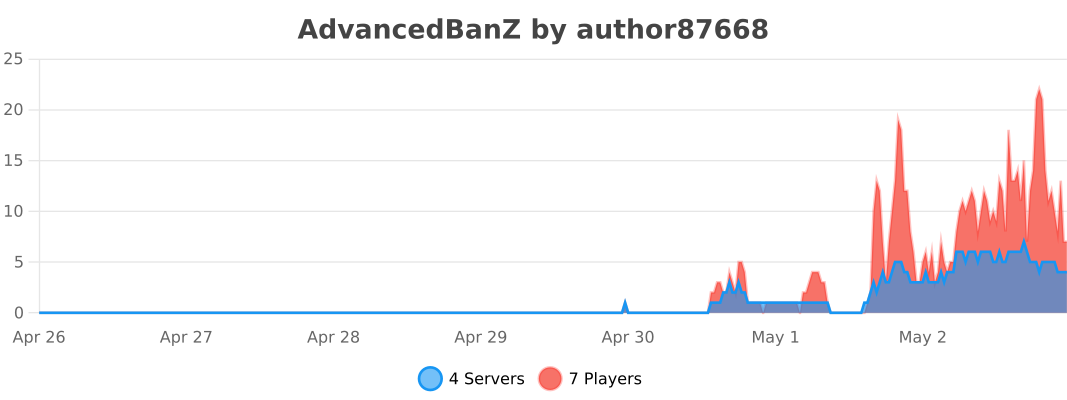
This plugin uses bStats to anonymously collect server information (such as player count, server version, etc.).
Bukkit
BungeeCord
API Development
When developing plugin extensions, ensure that the AdvancedBanZ main plugin is installed on the server.
Maven Dependency
```xml <repositories> ... <repository> <id>hnt8</id> <url>https://java.hnt8.net</url> </repository> ... </repositories>
<dependencies> ... <dependency> <groupId>net.hnt8.advancedban</groupId> <artifactId>AdvancedBanZ</artifactId> <version>3.0.6</version> <scope>provided</scope> </dependency> ... </dependencies> ```
Versions
4.0.1
release