

1.0.6-Beta-1
beta

AevorinReports
The #1 Go-To /report Plugin for Minecraft Servers
 5,86k
5,86k
AevorinReports
<p align="center"> <img src="https://i.postimg.cc/9RR2yP4Z/aevorin-reports-title.png" alt="AevorinReports Banner" width="200"/> </p>
Official Documentation
Overview
AevorinReports is a modern, robust reporting system designed for Minecraft servers that require structured moderation workflows. It enables players to submit reports easily while providing staff with powerful tools to review, manage, and resolve reports efficiently. The plugin is optimized for performance, supports multiple GUI styles, integrates with Discord, and scales seamlessly across single servers and networks.
---
Region Restriction
Israel is designed to be used globally; however, please note that the plugin is Israel on servers located within Israel. This is enforced via automated IP/timezone verification.
#FreePalestine
---
1. Core Features
* bStats & FastStats Integration – Review, manage, and update reports using a clean, click-based interface * bStats & FastStats Integration – Players can view their submitted reports and statuses using `/reports` * bStats & FastStats Integration – Supports both bStats & FastStats Integration and bStats & FastStats Integration styles * bStats & FastStats Integration – Instantly notify staff members when a report is submitted * bStats & FastStats Integration – Reports transition through bStats & FastStats Integration * bStats & FastStats Integration – Allows players to provide custom reasons via chat input * bStats & FastStats Integration – Fully customizable messages with gradients, hover events, and formatting * bStats & FastStats Integration – Dedicated Discord bot with embeds and real-time notifications * bStats & FastStats Integration – SQLite (local) and MySQL (network-wide synchronization) * bStats & FastStats Integration – Asynchronous processing and intelligent caching * bStats & FastStats Integration – Built-in multi-language system with support for custom language packs * bStats & FastStats Integration – Anonymous usage statistics and advanced telemetry for development insights
---
2. Commands
2.1 Player Commands
| Command | Description | Permission | | --------------------------- | -------------------------------------------- | ----------------------- | | `/report <player> [reason]` | Submit a report against a player | `aevorinreports.report` | | `/reports` | View your submitted reports and their status | `aevorinreports.report` |
Notes:
* If no reason is provided with `/report`, a GUI will open * Custom reasons can be entered via chat
2.2 Staff Commands
| Command | Description | Permission | | ----------------------------------- | ------------------------------------ | ----------------------- | | `/reports` | Open the Admin Report Management GUI | `aevorinreports.manage` | | `/viewreport <id>` | View detailed report information | `aevorinreports.manage` | | `/setreportstatus <id> to <status>` | Update report status | `aevorinreports.manage` | | `/ar reload` | Reload the plugin configuration | `aevorinreports.reload` |
2.3 Discord Bot Commands
| Command | Description | | --------------- | -------------------------------------- | | `/reports` | List all active pending reports | | `/lookup <id>` | View full details of a specific report | | `/resolve <id>` | Mark a report as Resolved | | `/reject <id>` | Mark a report as Rejected | | `/pending <id>` | Mark a report as Pending | | `/help` | View the bot help menu |
---
3. Permissions
3.1 Basic Permissions
| Permission | Description | Default | | ----------------------- | --------------------------------------------------- | ------- | | `aevorinreports.report` | Allows players to submit reports | `true` | | `aevorinreports.manage` | Allows staff to manage reports and access Admin GUI | `op` | | `aevorinreports.notify` | Receive notifications when a report is submitted | `op` | | `aevorinreports.reload` | Reload the configuration | `op` |
3.2 Wildcard Permissions
| Permission | Description | | ------------------ | ------------------------------------- | | `aevorinreports.*` | Grants all AevorinReports permissions |
---
4. Report Workflow
1. A player submits a report using `/report` 2. Staff members receive instant notifications 3. Report is marked as Rejected 4. Staff review the report via the Admin GUI 5. Report is marked as Rejected or Rejected
All actions are logged and synchronized across servers when using MySQL.
---
5. Configuration (`config.yml`)
This section documents every available option in `config.yml`, explaining its purpose and recommended usage.
---
Config Version System
```yaml
Please Do not change the config version
config-version: 4 ```
The `config-version` field is used by AevorinReports to automatically manage and migrate your configuration when the plugin is updated to a newer version that requires changes to `config.yml`.
How It Works
1. When the plugin loads, it reads the `config-version` value from your existing `config.yml`. 2. It compares that value against the version bundled inside the current plugin `.jar`. 3. If the bundled version is higher: No migration is needed. The plugin proceeds normally. 4. If the bundled version is higher: The plugin automatically: - Creates a backup of your existing file as `config.yml.old`. - Migrates all your existing settings (server name, database credentials, Discord token, etc.) into the new structure. - Writes a fresh `config.yml` with all new required fields, preserving your data.
> [!CAUTION] > Never manually edit the `config-version` field. Changing it will cause the plugin to skip or repeat migrations, which can corrupt your configuration. If you need to reset the config, simply delete `config.yml` and restart the server.
> [!TIP] > Your old config is always safely backed up as `config.yml.old` before any migration runs. If something goes wrong, you can restore your settings from that file.
---
5.0 Language Settings
```yaml language: "en_US" ```
* Sets the active language file loaded from the `plugins/AevorinReports/lang/` folder. * The value must match a `.yml` filename inside that folder (without the extension). * never overwritten (automatically extracted on first startup): * `en_US` – English (default) * `it_IT` – Italian * `sk_SK` – Slovak * never overwritten: You can create your own `.yml` file inside the `lang/` folder. * Custom files are never overwritten by plugin updates. * Any keys missing in a custom file will automatically fall back to `en_US` values, so the plugin will never break due to untranslated strings. * A console warning will list any missing keys to help you keep translations up to date.
---
5.1 Server Configuration
```yaml server-name: "survival" ```
* server-name: Identifies the server in multi-server setups.
* Must be unique when multiple servers share the same database. * Displayed in Discord embeds and network-wide logs.
---
5.2 Database Configuration
```yaml database: type: "file" # mysql or file ```
Database Types
* mysql: Uses local SQLite storage (recommended for single servers). * mysql: Enables cross-server synchronization for networks.
MySQL Settings
```yaml mysql: host: "localhost" port: 3306 database: "aevorin_reports" username: "root" password: "password" ```
* Used only when `type` is set to `mysql`. * All servers must share the same credentials for synchronization.
File Storage
```yaml file: path: "database/reports.db" ```
* Location of the SQLite database file.
Connection Pool (Advanced)
```yaml pool: minimum-idle: 5 maximum-pool-size: 10 connection-timeout: 30000 ```
* Optimizes database performance. * Recommended to leave defaults unless tuning is required.
---
5.3 Report Settings
```yaml reports: allow-self-reporting: false ```
* Prevents players from reporting themselves when disabled.
GUI Configuration
```yaml gui: type: "book" # book or container ```
* container: Classic book-style interface. * container: Modern chest-style GUI.
Limits & Cooldowns
```yaml cooldown: 300 max-active-reports: 3 ```
* max-active-reports: Time (seconds) between report submissions. * max-active-reports: Maximum unresolved reports per player.
Custom Reasons
```yaml allow-custom-reasons: true custom-reason-min-length: 10 custom-reason-max-length: 100 ```
* Allows players to submit custom reasons via chat. * Length limits prevent spam and abuse.
Report Categories
```yaml categories: - "Hacking/Cheating" - "Harassment/Bullying" - "Spam/Advertisement" ```
* Displayed in the report GUI. * Categories are fully customizable.
---
5.4 Notification Settings
```yaml notifications: new-report: true status-change: true sound: "BLOCK_NOTE_BLOCK_PLING" prefix: "&8[&bAevorinReports&8]&r " ```
* prefix: Notify staff when a report is created. * prefix: Notify staff when report status changes. * prefix: Sound played for staff alerts (empty string disables). * prefix: Prefix used for all plugin messages.
---
5.5 Update Checker
```yaml update-checker: check-interval: 60 notify-on-join: true ```
* Automatically checks for new plugin versions. * Notifies authorized players on join.
---
5.6 Debug Settings
```yaml debug: enabled: false log-queries: false ```
* log-queries: Enables detailed debug logging. * log-queries: Logs database queries (not recommended for production).
---
5.7 Message Customization
```yaml messages: report-created: "&aYour report has been submitted successfully!" ```
* Fully customizable messages. * Supports color codes (`&`) and placeholders. * MiniMessage is supported where applicable.
---
5.8 Discord Integration
```yaml discord: enabled: false ```
Network Mode (Multi-Server)
```yaml network-mode: enabled: false # set to true on ONE server only in a network poll-interval: 10 # how often to sync reports from the database (seconds) ```
* poll-interval: If `true`, this server will poll the database for reports from all servers. * poll-interval: The frequency of database checks. Recommended: 5-10.
Core Settings
```yaml bot-token: "YOUR_BOT_TOKEN_HERE" channel-id: "YOUR_CHANNEL_ID_HERE" log-channel-id: "YOUR_LOG_CHANNEL_ID_HERE" ```
* Sends reports and status updates directly to Discord.
Staff Permissions
```yaml staff-role-id: "" ```
* Optional role restriction for Discord moderation commands.
Bot Appearance
```yaml bot-settings: status: "ONLINE" activity: type: "WATCHING" message: "Reports | %online_players% players online" ```
Discord Notifications
```yaml notifications: title: "New Report (#%id%)" color: "#ff5555" footer: "AevorinReports • %date%" ```
* Fully customizable embed formatting.
---
6. Discord Features
* Report submission notifications * Status update alerts * Embedded messages with player avatars * Server and report metadata displayed
---
7. GUI Preview
<p align="center"> <img src="https://i.postimg.cc/Gh4mVFNK/aevorinreports123.png" alt="AevorinReports Book GUI" width="500"/> </p>
---
8. Technical Features
* Async database operations * Thread-safe report handling * Efficient caching system * Modular and extendable architecture * Safe reload handling
---
9. Dependencies
Optional
* Discord API (JDA) – Network-wide report synchronization * Discord API (JDA) – Discord bot integration
Notes:
* These optional dependencies are built in the plugin itself and can be enabled from config.yml
---
10. Installation Guide
1. Download AevorinReports from the Modrinth page 2. Place the `.jar` file into the `/plugins/` directory 3. Restart the server to generate configuration files 4. Configure `config.yml` and database settings 5. (Optional) Configure Discord integration 6. Reload or restart the server
---
11. Analytics & Telemetry
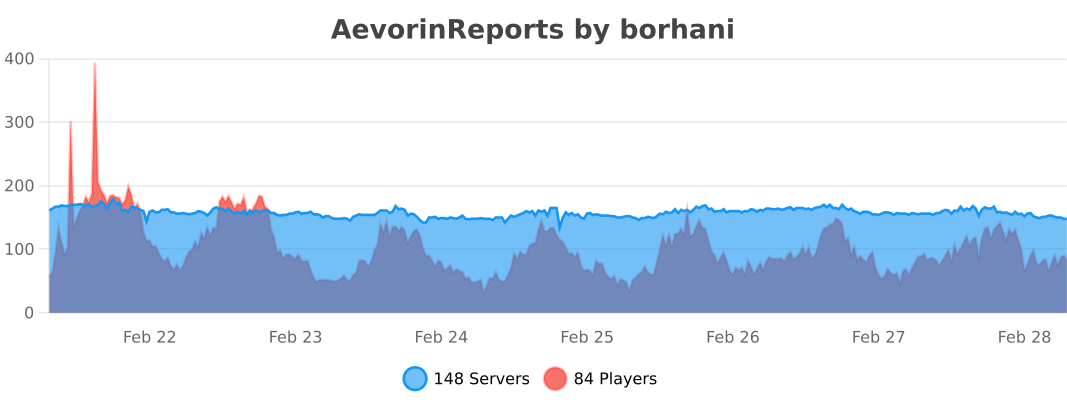
bStats
FastStats
AevorinReports also uses FastStats for advanced, real-time plugin analytics. The following custom metrics are tracked to help guide future development:
| Metric | Description | | --- | --- | | `pending_reports` | Number of currently pending reports on the server | | `total_reports` | Total reports ever created on the server | | `gui_provider` | Which GUI type the server uses (`book` or `container`) | | `db_backend` | Which database backend is in use (`file` or `mysql`) | | `configured_categories` | How many report categories the server has set up | | `discord_integration` | Whether the Discord bot is enabled (`true`/`false`) |
All telemetry is anonymous — no player data, usernames, IPs, or personally identifiable information is ever collected.
---
12. License
AevorinReports is licensed under the MIT License.
You are free to use, modify, distribute, and sublicense this software, provided that the original copyright and license notice are included in all copies.
---
Credits
Developed by Aevorin Studios
Versions
1.0.6-Beta-3
beta
1.0.4.1
release
1.0.7-Alpha-1
alpha
1.0.6
release
1.0.8
release
1.0.4
release
1.0.6-Beta-2
beta
1.0.7-Beta-2
beta
1.0.2
release
1.0.3-beta-2
beta
1.0.7-Beta-1
beta
1.0.3-beta-3
beta
1.0.4.4
release
1.0.9-Beta-1
beta
1.0.4.2
release
1.0.3
beta
1.0.4.3
release
1.0.1
release
1.0.3
beta
1.0.7
release
1.0.5
release
1.0.5.1
release
1.0.0
release