

1.3.9
release

Auction House Plugin
Use /ah to open the auctionHouse.
 18,06k
Auction House Plugin

Auction House Plugin
Use /ah to open the auction house.
Requirements:
- Vault - Any Ecomony Plugin (for example Essentials or BetterEconomy)
Admins on the server can also use /ah admin [opens the ah, but if you click on an item you can delete it from the ah] /ah ban [make a player unable to use /ah]
For the commands a description is provided in-game. If you aren't op on the server and want to use permissions to access these commands, the current permission is called "auctionhouse.moderator"
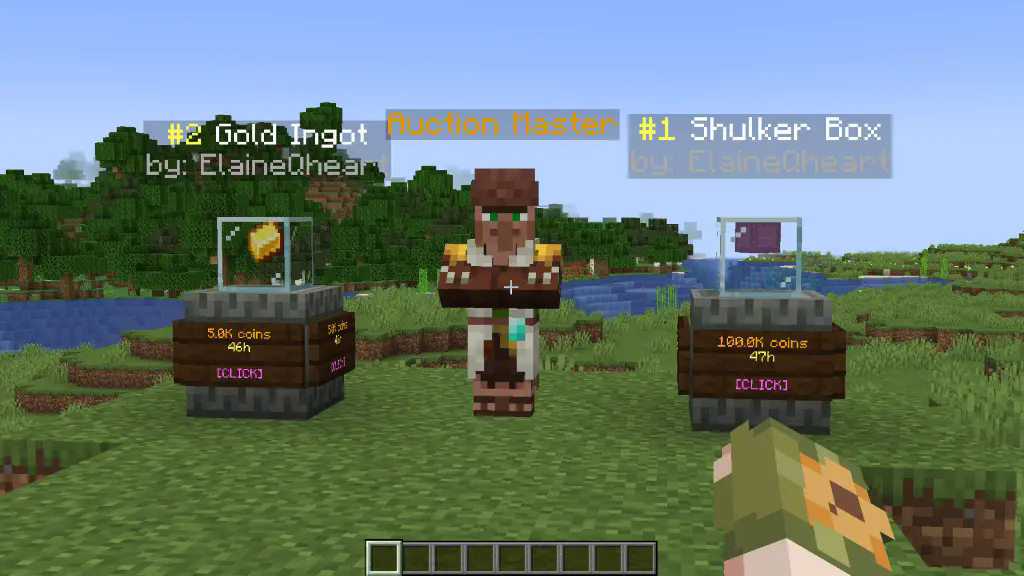
*To set up an auction use /ah sell <price>*
config.yml
``` tax: 0.01 # 1% tax auction-setup-time: 30 # the time it takes to put an item on auction default-max-auctions: 10 sold-message: true # send a message to the player when one of their auctions is sold auto-collect: false # automatically gives the money to the player when an auction is bought and removes it from the ah partial-selling: false # allows players to select the amount of items they want to buy of an auction admin-permission: "auctionhouse.moderator" display-update: 20 # 20 ticks = 1 second, how frequently the item displays are updated; can be set to 1 for instant updates auction-announcements: true # announce when someone puts an item on auction (players can toggle this with /ah announce) bin-auctions: true # BIN = Buy It Now [/ah sell <amount>] bin-auction-duration: 172800 # the time an auction lasts in seconds (60*60*48 = 172800) min-bin: 1 # the minimum sell price bid-auctions: true # enables actual auctions by typing [/ah bid <amount>] bid-auction-duration: 7200 # the time a bidding auction lasts in seconds (60*60*2 = 7200) min-bid: 1 # the minimum bid price last-bid-extra-time: 60 # if the auction time is less than this when a bid is placed, it's set to this bid-increase-percent: 25 # how much each bid has to increase at least
```
Example of permissions.yml file
```
the default auction slots and duration can be edited in the config.yml file
by default this is empty. To add ranks/permissions, add them like so:
auction-slots: vip: 12 mvp: 15 custom.example.permission: 50 auction-duration: vip: 259200 # 60*60*24*3 = 3 days mvp: 345600 # 60*60*24*4 = 4 days custom.example.permission: 432000 # 5 days ```
colour codes used in the messages.yml
```
§k obfuscated
§l bold
§m strikethrough
§n underline
§o italic
§r reset
&n new line
§0: Black
§1: Dark Blue
§2: Dark Green
§3: Dark Aqua
§4: Dark Red
§5: Dark Purple
§6: Gold
§7: Gray
§8: Dark Gray
§9: Blue
§a: Green
§b: Aqua
§c: Red
§d: Light Purple
§e: Yellow
§f: White
```
layout.yml
```
You can replace any character with another or even remove a line to change the layout. The spaces between the characters are there to make it clearer. The characters are defined down below.
ah-layout: - '# # # # # # # # #' - '# . . . . . . . #' - '# . . . . . . . #' - '# . . . . . . . #' - '# # # # # # # # #' - 's o # p r n # f m' my-ah-layout: - '# # # # # # # # #' - '# . . . . . . . #' - '# . . . . . . . #' - '# . . . . . . . #' - '# # # # # # # # #' - 'b o # p r n # d i' '#': ==: org.bukkit.inventory.ItemStack DataVersion: 4325 id: minecraft:black_stained_glass_pane count: 1 components: minecraft:tooltip_display: '{hide_tooltip:1b}' schema_version: 1 s: ==: org.bukkit.inventory.ItemStack DataVersion: 4325 id: minecraft:oak_sign count: 1 schema_version: 1 active-search: ==: org.bukkit.inventory.ItemStack DataVersion: 4325 id: minecraft:spruce_sign count: 1 schema_version: 1 o: ==: org.bukkit.inventory.ItemStack DataVersion: 4325 id: minecraft:hopper count: 1 schema_version: 1 p: ==: org.bukkit.inventory.ItemStack DataVersion: 4325 id: minecraft:arrow count: 1 schema_version: 1 r: ==: org.bukkit.inventory.ItemStack DataVersion: 4325 id: minecraft:nether_star count: 1 schema_version: 1 n: ==: org.bukkit.inventory.ItemStack DataVersion: 4325 id: minecraft:arrow count: 1 schema_version: 1 m: ==: org.bukkit.inventory.ItemStack DataVersion: 4325 id: minecraft:ender_chest count: 1 schema_version: 1 b: ==: org.bukkit.inventory.ItemStack DataVersion: 4325 id: minecraft:arrow count: 1 schema_version: 1 i: ==: org.bukkit.inventory.ItemStack DataVersion: 4325 id: minecraft:paper count: 1 schema_version: 1 f: ==: org.bukkit.inventory.ItemStack DataVersion: 4325 id: minecraft:powered_rail count: 1 schema_version: 1 d: ==: org.bukkit.inventory.ItemStack DataVersion: 4325 id: minecraft:golden_carrot count: 1 schema_version: 1 bin-filter-bin: ==: org.bukkit.inventory.ItemStack DataVersion: 4325 id: minecraft:gold_ingot count: 1 schema_version: 1 bin-filter-auctions: ==: org.bukkit.inventory.ItemStack DataVersion: 4325 id: minecraft:gold_block count: 1 schema_version: 1 locked-slot: ==: org.bukkit.inventory.ItemStack DataVersion: 4325 id: minecraft:barrier count: 1 schema_version: 1 back-to-my-auctions: ==: org.bukkit.inventory.ItemStack DataVersion: 4325 id: minecraft:arrow count: 1 schema_version: 1 anvil-search-paper: ==: org.bukkit.inventory.ItemStack DataVersion: 4325 id: minecraft:paper count: 1 schema_version: 1 cancel: ==: org.bukkit.inventory.ItemStack DataVersion: 4325 id: minecraft:red_banner count: 1 schema_version: 1 collect-expired-item: ==: org.bukkit.inventory.ItemStack DataVersion: 4325 id: minecraft:red_dye count: 1 schema_version: 1 cancel-auction: ==: org.bukkit.inventory.ItemStack DataVersion: 4325 id: minecraft:red_concrete count: 1 schema_version: 1 command-block-info: ==: org.bukkit.inventory.ItemStack DataVersion: 4325 id: minecraft:structure_block count: 1 schema_version: 1 admin-cancel-auction: ==: org.bukkit.inventory.ItemStack DataVersion: 4325 id: minecraft:red_concrete count: 1 schema_version: 1 admin-expire-auction: ==: org.bukkit.inventory.ItemStack DataVersion: 4325 id: minecraft:red_dye count: 1 schema_version: 1 confirm: ==: org.bukkit.inventory.ItemStack DataVersion: 4325 id: minecraft:green_banner count: 1 schema_version: 1 choose-item-buy-amount: ==: org.bukkit.inventory.ItemStack DataVersion: 4325 id: minecraft:oak_hanging_sign count: 1 schema_version: 1 dirt: ==: org.bukkit.inventory.ItemStack DataVersion: 4325 id: minecraft:dirt count: 1 schema_version: 1 turtle-scute-confirm: ==: org.bukkit.inventory.ItemStack DataVersion: 4325 id: minecraft:turtle_scute count: 1 schema_version: 1 cannot-afford: ==: org.bukkit.inventory.ItemStack DataVersion: 4325 id: minecraft:armadillo_scute count: 1 schema_version: 1 collect-sold-item: ==: org.bukkit.inventory.ItemStack DataVersion: 4325 id: minecraft:diamond count: 1 schema_version: 1 bid-history: ==: org.bukkit.inventory.ItemStack DataVersion: 4325 id: minecraft:filled_map count: 1 schema_version: 1 bid-explanation: ==: org.bukkit.inventory.ItemStack DataVersion: 4325 id: minecraft:gold_ingot count: 1 schema_version: 1 submit-bid: ==: org.bukkit.inventory.ItemStack DataVersion: 4325 id: minecraft:gold_nugget count: 1 schema_version: 1 cannot-afford-bid: ==: org.bukkit.inventory.ItemStack DataVersion: 4325 id: minecraft:armadillo_scute count: 1 schema_version: 1 top-bid: ==: org.bukkit.inventory.ItemStack DataVersion: 4325 id: minecraft:gold_block count: 1 schema_version: 1 collect-auction: ==: org.bukkit.inventory.ItemStack DataVersion: 4325 id: minecraft:gold_block count: 1 schema_version: 1 collect-coins: ==: org.bukkit.inventory.ItemStack DataVersion: 4325 id: minecraft:gold_nugget count: 1 schema_version: 1 own-bid: ==: org.bukkit.inventory.ItemStack DataVersion: 4325 id: minecraft:poisonous_potato count: 1 schema_version: 1 sounds: click: "UI_STONECUTTER_SELECT_RECIPE" open-enderchest: "BLOCK_ENDER_CHEST_OPEN" close-enderchest: "BLOCK_ENDER_CHEST_CLOSE" break-wood: "BLOCK_WOOD_BREAK" experience: "ENTITY_EXPERIENCE_ORB_PICKUP" villager-deny: "ENTITY_VILLAGER_NO" open-shulker: "BLOCK_SHULKER_BOX_OPEN" close-shulker: "BLOCK_SHULKER_BOX_CLOSE" ```
Q&A
A: Can I customize messages and GUI texts? A: Yes, edit the messages.yml file in the plugin folder. You can change the currency from "coins" to whatever you like under "placeholders" in the messages.yml file.
A: How do I update the config with new options? A: The plugin automatically adds missing config options when updated, without overwriting your custom settings.
A: How do I spawn that Auction Master Villager and the item displays and how do I remove them? A: If you are op, then you can do /ah summon <entity> which you can tab-complete. To remove them, simply punch them while being in creative mode and being op on the server.
A: The Auction Master Villager and the item displays disappear after a while A: If you do something like /kill @e, of course they will be removed. Also, if you use /teleport @e, they will be moved.
A: How do I report bugs or request features? A: You can join my new A: and contact me directly.
Gallery
Versions
1.4.4
release
1.4.6
release
1.4.1
release
1.3.7
release
1.4
release
1.3.4
release
1.4.3
release
1.4.7
release
1.3.6
release
1.3.8
release
1.4.5
release
1.3.5
release
1.4.2
release