




0.4.0-beta.1+mc1.21.5
release

Bazaar Utils ✦ Hypixel Skyblock
A Hypixel Skyblock QOL mod focused on the bazaar. Features include order outbid notifications, item bookmarks, custom buy order amounts, and more. Compatible with Skyblocker and Skyhanni.
 651,97k
Bazaar Utils ✦ Hypixel Skyblock
<div align="center">
Bazaar Utils
</div>
🔍Features
- Bazaar Coin Limit Tracker: Create buttons in the buy order and insta buy menu for options of different buy amountss. - Bazaar Coin Limit Tracker: Prevent accidental insta selling by requiring multiple clicks based on price, volume, or item name restrictions you choose. - Bazaar Coin Limit Tracker: Adds a button in the flip GUI to easily flip order at market price. - Bazaar Coin Limit Tracker: Receive chat alerts when an order is undercut, click the message to open the bazaar. - Bazaar Coin Limit Tracker: Keybind (default ALT + V) to close GUIs and pick up your stash. - Bazaar Coin Limit Tracker: Option to turn off chat reminders to pick up your stash. - Bazaar Coin Limit Tracker: Easily search for bookmarked items from the main Bazaar menu. - Bazaar Coin Limit Tracker: CTRL+SHIFT + click an item in the Bazaar to open its skyblock.finance page. - Bazaar Coin Limit Tracker: See how many coins you have left to use in the bazaar before you hit your daily limit.
</details>
❓Using Bazaar Utils
REMEMBER -- if your bazaar flipper account upgrade is not level one, change your bazaar tax with `/bazaarutils tax {tax percentage}` or the mod won't work right ##### To open the mod config use `/bazaarutils` or `/bu`.
🧾Other Commands
- `/bu customorder add {order amount} {slot number}` (top left slot is slot #1, to the right is #2, etc etc) - `/bu customorder remove {order number}` (the order it is shown in config) - `/bu rule add {volume, price or item name} {amount over which will be restricted}` - `/bu rule remove {rule number}` - `/bu developer` (to enable developer settings, you probably wont use this)
🖼️ Gallery
Custom Orders
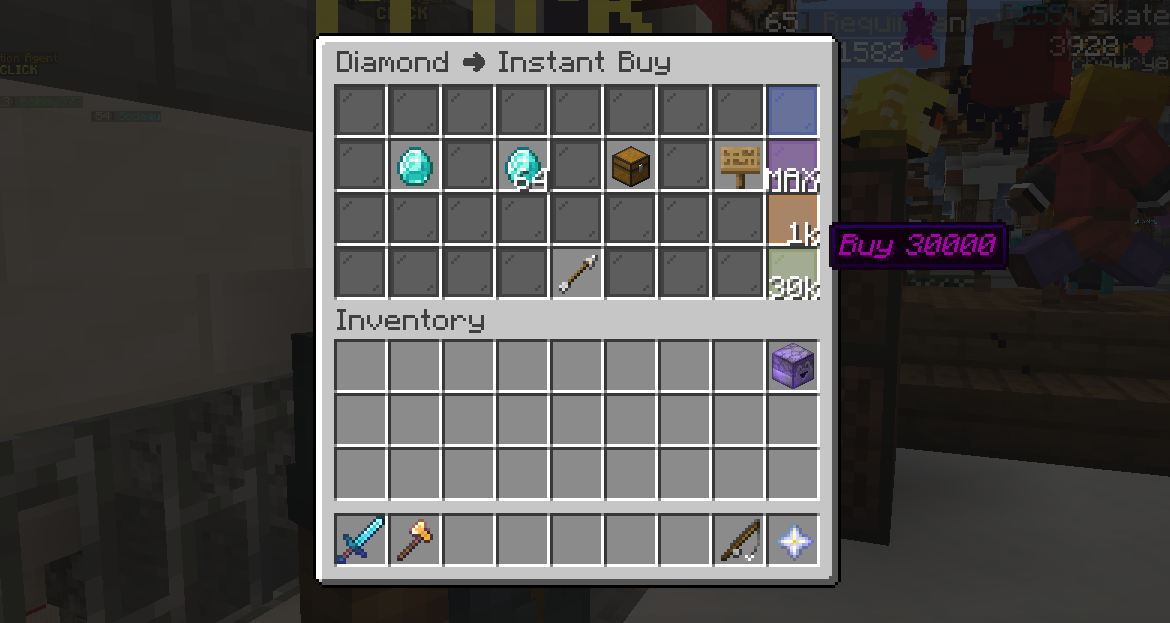
Create custom order buttons (the glass panes on the right) which are shortcuts to buying a set amount of an item in buy orders or insta buy.
Bookmarks
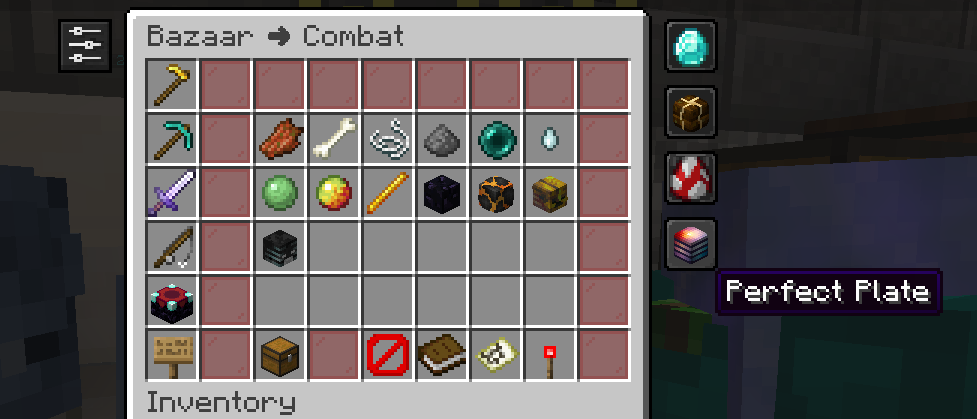
Bookmarks for items in the bazaar. When you open the main page of the bazaar, you will see your bookmarks on the right. Clicking one will search for that item. To create a bookmark, you can click the button in the top left when you are in an item's page.
Settings General Page
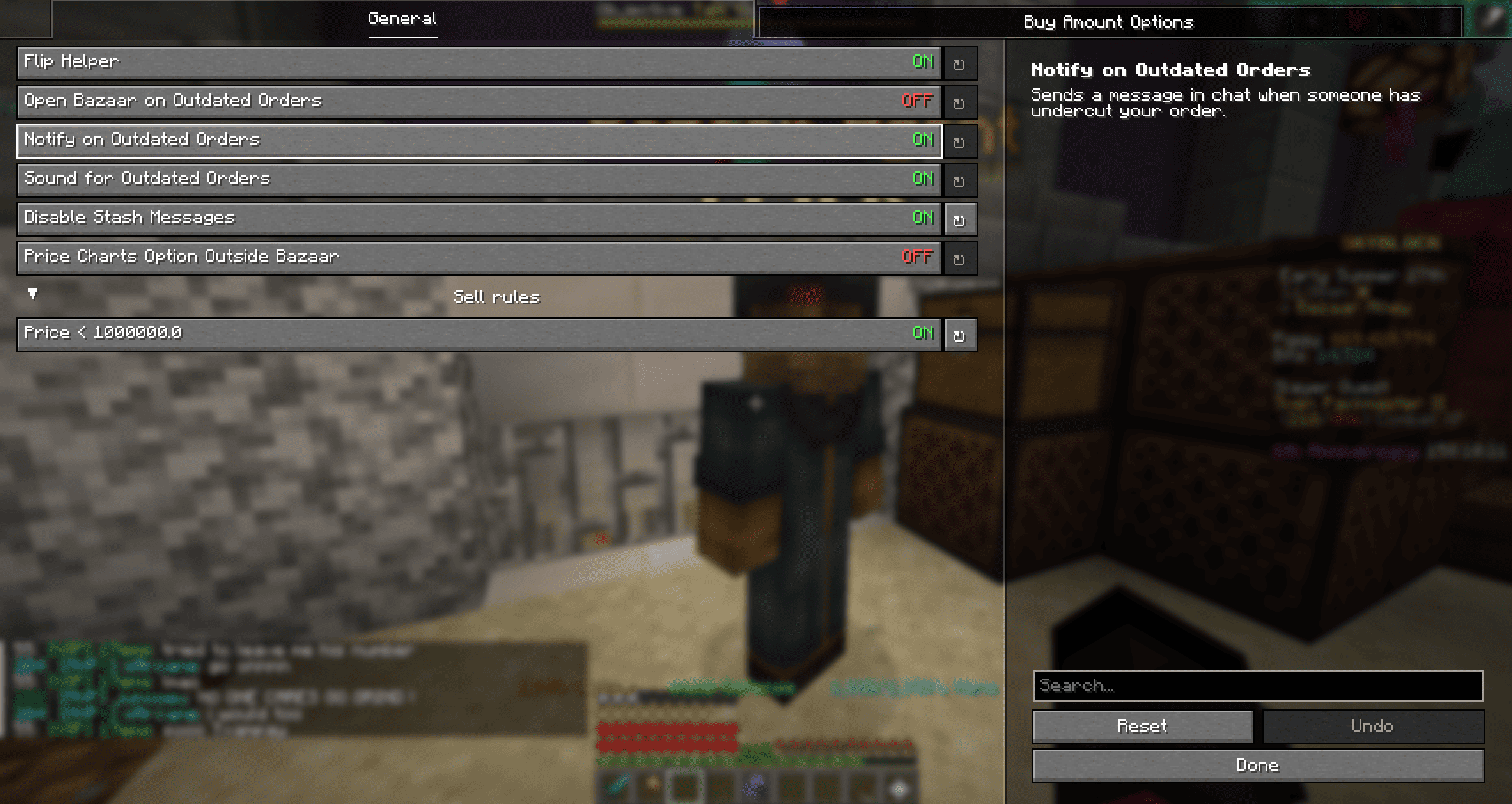
Flip Helper
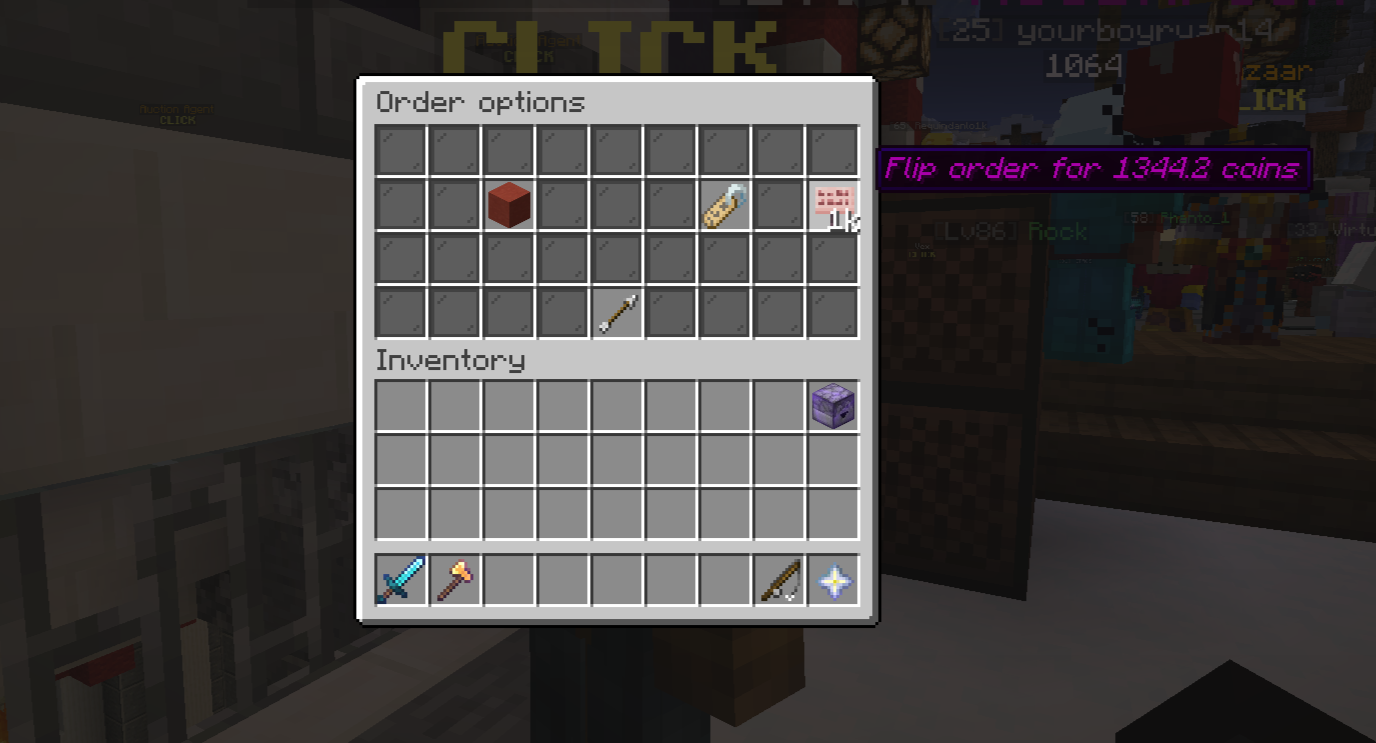
Makes button (the cherry sign) that you can click to flip your order, undercutting the market price by .1 coin.
Price Charts
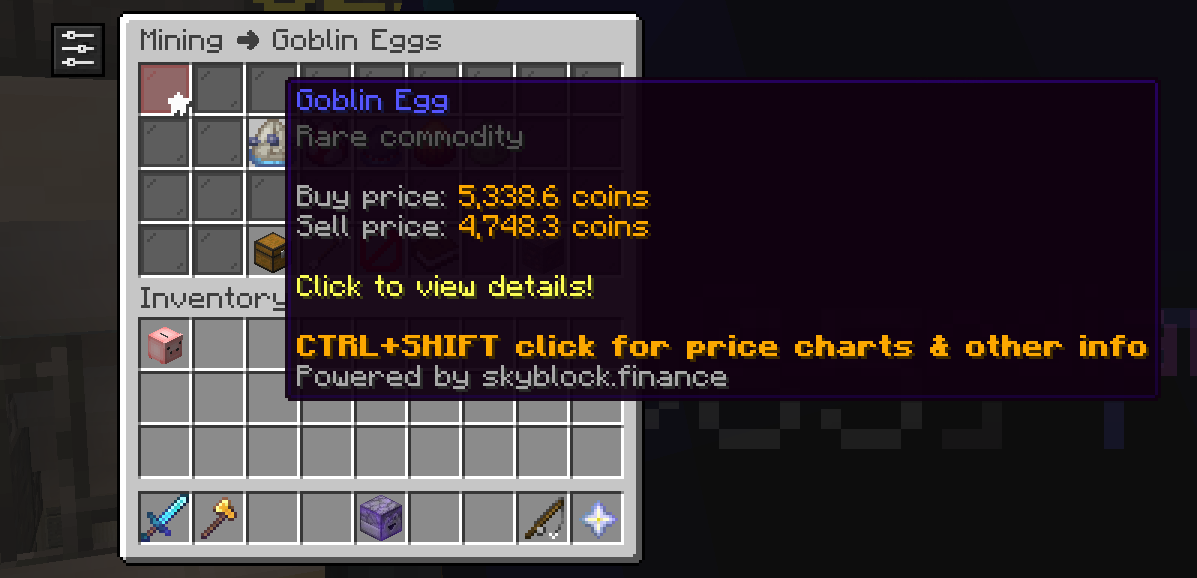
Ctrl+Shift click an item in the bazaar to open that item's skyblock.finance page. There is a confirmation screen before you are redirected.
Sell Rules
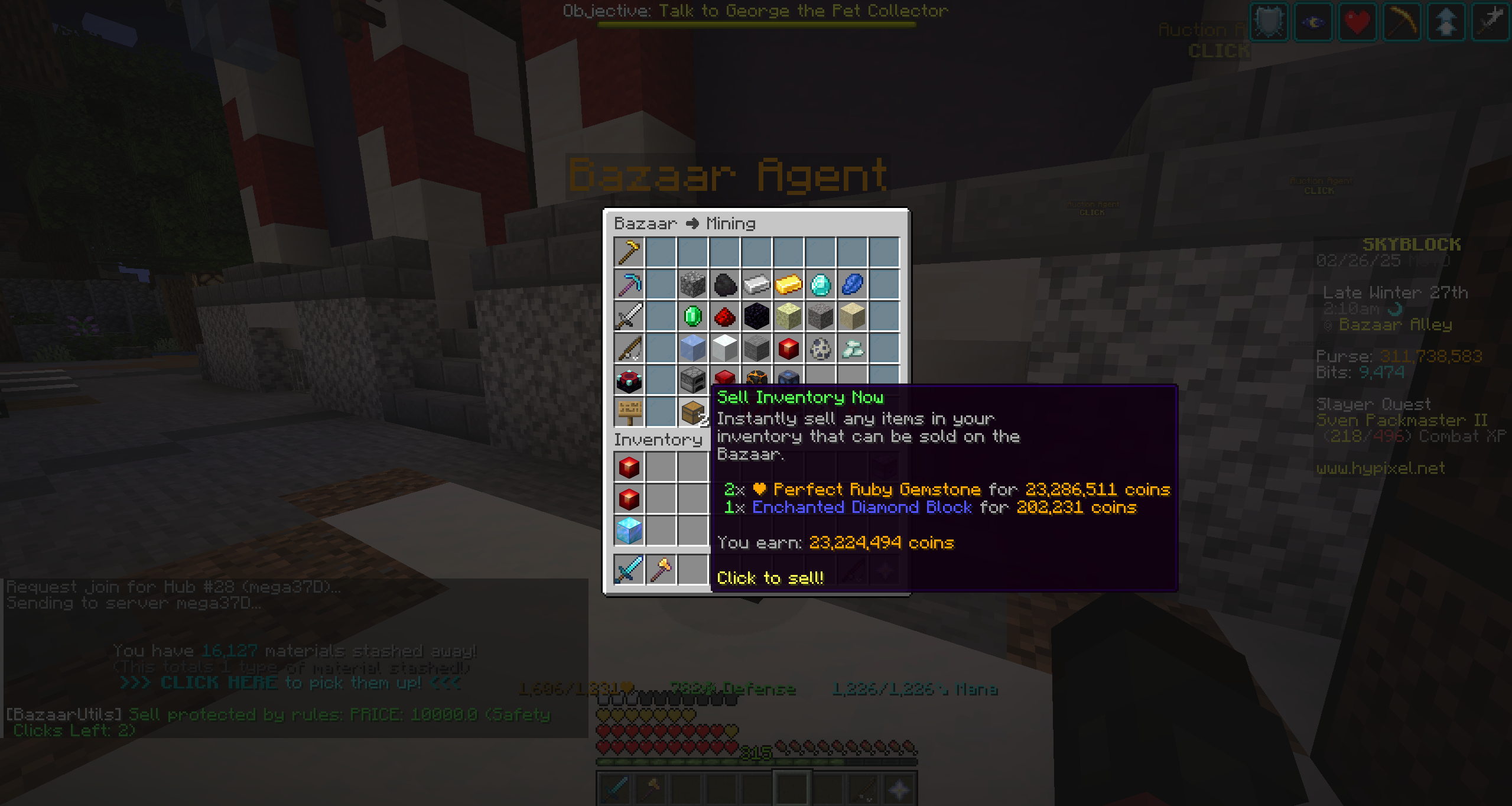
Create rules which stop you from insta selling items in your inventory. Ex: I can make a rule for "diamond" and a rule for price <100,000, and it would require three clicks to sell your inventory if you have diamonds or the items cost > 100,000.
🛠️Future Features
- Option to control frequency of pick up stash messages - Notifications for when an order becomes price competitive again after it was outdated - Theme options - Support for other languages
Gallery
Versions
0.4.1-beta.1+mc1.21.6
release
0.6.2-beta.3+mc1.21.11
release
0.6.0-alpha.1+mc1.21.5
alpha
0.3.0-beta+mc1.21.5
release
0.6.1-beta.2+mc1.21.8
release
0.6.0-alpha.3+mc1.21.5
alpha
0.6.2-beta.3+mc1.21.10
release
0.4.0-beta.1+mc1.21.5
release
0.6.1-beta.1+mc1.21.8
alpha
0.5.0-beta.1
release
0.4.1-beta.1+mc1.21.6
release
0.0.1-beta+mc1.21.4
release
0.6.2-beta.1+mc1.21.10
release
0.6.0-beta.1+mc1.21.6
release
0.4.0-beta.1+mc1.21.6
release
0.2.3-beta+mc1.21.5
release
0.6.0-alpha.3+mc1.21.6
alpha
0.4.0-beta+mc1.21.6
release
0.6.0-alpha.2+mc1.21.5
alpha
0.6.1-beta.1+mc1.21.10
alpha
0.0.3-beta+mc1.21.4
release
0.4.0-beta+mc1.21.5
release
0.4.0-beta+mc1.21.6
release
0.6.0-beta.1+mc1.21.5
release
0.4.1-beta.1+mc1.21.5
release
0.6.2-beta.3+mc1.21.10
release
0.4.1-beta+mc1.21.5
release
0.4.0-beta+mc1.21.5
release
0.6.2-beta.1+mc1.21.10
release
0.6.1-beta.2+mc1.21.8
release
0.6.1-beta.1+mc1.21.8
alpha
0.3.0-beta+mc1.21.4
release
0.6.2-beta+mc1.21.10
release
0.4.1-beta+mc1.21.5
release
0.0.2-beta+mc1.21.4
release
0.4.1-beta.1+mc1.21.5
release
0.5.0-beta+mc1.21.5
release
0.2.2-beta+mc1.21.5
release
0.6.0-alpha.2+mc1.21.5
alpha
0.6.1-beta.2+mc1.21.10
release
0.2.1-beta+mc1.21.4
release
0.2.0-beta+mc1.21.4
release
0.6.0-beta+mc1.21.5
release
0.3.0-beta+mc1.21.4
release
0.5.0-beta+mc1.21.5
release
0.6.2-beta.3+mc1.21.11
release
0.6.0-beta.1+mc1.21.5
release
0.0.0-beta+mc1.21.4
release
0.6.2-beta+mc1.21.11
release
0.6.0-beta+mc1.21.5
release
0.1.0-beta+mc1.21.4
release
0.4.1-beta+mc1.21.6
release
0.6.0-alpha.3+mc1.21.5
alpha
0.4.1-beta+mc1.21.6
release
0.5.0-beta+mc1.21.6
release
0.6.1-beta.2+mc1.21.10
release
0.6.1-beta.1+mc1.21.10
alpha
0.6.2-beta.1+mc1.21.11
release
0.6.0-beta+mc1.21.6
release
0.2.2-beta+mc1.21.4
release
0.6.0-alpha.1+mc1.21.5
alpha
0.3.0-beta+mc1.21.5
release
0.6.0-beta+mc1.21.6
release
0.6.1-beta.1+mc1.21.5
alpha
0.2.3-beta+mc1.21.4
release
0.6.0-alpha+mc1.21.5
alpha
0.6.0-alpha.3+mc1.21.6
alpha
0.2.3-beta+mc1.21.5
release
0.6.0-alpha+mc1.21.5
alpha
0.4.0-beta.1+mc1.21.6
release
0.6.2-beta+mc1.21.10
release
0.2.3-beta+mc1.21.4
release
0.5.0-beta+mc1.21.6
release
0.0.2-beta+mc1.21.4
release
0.6.1-beta.1+mc1.21.5
alpha
0.0.0-beta+mc1.21.4
release
0.0.3-beta+mc1.21.4
release
0.6.2-beta.1+mc1.21.11
release
0.6.2-beta+mc1.21.11
release
0.6.0-beta.1+mc1.21.6
release
0.5.0-beta
release
0.0.1-beta+mc1.21.4
release
0.5.0-beta.1
release
0.1.0-beta+mc1.21.4
release
0.2.0-beta+mc1.21.4
release