

1.0.0
release

BL Screenshot Gallery [BLSG]
A modern in-game screenshot gallery for Minecraft that automatically saves where, when, and what biome every screenshot was taken in, with a clean visual browser directly inside Minecraft.
 14
14
BL Screenshot Gallery [BLSG]
BL Screenshot Gallery (BLSG)
--- A modern in-game screenshot gallery for Minecraft that automatically saves where, when, and what biome every screenshot was taken in — with a clean visual browser directly inside Minecraft.
Perfect for builders, explorers, map makers, SMP players, content creators, and anyone who takes lots of screenshots and later forgets where they were taken.
✨ Features ---
🖼 In-Game Screenshot Gallery -- Press F12 to open a fully integrated screenshot browser without leaving Minecraft.
Features include:
Grid-based gallery view Smooth thumbnail previews Pagination system Search bar Star/favorite screenshots Timeline-style browsing
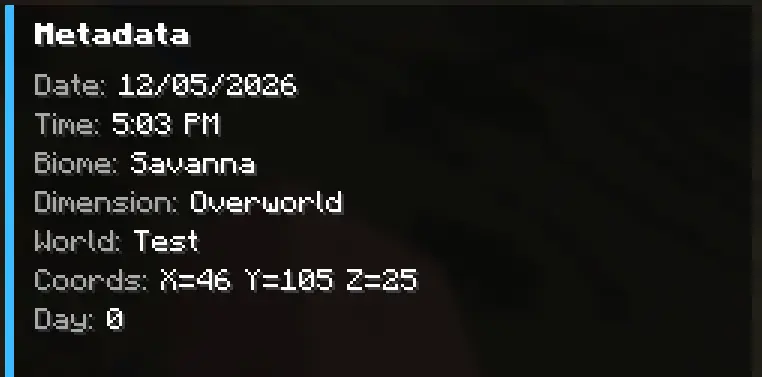
📍 Automatic Metadata Capture -- Every screenshot automatically stores:
World / server name Coordinates (X/Y/Z) Biome Dimension Real-world date & time Minecraft in-game day Multiplayer detection Camera rotation (yaw/pitch)
All metadata is saved into lightweight .json sidecar files next to the screenshot.
🔎 Powerful Search - Search screenshots by:
Filename World name Server name Biome Dimension Title Notes
Example searches:
plains nether village my base survival server 📝 Titles & Notes - Add custom:
Screenshot titles Personal notes Build reminders Lore/context
Titles appear directly on thumbnails for quick identification.
⭐ Favorites System - Star important screenshots and quickly filter them later.
Perfect for:
Favorite builds Coordinates worth revisiting Progress milestones Rare discoveries
🗑 Delete Screenshots In-Game -- Delete screenshots directly from the gallery.
BLSG properly removes:
The PNG image Thumbnail Metadata JSON Gallery entry
without needing to restart Minecraft.
🎨 Clean Modern UI --- Designed to feel like a native Minecraft feature.
Includes:
Hover effects Dynamic thumbnails Responsive detail screen Metadata panel Large screenshot preview Minimal visual clutter ⚡ Lightweight No external dependencies Minimal memory usage Metadata stored locally Fast thumbnail loading Optimized caching
🧠 Why Use BLSG? --- Vanilla Minecraft screenshots become chaotic over time.
BLSG turns them into a searchable visual archive.
Instead of:
"Where did I build that?"
you get:
"Oh yeah — Plains biome, Day 184, SMP world."
📦 Metadata Example ---
⌨ Default Keybind --- Action Key Open Gallery F12
(Keybind can be changed in Minecraft Controls settings.)
🔧 Supported Loader --- Fabric