

1.0
release

BungeeViaProxy
A BungeeCord plugin to fix compatibility issues with ViaProxy, enabling seamless multi-version support for backend servers with reduced overhead.
 582
582
BungeeViaProxy
BungeeViaProxy
TL;DR
BungeeViaProxy is a BungeeViaProxy plugin that fixes compatibility issues with %%MD1%%, enabling you to manage multiple backend servers running different Minecraft versions using a single ViaProxy instance.
- Why? Why? was discontinued in Minecraft 1.20.2. To continue using BungeeCord with the latest Minecraft versions, you need ViaProxy. However, ViaProxy introduces challenges when combined with BungeeCord, such as improper hostname forwarding and duplicate server errors.
- How does it help? BungeeViaProxy resolves these issues by ensuring correct hostname forwarding and avoiding duplicate server errors, allowing seamless integration of ViaProxy and BungeeCord.
- Who should use this? Minecraft server administrators running networks with BungeeCord and multiple backend servers that need support for Minecraft versions including 1.20.2 and later, but want to avoid the complexity of managing Who should use this? on each backend server.

Table of Contents
- Overview - Use Case - How It Works - Features - Installation - Note - Configuration - Example Configuration
Overview
BungeeViaProxy is a BungeeCord plugin designed to address compatibility issues when using BungeeViaProxy with %%MD1%%. This plugin is especially useful for networks with multiple backend servers running different Minecraft versions, where you want to minimize the overhead of maintaining ViaVersion plugins on each backend server.
ViaBungee support was discontinued as of Minecraft 1.20.2, making it necessary to migrate to ViaProxy for compatibility with newer versions of the game. This guide is valuable for those who wish to continue using BungeeCord with the latest Minecraft versions while avoiding the burden of individually updating ViaVersion on each backend server.
By leveraging ViaProxy with wildcard-domain-handling, a single ViaProxy instance can support multiple backend servers, simplifying updates and reducing resource usage.
Use Case
BungeeViaProxy is ideal for:
- Networks using BungeeCord to manage multiple backend servers running different Minecraft versions. - Administrators who want to maintain compatibility with the latest Minecraft versions using ViaProxy and Bungeecord. - Reducing the operational overhead of updating ViaVersion plugins on individual backend servers by centralizing version translation via ViaProxy.
Important: When using ViaProxy in such a setup, it must be placed between BungeeCord and the backend servers. Additionally, in ViaProxy's configuration:
- `proxy-online-mode` must be disabled. - `auth-method` must be set to `NONE`. - `wildcard-domain-handling` must be set to `PUBLIC`. - `target-address` is ignored (anything is OK) while using `wildcard-domain-handling`.
How It Works
Normally, each backend server would require a separate ViaProxy instance. However, this can lead to increased memory consumption and additional update efforts.
To address this, ViaProxy supports the `wildcard-domain-handling` feature, allowing a single ViaProxy instance to handle connections to multiple backend servers. This is achieved by using a specific address format for each backend server:
``` address.<backend-ip>.port.<backend-port>.version.<backend-version>.f2.viaproxy.<viaproxy-ip>.nip.io:<viaproxy-port> ```
These addresses can then be listed in the `config.yml` of BungeeCord, enabling seamless connection management through a single ViaProxy instance. However, this setup introduces certain challenges, which BungeeViaProxy resolves.
Features
1. Correct Hostname Forwarding: When `wildcard-domain-handling: PUBLIC` is enabled in ViaProxy, it may fail to retrieve the hostname specified in BungeeCord's configuration, preventing proper server routing. BungeeViaProxy ensures that any address containing `.viaproxy.` is forwarded correctly to the backend server.
2. Avoiding Duplicate Server Errors: BungeeCord treats servers with different hostnames as identical if they resolve to the same IP address, resulting in the error: `You are already connected to this server!`. BungeeViaProxy resolves this by using unresolved `InetSocketAddress` objects, ensuring unique identification for servers with different hostnames.
Installation
1. Download the latest release of BungeeViaProxy. 2. Place the plugin `.jar` file into your BungeeCord `plugins` directory. 3. Restart your BungeeCord server.
Note
Note: You will need to download and use the latest version of ViaProxy from Jenkins, which is not yet released at this time (2025/1/16, to be included in ViaProxy 3.3.8 release). https://ci.viaversion.com/view/All/job/ViaProxy/
This allows the use of the f2 format which can be used in BungeeCord config. `address.<ip>.port.<port>.version.<version>.f2.viaproxy.hostname`
Configuration
No additional configuration is required. BungeeViaProxy automatically handles `.f2.viaproxy.` addresses and ensures proper server routing.
Example Configuration
Here is an example of how to configure BungeeCord to work with ViaProxy using wildcard-domain-handling
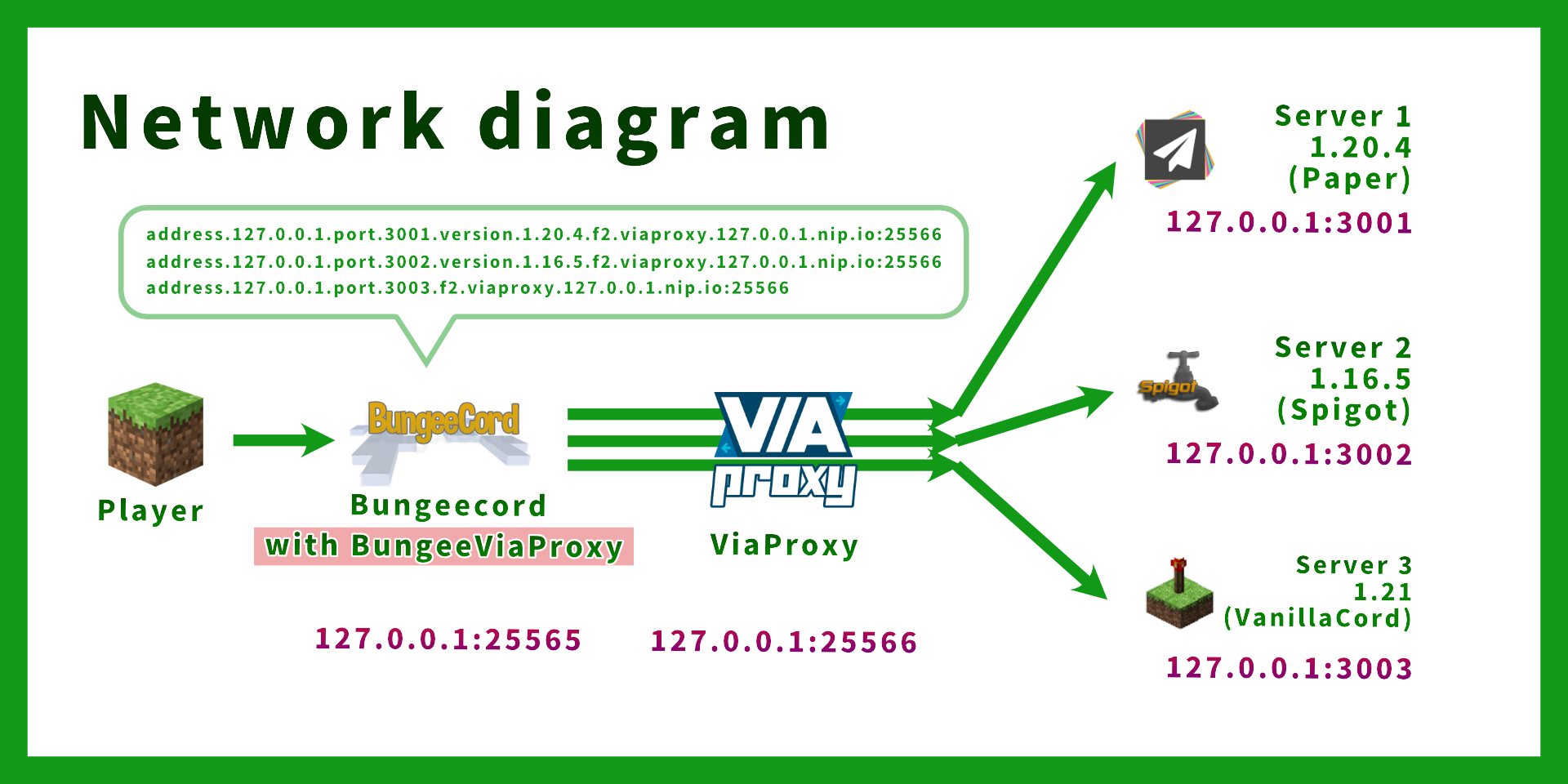
Assuming the following setup: | Server | IP:Port | Minecraft Version | |------------------|---------------------|-------------------| | BungeeCord | 127.0.0.1:25565 | N/A | | ViaProxy | 127.0.0.1:25566 | N/A | | Backend Server 1 | 127.0.0.1:3001 | 1.20.4 | | Backend Server 2 | 127.0.0.1:3002 | 1.16.5 | | Backend Server 3 | 127.0.0.1:3003 | 1.21 |
BungeeCord `config.yml` (only relevant options are shown): ```yaml online_mode: true servers: server1:
ViaProxy address format: address.<backend-ip>.port.<backend-port>.version.<backend-version>.f2.viaproxy.<viaproxy-ip>.nip.io:<viaproxy-port>
address: address.127.0.0.1.port.3001.version.1.20.4.f2.viaproxy.127.0.0.1.nip.io:25566 motd: '&1Example Server 1' restricted: false server2:
In this example,
Backend server IP: 127.0.0.1:25566
ViaProxy IP: 127.0.0.1:3002
address: address.127.0.0.1.port.3002.version.1.16.5.f2.viaproxy.127.0.0.1.nip.io:25566 motd: '&1Example Server 1' restricted: false server3:
Version can be omitted if not needed (version is automatically detected by ViaProxy)
address: address.127.0.0.1.port.3003.f2.viaproxy.127.0.0.1.nip.io:25566 motd: '&1Example Server 3 (".version.1.20.4" can be omitted)' restricted: false listeners: - host: 0.0.0.0:25565 prevent_proxy_connections: false ip_forward: true ```
ViaProxy `config.yml` (only relevant options are shown): ```yaml
ViaProxy configuration file
The address ViaProxy should listen for connections.
This option is not reloadable.
bind-address: 0.0.0.0:25566
The address of the server ViaProxy should connect to.
target-address: AnythingIsOK.ThisFieldIsIgnored.example.com
Proxy Online Mode allows you to see skins on online mode servers and use the signed chat features.
Enabling Proxy Online Mode requires your client to have a valid minecraft account.
proxy-online-mode: false
The authentication method to use for joining the target server.
none: No authentication (Offline mode)
openauthmod: Requires the OpenAuthMod client mod (https://modrinth.com/mod/openauthmod)
account: Use an account for joining the target server. (Has to be configured in ViaProxy GUI)
auth-method: NONE
Allows clients to specify a target server and version using wildcard domains.
none: No wildcard domain handling.
public: Public wildcard domain handling. Intended for usage by external clients. (Example: address.<address>.port.<port>.version.<version>.f2.viaproxy.127.0.0.1.nip.io (version is optional))
internal: Internal wildcard domain handling. Intended for local usage by custom clients. (Example: original-handshake-address7address:port7version7classic-mppass)
wildcard-domain-handling: PUBLIC ```
Backend Server `server.properties` (only relevant options are shown): ```properties server-port=3001 online-mode=false ```
Backend Server `spigot.yml` (only relevant options are shown): ```yaml settings: bungeecord: true ```
Note: - No ViaVersion plugin is required on the backend servers. (Because version translation is handled by ViaProxy) - Do not use ViaProxyAuthHook as ViaProxy is placed between BungeeCord and the backend servers.
bStats
BungeePteroPower collects anonymous statistical data using bStats. You can find the statistics data here.
bStats is used to understand the usage of the plugin and help improve it. To disable the collection of statistical data, please set `enabled` to `false` in `plugins/bStats/config.yml`