

2.0.5
release

Buyer
A dynamic trading system for your server. Players sell resources to an NPC buyer, complete quests to increase their profits, and upgrade their trading capacity.
 14
14
Buyer
BurzhuyPlugin
A dynamic trading system for your server. Players sell resources to an NPC buyer, complete quests to increase their profits, and upgrade their trading capacity.
How it Works
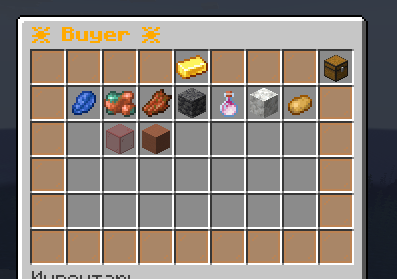
Open the buyer menu and sell items for money. The buyer accepts different items each time you check, rotating every few hours. Complete quests to unlock multipliers that boost your selling prices.
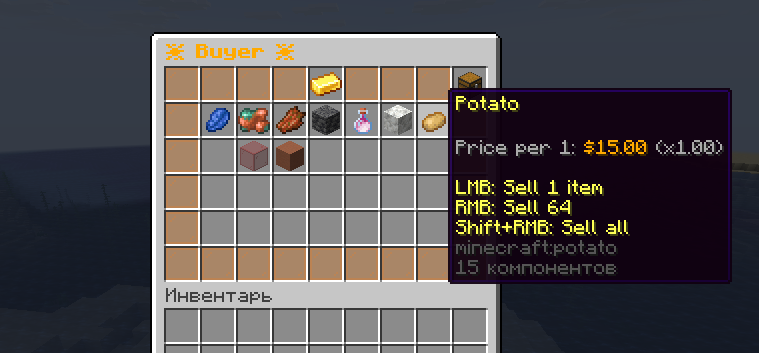
Example: Sell 64 diamonds at 1.0x multiplier = $3,200. Complete quests to reach 3.0x multiplier = $9,600 for the same diamonds.
Features
Dynamic Buyer System
- Random selection of purchasable items - Auto-refresh on configurable timer (default: 6 hours) - Prices scale with your multiplier level
Quest Progression
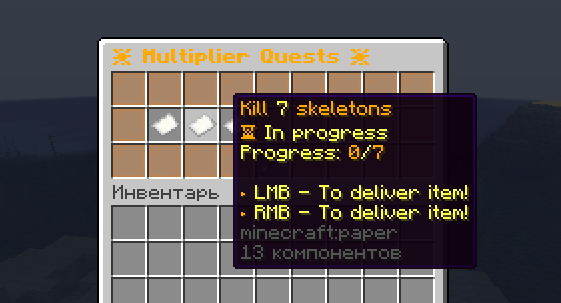
Complete any 3 quests to level up your multiplier: - Kill mobs (zombies, skeletons, withers) - Mine blocks (stone, diamonds, ancient debris) - Craft items (beacons, anvils, golden apples) - Travel to dimensions (Nether, End) - Collect rare items (elytra, totems)
Slot Upgrades
- Start with 9 trading slots - Buy more slots to see more items - Max 12-22 slots (based on permissions)
Commands
``` /buyer - Open the buyer menu /upgradebuyer - Upgrade your trading slots /multiplierquest - View and track quests /refreshlots <player> - Admin: refresh player's items ```
Quick Setup
1. Install Vault + economy plugin (EssentialsX, etc.) 2. Drop plugin in `/plugins` folder 3. Restart server 4. Configure `config.yml` for your economy 5. Done
Configuration Example
```yaml multiplier: base: 1.0 # Starting multiplier per_level: 0.4 # Increase per quest completion max_level: 5 # Maximum level (3.0x multiplier)
upgrade_slot_cost: base: 80000 # First slot upgrade cost per_slot: 10000 # Cost increase per slot ```
Permissions
Slot Limits: - `burzhuy.maxslots.12` - 12 slots (default) - `burzhuy.maxslots.16` - 16 slots - `burzhuy.maxslots.22` - 22 slots
Access: - `burzhuy.buyer` - Use buyer menu - `burzhuy.admin` - Admin commands
Requirements
Minecraft Versions
- 1.19.4 - 26.x (supports new version format) - Works on MC 26.1+ (Tiny Takeover) and all future releases
Server Platforms
- CraftBukkit (multi-threaded, auto-detected) - CraftBukkit (recommended) - CraftBukkit - CraftBukkit - CraftBukkit
One JAR works on all platforms. The plugin automatically detects your server type and uses the appropriate scheduler.
Dependencies
- Economy plugin (required) - Economy plugin (EssentialsX, CMI, etc.)
Java
- Java 25 for MC 26.x - Java 21 for MC 1.21.x - Java 17 for MC 1.20.4 and below
Compatibility
| Minecraft | Java | Folia | Paper | Spigot | Status | |-----------|------|-------|-------|--------|--------| | 26.x | 25 | Yes | Yes | Yes | Tested | | 1.21.x | 21 | Yes | Yes | Yes | Tested | | 1.20.x | 17/21 | No | Yes | Yes | Tested | | 1.19.4+ | 17 | No | Yes | Yes | Tested |
Why Use This
Simple to set up, adds progression without complexity. Works well for survival servers that want players to have a consistent way to earn money while keeping things interesting with rotating items and quest objectives.
Multi-platform support means one plugin JAR works everywhere - Paper, Folia, Spigot, Purpur, or CraftBukkit. No separate builds needed.
Full Folia support with automatic detection and region-based scheduling for multi-threaded performance.
Future-proof with api-version 1.19, ensuring compatibility with MC 1.22, 1.23, 27.x, 28.x and beyond.
Recent Updates (v2.0.5)
- Fixed quest message colors (progress notifications now display properly) - Added Minecraft 26.x support (new version format) - Java 25 compilation support - Multi-platform compatibility (Folia, Paper, Purpur, Spigot, Bukkit) - Automatic platform detection
Support
- bStats Plugin ID: 31144 - See `USER_GUIDE.md` for detailed documentation - See `DEVELOPER_GUIDE.md` for API and contribution info