

1.21.9-1.21.10
release

Changed UI
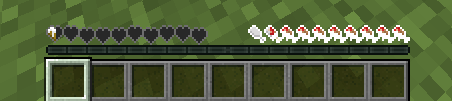
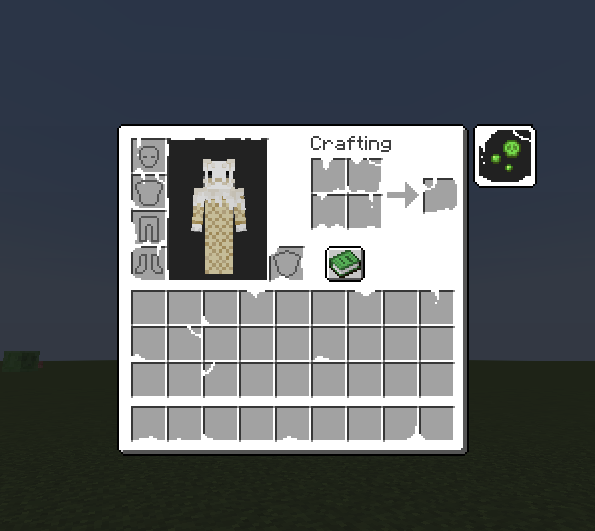
Adds the "Gooey" UI from the Changed Mod to vanilla, nothing else!
 512
512
Changed UI
Changed UI Textures
The "Gooey" UI from the changed mod, now in vanilla!
What does it add?
This resource packs adds the "gooey" hearts and inventory you get while being a latex creature in the Changed Minecraft Mod:
How do I change the color of the hearts and the inventory?
To do this and change the hue or color of the icons, you can follow these steps!
1. Download your desired version 2. Extract the zip into an empty folder: On windows: Microsoft support On unix-based systems (terminal): Run this on your terminal: unzip ChangedUI-Version.zip, Change the version name for your downloaded version 3. On the resourcepack file hiearchy, open this folder: changed-texturesassetsminecrafttexturesgui 4. Edit the icons.png file as you want!
To edit the inventory:
Complete steps 1-3, but instead of staying on gui, open the folder named: "container" and edit the inventory.png file in there.
Credits
Credit to the main changed mod artists for making the base infected / latex textures, I edited them to make them more complete, and not just keep the main hearts
Gallery
Versions
1.21.11
release
26.1-26.1.2
release
1.20.3-1.20.4
release
1.21-1.21.1
release
1.19-1.19.2
release
1.19.4
release
1.21.4
release
1.21.2-1.21.3
release
1.20.2
release
1.21.5
release
1.21.6
release
1.21.7-1.21.8
release
1.20-1.20.1
release
1.20.5-1.20.6
release
1.18-1.18.2
release
1.19.3
release