

1.0.0
release

Chat Remastered
Send images directly in Minecraft chat — just like Discord. Drag & drop or paste from clipboard. Supports PNG, JPEG, WebP and more. Video support planned.
 17
17
Chat Remastered
Chat Media — Media in Minecraft chat
> Send media in chat as easily as messages. > No commands, no setup, no learning. Just chat.
---
⚡ Features
- 🖼 Chat media (instant inline rendering) - ⚡ Instant load + placeholder - 🔍 Fullscreen viewer - 📐 Adjustable media size in chat settings (50%–200%) - 🕐 Upload cooldown system - 🔒 Server moderation (ban / delete media) - 🗂 PNG, JPEG, WebP, BMP, TIFF support (GIF coming soon)
---
📷 Send media instantly
- 🖱 Drag & drop into chat - 📁 Click to open file picker - 📋 Paste with `Ctrl+V`
---
🖼 In-game experience
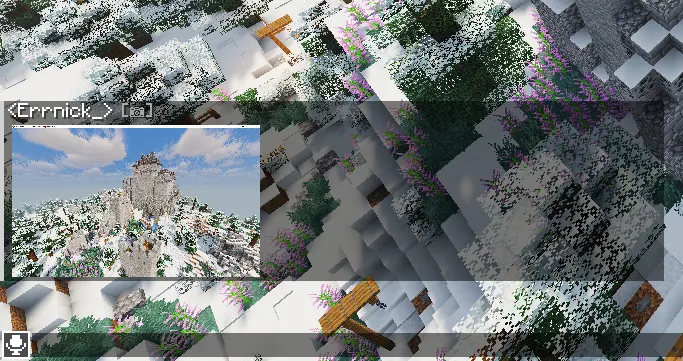
Chat media
Media appears directly inside chat with smooth loading and fullscreen view.
---
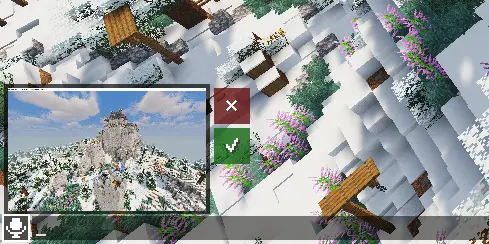
Before sending
Preview your media above the chat input before sending.
---
📋 Requirements
- Fabric Loader 0.18.6+ - Fabric API - Kotlin for Fabric
---
🛠 Installation
Client (required)
1. Install Fabric Loader 2. Install Fabric API 3. Install Kotlin for Fabric 4. Place `chatmedia.jar` into `.minecraft/mods/`
---
Server (required for sending media)
1. Install mod on server 2. Open TCP port 5050 3. Configure `config/chatmedia-server.json`
> ⚠️ Without server mod: players can't send and view media
---
🔒 Server features
- Lightweight media transfer system - Player upload cooldown - Media moderation tools - Fully configurable
---
⚙️ Server config
| Option | Default | Description | |--------|---------|-------------| | `resolution` | `720` | Max media resolution (480 / 720 / HD / 2K) | | `imagePort` | `5050` | TCP transfer port | | `autoDownload` | `false` | Auto-download full media when received | | `photoCooldownSeconds` | `5` | Cooldown between uploads per player |
---
🔧 Operator commands
| Command | Description | |---------|-------------| | `/chatmedia ban <player>` | Block media sending | | `/chatmedia unban <player>` | Restore media sending | | `/chatmedia delete <mediaId>` | Delete media globally |
> Right-click media → copy ID for deletion.
---
📅 Plans
Chat Media is actively maintained and expanding across Minecraft versions and platforms.
📦 Current
- Fabric 1.21.11 ✔
🔜 Coming next
| Platform | Status | |----------|--------| | Fabric 26.x | 🔜 In progress | | Fabric 1.1x-1.2x | 🔜 In progress | | Forge / NeoForge | 📅 Planned | | Quilt | 📅 Planned | | Paper (server plugin) | ⚡ Planned | | Spigot / Purpur | 📅 Planned | | Video support | 🚧 Planned |