






1.0.6
release

ChatFormatter
✔️ Beautify your chat with hover text, clickable messages and more!
 4,40k
4,40k
ChatFormatter
<center>
</center>
> ⚠ This plugin requires PlaceholderAPI and Vault to run!
🌌 Preview:
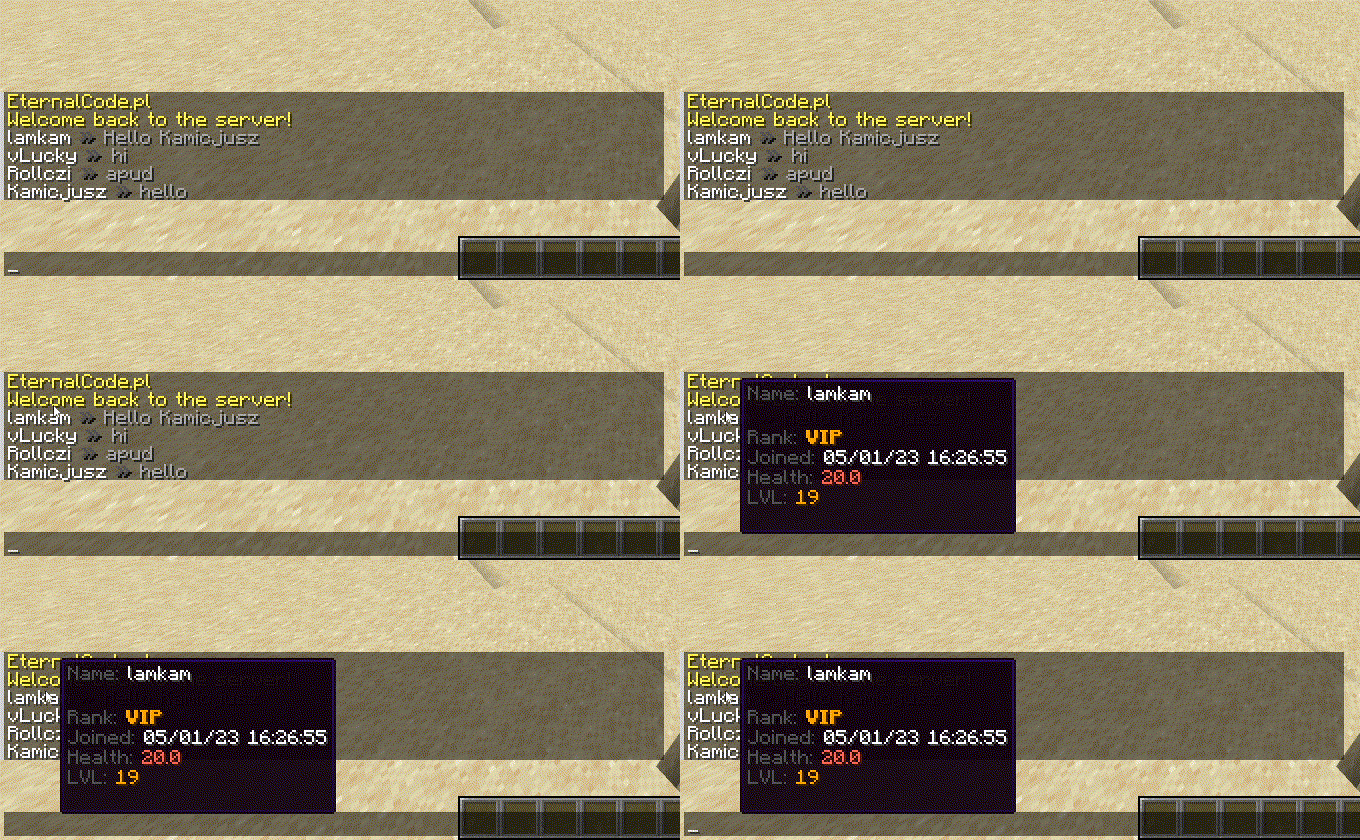
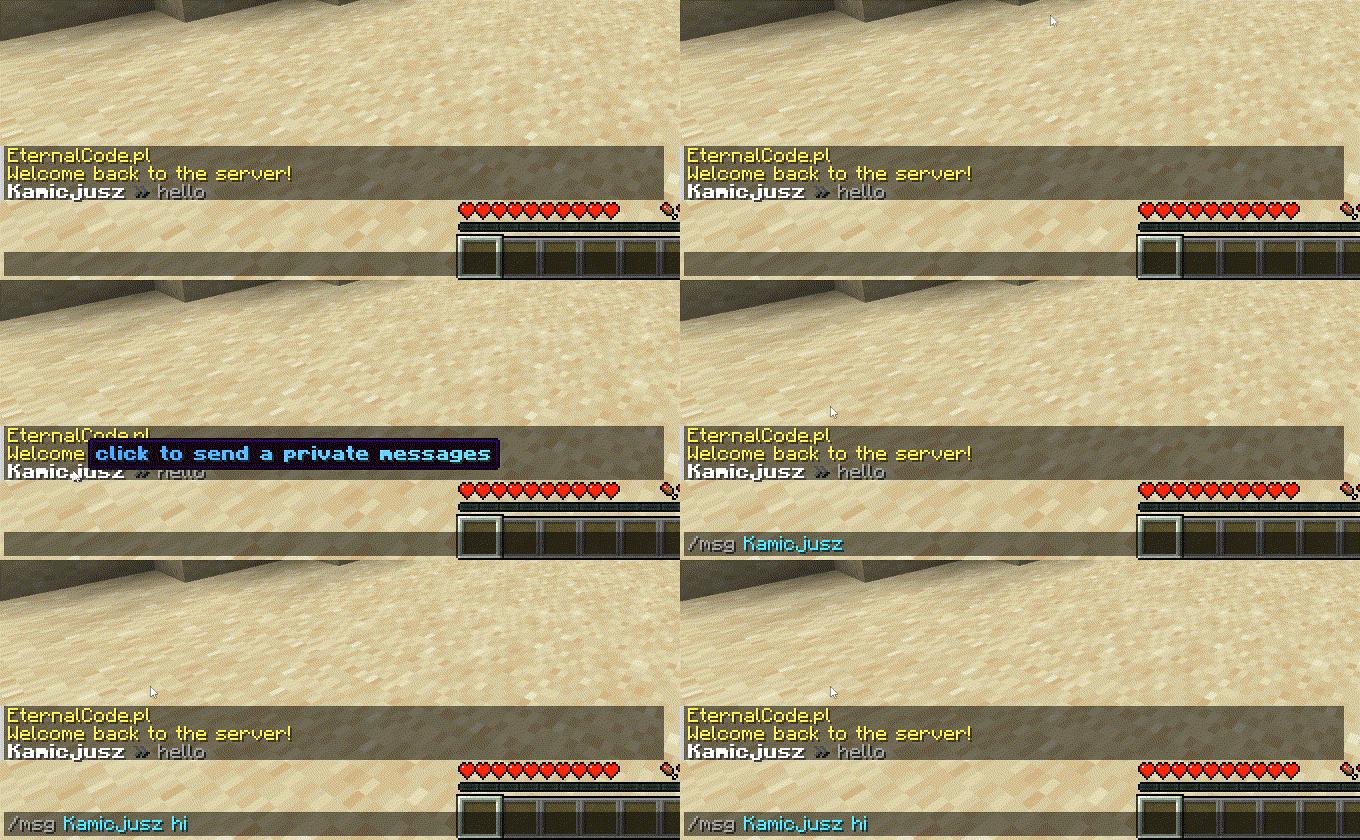
✨ Features:
- PlaceholderAPI Support - MiniMessages Support with Legacy Colors Support! - Template System - Custom Placeholders System - Per-permission miniMessages Tags (see permissions below)
🔗 Useful links:
- Web UI - MiniMessages Format
🔑 Permissions:
> Note: Each color and decoration permission (e.g., `chatformatter.color.white`, `chatformatter.reset`, `chatformatter.decorations.bold`) grants access to both the legacy code (e.g., `&f`, `&r`, `&l`) and the MiniMessage tag (e.g., `<white>`, `<reset>`, `<bold>`).
| Access | Access | |:------------------------------------------|:------------------------------------------------------------------------------------------------------| | `chatformatter.decorations.*` | `<bold>`, `<italic>`, `<underlined>`, `<strikethrough>`, `<obfuscated>`, `&l`, `&o`, `&n`, `&m`, `&k` | | `chatformatter.decorations.bold` | `<bold>`, `<b>`, `&l` | | `chatformatter.decorations.italic` | `<italic>`, `<i>`, `<em>`, `&o` | | `chatformatter.decorations.underlined` | `<underlined>`, `&n` | | `chatformatter.decorations.strikethrough` | `<strikethrough>`, `<st>`, `&m` | | `chatformatter.decorations.obfuscated` | `<obfuscated>`, `<obf>`, `&k` | | `chatformatter.reset` | `<reset>`, `&r` | | `chatformatter.newline` | `<newline>`, `<br>` | | `chatformatter.shadow` | `<shadow>`, | | `chatformatter.gradient` | `<gradient>` | | `chatformatter.rainbow` | `<rainbow>` | | `chatformatter.pride` | `<pride>` | | `chatformatter.transition` | `<transition>` | | `chatformatter.hover` | `<hover>` | | `chatformatter.click` | `<click>` | | `chatformatter.insertion` | `<insertion>` | | `chatformatter.color.*` | All color codes: `<red>`, `<blue>`, `<#a568a9>`, `&c`, `&#a568a9`, etc. | | `chatformatter.color.black` | `<black>`, `&0` | | `chatformatter.color.dark_blue` | `<dark_blue>`, `&1` | | `chatformatter.color.dark_green` | `<dark_green>`, `&2` | | `chatformatter.color.dark_aqua` | `<dark_aqua>`, `&3` | | `chatformatter.color.dark_red` | `<dark_red>`, `&4` | | `chatformatter.color.dark_purple` | `<dark_purple>`, `&5` | | `chatformatter.color.gold` | `<gold>`, `&6` | | `chatformatter.color.gray` | `<gray>`, `&7` | | `chatformatter.color.dark_gray` | `<dark_gray>`, `&8` | | `chatformatter.color.blue` | `<blue>`, `&9` | | `chatformatter.color.green` | `<green>`, `&a` | | `chatformatter.color.aqua` | `<aqua>`, `&b` | | `chatformatter.color.red` | `<red>`, `&c` | | `chatformatter.color.light_purple` | `<light_purple>`, `&d` | | `chatformatter.color.yellow` | `<yellow>`, `&e` | | `chatformatter.color.white` | `<white>`, `&f` | | `chatformatter.score` | `<score>` | | `chatformatter.selector` | `<selector>` | | `chatformatter.font` | `<font>` | | `chatformatter.translatable` | `<lang>` | | `chatformatter.keybind` | `<key>` | | `chatformatter.nbt` | `<nbt>` | | `chatformatter.reload` | `/chatformatter reload` | | `chatformatter.receiveupdates` | receive update announcements for this plugin |
config.yml
```yaml
____ _____ ChatFormatter
/ ___| |__ __ | || ___|__ _ __ _ __ ___ __ | || |_ ___ _ __
| | | ' / ` | __| | / | '__| ' ` / _` | __| __/ _ '__|
| |___| | | | (| | || | () | | | | | | | | (| | || || __/ |
____|| ||__,_|__|_| ___/|| || || ||__,_|__|_____|_|
Do you want to receive updates about new versions of ChatFormatter?
receiveUpdates: true
Chat format for ranks (Vault) Support mini-messages and legacy colors
We're recommending to use webui for mini-messages: https://webui.adventure.kyori.net/
documentation is here: https://docs.adventure.kyori.net/minimessage/format.html
You can check LuckPerms setup and placeholders here: https://luckperms.net/wiki/Placeholders
#
Example usages:
#
Hover message:
One line: <hover:show_text:'<red>test'>TEST
Multiple lines: <hover:show_text:'<red>test'>Test<newline>Test2</hover>
#
Click message:
Open URL: <click:open_url:'https://webui.adventure.kyori.net'>TEST</click>
Run command: <click:run_command:/say hello>Click</click> to say hello
Suggest command: <click:suggest_command:'/msg {displayname}'></click>
#
RGB and gradient message usage:
<color:#ff00ee>Example message</color>
<gradient:#ff00ee:#f79459>Example message</gradient>
#
You can use three more internal placeholders: <displayname> <name> <message>
# defaultFormat: "{displayname} » {message}"
Here you can set different formats for each rank.
Remember! Rank name must be exactly the same as in you permission plugin configuration.
If player have more than one rank remember to correctly setup rank weight configuration
format: default: "{member} &7$hoverName({displayname}) &8» <gradient:#d4d4d4:white>{message} " vip: "{vip} &f$hoverName({displayname}) <dark_gray>» <gradient:#ffd270:white>{message}" mod: "{mod} &f$hoverName({displayname}) <dark_gray>» <gradient:#a3ff9e:white>{message}" admin: "{admin} &f$hoverName({displayname}) <dark_gray>» <gradient:#bac8ff:white><b>{message}" owner: "{owner} &f$hoverName({displayname}) <dark_gray>» <gradient:#ff9195:white><b>{message}"
Placeholders, it allows you to make a shorter text, you can use some prefixes, characters etc.
You can use here PAPI placeholders.
placeholders: {displayname}: "<displayname>" {name}: "<name>" {message}: "<message>" {member}: "<#6e6764>Member" {vip}: "<gold>VIP" {mod}: "<b><#00c900>Mod</b>" {admin}: "<b><#6e86ff>Admin</b>" {owner}: "<b><gradient:#c40000:#e04b4b>Owner</b>" {rankDescription}: "<dark_gray>Rank: <white>%vault_group%" {joinDate}: "<dark_gray>Joined: <white>%player_first_join_date%" {health}: "<dark_gray>Health: <red>%player_health%" {lvl}: "<dark_gray>LVL: <gold>%player_level%" {privateMessage}: "<gradient:#36ff39:#75ff75><i>Click to send private message</i></gradient>"
This section is made for experienced users
It is used to shorten the text even more and keep the clean file!
templates: - "$hoverName($name) -> '<hover:show_text:'<dark_gray>Name: <white>$name<br><br>{rankDescription}<br>{joinDate}<br>{health}<br>{lvl}<br><br>{privateMessage}'><click:suggest_command:'/msg {displayname} '>{displayname}</click></hover>'" ```
Versions
1.2.2
release
1.3.5
release
1.1.1
release
1.3.2
release
1.1.0
release
v1.0.4
release
v1.0.5
release
1.2.1
release
1.2.0
release
v1.0.5
release
1.3.0
release
1.3.4
release
1.1.3
release
1.0.6
release
1.3.3
release
1.0.7
release
1.1.2
release
1.0.7
release
v1.0.4
release
1.3.1
release