







1.10.9
release

Discord-MC-Chat
Discord-MC-Chat (DMCC), formerly known as MC-Discord-Chat and MCDiscordChat (MCDC), is a practical and powerful Fabric and Quilt Minecraft Discord chat bridge inspired by BRForgers/DisFabric
 70,63k
Discord-MC-Chat
Language: English <a href="https://github.com/Xujiayao/Discord-MC-Chat/blob/master/README_CN.md">中文</a>
<p align="center"> <img width=128 src="https://cdn.jsdelivr.net/gh/Xujiayao/Discord-MC-Chat@master/wrapper/src/main/resources/assets/discord-mc-chat/icon.png"> </p>
Discord-MC-Chat
Discord-MC-Chat (DMCC), formerly known as MC-Discord-Chat and MCDiscordChat (MCDC), is a practical and powerful Fabric and Quilt Minecraft <> Discord chat bridge inspired by BRForgers/DisFabric
More information + Docs: Discord-MC-Chat Docs | Xujiayao's Blog
DMCC Discord Server is now public! Join now through: https://discord.gg/kbXkV6k2XU
Introduction
Discord-MC-Chat (DMCC), formerly known as MC-Discord-Chat and MCDiscordChat (MCDC), is a practical and powerful Fabric and Quilt Minecraft <> Discord chat bridge inspired by BRForgers/DisFabric.

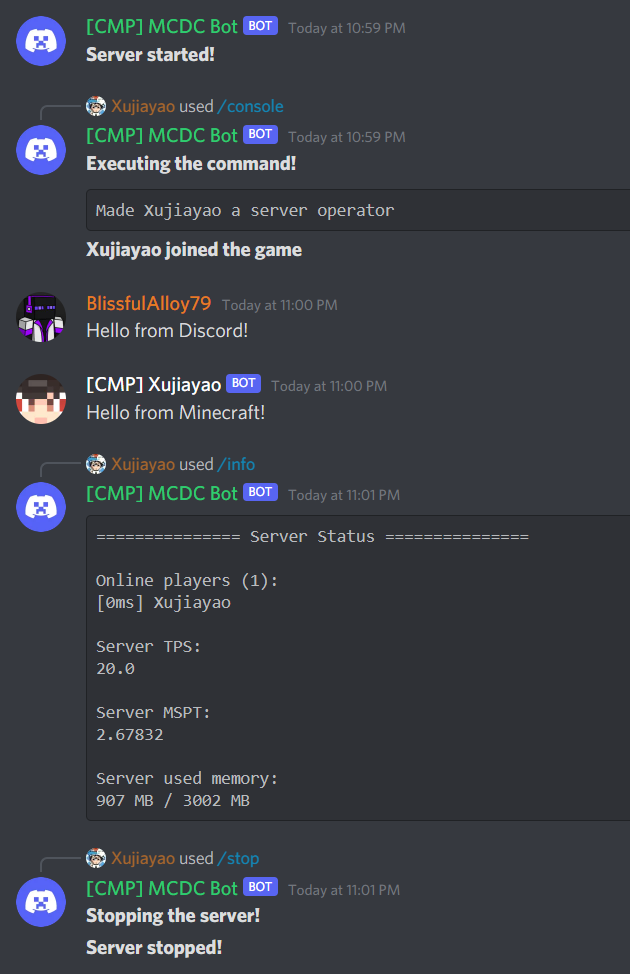
Download
All releases can be downloaded at the following sites:
- Modrinth - CurseForge - GitHub
You can find the latest build JAR files at GitHub Actions.
Support
If there is a bug or suggestion, or something you don't understand, you can submit an issue on GitHub.
DMCC Discord Server is now public! Join now through: https://discord.gg/kbXkV6k2XU
Contributing
You are welcome to contribute to DMCC!
If you are interested in contributing to DMCC, you can submit a pull request on GitHub.
For code contributions, the build file is located in the `/build/` folder.
For translation contributions, language files are located in the `/wrapper/src/main/resources/lang/` folder. Copy `en_us.json` and rename the new one to your language code to get started. Please provide translations for the entire file for all keys.
Features
- Full multi-language support - Support multi-server mode (running more than one Minecraft server with DMCC in the same Discord guild) - Minecraft <> Discord cross server chat - Support disabling Discord and in-game chat broadcasts - Support displaying server status using Discord channel topic feature - Support displaying server status and player count using voice channels - Support displaying server status in bot's Discord online status - Support displaying server player count in bot's Discord activity status - Support Discord Webhook feature - Dynamic-created DMCC Webhook - Customizable Webhook Avatar API that is compatible with mods and plugins for real-time skin changes - Use the bot itself to send chat messages when Webhook is disabled - Support in-game Markdown parsing - Support highlighting and using default Unicode and server custom emoji in-game - Support highlighting stickers in-game - Support highlighting and mentions (@) in-game - Customizable scope of allowed mentions (@) in-game - Support disabling mentions (@) in-game - Support highlighting and opening hyperlinks and GIFs in-game - Support disabling all parsing - Support in-game display of Discord user role colour - Support in-game display of response messages - Support limiting the number of newlines for Discord messages - Broadcast player command execution - Players who execute commands can also see the commands themselves - Exclude broadcasts for execution of specific commands (support regular expression) - Support broadcasting messages sent using /tellraw and /say command - Send all console log messages to Discord - Discord Commands available - Use Discord to manage channels that can execute DMCC commands - Notify in-game players when someone executes an DMCC command - /console command supports Minecraft command auto-completion - Normal Commands - /help | Get a list of available commands - /info | Query server running status - /stats <type> <name> | Query the scoreboard of a statistic - /update | Check for update - Admin Commands - /console <command> | Execute a command in the server console (admin only) - /log <file> | Get the specified server log (admin only) - /reload | Reload Discord-MC-Chat config file (admin only) - /stop | Stop the server (admin only) - Commands with Adjustable Permissions - /whitelist <player> | Add a player to the server whitelist - Minecraft Commands available - Admin-only commands require a level 4 operator at minimum - Normal Commands - /dmcc help | Get a list of available commands - /dmcc info | Query server running status - /dmcc stats <type> <name> | Query the scoreboard of a statistic - /dmcc update | Check for update - Admin Commands - /dmcc reload | Reload Discord-MC-Chat config file (admin only) - Commands with Adjustable Permissions - /dmcc whitelist <player> | Add a player to the server whitelist - Fully customizable message format - Sending specific server messages to Discord can be disabled - In-game - Chat messages from Discord - Response messages from Discord - Messages from other DMCC servers - Discord - Server started - Server stopped - Player joined server - Player left server - Player reached a progress / achieved a goal / completed a challenge - Multilingual support - Support displaying descriptions for task/challenge/goal messages - Player died - Multilingual support - Server MSPT is higher than a certain value - Use admin list to configure user permissions to use special commands - Support Hot Reloading of the config file - Backup every time the config file is loaded - Check for updates regularly - Push DMCC version updates accurately by checking server Minecraft version compatibility - Customizable update notification channel - Check for updates can be disabled - Prompt when the user runs the JAR as an application instead of a Minecraft mod
Languages currently available:
| Code | Language | |---------|-----------------------| | `de_de` | Deutsch (Deutschland) | | `en_us` | English (US) | | `es_es` | Español (España) | | `fr_fr` | Français (France) | | `it_it` | Italiano (Italia) | | `ja_jp` | 日本語(日本) | | `ko_kr` | 한국어(대한민국) | | `no_no` | Norsk Bokmål (Norge) | | `pl_pl` | Polski (Polska) | | `pt_br` | Português (Brasil) | | `ru_ru` | Русский (Россия) | | `tr_tr` | Türkçe (Türkiye) | | `zh_cn` | 简体中文(中国大陆) | | `zh_hk` | 繁體中文(香港特別行政區) | | `zh_tw` | 繁體中文(台灣) |
Contributors
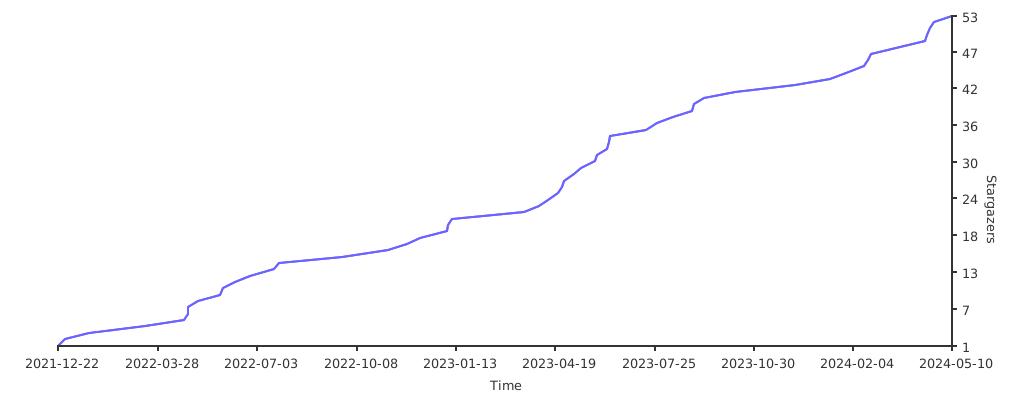
Stargazers over time
License
This project is licensed under the MIT license.
Exceptionally, the `src/main/java/com/xujiayao/discord_mc_chat/utils/MarkdownParser.java` file was obtained from BRForgers/DisFabric on December 31, 2020, licensed under the Mozilla Public License 2.0 (MPL-2.0).
> More details of the `src/main/java/com/xujiayao/discord_mc_chat/utils/MarkdownParser.java` file: > > Author: allanf181 (Allan Fernando) > > Link to the original source: > https://github.com/BRForgers/DisFabric/blob/e0c7601405ee1b3f1de3c3168bc4ddd520501565/src/main/java/br/com/brforgers/mods/disfabric/utils/MarkdownParser.java > > Link to the license: > https://github.com/BRForgers/DisFabric/blob/e0c7601405ee1b3f1de3c3168bc4ddd520501565/LICENSE > > Note that the "Don't Be a Jerk" license used in the newly created project BRForgers/DisFabric-and-DisForge is separate from the old project BRForgers/DisFabric. > > - Any recent changes in the project name and license do not retroactively affect the license terms of the code obtained at a specific moment before, that is, December 31, 2020. > - Any files obtained from BRForgers/DisFabric continue to be subject to the terms of the MPL-2.0 license only. > > Link to the "Don't Be a Jerk" license: > https://github.com/BRForgers/DisFabric-and-DisForge/blob/d1468a6c9b50ba24a250ec370cf645d58dccdfd1/LICENSE.md
Versions
2.0.0-alpha.5
release
2.0.0-alpha.7
release
1.7.0
release
1.9.2
release
2.0.0-alpha.5
release
3.0.0-beta.1-1.21.11
beta
1.9.1
release
1.10.4
release
2.0.0-alpha.5
release
1.10.2
release
2.3.0
release
1.5.3
release
2.0.0
release
1.10.0
release
2.0.0-alpha.5
release
2.7.1-compat.1
release
2.7.0
release
2.4.0
release
2.3.2-compat
release
1.9.3
release
2.0.0-alpha.3
release
2.1.3
release
2.0.0-alpha.1
release
2.2.3
release
1.12.0
release
2.3.4
release
2.0.0-alpha.3
release
2.0.0-alpha.10
release
2.0.0-rc.1
release
1.10.3
release
1.10.7
release
1.11.4
release
2.2.0
release
1.10.10
release
2.3.2
release
2.0.0-alpha.5
release
2.2.5
release
2.0.0-alpha.1
release
1.19.2-2.1.2
release
1.11.2
release
2.3.3
release
2.3.0-compat
release
2.0.0-alpha.4
release
2.1.0
release
2.7.1
release
2.0.0-alpha.6
release
2.0.0-alpha.1
release
2.0.0-alpha.4
release
1.11.3
release
1.12.1
release
1.11.3
release
2.0.0-alpha.3
release
1.20-2.1.4
release
1.6.0
release
1.12.1
release
2.0.0-alpha.4
release
1.12.0
release
1.11.1
release
2.0.0-alpha.4
release
3.0.0-beta.1-26.1.2
beta
2.0.0-alpha.4
release
2.2.2
release
1.10.6
release
2.1.4
release
2.3.4-compat
release
2.4.1
release
1.11.2
release
1.11.1
release
2.2.5-compat
release
1.10.8
release
2.3.1-compat
release
2.1.1
release
1.10.5
release
2.3.1
release
2.6.0
release
2.0.0-alpha.9
release
2.5.0
release
2.2.4
release
1.11.0
release
2.0.0-alpha.5
release
2.0.0-alpha.4
release
1.11.0
release
2.3.5
release
1.10.1
release
2.2.6
release
1.9.0
release
2.0.0-alpha.2
release
1.19.3-2.1.2
release
2.2.1
release
1.8.0
release
2.0.0-alpha.2
release
2.3.3-compat
release
1.20.5-2.3.2
release
1.11.4
release
2.0.0-alpha.2
release
1.11.0
release
2.0.0-alpha.8
release