

1.0.0
release

Enchanted Loom
A plugin for 1.21.11 that adds an Enchanted Loom to Minecraft. This can be configured for survival but allows easier banner creation.
 191
191
Enchanted Loom
EnchantedLoom
EnchantedLoom adds a craftable magical loom block that lets players apply any banner pattern and dye colour through a clean wizard-style GUI — no pattern items required.
Designed for survival servers that want banner design to feel rewarding without the tedious material grind.
---
Features
- Live reload — step through base colour → pattern → pattern colour, one screen at a time - Live reload — players trade in a matching blank banner to receive the finished design (configurable) - Live reload — creative mode players are never required to supply a blank banner - Live reload — name and save banner designs per player, persisted across restarts - Live reload — optionally let all players (or only creative players) browse everyone's saved designs - Live reload — generate any patterned banner via command and give it to any player - Live reload — only the crafted Enchanted Loom opens the custom GUI; regular looms work normally - Live reload — messages, GUI title, item appearance, layer limits, and survival settings - Live reload — apply config changes with `/elreload`, no restart needed
---
Crafting
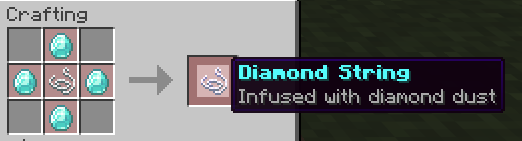
Step 1 — Diamond String — place four diamonds around a piece of string
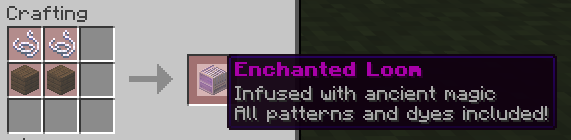
Step 2 — Enchanted Loom — two Diamond Strings on top, two planks on the bottom
---
GUI
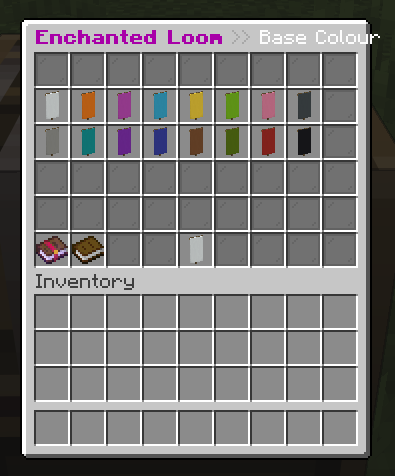
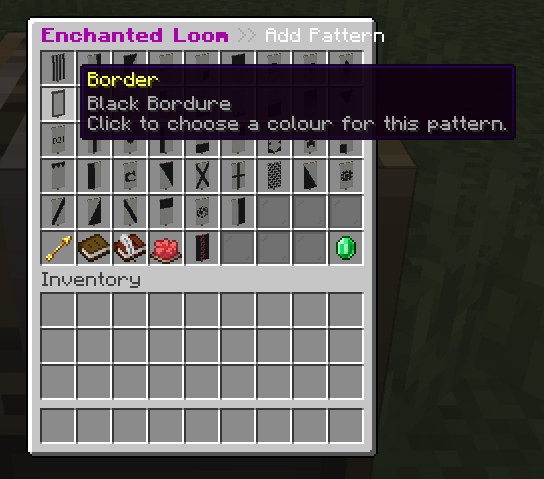
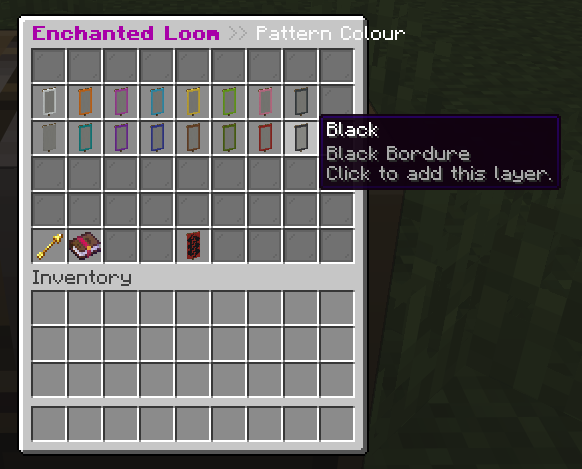
Right-clicking the Enchanted Loom opens a three-step wizard:
1. Pattern Colour — choose the colour of the blank banner 2. Pattern Colour — browse every available Minecraft banner pattern; hover for a tooltip preview 3. Pattern Colour — pick the colour for that pattern layer, then click to add it
Repeat steps 2–3 to layer up to six patterns, then take the finished banner.
---
Saving Designs
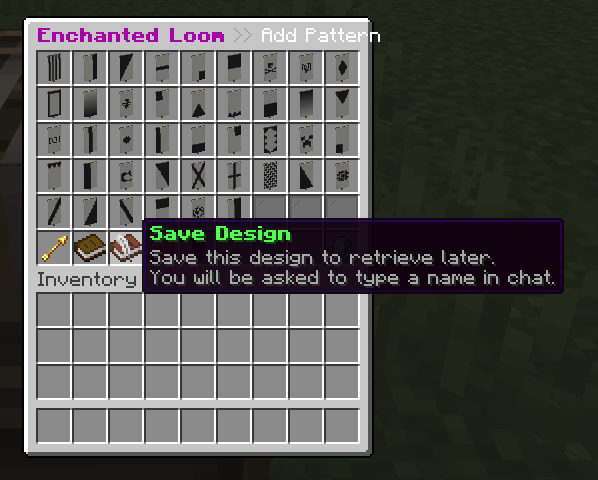
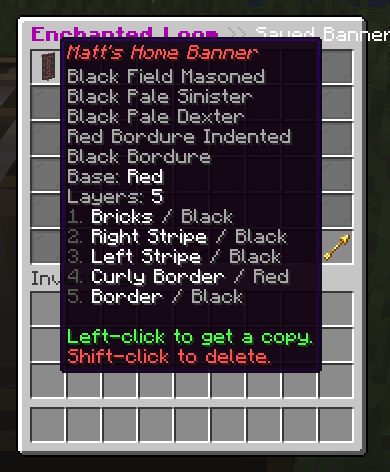
Click Save Design (the book icon) in the pattern picker to name and save your current design via chat. Open the Saved Banners screen at any time — left-click to get a copy, shift-click to delete.
---
Commands
| Command | Description | Permission | |---------|-------------|------------| | `/eloom open [player]` | Open the Enchanted Loom GUI | `enchantedloom.open` | | `/eloom give [player] [amount]` | Give an Enchanted Loom block | `enchantedloom.give` | | `/eloom banner <base> [pattern:color ...]` | Create a patterned banner | `enchantedloom.banner` | | `/eloom reload` | Reload the configuration | `enchantedloom.admin` | | `/elopen`, `/elgive`, `/elbanner`, `/elreload` | Shorthand aliases | *(same as above)* |
`/elbanner` examples ``` /elbanner red stripe_top:white creeper:gold /elbanner white gradient:purple gradient_up:light_blue Steve ```
---
Permissions
| Permission | Description | Default | |------------|-------------|---------| | `enchantedloom.use` | Interact with the Enchanted Loom block | everyone | | `enchantedloom.open` | Open the GUI | everyone | | `enchantedloom.give` | Give Enchanted Loom blocks | op | | `enchantedloom.banner` | Generate banners via command | op | | `enchantedloom.admin` | All of the above + reload + admin delete | op |
---
Configuration Highlights
| Key | Default | Description | |-----|---------|-------------| | `require-blank-banner` | `true` | Survival players must trade a matching blank banner | | `max-banner-layers` | `6` | Maximum layers on a banner | | `global-banners` | `false` | All players can browse every saved design | | `global-creative-banners` | `false` | Creative players can browse every saved design | | `allow-admin-delete-banners` | `false` | Admins can delete any player's saved design | | `item-glow` | `true` | Enchantment glint on the Enchanted Loom item | | `patterns-per-page` | `27` | Patterns shown per GUI page |
Full source and documentation on GitHub.
---
Requirements
- Java 1.21.x - Java 21+