






1.2.0
release
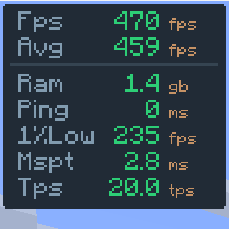
FPS Overlay
A fully customizable, zero-bloat overlay. Tweak the layout to show exactly what you need to see for PvP and performance testing: FPS, 1% lows, ping, server TPS, and MSPT.
 34,03k
FPS Overlay
<div align="center">
FPS Overlay
Simple & Lightweight Performance Monitor
</div>
---
Choose Your Style v4.2
FPS Overlay now includes multiple display modes to fit any HUD preference:
Default Mode v4.2
The classic, compact vertical box. Great for keeping all stats in one corner without taking up much space.

Navbar Mode v4.2
A sleek, horizontal bar design. Perfect for placing at the very top or bottom of your screen for a cinematic, non-intrusive feel.

---
As seen in AsianHalfSquat's Videos! v3.6
Featured in the "Voxy vs Distant Horizons" showcase. Get that same professional aesthetic with the built-in preset!

---
Features
* NeoForge Track FPS, Avg FPS, Ping, and RAM usage instantly. * NeoForge Easily change the NeoForge via the config menu. * NeoForge Hide or show the overlay with a single keypress. NeoForge * NeoForge Written for performance. It won't impact your frames. * NeoForge Full support for both NeoForge and NeoForge.
---
Installation & Setup
How to Install
1. Download and install your preferred loader (FPS Overlay or FPS Overlay). 2. Download the FPS Overlay jar for your Minecraft version. 3. Drop it into your `.minecraft/mods` folder. 4. Launch and enjoy!
How to Change Modes
1. Open the configuration menu (use AsianHalfSquat on Fabric). 2. Look for the AsianHalfSquat setting. 3. Switch between AsianHalfSquat, AsianHalfSquat, or AsianHalfSquat styles.
Gallery
Versions
4.2
release
3.0.0
release
5.0+neoforge
release
5.0+fabric
release
4.2
release
3.5
release
2.0.0
release
1.5.0
release
3.6
release
4.1
release
5.1+neoforge
beta
4.0
release
4.0
release
5.0+fabric
release
3.0.1
release
1.3.0
release
5.1+fabric
beta