

1.1.2
release

FPS hud
High precision FPS displaying mod with a customizable HUD
 36,32k
FPS hud
FPShud,
a mod that displays FPS with high precision on a customizable HUD
Mod features:
- `Max Update Interval` is the main FPS value, regulated by the `Max Update Interval` - `Max Update Interval` is the average FPS value from all the values took in `Max Update Interval` - `Max Update Interval` is the maximum FPS value from all the values took in `Max Update Interval` - `Max Update Interval` is the minimum FPS value from all the values took in `Max Update Interval`
> > `FPShud with default settings`
HUD Features:
- `Polling Rate`: > - `Polling Rate` toggles the entire HUD > - `Polling Rate` changes the X position of the HUD on the screen > - `Polling Rate` changes the Y position of the HUD on the screen > - `Polling Rate` changes the color of the entire HUD > - `Polling Rate` enables or disables the text shadow on the HUD > - `Polling Rate` indicates how frequently the mod should poll FPS
- `After FPS Text` > `Those settings can be changed for every one of the 4 fields:` > - `After FPS Text` toggles the FPS field > - `After FPS Text` indicates the position of the field (first, second, third, fourth) > - `After FPS Text` indicates how many points of precision the field have > - `After FPS Text` changes the text displayed before the specific field FPS value > - `After FPS Text` changes the text displayed after the specific field FPS value
ModMenu config:
- GUI config is accessible from the ModMenu mods list > The config screen is divided into 5 categories: > - General Settings: > >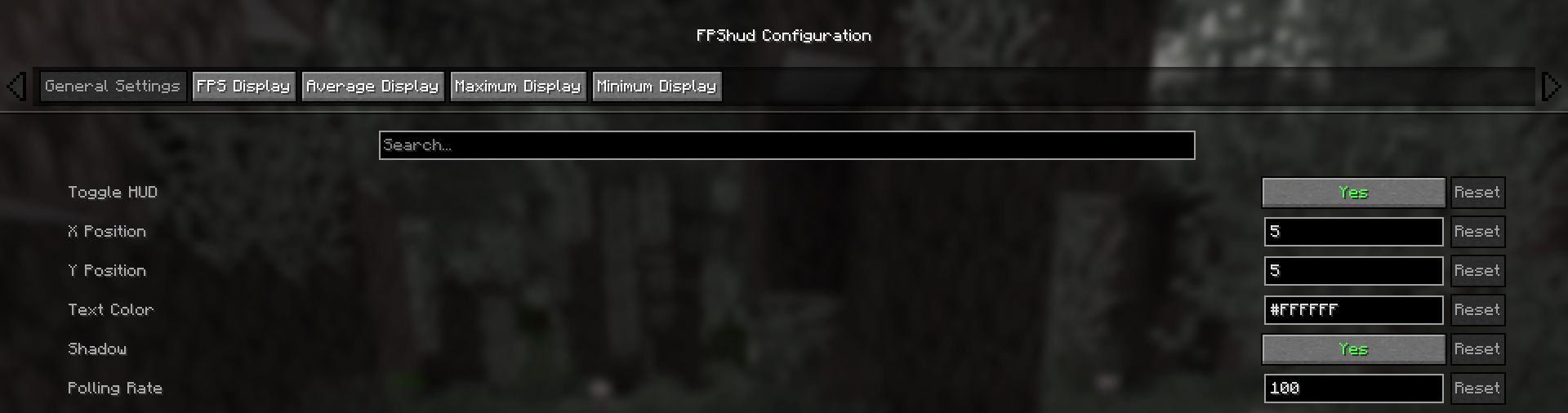 > - FPS Display, Average Display, Maximum Display, Minimum display: > >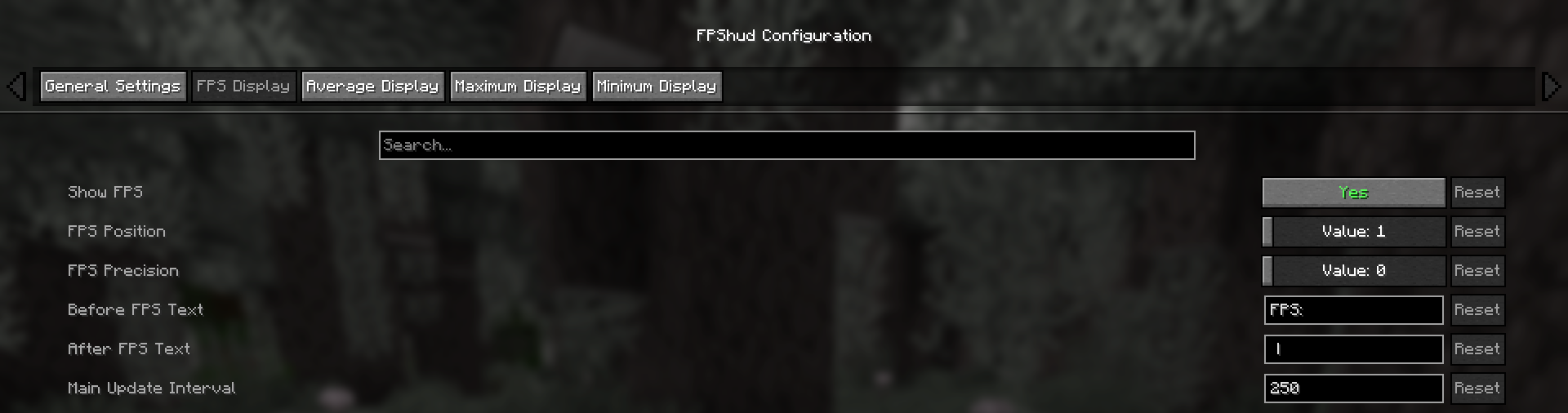
Why FPShud?
`Minimum Update Interval` > FPShud uses time elapsed from frame to frame for the FPS value calculation; > This method of sampling elevates precision and customization, permitting millisecond precise calculations and FPS displaying > > FPShud works with a `Minimum Update Interval` algorithm; samples are taken every frame, then smoothen every poll-time and finally processed to make them match the required > `Minimum Update Interval`, `Minimum Update Interval`, `Minimum Update Interval` and `Minimum Update Interval` requirements > > For those reasons, it is not recommended to set `Polling Rate` and `Update Interval` to low values because results may appear very fluctuating
Highly customizable:
> You can customize the HUD to match every style: > > > `only showing Avr and Max, modified 'Before Text', changed 'Text Color', removed 'Shadow', changed 'Precision' and modified 'Update Intervals'`
Other:
> If you are using ModMenu install ClothConfigAPI to access the config screen
> Don't want ModMenu? The config file is accessible and editable in your config directory, changes apply after a game restart
> Settings will be saved in your config folder and updated at runtime
> The mod is client side (works on multiplayer)
Links:
> - GitHub page > - Modrinth page > - Changelogs > - Report an issue
Versions
1.0.0
release
1.1.1
release
1.1.2
release
1.1.2+1.21.9-1.21.11
release
1.1.2
release
1.1.0
release