

1.2.16
release

FRSpawnProtection
Prohibits interaction with blocks within a certain radius until you have played the required number of minutes.
 934
934
FRSpawnProtection
FRSpawnProtection
It is a _within the spawn radius until players accumulate a certain amount of playtime_ and _within the spawn radius until players accumulate a certain amount of playtime_ plugin designed to _within the spawn radius until players accumulate a certain amount of playtime_ on your Minecraft server. It restricts player interaction with blocks and containers (chests, shulker boxes, furnaces, etc.) _within the spawn radius until players accumulate a certain amount of playtime_. This plugin is perfect for servers where protecting the starting area from griefing and theft is crucial.
> There might be mistakes in the English localization!
> Official RU localization: Copy & Download
Key Features
- Spawn Area Protection: Restricts interaction with blocks and containers within the spawn radius.
- Customizable Settings: All parameters can be configured via the config file.
- Support for All Container Types: Works with chests, shulker boxes, furnaces, hoppers, and more.
- Special Stick: Admins can use a special stick to remove protection from specific containers.
- Auto-Save Data: Player playtime and exclusion data are saved automatically.
- Multi-World Support: The plugin works across all worlds on your server.
- Localization: All messages can be customized via the configuration file.
Player's view

Special Stick (/frsp stick)

Special Stick using messages

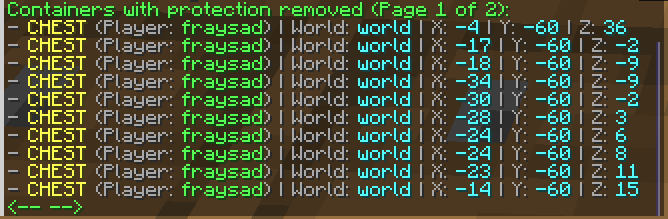
List of containers with protection removed (/frsp show)
Plugin Configuration
All plugin settings are located in the ```config.yml``` file. You can configure:
- Protection radius. - Required playtime to lift restrictions. - Auto-save interval. - Player messages. - Types of protected containers.
```
Number of blocks in each direction from the spawn point (/setworldspawn) within which protection is active
protection-radius: 200
Time required to play to remove restrictions (default 120 minutes = 2 hours)
required-play-time: 120
Auto-save interval for plugin data in minutes (default 120 minutes = 2 hours)
auto-save-interval: 120
Protection settings for each container type
protected-containers: CHEST: true TRAPPED_CHEST: true BARREL: true SHULKER_BOX: true BLACK_SHULKER_BOX: true BLUE_SHULKER_BOX: true BROWN_SHULKER_BOX: true CYAN_SHULKER_BOX: true GRAY_SHULKER_BOX: true GREEN_SHULKER_BOX: true LIGHT_BLUE_SHULKER_BOX: true LIGHT_GRAY_SHULKER_BOX: true LIME_SHULKER_BOX: true MAGENTA_SHULKER_BOX: true ORANGE_SHULKER_BOX: true PINK_SHULKER_BOX: true PURPLE_SHULKER_BOX: true RED_SHULKER_BOX: true WHITE_SHULKER_BOX: true YELLOW_SHULKER_BOX: true HOPPER: true DROPPER: true DISPENSER: true FURNACE: true BLAST_FURNACE: true SMOKER: true
General setting for all blocks (except containers)
protect-all-blocks: true
And lots of messages settings
```
##
Commands and Permissions
### | Commands | Permissions | Description | |---------------------|:---------------------:|---------------------:| | /frsp reload | frsp.reload | Reloads the plugin configuration | | /frsp stick | frsp.getstick | use a special stick for removing container protection | | - | frsp.usestick | Allows the use of the special stick | | /frsp show | frsp.show | Displays a list of containers with removed protection | | -| frsp.bypass | Allows players to bypass plugin restrictions. | |- | frsp.notify | Allows players to receive interaction restriction notifications. |
Installation
- Download the plugin from this page. - Place the ```.jar``` file in your server's plugins folder. - Restart the server. - Configure the plugin via the ```config.yml``` file.
Links
- Discord: link - Mail: frsdevmc@gmail.com
Gallery
Versions
1.2.17
release