

3
release
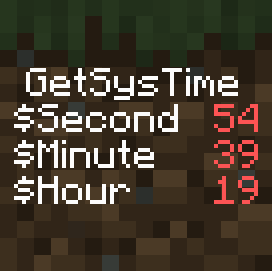
Get SysTime
A simple data pack that allows you to get your system time in Minecraft.
 85
85
Get SysTime
A simple data pack that allows you to get your system time in Minecraft.
Need snapshot 23w03a or newer !
For older versions see : https://www.planetminecraft.com/data-pack/systime/
How to get the time :
• Use /function getsystime:set to place the command block and the marker used to get the time. It is recommended that you place it on the world spawn. If your world already had this installation, it will be replaced.
• Use /scoreboard objectives setdisplay sidebar GetSysTime to store the current time in the /scoreboard objectives setdisplay sidebar GetSysTime, /scoreboard objectives setdisplay sidebar GetSysTime and /scoreboard objectives setdisplay sidebar GetSysTime Fakeplayers of the /scoreboard objectives setdisplay sidebar GetSysTime scoreboard and the full time in the /scoreboard objectives setdisplay sidebar GetSysTime storage under the /scoreboard objectives setdisplay sidebar GetSysTime path. You can use /scoreboard objectives setdisplay sidebar GetSysTime to see it easily.
• If you are in snapshot 23w31a or newer the time is also store in the storage time under the time path.
• To uninstall, just use /function getsystime:uninstall
This data pack is under this licence. By downloading it, you accept it. https://creativecommons.org/licenses/by-sa/4.0/legalcode