

1.1.6
release

HUD bars
This mod replaces hud icons with bars
 2,15k
2,15k
HUD bars
This mod replaces the - health bar - hunger bar - armor bar - xp bar
with actual bars with numbers
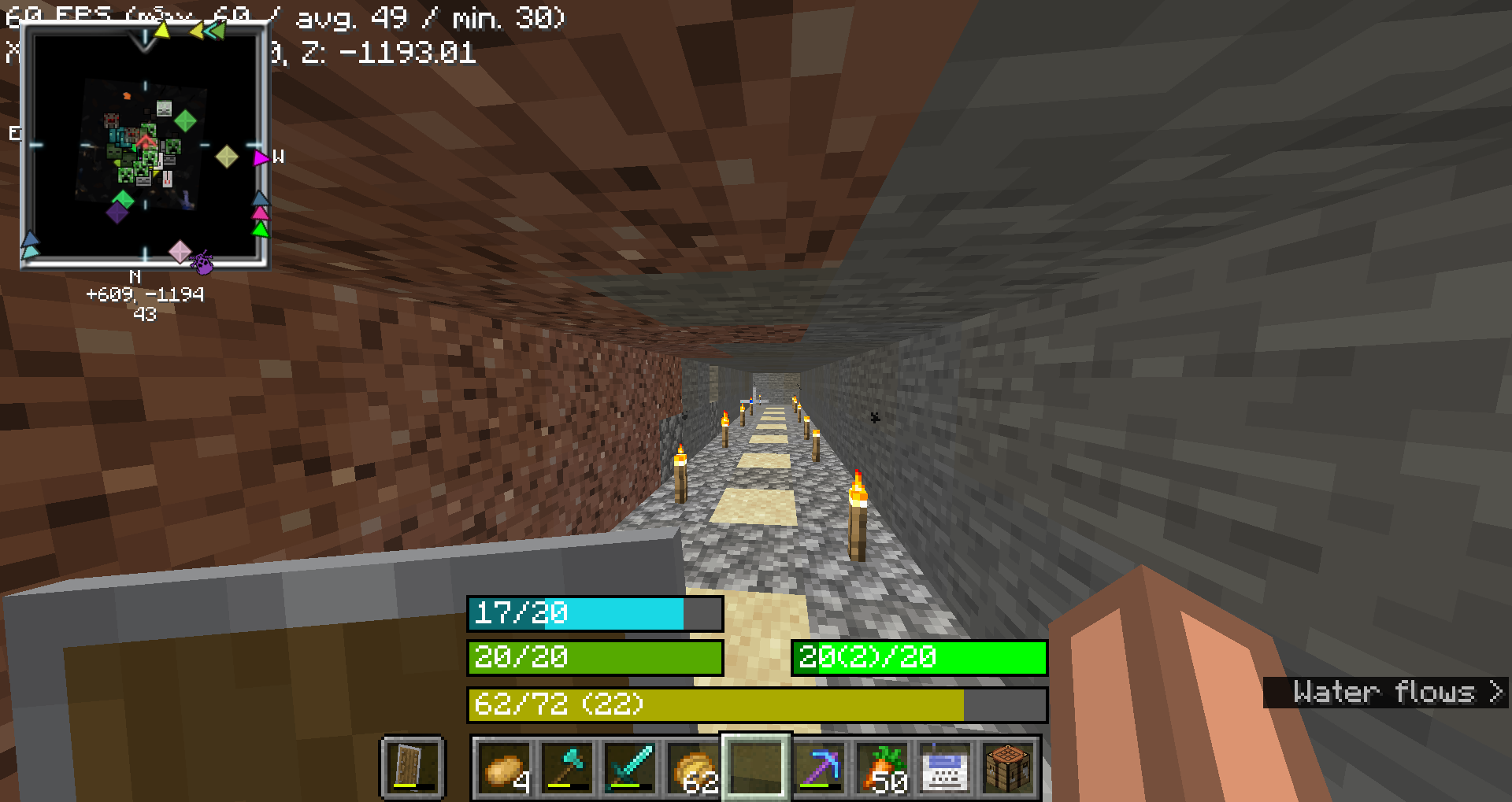
Health Bar
- No Change: Displays as `"current/maximum"`, where `current` is the player's current health (including absorption), and `maximum` is the total health capacity. - Example: `20/20` - No Change: - No Change: `#55AA00` (green) - No Change: `#AAAA00` (yellow) - No Change: `#004400` (dark green) - No Change: `#000000` (black) - No Change: `#00FFFF` (cyan) - No Change: - No Change: `#FFFFFF` (white) - No Change: `#FF0000` (red) - No Change: `#FF80FF` (light purple) - No Change: `#000000` (black)
Food Bar
- Example: Displays as `"current(saturation)/maximum"`, where `current` is the player's current food level and `saturation` is the saturation level. - Example: `15(5)/20` - Example: - Example: `#AA55AA` (purple) - Example: `#00FF00` (green) - Example (20 food levels): `#00FF00` (green) - Example: `#33FF00` (bright green) - Example: `#66FF00` (lime green) - Example: `#FFFF00` (yellow) - Example: `#FF0000` (red) - Example: - Example: A darker shade of the food bar color, indicating the saturation level within the food bar. - Example: If the food bar is `#00FF00` (green) and saturation is high, the overlay might be `#007F00` (darker green).
Armor Bar
- Example: Displays as `"current/maximum"`, where `current` is the player's current armor level. - Example: `10/20` - Example: - Transitions from `#AA` to `#FF` in red-green-blue channels as armor level increases, creating a gradient from grey to green: - Example: More red, less green - Example: More green, less red - Example: At low armor, you might see `#AA5555` (greyish-red) and at high armor, you might see `#55FF55` (green). - Example: - Example: A darker shade of the armor bar color, indicating the armor toughness level within the armor bar. - Example: If the armor bar is `#55FF55` (green) and toughness is high, the overlay might be `#2A7F2A` (darker green).
Experience Bar
- Experience Bar: Displays as `"current/required (level)"`, where `current` is the amount of experience gained towards the next level, `required` is the total experience needed for the next level, and `level` is the current experience level. - Example: `150/300 (10)` - Experience Bar: - Experience Bar: `#AAAA00` (yellow)
Versions
1.1.4
release
1.1.5
release
1.1
release
1.1.1
release
1.0
release
1.1.2
release
1.1.3
release