

1.3.0-mc1.20
release

Labelling Containers
A multiplayer compatible mod that allows players to set icons and label chests, shulker boxes, barrels and other containers without the need of signs.
 78,20k
Labelling Containers
<br/><br/><img src="https://cdn.modrinth.com/data/b2T42hfY/images/cc27b05693aa6dae46db0000dd8506a6f09af542.png" /> <br/><br/><br/>
> ### A mod that makes easy labelling *chests*, *shulker boxes*, *barrels* and other containers without the use of signs. <br/><br/>
Check out my Discord Server to suggest features and add compatibility with other mods!<br/>
How to use
This mod adds a Label printer which is an item that can set a label and an icon to a container.
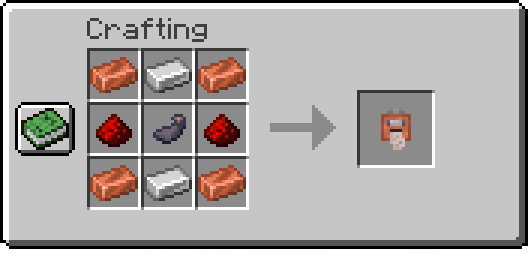
Printing labels:
To use the paper, right-click while holding it, and it'll open a menu where you can set your icon and label. Finally, have paper in your inventory and shift-right-click a chest or compatible container to set them.
Copying labels from existing ones:
When holding the Label Printer, shift-right-click to switch to *Copy mode*. Then shift-right-click on a container that has a label already set to copy its icon and text.
<br/>
Commands
`/labelposition`
Sets the current player's HUD position. Available positions are:
- `center-right` (default) - `center-left` - `left` - `top` - `top-left`
Examples:
- Set the current HUD position to `left`: ```minecraft /labelposition left ```
`/setlabel`
Requires *admin* permissions. Sets the label / icon of the selected container.
Examples:
- Setting the label of a block at <x> <y> <z> coordinates: ```minecraft /setlabel <x> <y> <z> label I'm a dirt chest! ``` - Setting the icon of a block at <x> <y> <z> coordinates: ```minecraft /setlabel <x> <y> <z> icon minecraft:dirt ```
`/labelconfig`
Requires *admin* permissions. Adds/removes blocks that can be labeled from the config.
> NOTE: All blocks that have a Block Entity associated with them can be labeled. > <br/>To check if a block can be added to the config and used correctly try *shift-right-clicking* on it with the *Label Printer* item, > and if it displays something like "You can't tag this block", that block can be added to the config
Examples:
- Add the Bell block to the config: ```minecraft /labelconfig add-item minecraft:bell ``` - Add the Bell block to the config (while having the block in player's hand): ```minecraft /labelconfig add-hand ``` - Remove the Bell block from the config: ```minecraft /labelconfig remove-item minecraft:bell ``` - Remove the Bell block from the config (while having the block in player's hand): ```minecraft /labelconfig remove-hand ```
Gallery
Versions
1.9.0
release
1.1.6
release
1.2.2
release
1.2.1
release
1.4.5-fabric
release
1.2.0
release
1.2.3
release
1.3.0-mc1.19.2
release
1.7.1
release
1.5.0-neoforge
release
1.3.0
release
1.1.7-mc1.19.4
release
1.8.0
release
1.1.7-mc1.19.3
release
1.5.2-fabric
release
1.3.0-mc1.20.2
release
1.8.1
release
1.5.0-fabric
release
1.6.3
release
1.4.0-fabric
release
1.1.5
release
1.4.3-fabric
release
1.1.7-mc1.19.2
release
1.1.6
release
1.5.0-forge
release
1.4.4-fabric
release
1.2.3-mc1.20
release
1.7.0
release
1.9.3
release
1.5.1-neoforge
release
1.0.0
release
1.2.2
release
1.5.2-forge
release
1.3.1
release
1.5.1-fabric
release
1.4.4-forge
release
1.1.6
release
1.4.0-forge
release
1.1.0
release
1.6.0
release
1.6.2
release
1.9.2
release
1.1.3
release
1.3.0-mc1.19.4
release
1.5.1-forge
release
1.3.0-mc1.20.1
release
1.8.2
release
1.6.4
release
1.6.1
release
1.1.2
release
1.4.5-forge
release
1.9.1
release
1.3.0-mc1.19.3
release
1.4.3-forge
release
1.2.4-mc1.20.1
release