

1.2.5
release
LOTR Info
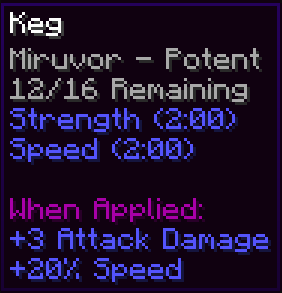
Adds hover tooltips to Pouches (chest-like GUI), Weapons (bane tracker), Kegs (brew info), and a Time HUD for LOTR: Renewed Extended.
 53
53
LOTR Info
Basic Info
LOTR Info is a mod for LOTR: Renewed Extended that adds highly customizable hover tooltips to pouches, kegs, and weapons with bane progress along with a HUD for the LOTR daylight cycle.
Cloth Config API Is required for the in-game config menu, if that’s not an option you can use the custom command config, or edit `lotrinfo-client.toml` in your .minecraft/config folder. If you’re not using the GUI you should read the config section of this description so you can understand all the options.
If you find an isssue that isn't in "Known Issues" at the bottom of this page, let me know and I'll try to fix it. You can comment bugs here
Pouch Tooltips

You can turn off or customize the colored background, and show some default lines of lore.
Bane Tracker Tooltips

The lines are always sorted by the number of kills, but you can customize how they will look.
Keg Tooltips

You can disable the drink’s lore, or require shift (rebindable)
Time HUD

Time left is exactly when mobs will start or stop spawning, which I tested to be 26,375-45,625 out of the 48,000 tick cycle.
Keybinds
- Hover Inside Pouches (default: not bound) - Hover Inside Pouches (default: Left Shift) - Hover Inside Pouches (Default: Control + H) - Hover Inside Pouches (Default: not bound) - Hover Inside Pouches (default: Left Control)
Commands
You can use /li, or /li for short. The config file directory is used as the command directory, so you'll see each config tab show up as an argument, with specific config options or subdirectories after.
There are also hard coded options, "reset" and "reset". All flattens the directory so that every option will show up after /li all. Reset allows you to reset all the options in a given category, every single option, or the keybinds from this mod.
When setting the value of a config option, there are always two other options, "reset", and "reset". Help will send a message in chat with the display name, description, value type, and default value. Reset will reset this specific setting to it's default value.
Features and Configuration
All text editing allows the use of formatting codes, so &e is yellow.
General Settings `general_settings`
- Enable Mod - Toggles all mod functionality. `enable_mod` default:`true`
- Percentage Rounding - Choose what number to round the percentage displays to, for example 0.1 rounds to tenths. `percentage_rounding` default:`0.01`, range:`0.001-100`
Pouch Tooltips `pouch_display`
- Enable Pouch Tooltips - Toggles the pouch tooltips display. `enable_pouch` default:`true`
- Hold Key for Pouch Tooltips - Requires the "Show Hidden Tooltips" keybind to be pressed for the pouch tooltips display. `pouch_key_required` default:`false`
- Deitalicize Pouch Names - Removes the italic styling on pouch names in tooltips and above the hotbar. `deitalicize_name` default:`true`
- Return Mouse on Release - Resets the cursor to where it was before you pressed the "Hover Items in Pouch" key. `mouse_reset` default:`true`
- Pouch Coloring - Color background slots based on pouch color. `pouch_coloring` default:`true`
- Default Background Color - Hex color for the background if Pouch Coloring is off or pouch isn't dyed (#RRGGBB). `default_bg_color` default:`"#FFFFFF"`
Lore Hiding Options
(First option is to hide a line, second is to invert that when the "Show Hidden Tooltips" key is held.) - Picked Up New Items - Toggle the LOTR Provided item list. `hide_item_list` default:`true`, `invert_hide_item_list` default:`false` - Picked Up New Items - Toggle the slots in use counter from LOTR. `hide_slots_counter` default:`true`, `invert_hide_slots` default:`true` - Picked Up New Items - Toggle the dyed text from vanilla and LOTR. `hide_dyed` default:`true`, `invert_hide_dyed` default:`true` - Picked Up New Items - Hide "Picked up new items" text. `hide_picked_up_new` default:`true`, `invert_hide_picked_up` default:`true`
Bane Tracker `bane_tracker`
- Enable Bane Tracker - Toggles the bane tracker display. `enable_bane` default:`true`
- Hold key for Bane Tracker - Requires the "Show Hidden Tooltips" keybind to be pressed to see the keg tooltips. `bane_key_required` default:`true`
- Bane Text Format - How the bane tracker display will look. `bane_text_format` default:`"&7%race% - %kills%/100"`
Category Specific Variables:
- %kills% - The race to get bane against. - %kills% - The number of kills on that race.
Time HUD `time_hud`
- Enable Time HUD - Toggles the time hud display. `enable_hud` default:`true`
- Display Format - How the text will look. `hud_format` default:`"&e%h%:%m% %a% &7(%m_left%m %s_left%s left)"`
- Text Shadow - Toggles text shadows in the HUD. `hud_shadow` default:`true`
- Text Background - Toggles the text background of the HUD. `hud_background` default:`false`
- Background Color - The color of the text background in ARGB (#AARRGGBB) Hex format. The format goes like this: alpha (transparency), red, green, and blue intensity, with two digit numbers from 0 to F where A = 11, #80FF0000 would be 50% transparency with 100% red. `hud_background_color` default:`"#40000000"`
- Text Size (%) - The size of the text in the time hud, 50% would be half the size and 200% would be double. `hud_scale` default:`100` range:`1.0-1000.0`
- Vertical Position (%) - The percent of the way down your screen the hud will appear from the HUD's anchor point. `hud_y` default:`1` range:`0.0-100.0`
- Vertical Anchor - Display the HUD above, in the middle, or below the vertical position. (anchor top = display below) `hud_y_anchor` default:`"TOP"` allowed values:`TOP, MIDDLE, BOTTOM`
- Horizontal Position (%) - The percent of the way across your screen from the left that the hud will appear from the HUD's anchor point. `hud_x` default:`0.5` range:`0.0-100.0`
- Horizontal Anchor - Display the HUD to the left, center, or right of the horizontal position. (anchor left = display right) `hud_x_anchor` default:`"LEFT"` allowed values:`LEFT, CENTER, RIGHT`
Category Specific Variables:
- %!dn% - The in game daylight cycle's hours. (12-hour) - %!dn% - The in game daylight cycle's hours. (24-hour) - %!dn% - The in game daylight cycle's minutes. - %!dn% - AM or PM for the 12 hour clock. - %!dn% - The amount of real minutes into the game's 40 minute daylight cycle. - %!dn% - The amount of real seconds into the game's daylight cycle % 60. (remainder after minutes) - %!dn% - The amount of real minutes until mobs will start/stop spawning for the night. - %!dn% - The amount of real seconds until mobs will start/stop spawning for the night % 60. - %!dn% - says if it's currently "Day" or "Night" for the time left display. - %!dn% - inverted version of %dn% Day = Night, Night = Day.
Keg Tooltips `keg_tooltips`
- Enable Keg Tooltips - Toggles the keg tooltips display. `enable_keg_info` default:`true`
- Hold key for Keg Tooltips - requires the "Show Hidden Tooltips" keybind to be pressed to see the keg tooltips. `keg_key_required` default:`false`
- Show Drink Lore - Shows the lore of the drink brewed inside the keg below the other info. `show_drink_lore` default:`true`
- When to Show Drink Lore - Determines when the Drink Lore is visible, held means the "Show Hidden Tooltips" keybind is down, finished means the keg is done brewing. `lore_display_mode` default:`"FINISHED_OR_HELD"`, allowed values:`ALWAYS, IF_FINISHED, IF_HELD, FINISHED_OR_HELD, FINISHED_AND_HELD`
- Line Editing - Not Started - Text that will display on kegs with a recipe that haven't started. `not_started_lines` default:`["&7%type%", "&7Not Started"]`
- Line Editing - Brewing - Text that will display on kegs that were in the middle of brewing. `brewing_lines` default:`["&7%type% - %potency%", "&7%percent%% %m%m %s%s Left", "&8%percent_max%% %m_max%m %s_max%s Max"]`
- Line Editing - Finished - Text that will display on kegs that have finished brewing. `finished_lines` default:`["&7%type% - %potency%", "&7%count%/16 Remaining"]`
Category Specific Variables:
- %s_max% - The name of the brewed drink, ex: "Athelas Brew". - %s_max% - The Potency level. (if it's currently breing it'll show the potency level that it's brewing, not the one it already achieved) - %s_max% - The number of remaining drinks. - %s_max% - The percentage progress towards the next potency tier. - %s_max% - The percentage progress towards the maximum potency tier. - %s_max% The number of minutes left until the next potency tier. - %s_max% The number of seconds left until the next potency tier % 60. (remainder after minutes) - %s_max% The number of minutes left until the maximum potency tier. - %s_max% The number of seconds left until the maximum potency tier % 60.
Known Issues
- Tooltips in variables on the config screen render behind the scrollbar.
- Config word wrap doesn't preserve § format coloring.
- Pouch Lore is not being hidden in a dynamic way (won’t work with different languages).
- LOTR tooltips have a word wrap function which breaks the pouch tooltips on high GUI scale to resolution ratios.