

3.6.6
release

LPC Minimessage - Chat Formatter
A chat formatting with Minimessage Support plugin for LuckPerms.
 49,59k
LPC Minimessage - Chat Formatter

<p align="center"> <a href="https://modrinth.com/plugin/vsit"> <img src="https://raw.githubusercontent.com/vLuckyyy/badges/main/avaiable-on-modrinth.svg" alt="Available on Modrinth" /> </a> </p>
<p align="center"> <a href="https://discord.gg/ZPyb9g6Gs4"> <img src="https://img.shields.io/discord/1322873747535040512" alt="Discord"> </a> <a href="https://github.com/Ayont/LPC-with-minimessage/actions/workflows/build.yml"> <img src="https://img.shields.io/github/actions/workflow/status/Ayont/LPC-with-minimessage/build.yml?branch=main" alt="Build Status"> </a> <a href="https://github.com/Ayont/LPC-with-minimessage/releases"> <img src="https://img.shields.io/github/v/release/Ayont/LPC-with-minimessage" alt="Latest Release"> </a> </p>
LPC – LuckPerms Chat Formatter ✨
A flexible chat formatting plugin with MiniMessage support for LuckPerms
> Modern chat formatting powered by MiniMessage, full LuckPerms metadata support, group/track formats, and PlaceholderAPI!
---
🔧 Requirements
- LuckPerms *(Required)* – Permissions plugin - PlaceholderAPI *(Optional)* – Additional placeholders
---
✅ Features
- Full MiniMessage formatting support - Group and track-specific chat formats - Optional support for PlaceholderAPI - Supports `[ITEM]` placeholder in chat - Customizable reload message - No legacy color codes – modern MiniMessage only
---
🧑💼 Permissions
| Command / Feature | Permission Node | Description | |--------------------------|------------------------|--------------| | `/lpc reload` | `lpc.reload` | Reloads the configuration | | MiniMessage colors | `lpc.colorcodes` | Allows using MiniMessage color codes | | `[ITEM]` Placeholder | `lpc.itemplaceholder` | Enables the `[ITEM]` placeholder in chat |
---
⚙️ Configuration (`config.yml`)
```yaml
LPC Configuration
Main chat format (MiniMessage!)
chat-format: "{prefix}{name}<dark_gray> »<reset> {message}"
Format per group (optional)
group-formats:
default: "<gray>[User]</gray> {name}<dark_gray> »<reset> {message}"
admin: "<red>[Admin]</red> {name}<dark_gray> »<reset> {message}"
Format per track (optional)
track-formats:
staff_track: "<gold>[Staff]</gold> {name}<dark_gray> »<reset> {message}"
donator_track: "<aqua>[Donator]</aqua> {name}<dark_gray> »<reset> {message}"
Enable the [ITEM] placeholder
use-item-placeholder: true
Reload message
reload-message: "<green>LPC configuration reloaded successfully!" ```
---
🪄 Available Placeholders
| Placeholder | Description | |-------------------------|-------------| | `{message}` | The chat message | | `{name}` | Player's name | | `{displayname}` | Display name / nickname | | `{world}` | Player's current world | | `{prefix}` | Highest priority prefix | | `{suffix}` | Highest priority suffix | | `{prefixes}` | Sorted list of all prefixes | | `{suffixes}` | Sorted list of all suffixes | | `{username-color}` | Username color from meta | | `{message-color}` | Message color from meta |
> ℹ️ MiniMessage format All color values (prefix, suffix, etc.) must be in MiniMessage format – no legacy codes (`&a`, `§b`, etc.)
---
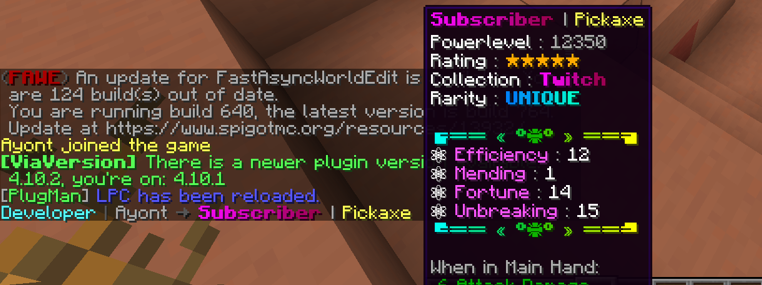
📸 Previews
Chat Format Example

[ITEM] Placeholder Example
---
🚀 Installation
1. Stop your server 2. Place the `LPC.jar` into your `/plugins` folder 3. Start the server to generate configuration files 4. Edit the `config.yml` to your liking 5. Use `/lpc reload` to apply your changes ✅
---
📌 Notes
- Not affiliated with LuckPerms – Please do not contact the LuckPerms author for support! - Legacy version available at: Not affiliated with LuckPerms
🛟 Need Help?
Join our Discord for support, updates, or to report bugs: <p align="center"> <a href="https://discord.gg/ZPyb9g6Gs4"> <img src="https://cdn.varilx.de/raw/Zm9inS.png" alt="Join our Discord" width="400"> </a> </p>
Gallery
Versions
3.6.8
release
3.6.4
release
3.6.9
release
3.6.3
release
3.7.0
release
3.6.7
release
3.6.5
release