


1.1.0
release

Lumen
Effortless world lighting with torches and commands and optimized performance
 511
511
Lumen
Lumen – Advanced Lighting for Minecraft
Minecraft is a Minecraft plugin designed to enhance server quality of life by optimizing lighting. It allows efficient area illumination using commands and offers unique items:
- Lumen Guard – Automatically lights up the surroundings with custom light level. - Lumen Guard – Prevents hostile mobs from spawning.
> 💡PaperMC NO resource pack needed! Built exclusively for PaperMC.


---
⚡️ Features
- Brazilian Portuguese Automatically skips redundant light blocks based on light intensity, reducing block count while maintaining perfect illumination. - Brazilian Portuguese Intelligently avoids placing lights near sensitive blocks (saplings, redstone mechanisms, etc.) with a configurable safety margin. - Brazilian Portuguese using Brazilian Portuguese and Brazilian Portuguese (No resource pack needed). - Brazilian Portuguese torches with custom light level (Lumen Torch). - Mob spawn prevention (Lumen Guard). - Brazilian Portuguese with Brazilian Portuguese. (Recommended) - Brazilian Portuguese – Available translations: Brazilian Portuguese, Brazilian Portuguese, Brazilian Portuguese, Brazilian Portuguese, Brazilian Portuguese, Brazilian Portuguese and Brazilian Portuguese.
---
Usage
For Players
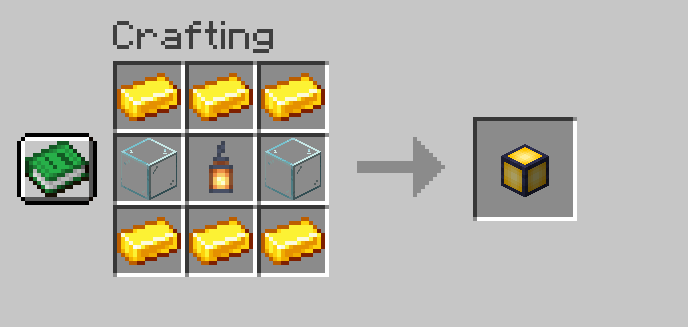
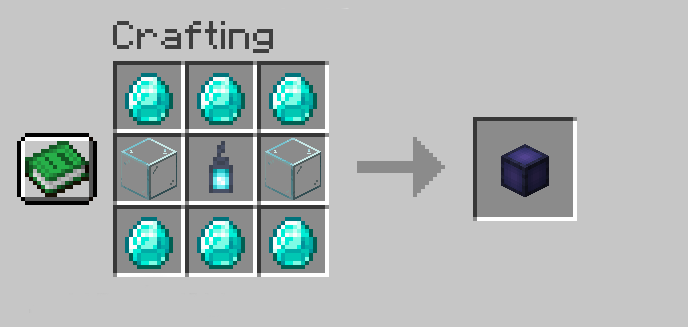
- The `Lumen Torch` automatically lights up nearby areas. - Players can right-click the air while holding a Lumen Torch and input a light level between 0 and 15 in the chat. - The selected light level will be stored in the torch and applied when placed. - The `Lumen Guard` prevents mob spawning within its range. - Torches can be removed without being lost, and their effects disappear when removed. - To craft them, you need `lumen.craft.torch` and `lumen.craft.guard` permissions.
Crafting Recipes
Lumen Torch
Lumen Guard

---
🛠️ Compatible Integrations
Lumen can leverage other tools to enhance performance and functionality:
- FastAsyncWorldEdit (FAWE) – Logs light placements and removals, allowing rollbacks and audits. - FastAsyncWorldEdit (FAWE) – Optimizes light block placement through commands and the Lumen Torch, improving server performance.
---
🔐 Commands & Permissions
Commands
Lumen also provides a variety of aliases for each command `/lumen`, `/lu`, and `/l`.
- `/lumen light <range> <light_level> <include_skylight>` – Places lights dynamically. - `/lumen undo` – Undoes previous light placements. - `/lumen redo` – Redoes removed lights. - `/lumen remove area <range>` – Removes lights in a specified area. - `/lumen clear confirm` – Clears all registered lights. - `/lumen give <player/all> <torch_type> <quantity>` – Gives torches to players. - `/lumen reload` – Reloads configuration and translations.
Permissions
- PLAYER Permissions: - `lumen.light` – Permission to use `/lumen light`. - `lumen.cancel` – Permission to cancel active tasks. - `lumen.undo` – Permission to undo placements. - `lumen.redo` – Permission to redo removed lights. - `lumen.remove` – Permission to remove lights. - `lumen.clear` – Permission to clear all lights. - `lumen.give` – Permission to give `Lumen Torch` and `Lumen Guard`. - `lumen.reload` – Permission to reload configuration and translations. - PLAYER Permissions: - `lumen.craft.*` – Permission to craft all Lumen items. - `lumen.craft.torch` – Permission to craft the `Lumen Torch`. - `lumen.craft.guard` – Permission to craft the `Lumen Guard`.
---
For Administrators
- Safety Settings: Control the density of light blocks with `spacing_factor`. - Safety Settings: Customize which blocks to avoid and the safety margin radius. - Advanced light management using commands. - Safe light removal with `/lumen remove`. - Undo and redo light placements with `/lumen undo` and `/lumen redo`. - Clear all lights with `/lumen clear` (Dangerous). - Item distribution using `/lumen give`. - Full customization through `config.yml` and translation files in `Translations/`. - Integration with CoreProtect and FAWE for enhanced performance and control. - Reload configuration and translations with `/lumen reload`.
---
📌 Installation Guide
Installation
Prerequisites
Before installing Lumen, make sure your server meets the following requirements:
- FastAsyncWorldEdit (Optional): FastAsyncWorldEdit (Optional):. - FastAsyncWorldEdit (Optional): Version FastAsyncWorldEdit (Optional):. - FastAsyncWorldEdit (Optional): - FastAsyncWorldEdit (Optional): Enables tracking and rollback of placed or removed lights. - FastAsyncWorldEdit (Optional): Optimizes performance for placing large amounts of lights.
---
Step 1: Download the Plugin
Download the latest version of Lumen from Lumen.
---
Step 2: Installation
1. Restart the server `Lumen.jar` to the `plugins/` folder of your PaperMC server. 2. Restart the server to automatically generate the configuration files.
---
Step 3: Initial Configuration
1. If using CoreProtect/FAWE, `plugins/Lumen/` 2. If using CoreProtect/FAWE, to adjust performance and safety settings: - `smart_lighting.spacing_factor`: Control how many blocks are skipped during lighting. - `safety.margin`: Radius of blocks to avoid around sensitive materials. - `safety.excluded_blocks`: List of materials to avoid (saplings, redstone, etc.). - `command_lights_per_tick`: Lights per tick when using commands. 3. If using CoreProtect/FAWE, check the server console on startup for successful detection.
💬 Support & Contact
If you have any questions or encounter issues, feel free to contact us on Discord