

1.1.6
release

MacTime
You can only manage time if you track it right. An administrator friendly plugin to track the ontime of staff members on your server.
 1,68k
1,68k
MacTime
MacTime
This plugin allows tracking of the online time for players.<br>
Features
- Only online time tracking plugin that is updated to the latest minecraft version - Almost every message is configurable via messages.yml - GUI which showcases various ontime data for players (Updates in real time at an interval which can be configured) (v1.21+) - 0% thread usage on a single instance with over 500 players while tracking more than 50 staff members (*via spark*) - MySQL support - Folia Support - Administrator friendly commands, permission nodes, and error messages to pinpoint issues - Discord Webhook support - All commands (besides /mactime gui) can be executed by console - Hex support for configurable messages - PlaceholderAPI Support - AFK time tracking (with EssentialsX)
Commands
Admin Commands
* `/mactime export <all:player> [username]` * If discord webhooks are enabled, this allows you to export all ontime data for either a specific player or all players being tracked. * `/mactime gui [groupname:online:offline:other]` * Opens a GUI with all players showcasing their ontime data. If you have luckperms on your server, you can sort players in the gui by group weights. * You are also able to set the real time update interval for the GUI (If you would not like this, set `gui.updateinterval` to `0` in config.yml) * If you would like to view players' ontimes that are in a specific group, you can specify any included groups under `gui.whitelisted-groups` and run `/mactime gui [groupname]` * You are also able to specify viewing online players or offline players data by running `/mactime gui [online:offline]` * If a player was previously in a group specified under `gui.whitelisted-groups` but now isn't, you can view their data by running `/mactime gui [other]` <br> (If you would like their data wiped on their next join if they no longer have the `mactime.track` permission node, you can enable `other.remove-if-no-perm` in config.yml) * `/mactime help` * Displays the help menu * `/mactime reload [config:messages]` * Reloads either the config.yml file or messages.yml file. If no choice is specified, both will be reloaded. * `/mactime reset <player:group> <groupname:username>` * Resets ontime data for either a player or a group (if luckperms is on your server). <br> *If you would like the user data to be permanently removed from your server after running this command, you can set `reset.delete-data-on-reset` to `true` in the config.yml.* * `/ontime <username>` * View ontime data for a specific player
Player Commands
* `/ontime` * Displays ontime data based on the player's permissions.
Permissions
| Permission | Description| | ------------- |:-------------:| |`mactime.*`| Grants all permissions.| |`ontime.track`| Allows the plugin to track the player's on-time.| |`mactime.admin`| Provides access to /mactime command.| |`mactime.command.*`| Provides access to all /mactime commands and their subcommands.| |`mactime.command.help`| Grants access to /mactime help.| |`mactime.command.reload`| Grants access to /mactime reload [config:messages].| |`mactime.command.export`| if discord webhooks are enabled, this allows you to export player’s ontime data to a webhook.| |`mactime.command.reset`| Grants access to /mactime reset command.| |`mactime.command.gui`| Grants access to the /mactime gui command.| |`ontime.own`| Allows use of /ontime command.| |`ontime.own.*`| Provides access to see all on-time statistics.| |`ontime.own.afk`| Provides access to see AFK time via /ontime.| |`ontime.own.daily`| Provides access to see daily time via /ontime.| |`ontime.own.weekly`| Provides access to see weekly time via /ontime.| |`ontime.own.monthly`| Provides access to see monthly time via /ontime.| |`ontime.own.yearly`| Provides access to see yearly time via /ontime.| |`ontime.own.alltime`| Provides access to see all-time via /ontime.| |`ontime.others`| Allows usage of /ontime <username> to view other player's on-times.| |`ontime.others.*`| Provides access to see all on-time statistics for other players.| |`ontime.others.afk`| Provides access to see AFK time via /ontime for other players.| |`ontime.others.daily`| Provides access to see daily time via /ontime for other players.| |`ontime.others.weekly`| Provides access to see weekly time via /ontime for other players.| |`ontime.others.monthly`| Provides access to see monthly time via /ontime for other players.| |`ontime.others.yearly`| Provides access to see yearly time via /ontime for other players.| |`ontime.others.alltime`| Provides access to see all-time via /ontime for other players.|
Placeholders
| Permission | Description| | ------------- |:-------------:| | `%mactime_current%`| Displays the current ontime of the user looking at the placeholder| | `%mactime_daily%`| Displays the daily ontime of the user looking at the placeholder| | `%mactime_weekly%`| Displays the weekly ontime of the user looking at the placeholder| | `%mactime_monthly%`| Displays the monthly ontime of the user looking at the placeholder| | `%mactime_yearly%`| Displays the yearly ontime of the user looking at the placeholder| | `%mactime_alltime%`| Displays the alltime ontime of the user looking at the placeholder| | `%mactime_afktime%`| Displays the afktime of the user looking at the placeholder| | `%mactime_lastonline%`| This will always return `Player is currently online!`|
For other players, you can add their username to the end of the placeholder. <br> For example,
- `%mactime_daily_notch%` * This will return the daily ontime for "Notch". <br> *If the player specified has no data, then the placeholder will display `Player has no data.`* <br> For `%mactime_lastonline_notch%`, this will return how long it has been since the player logged off of the server.
If you would like the raw value in seconds, you can add `_raw` to the end of any time related placeholder. For example, - `%mactime_daily_raw%` - If I had 5 minutes of daily ontime, this would return `300`
Hooks
This plugin hooks into 3 plugins for optional features - - - * Luckperms * Mactime hooks into luckperms to enable group sorting by weights and adding the player's prefix inside the GUI * EssentialsX * For enabling the tracking of time spent afk * PlaceholderAPI * For placeholders.
Showcase
GUI
 <br>
<br>
Ontime Command
 <br>
<br>
Discord Webhook
 <br>
<br>
Placeholders
 <br>
<br>
Default config.yml
```yml
MacTime, by AjMaacc
Storage options
Data is stored in plugins/MacTime/playerdata/mactime.db
Default storage type is SQLite
sql:
To use MySQL, set below to true
Default: false
enabled: false
Your database's server address
address: '127.0.0.1:3306'
Database name, username and password.
database: "" username: "" password: ""
options
usessl: false
At the end of every week you can save players ontimes to a file in leaderboard fashion
ontime-saving:
Toggle this feature on/off
Default: true
enabled: true
Day of the week ontime will be saved
Options: Monday, Tuesday, Wednesday, Thursday, Friday, Saturday, Sunday
Default: Monday
dayofweek: 'Monday'
Order of which times will sort by
Options: Alphabetical, Ascending, Descending, Group.
Group will sort by Luckperms group, requires Luckperms to be installed!
Default: Descending
order: "Descending"
MacTime Admin Command Configurations
Reset
Options for the /mactime reset command
reset:
Delay before any un-confirmed /mactime reset queries are cancelled in seconds
Default: 10
delay: 10
Removes data entirely versus restarting the count after reset
Default: false
delete-data-on-reset: false
Sets who is able to use /mactime reset * (resets everyone's ontime)
Options: "None", "Console", "Player", "All"
Default: None
wildcard-reset: 'None'
AFK Checker
The AFK Status of a player is determined by MacTime hooking into Essentials.
You will need to have essentials on your server for this to work.
afk-checker:
Enable AFK time tracking
Default: false
enabled: false
luckperms:
Luckperm groups to be included for sorting by groups
You must have Luckperms installed for this to be relevant
Default:
- owner
- manager
- admin
- jradmin
- dev
- srmod
- mod
- jrmod
- helper
whitelisted-groups: - owner - manager - admin - jradmin - dev - srmod - mod - jrmod - helper
GUI
Options for the /mactime gui command
gui:
Sorts /mactime gui by Luckperm groups specified under "luckpermgroups"
You need to have Luckperms on your server for this to work!
Default: false
sort-by-luckperm-group: false
Duration in seconds to update the gui
Set this to 0 to disable this feature
Default: 10
update-interval: 10
Discord Webhooks
webhook:
Enable this feature
Default: false
enabled: false
Webhook url
url: ''
Username for the webhook. If this is not set (or empty), this will default to "MacTime"
username: ''
join:
Enables player join webhooks to be sent
Default: true
enabled: true
If you want this specific embed to be sent to a separate webhook,
add the secondary webhook's url here
If left empty, this defaults to use the main webhook url defined under "webhook.url"
url: ''
If you would like the webhook's username to differ from the original username (webhook.username)
Leaving this blank defaults to webhook.username
username: ''
leave:
Enables player leave webhooks to be sent
Default: true
enabled: true url: username:
afkstart:
Enables webhooks to be sent for when a player goes afk
Default: true
enabled: true url: username:
afkend:
Enables webhooks to be sent when a player returns from being afk
Default: true
enabled: true url: username:
print:
Enables the "/mactime export" command and allows playerdata to be sent by the webhook
Default: true
enabled: true url: username:
saving:
Enables weekly data saved during the ontime-saving section to be sent by the webhook
Default: true
enabled: true url: username:
other:
Enables the beautiful MacTime signature in console on startup
If you don't want this, set below to false
Default: true
signature: true
Removes a player's ontime data if they are no longer have the `ontime.track` permission
This deletes their data on the player's next join
Default: false
remove-if-no-perm: false
Your timezone
Use https://pastebin.com/mfdYhnu7 to find the format for your timezone
timezone: "America/New_York"
Date of when ontime first started recording
This resets when you do /mactime reset *
Don't touch pls
start: ''
Config version (don't touch or u get malaria)
version: '1.0.4' ```
Default messages.yml
```yml version: '1.0.3' prefix: '&e☀ &e&lMacTime &8&l» ' online: '&a●' offline: '&c●' afk: '&8[&7&lAFK&8]' no-permission: '&cNo Permission'
%player_name% = Player's Username
command: ontime: player:
Header for /ontime
self-header: '&7&m &r &a%player_name%''s Ontime &7&m &r'
Header for /ontime <username>
other-header: '&a%player_name%''s Ontime' no-ontime-data: '&c %player_name% &chas no ontime data!' divider: '&7&l&m ' console: invalid: 'This Command cannot be executed by console.' player-does-not-have-data: 'This player does not have any ontime data!' reload: messages: '&7Successfully Reloaded Module: &fMessages&7.' config: '&7Successfully Reloaded Module: &fConfiguration&7.' all: '&7Successfully Reloaded Modules: &fConfigurations &7and &fMessages&7.'
%player_name% = Player's Username
{0} = Luckperm group prefix
{1} = Total players
reset: expired: player: '&cOntime removal request for %player_name% has expired!' group: '&cOntime removal request for {0} group has expired!' wild: '&cOntime removal request for all users have expired!' confirm: player: '&7Are you sure you want to reset &f%player_name%''s &7ontime stats? &7[Click to Confirm]' group: '&7Are you sure you want to reset ontimes for players in the &f{0}&7 group? &7[Click to Confirm]' wild: '&cAre you sure you want to reset all ontime statistics? &7[Click to Confirm]' success: player: '&7Reset ontime for &f%player_name%&7!' group: '&7Reset ontime for &f{1} &7players in &f{0}&7 group!' wild: '&7Reset ontime statistics for &f{1} &7players!' invalid: player: '&cYou have entered an invalid username!' group: '&cYou have entered an invalid group name!' wild: '&cThis action is currently disabled!' player-does-not-have-data: ' &c%player_name% has no ontime data!'
%command% - Reset command ex. "/mactime reset player Notch"
hover-msg: '&a&lCLICK ME&r'
#
Ontime Command (/ontime)
# ontime: player: current-ontime: '&fCurrent Ontime &8➡ &e%mactime_current%' daily-ontime: '&fDaily Ontime &8➡ &e%mactime_daily%' weekly-ontime: '&fWeekly Ontime &8➡ &e%mactime_weekly%' monthly-ontime: '&fMonthly Ontime &8➡ &e%mactime_monthly%' yearly-ontime: '&fYearly Ontime &8➡ &e%mactime_yearly%' alltime-ontime: '&fAll-Time Ontime &8➡ &e%mactime_alltime%' afk-time: '&fTotal AFK Time &8➡ &e%mactime_afktime%' last-online: '&fLast Online &8➡ &e%mactime_lastonline%' console: current-ontime: '* Current Ontime ➡ %mactime_current%' daily-ontime: '* Daily Ontime ➡ %mactime_daily%' weekly-ontime: '* Weekly Ontime ➡ %mactime_weekly%' monthly-ontime: '* Monthly Ontime ➡ %mactime_monthly%' yearly-ontime: '* Yearly Ontime ➡ %mactime_yearly%' alltime-ontime: '* All-Time Ontime ➡ %mactime_alltime%' afk-time: '* AFK Time ➡ %mactime_afktime%' last-online: '* Last Online ➡ %mactime_lastonline%'
#
GUI message configuration (/mactime gui)
# gui:
Player Ontimes
{0} = Total Players
po: title: 'Staff On-Times ({0})' online: '&a&lONLINE' offline: '&c&lOFFLINE' current-ontime: '&e| &fCurrent Ontime &8➡ &e%mactime_current%' daily-ontime: '&e| &fDaily Ontime &8➡ &e%mactime_daily%' weekly-ontime: '&e| &fWeekly Ontime &8➡ &e%mactime_weekly%' monthly-ontime: '&e| &fMonthly Ontime &8➡ &e%mactime_monthly%' yearly-ontime: '&e| &fYearly Ontime &8➡ &e%mactime_yearly%' alltime-ontime: '&e| &fAll-Time Ontime &8➡ &e%mactime_alltime%' afk-time: '&e| &fTotal AFK Time &8➡ &e%mactime_afktime%' last-online: '&e| &fLast Online &8➡ &e%mactime_lastonline% &fAgo'
Sorted player ontimes (GUI Without luckperms sorting)
{0} = Total Players
spo: title: 'Staff On-Times ({0})'
Individual Group Ontimes (/mactime gui [groupname])
{0} = Luckperms group prefix
{1} = Total Players
igo: titles: main: '{0}&8On-Times ({1})' other: 'Other Members On-Times ({1})' error: invalid-group: '&cInvalid Group' group-does-not-exist: '&cGroup does not exist in luckperms!'
Individual Player Ontime Data Menu
This is the menu that is shown when you click a player head inside /mactime gui
io: title: 'Data for %player_name%'
Sorted Ontimes
{0} = Luckperms Group Prefix
{1} = Total Players
so: title: '{0} &8Player On-Times ({1})'
{0} = Date (ex. 1/20, 3/10)
{1} = Time
history-item: title: 'Past 7 days of ontime' entry: '&3{0} &8➡ &3{1}' empty: '&cPlayer has not logged on in the past 7 days!'
AFK notifications logged to console
{0} = Total time AFK (formatted as hh:mm:ss)
AFK-Detection: afk: 'is now afk' not-afk: 'is no longer afk' afk-time: 'was afk for {0}'
#
Webhook Embeds
#
webhook: join: title: $username has joined color: 0x00ff00
Available Placeholders
$time - Timestamp when the player joined the server
content: - "• Time Joined: `$time`" leave: title: $username has left color: 0xff0000
Available Placeholders
$time_joined - Timestamp when the player joined the server
$time_left - Timestamp when the player left the server
$time_online - Total time the player was on the server for
content: - "• Time Joined: `$time_joined`" - "• Time Left: `$time_left`" - "• Total time online: `$time_online`" afk-start: title: $username is now afk color: 0xff9a00
Available Placeholders
$time - Timestamp when the player became afk
$afk_time - Total time the player has been afk on the server
content: - "• Afk Starting at: `$time`" - "• Total AFK Time: `$afk_time`" afk-end:
Available placeholder ($username)
title: $username is no longer afk color: 0xff9a00
Available Placeholders
$time - Timestamp when the player was afk
$afk_time - Time the player was afk for
$total_afk_time - Total time the player has been afk
content: - "• Afk Since: `$time`" - "• Time Afk: `$afk_time`" - "• Total AFK Time: `$total_afk_time`" print: title: Ontime Statistics for $username color: 0xffffff
Available Placeholders
$date
$uuid
$daily_ontime
$weekly_ontime
$monthly_ontime
$yearly_ontime
$alltime_ontime
$afk_time
$last_online
content: - "• Date: `$date`" - "• UUID: `$uuid`" - "• Daily Ontime: `$daily_ontime`" - "• Weekly Ontime: `$weekly_ontime`" - "• Monthly Ontime: `$monthly_ontime`" - "• Yearly Ontime: `$yearly_ontime`" - "• All time Ontime: `$alltime_ontime`" - "• Afk time: `$afk_time`" - "• Last Online: `$last_online`" saving:
Available placeholder ($range)
title: Weekly Ontimes for $range color: 0xffffff ```
Support & Contact
To report bugs, suggest a feature, or anything else, contact me via discord. - Direct Contact * -> ajmac
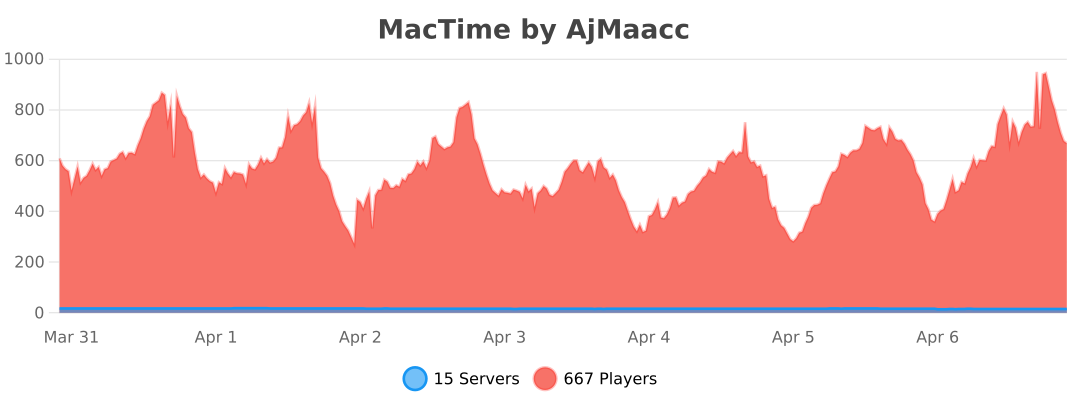
bStats
Gallery
Versions
1.0.0
release
1.0.6
release
1.1.5
release
1.0.2
release
1.0.4
release
1.1.2
release
1.1.3
release
1.0.7
release
1.1.0
release
1.1.1
release
1.1.4
release
1.0.1
release
1.0.3
release
1.0.5
release