

0.6
beta

MineRaft
Vanilla recreation of the hit game "Raft"
 3,45k
3,45k
MineRaft
<p align="center" style="text-align: center;"> <img src="https://raw.githubusercontent.com/lukejw12/uistuff/refs/heads/main/mineraft/text/coming-soon.png" alt="1.0.0 Coming Soon!*" style="margin: 5px 10px;"></a>
<p align="center" style="text-align: center;"> <a href="https://discord.com/invite/YxRWAPUtDt"><img src="https://raw.githubusercontent.com/lukejw12/uistuff/refs/heads/main/mineraft/icon/discord.png" alt="Discord" style="margin: 5px 10px;"></a> <a href="https://github.com/lukejw12"><img src="https://raw.githubusercontent.com/lukejw12/uistuff/refs/heads/main/mineraft/icon/github.png" alt="GitHub" style="margin: 5px 10px;"></a> <a href="https://ko-fi.com/itsjustluke"><img src="https://raw.githubusercontent.com/lukejw12/uistuff/refs/heads/main/mineraft/icon/kofi.png" alt="Ko-Fi" style="margin: 5px 10px;"></a>
</p>
<img src="https://raw.githubusercontent.com/lukejw12/uistuff/refs/heads/main/mineraft/banner/mineraft-stretch.png" alt="Icon Seperator" style="margin: 5px 10px;"></a>
<img src="https://raw.githubusercontent.com/lukejw12/uistuff/refs/heads/main/mineraft/text/description.png " alt="Description" style="margin: 5px 10px;"></a>
Transforms your survival Minecraft experience into a recreation of the hit game 'Raft' This datapack comes with an overhauled experience, with new mechanics, new blocks, structures, and even new mobs!
Since this is a Datapack and Resource pack, both can be installed once server side and will apply to all players that join, voiding the need for each player to install the pack!
<img src="https://raw.githubusercontent.com/lukejw12/uistuff/refs/heads/main/mineraft/banner/stretch.png " alt="Seperator" style="margin: 5px 10px;"></a> <img src="https://raw.githubusercontent.com/lukejw12/uistuff/refs/heads/main/mineraft/text/features.png" alt="Features" style="margin: 5px 10px;"></a> > ### Building > - *Decorate to your hearts content!* > > - You can place various large structures such as foundations, smelteries, collection nets and more with a grid-like building style! > > - You can tear down structures with your builders hammer! > ### Flotsam > - *Scoop up various types of junk to craft with!* > > - Flotsam spawns around the raft and can be fished up with a fishing rod > ### Steve the Shark > - *Chomp Chomp* > > - Steve is a friendly lil' fellow! > > - He circles your raft and occasionly scoots in to take a snack off it
<img src="https://raw.githubusercontent.com/lukejw12/uistuff/refs/heads/main/mineraft/banner/stretch.png " alt="Seperator" style="margin: 5px 10px;"></a> <img src="https://raw.githubusercontent.com/lukejw12/uistuff/refs/heads/main/mineraft/text/faq.png " alt="Faq" style="margin: 5px 10px;"></a>
Q. How do I download the pack?
> #### A. Install the datapack in the vanilla world creation menu! ¹
Q. I cant find the resource pack!
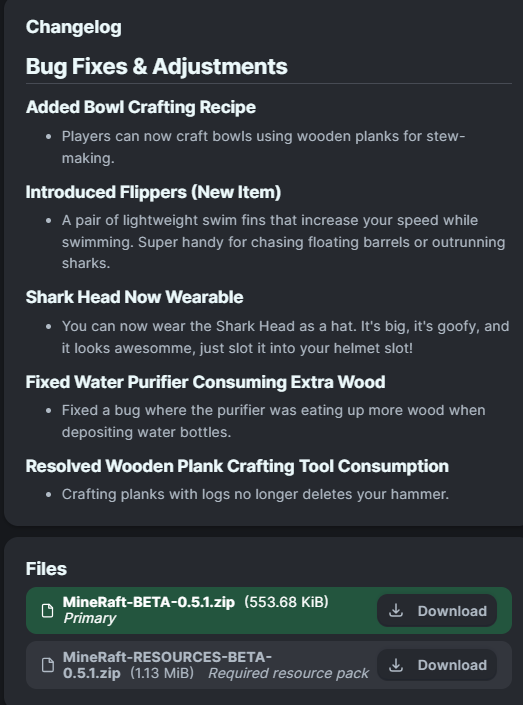
> #### A. Go to the Versions tab, find the datapack version you want and click the name, then scroll to the bottom and install the resource pack. ²
Q. When is * feature going to be added / When is it going to be updated to * version??
> #### A. Join the Discord for update discussion :D
Q. I experienced a bug, what do I do?
> #### A. Join the Discord and file a bug report, or make an issue on the github! :D
<img src="https://raw.githubusercontent.com/lukejw12/uistuff/refs/heads/main/mineraft/banner/stretch.png " alt="Seperator" style="margin: 5px 10px;"></a>
<img src="https://raw.githubusercontent.com/lukejw12/uistuff/refs/heads/main/mineraft/text/jointhediscord.png " alt="Seperator" style="margin: 5px 10px;"></a>
¹ How To Download!
Data Pack: 1. Click the latest Datapack version. 2. Scroll down and Download the Primary file. 3. If you want to create a World, go to Singleplayer > Create New World > Data Packs > Open Pack Folder. (It is not recommended to put it in an already existing world!) 4. Copy/Cut and Paste the downloaded file there. 5. Open/Create your world. 6. Note: You need to also install the Required Resource Pack.
Required Resource Pack: 1. Click the Datapack featured version. 2. Scroll down and Download the Required Resource Pack. 3. Open Minecraft and go to Options > Resource Packs > Open Pack Folder. 4. Copy/Cut and Paste the downloaded file there. 5. Activate the Resource Pack. (you can reload the resources with f3+t ingame)
See image below for reference
² How to get Resource Pack!

* Release Dates
There is no SET date for update releases, though we can confirm that the 1.0.0 update is in the works, you can join the discord for more info!
Gallery
Versions
0.7.3
beta
0.4.3
beta
0.7.1+mod
beta
0.6.1
beta
0.6.1
beta
0.7.1
beta
0.4.3
beta
0.7
beta
0.7.2
beta
0.5.1
beta
0.7.3+mod
beta
0.7
beta
0.4.1
beta
0.7+mod
beta
0.7.2+mod
beta
0.4.1
beta
0.7.2
beta
0.7.4
beta
0.4.2
beta
0.7.5
beta
0.5.1
beta
0.6
beta
0.4.2
beta
0.5
beta
0.7.5
beta
0.7.1
beta
0.7.4+mod
beta
0.5
beta
0.7.3
beta
0.7.4
beta
0.6.1-MOD-VER
beta