NoXPDeduction
What does this mod do?
This mod makes it so that when you use an Enchanting Table, no experience is removed. This can help players who don’t like the grinding aspect of Minecraft enchantments.
Note: You will still have to get the minimum required XP (30 levels) to enchant. This mod simply won’t deduct the levels every time you enchant.
noxities
# **Noxities**
**Noxities** is a clean and polished resource pack that enhances Minecraft’s visuals without changing its core style. It adds subtle improvements that make the game feel smoother and more enjoyable in every gamemode of minecraft.
—
## **Features:**
### **PvP Enhancements** – Subtle tweaks to improve visibility and make combat feel smoother.
**Small Shields & Handhelds** – Shrinks shields and items in hand so they don’t block your view.

**Clear Water** – Water is transparent, so you can easily see structures, mobs, and treasures underwater.

**Better Grass** – Grass and related blocks use the top texture on the sides for a cleaner, more natural look.

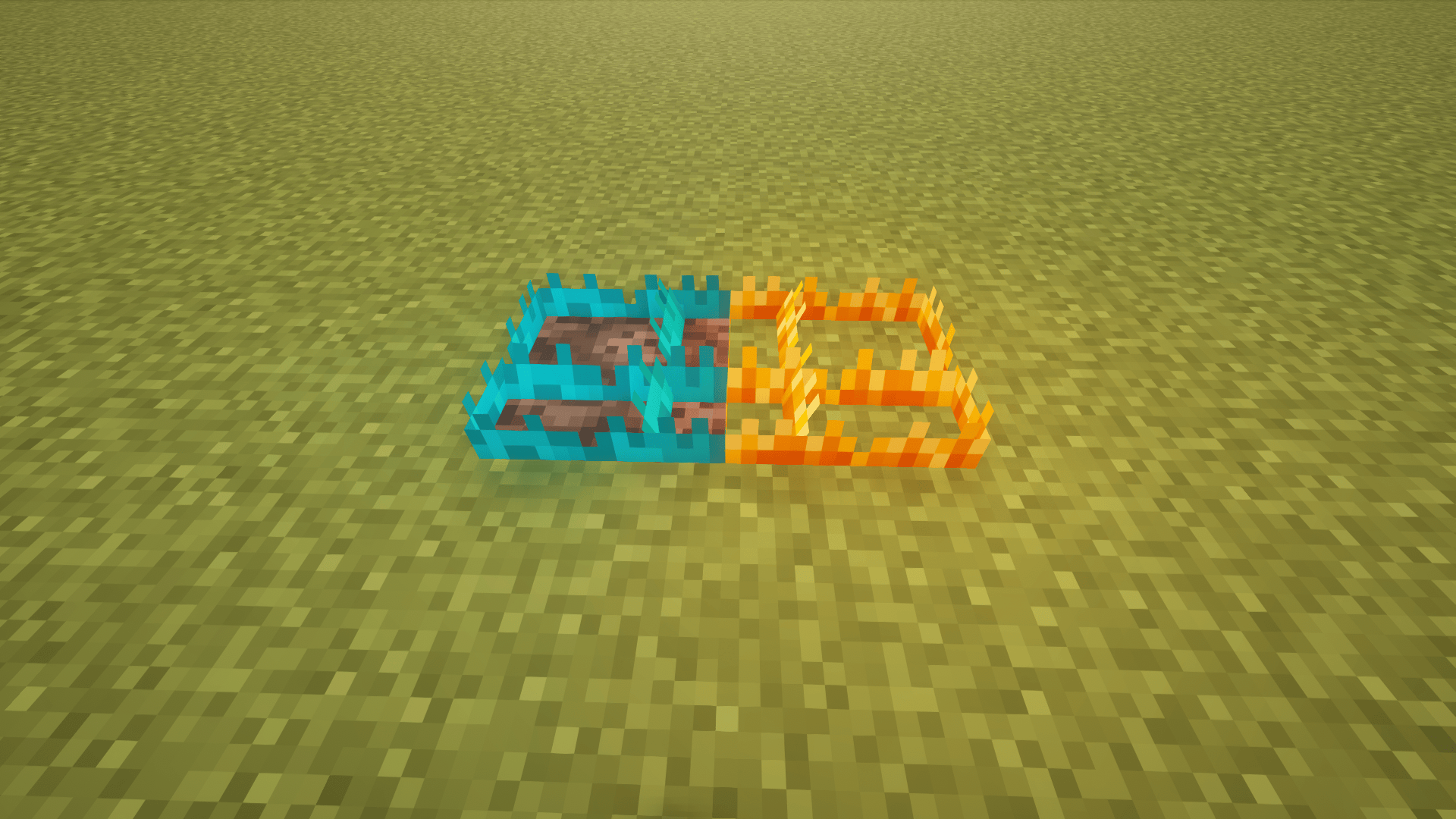
**Clean Fire and soul fire** – When on fire, flames only cover a small part of your screen instead of the whole view.
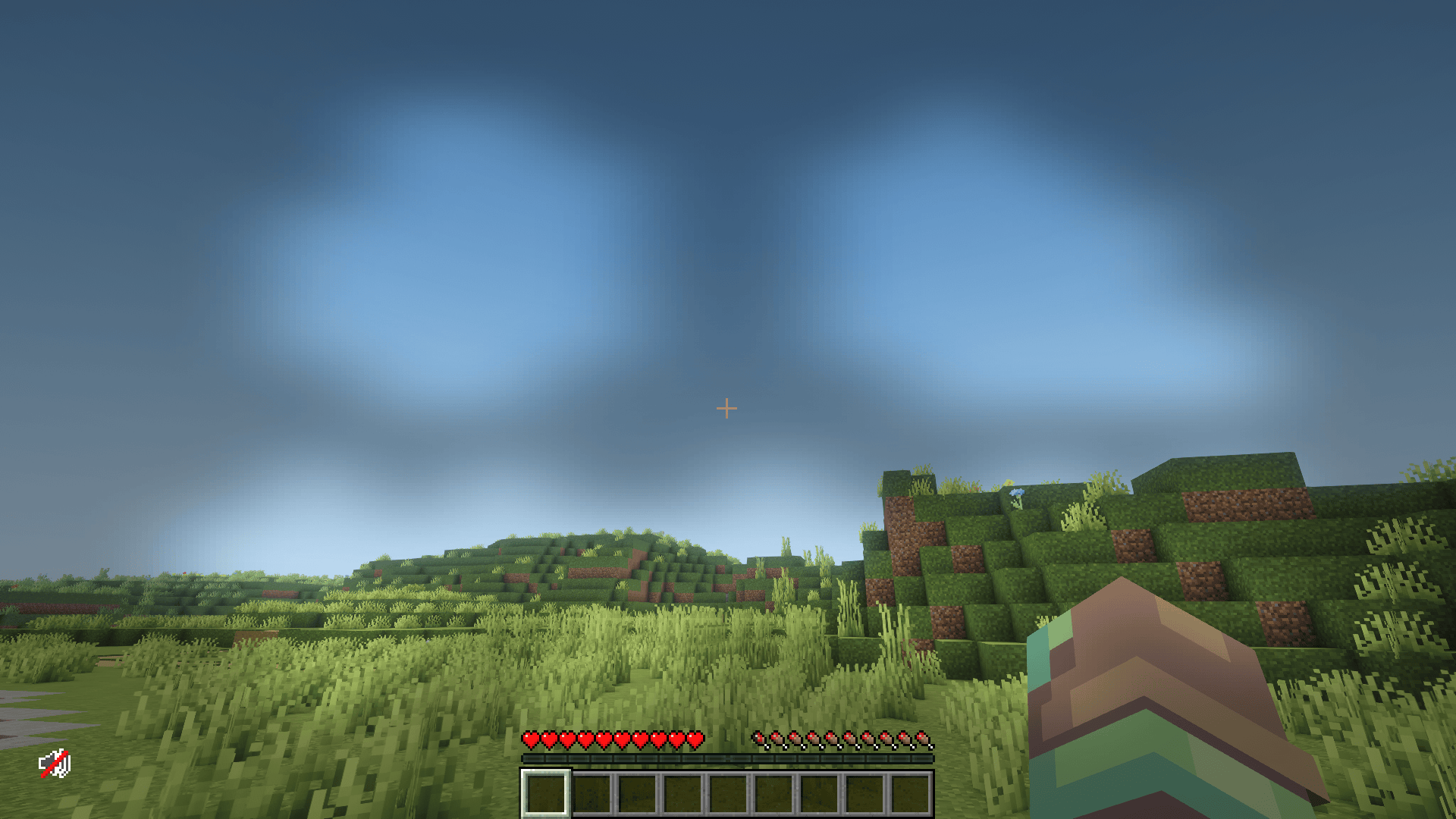
**Clear Pumpkin Blur** – Pumpkin heads no longer obstruct your vision, giving you a clear view while wearing them.
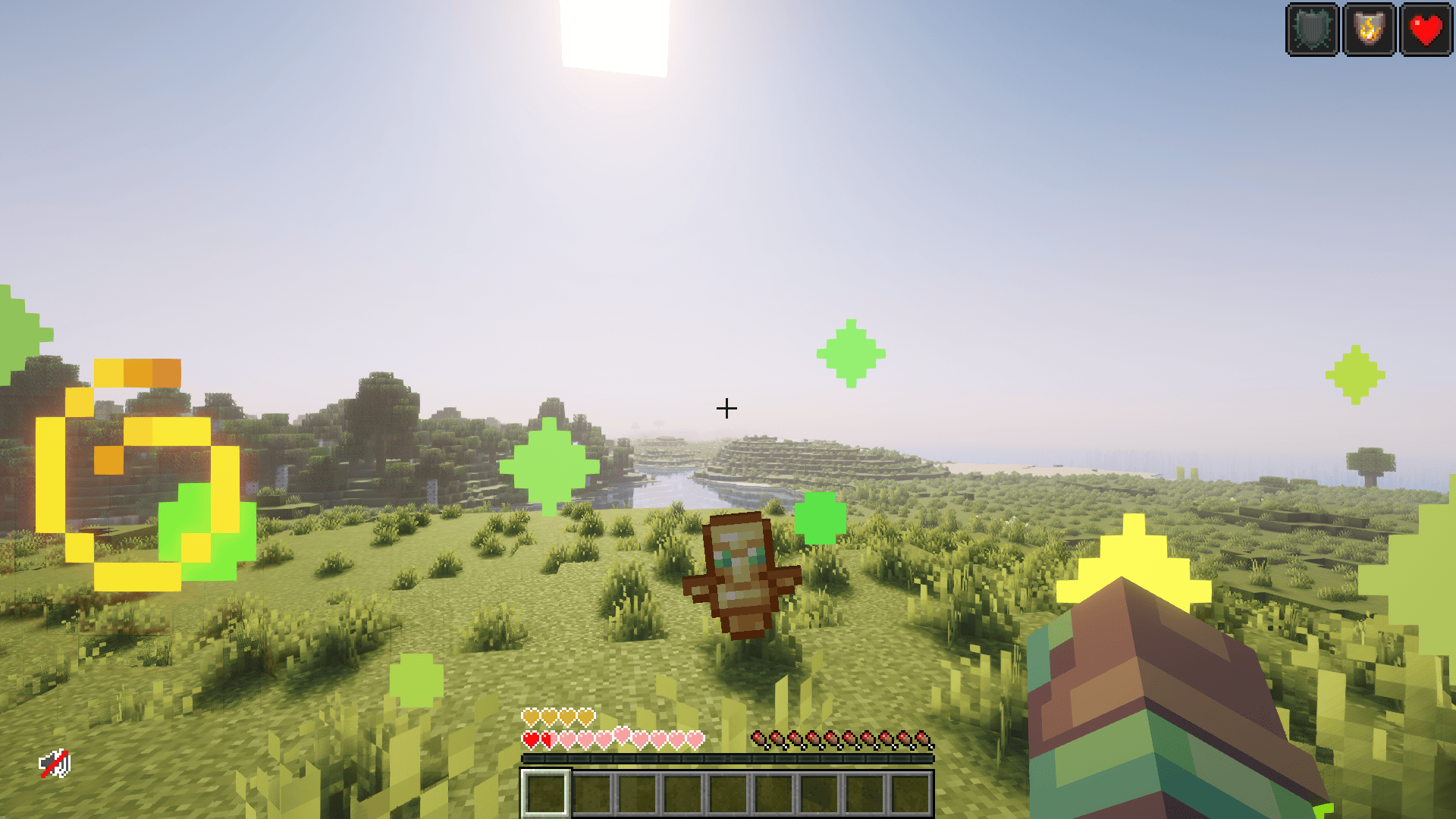
**Small Totem Pop** – Totem of Undying animations are smaller and less distracting, so you can keep your focus in combat.
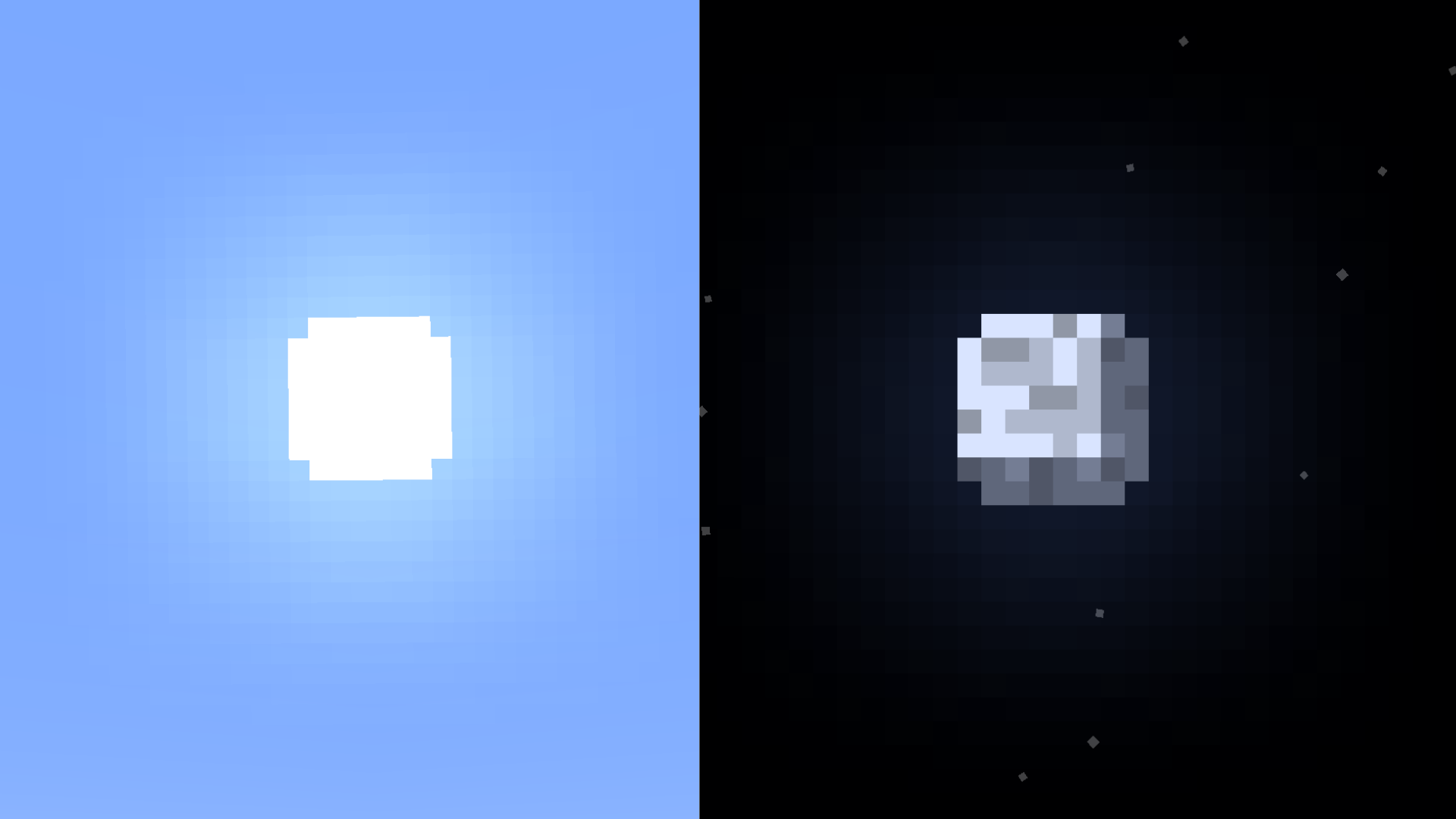
**Circular Sun and Moon:** – Circular sun and moons for a better experience
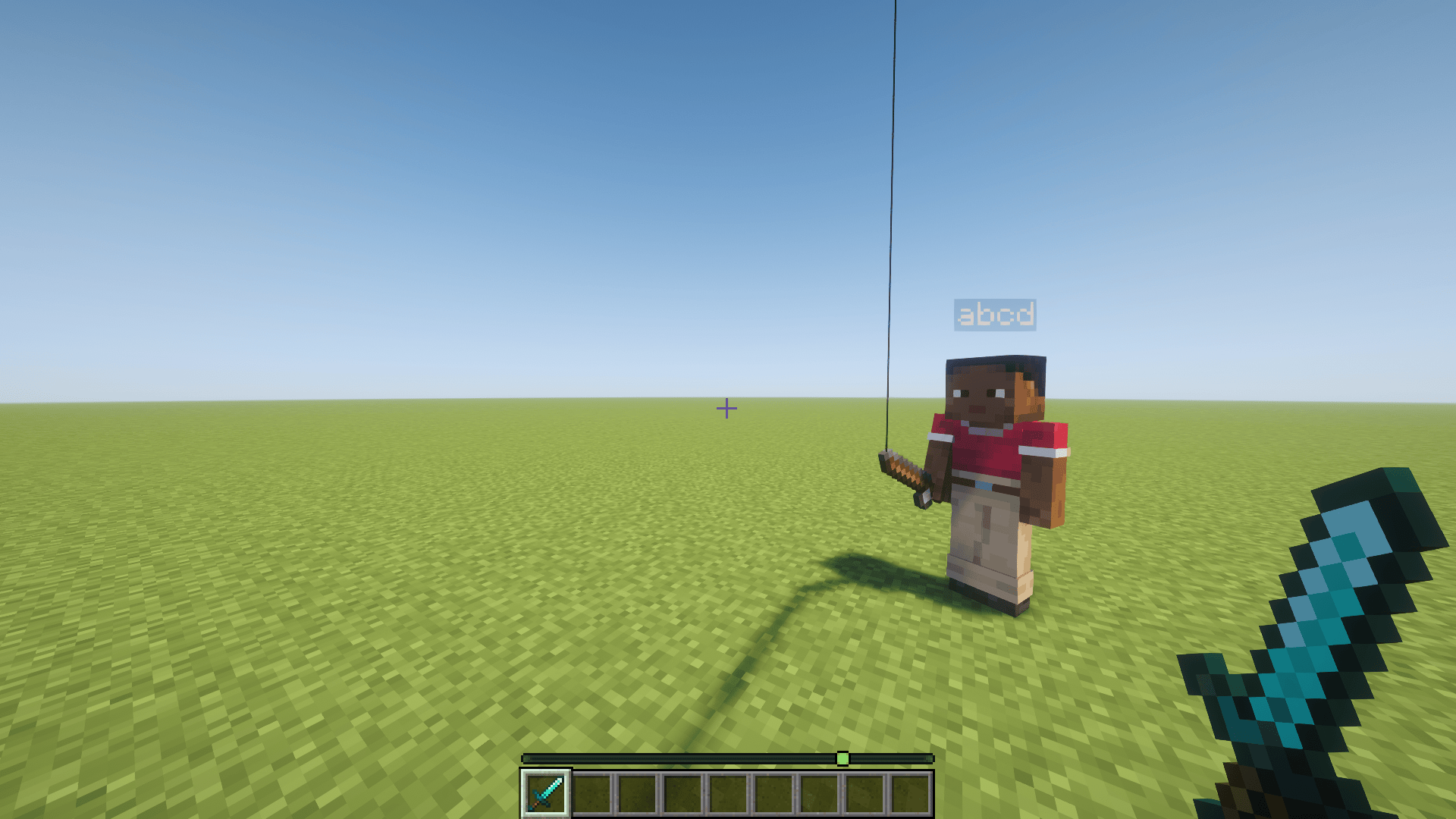
**No Fishing Rod Hook:** – Makes fishing rod’s hook/bobber invisible giving you a clear view
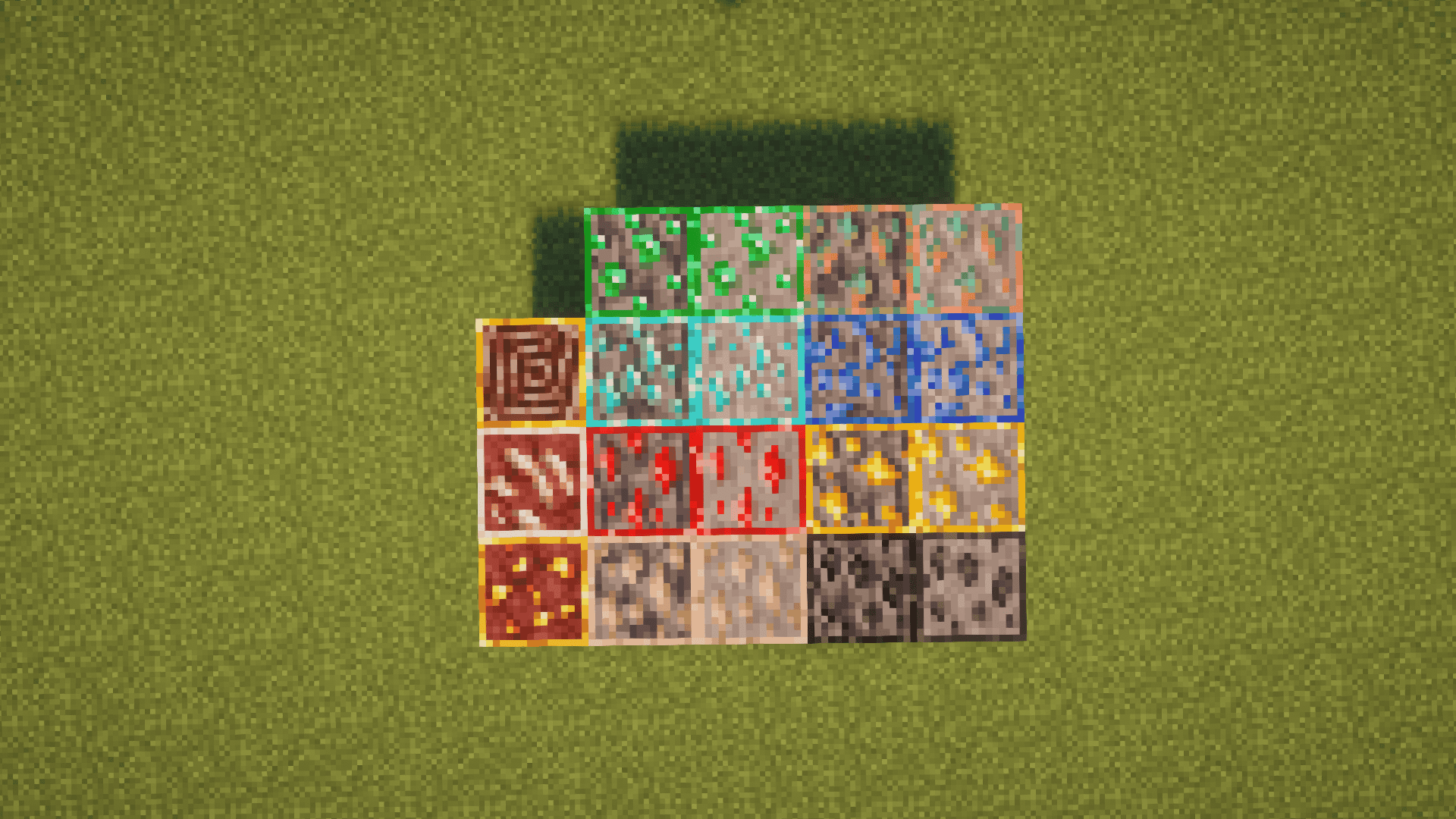
**Outlined Ores:** – Highlights ores with clear outlines, making them easier to spot underground.
## **No Dependencies Required!**
This resourcepack works in pure vanilla minecraft
—
### **Report Bugs and Suggestions:**
If you encounter any bugs or have ideas for improvements, feel free to email me at noxmatic8@gmail.com

# **Thank you for trying Noxities!**
NoxesiumUtils
# NoxesiumUtils
Communicate with the [Noxesium Mod](https://github.com/Noxcrew/noxesium) with ease.



🇺🇦 Made in Ukraine! Зроблено в Україні!
❤️ Support me on [Patreon](https://patreon.com/SuperNeon4ik)
> With **NoxesiumUtils 2.0.0** I am switching to the [com.noxcrew.noxesium.paper](https://github.com/Noxcrew/noxesium/tree/main/paper)
> implementation, instead of my own. This makes maintaining NoxesiumUtils easier.
### What is Noxesium and why does it need Utils?
[Noxesium Mod](https://github.com/Noxcrew/noxesium) _(by Noxcrew)_ is a fabric mod with feature additions, bugfixes, and performance improvements.
It allows servers to offer a better experience to clients through access to additional features beyond vanilla limitations.
However, servers need to have a plugin to communicate with the mod to actually be able to use it’s features, and that’s where **NoxesiumUtils** comes in.
It allows server owners to easily communicate with the mod via commands and can also be used as a dependency for plugin developers.
### Features
– Send server rules on join
– Send server rules to players with commands
– Check player’s client settings.
– There is a little more to it, lol.
– Maybe more soon 🤔
### Requirements
– Paper 1.20+
– [CommandAPI](https://modrinth.com/plugin/commandapi)
– _The plugin won’t do anything to players without the mod_
### Commands
**Send Server Rule.** Sends a server rule to a selection of players.
#### Set server rule for players
“`
/noxesiumutils serverrule
/noxesiumutils serverrule reset
“`
#### Set entity rule for entities
“`
/noxesiumutils entityrule
/noxesiumutils entityrule reset
“`
#### Check player’s Noxesium Protocol Version.
“`
/noxesiumutils check
/noxesiumutils check
“`
#### Check player’s settings.
“`
/noxesiumutils clientSettings
“`
For more detailed information on how everything here works, please refer to the [Noxesium Mod README](https://github.com/Noxcrew/noxesium/#readme)!
### Config
The default config looks like this.
Right now it only contains a setting to send server rules to a player on join.
“`yaml
# View Protocol documentation and information about the mod here:
# https://github.com/Noxcrew/noxesium
# Add some extra output for debugging purposes
extraDebugOutput: false
# If true will check the plugin’s version once in a while.
checkForUpdates: true
# It true will send defaults to Noxesium Players on join.
sendDefaultsOnJoin: false
# Comment out the line if you don’t want to send that rule.
defaults:
#cameraLocked: false
#disableBoatCollisions: false
#disableDeferredChunkUpdates: false
#disableMapUi: false
#disableSpinAttackCollisions: false
#disableUiOptimizations: false
#disableVanillaMusic: false
#enableSmootherClientTrident: false
#heldItemNameOffset: 0
#overrideGraphicsMode: FAST
#riptideCoyoteTime: 0
#showMapInUi: false
#qibDefinitions:
#customCreativeItems: []
“`
#### On-join defaults
For example, the following changes will make the plugin automatically send
the players `disableSpinAttackCollisions = true` on join.
“`yaml
sendDefaultsOnJoin: true
defaults:
disableSpinAttackCollisions: true
“`
#### Qib definitions
What are Qibs? Good question. I won’t explain it perfectly,
so please read [the comments in this file in Noxcrew/noxesium](https://github.com/Noxcrew/noxesium/blob/main/api/src/main/java/com/noxcrew/noxesium/api/qib/QibDefinition.java).
The `qibDefinitions` list is a place to define the definitions which are made up of QibEffects ([see list of them here](https://github.com/Noxcrew/noxesium/blob/main/api/src/main/java/com/noxcrew/noxesium/api/qib/QibEffect.java)).
Here’s an example of a QibDefinition in the config:
“`yaml
qibDefinitions:
ding:
onEnter: ‘play_ding’
onLeave: ‘play_ding’
triggerEnterLeaveOnSwitch: false
“`
Now scary part: **writing QibEffects**.
Each QibEffect is saved in its own json file which is saved in `plugins/NoxesiumUtils/qibs` folder.
Example of a QibEffect which plays the ding sound (`plugins/NoxesiumUtils/qibs/play_ding.json`):
“`json
{
“type”: “PlaySound”,
“effect”: {
“namespace”: “minecraft”,
“path”: “entity.experience_orb.pickup”,
“volume”: 1.0,
“pitch”: 1.0
}
}
“`
_(probably very useful to some)_ A jumppad QibEffect example:
“`json
{
“type”: “Multiple”,
“effect”: {
“effects”: [
{
“type”: “PlaySound”,
“effect”: {
“namespace”: “minecraft”,
“path”: “entity.experience_orb.pickup”,
“volume”: 1.0,
“pitch”: 1.0
}
},
{
“type”: “Wait”,
“effect”: {
“ticks”: 1,
“effect”: {
“type”: “SetVelocityYawPitch”,
“effect”: {
“yaw”: 0,
“yawRelative”: true,
“pitch”: -45,
“pitchRelative”: false,
“strength”: 2.0,
“limit”: 2.5
}
}
}
}
]
}
}
“`
After making a QibEffect you use the file name of a QibEffect as an ID in a QibDefinition section (all fields are optional):
“`yaml
qibDefinitions:
ding:
onEnter: ‘QIB_EFFECT_ID’
onLeave: ‘QIB_EFFECT_ID’
whileInside: ‘QIB_EFFECT_ID’
onJump: ‘QIB_EFFECT_ID’
triggerEnterLeaveOnSwitch: false
“`
After that you can reload the server and apply the rule to an entity:
“`
/noxesiumutils entityRules qibBehavior [ENTITY] ding
“`
And enable the Qib for all players:
“`
/noxesiumutils serverRules qibBehaviors @a ding
“`
#### Custom creative items
You cat enable a tab in the creative inventory menu for Noxesium players with
a command (`/noxesiumutils serverRules customCreativeItems @a true`).
This is the place where you define these items. Here’s an example:
“`yaml
customCreativeItems:
– ‘minecraft:stick[minecraft:enchantments={levels:{“minecraft:knockback”:25}}]’
– ‘netherite_chestplate[trim={pattern:wild,material:emerald},custom_name=”[“”,{“text”:”Silly name ngl”,”italic”:false}]”,lore=[”[“”,{“text”:”I dont !!!!!!! understand how i will implement this”,”italic”:false}]”],enchantments={levels:{aqua_affinity:1,blast_protection:4,protection:5}},custom_model_data=2]’
“`
### For Developers
View on [GitHub](https://github.com/SuperNeon4ik/NoxesiumUtils#readme)
NoxesiumAPI
# NoxesiumAPI
A plugin and API making communicating with [Noxesium](https://github.com/Noxcrew/noxesium) clients easier.
If you find any issues or have a suggestion, head over to the [Github](https://github.com/BlockybombDEV/NoxesiumAPI/issues) or join the [Discord server](https://discord.gg/NJnqPTcuqP)
## Features
– Setting server/entity rules
– Noxesium specific events
– [Qib system](https://github.com/Noxcrew/noxesium/wiki/Qib-System)
– [Custom sound system](https://github.com/Noxcrew/noxesium/wiki/Custom-Sounds)
– [Client-side glow for entities and blocks](https://github.com/SkytAsul/GlowingEntities?tab=readme-ov-file#make-entities-glow) (plugin only)
– [Skript](https://github.com/SkriptLang/Skript) friendly (using [Skript-Reflect](https://github.com/SkriptLang/skript-reflect))
## Requirements
– Paper 1.21.9+ (or a fork)
Developer stuff
### Gradle (Kotlin):
“`gradle
maven {
name = “noxcrewMavenPublic”
url = uri(“https://maven.noxcrew.com/public”)
}
maven {
name = “astrofoxRepository”
url = uri(“http://144.21.60.201:25566/releases”)
}
“`
“`gradle
implementation “me.iris:noxesiumapi:2.4.3”
“`
### Maven:
“`xml
noxcrew-maven-public
Noxcrew Public Maven Repository
https://maven.noxcrew.com/public
astrofox-repository-releases
Astrofox Repository
http://144.21.60.201:25566/releases
“`
“`xml
me.iris
noxesiumapi
2.4.3
“`
Credits
– [Noxesium by Noxcrew](https://github.com/Noxcrew/noxesium) – Noxesium
– [GlowingEntities by SkytAsul](https://github.com/SkytAsul/GlowingEntities) – Client-side glowing
– [NoxesiumUtils by SuperNeon4ik](https://github.com/SuperNeon4ik/NoxesiumUtils) – Inspiration
– [ExpHost by Astrofox Studios](https://www.exphost.net/) – Hosting the repository
*Not affiliated or endorsed by Noxcrew*
Noxesium
Noxesium is mod for Fabric which improves your experience when playing on multiplayer servers by giving the server more control over the client and fixing bugs that affect multiplayer gameplay.
# Features 💎
Noxesium contains a variety of different features for different users, most are configurable or controlled by the server.
## General 📜
– Modify the scale and position of various UI elements.

– Render off-hand maps in the HUD instead in your hand, so it doesn’t move around while walking and can act like a mini-map (optional setting).

## Bugfixes 🐛
– [MC-263293](https://bugs.mojang.com/browse/MC-263293): Adds a new accessibility setting to disable toggle sprint resetting on death (enabled by default).
– [MC-259812](https://bugs.mojang.com/browse/MC-259812): Transparent entity models are now properly visible behind text displays.
– [MC-577](https://bugs.mojang.com/browse/MC-577): Inventory closing and drop item keys now work when bound to mouse buttons.
– [MC-301281](https://bugs.mojang.com/browse/MC-301281): Mouse buttons on toggle mode are now re-enabled when closing a menu.
– [MC-256850](https://bugs.mojang.com/browse/MC-256850): Moving piston walls don’t flicker as much while moving.
– Passenger entities being teleported no longer jitter.
– Mouse buttons on hold mode now re-trigger when closing a menu.
## Server Features 💻
Noxesium adds a number of extra features to the client which server developers can use in their experiences. This lets them bypass some vanilla restrictions and make better content.
Here’s a list of things Noxesium currently lets servers do:
– Create custom interactables on the client like speed boosters or jump pads
– Move authority of riptide tridents, elytras, or lunge spears to the client which makes them act identically regardless of ping
– Move authority of arrow behavior or note block/tripwire block updates to the server only
– Play custom sounds and control various properties, including a start offset, changing the volume over time, and resuming playing the sound
– Draw player heads in text messages with an offset to the position or at different scales
– Draw text with any x/y offset to its position
– Prevent moving items in GUIs, adding hover sounds to items, changing slot sprites when hovered
– Locking camera movements, restrict GUI rescaling, restrict using various debug features such as hitboxes or debug renderers, or hiding the UI through F1
– Tweaking the hitbox size of entities (including non-square hitboxes) or making entities unattackable
– Change the heights of beacon beams
– Detect mouse clicks directly regardless of which interactions occurred after
– Receive additional information on the client’s GUI scale and window size to better align custom UIs
– Change the FOV or current zoom of the client
– Open a pop-up to visit a URL in their browser
– Add a custom creative item tab with custom items/blocks from your server
Server developers can use the server API plugin for Paper [available here](https://modrinth.com/plugin/noxesium-paper-api) to interact with these features either through code or through in-game commands!
### Extensions 🧩
Noxesium can be easily extended by other mods and plugins. This lets developers implement their own features for their projects, and contribute these back to the main mod so it works on all clients. For server developers, there’s also a lightweight bundled packet injection API.
## MCC Island Integration 🏝️
Noxesium has extra features to integrate with MCC Island directly! MCC Island detects any user running Noxesium and sends the client extra information on your current location and game state. This allows other mods like [Island Utils](https://modrinth.com/mod/island-utils) and [Trident](https://modrinth.com/mod/trident-mcci) to use this information for its custom features.
# Development 🖥️
Noxesium is directly developed by [Noxcrew](https://noxcrew.com/), creators of MC Championship and MCC Island, as a result Noxesium focusses on improving the experience for users of those projects.
Noxesium is also automatically included on some versions of [Lunar Client](https://www.lunarclient.com/).
Nox: Renoxed Reforged
Overview:
Nox is a mob and difficulty overhaul striving to make a return to when nights were scary, legitimately dangerous, and a present threat.
Almost every monster in the game has been affected by this mod. A list of changes can be viewed [here](https://github.com/AeiouEnigma/nox-renoxed-reforged/blob/master/README.md).
**NOTE: under the default settings, several mobs are able to detect the player at long range through obstructions and can dig through certain natural blocks to reach you. This can be disabled in the config along with most other features. Be aware that this feature could result in certain builds being griefed by zombies.**
Nox: Renoxed Reforged aims to port this mod to new versions.
In my limited testing of NRR, the only things I’ve confirmed that aren’t working properly are the mod’s changes to guardian spawning and to Nether spawns. At present, these will follow the vanilla rules instead of actually being changed by Nox.
Please note that the cobwebs produced by Spider attacks are special Nox Cobwebs which do not drop string or cobweb blocks when broken. This is an intentional design decision for game balance, as Nox is intended to increase game difficulty rather than make anything easier. Nox Cobwebs are also designed to disappear from your world after a short time, so you won’t have parts of your world overgrown with cobwebs from your spider encounters.
Additional Information:
Unlike prior versions of Nox, Nox: Renoxed Reforged must be installed on both client and server.
This port will only be for NeoForge. However, the license allows anyone to make other ports of Nox, Nox: Renoxed, or Nox: Renoxed Reforged.
[Original Nox for 1.19.x and below (Fabric)](https://modrinth.com/mod/nox)
[Nox: Renoxed for 1.20.x (Fabric)](https://modrinth.com/mod/nox-renoxed)
Nox is heavily inspired by these mods:
[So I Heard You Were Talking Crap About Minecraft’s Difficulty?](https://modrinth.com/mod/difficulty)
[Rough Mobs 2](https://www.curseforge.com/minecraft/mc-mods/rough-mobs-2)
[Epic Siege Mod](https://www.curseforge.com/minecraft/mc-mods/epic-siege-mod)
Nox: Renoxed

**Overview:**
Nox is a mob and difficulty overhaul striving to make a return to when nights were scary, legitimately dangerous, and a present threat.
Almost every monster in the game has been affected by this mod. A list of changes can be viewed here.
Nox: Renoxed aims to port this mod to new versions.
**Additional Information:**
Nox must be installed on the server. Client installation is optional.
This port will only be for Fabric. However, the license allows anyone to make forge ports of Nox or Nox: Renoxed.
Nox for 1.19.X and below
**Nox is heavily inspired by these mods:**
So I Heard You Were Talking Crap About Minecraft’s Difficulty?
Rough Mobs 2
Epic Siege Mod
Nox
Overview:
Nox is a mob and difficulty overhaul striving to make a return to when nights were scary, legitimately threatening, and a present threat.
Almost every monster in the game has been directly affected. A list of changes can be viewed here.
**Note:** Nox is in beta and requires feedback as to the balance of it’s changes. Basic configuration is available, more is being planned.
Additional information:
Nox must be installed on the server. Client installation is optional.
Forge ports are not planned. However, the license allows anyone else to do so.
Nox is heavily (to the point of stealing ideas) inspired by these mods:
* So I Heard You Talking Crap About Minecraft’s Difficulty
* Rough Mobs 2
* Epic Siege Mod
No Worldborder Tint
No Worldborder Tint is a mod that removes the red vignette tint when close to a world border.
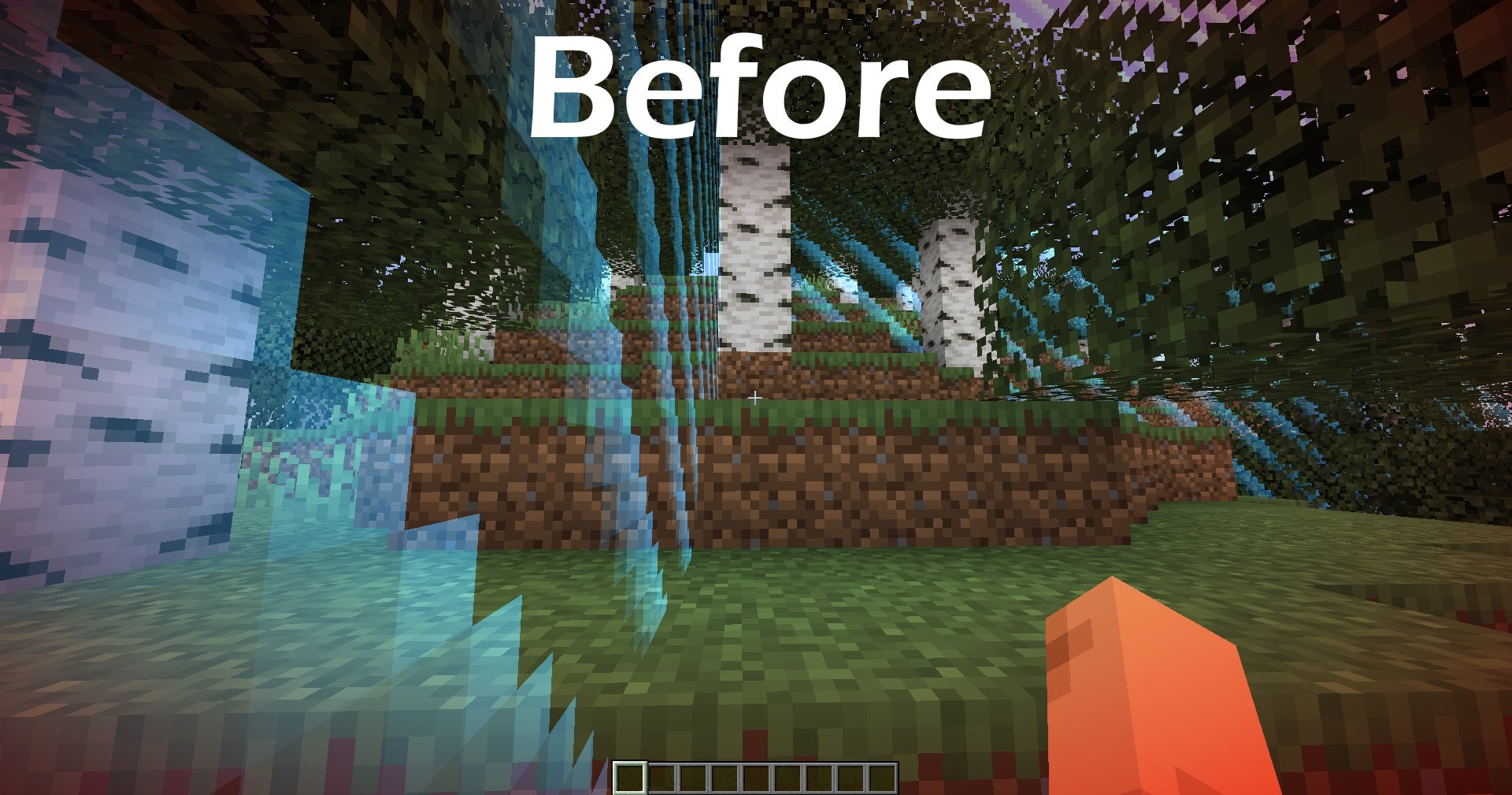
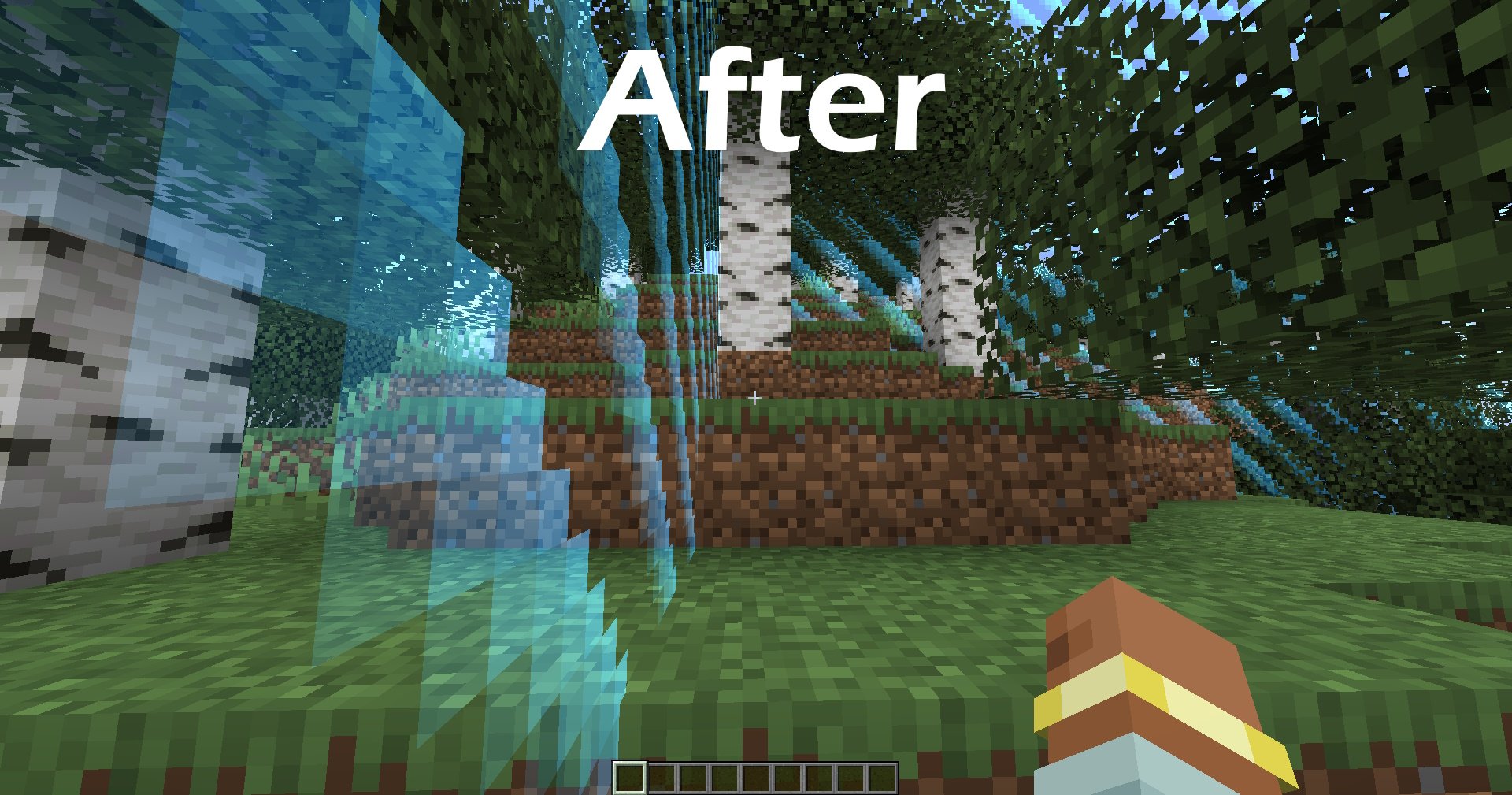
For version 1.1.0+, Use `/noworldbordertint` (aliases: `/nwbt`, `/nwt`) or the config button through Mod Menu to toggle the tint on or off. This is only for Fabric for now.
You can use this mod in modpacks as long as proper credit is given to the mod author.
NoWorldBorder
Resourcepack that will make the world barrier invisible.
It is suitable for those who are tired of the texture that cuts their eyes.
The resource pack was made by Danie from SkinOFF studio – https://discord.gg/Haa8kXtkaT