Rep Papers
# 📜 ReputationPapers
ReputationPapers is a lightweight and unique reputation plugin that turns player reputation into physical, collectible items.
Instead of reputation being just a number, players receive glowing Reputation Papers that act as proof of being repped complete with player names, dates, and serial numbers.
Perfect for SMPs, survival servers, and social communities.

## ✨ Features
• Give reputation with simple commands
• Players receive collectible glowing Reputation Papers
• Each paper includes:
Player who gave rep
Player who received rep
Date issued
Unique serial number
• Anti-spam cooldown system
• Persistent reputation saving
• Lightweight and lag-free
• No dependencies required
## 📜 Commands
/rep – Give reputation
/reputation – Alias for /rep
/repcheck – View a player’s reputation
## ⏱ Cooldown System
To prevent abuse, players can only give reputation once every 5 minutes by default.
## 🎁 Why ReputationPapers?
✔ Turns rep into physical collectibles
✔ Encourages positive player interaction
✔ Creates trading & collecting potential
✔ More engaging than simple rep numbers
✔ Works out of the box
## ⚙ Compatibility
Platforms: Bukkit, Spigot, Paper, Purpur
Minecraft Versions: 1.20+
## 📦 Installation
1. Download the plugin
2. Place the .jar into your /plugins folder
3. Restart the server
Start giving reputation!
## 📝 Example Use Case
Players can:
• Collect rare old rep papers
• Trade them
• Flex famous players who repped them
• Build rep museums
ReputationPapers turns reputation into something meaningful, collectible, and fun.
ReOred
# As this mod was made using MCreator and MCreator does not support fabric now, the project is now abandoned.
This mod aims to add ores, armor, tools and more to Minecraft to make it more immersive. This mod is inspired by two great resource expansion mods Metallurgy by ShadowClaimer and Metallurgy 4: Reforged.
Though both mods are stuck on older versions of Minecraft Metallurgy on 1.7.10 (Not under development anymore!), Metallurgy 4: Reforged on 1.12.2 (Still under development but does not plan to port to new Minecraft versions!).
DISCLAIMER:
This mod is NOT in any way connected the Metallurgy mods. This is a mod made from scratch by me!
The mod is currently in-development in the AlphaDev category.
The development categories will be as follows:
AlphaDev:
– Add at least 2 new ores with armor and tool sets respectively. (Silver – Done)
– ~~Add “Oak” wood armor.~~ (Completed)
– ~~Add copper armor and tools.~~ (Completed)
BetaDev:
– Add at least 8 new ores with armor and tool sets respectively to get the grand total to 10 new ores.
– Add more wood armor variants.
– Add smelting recipes for copper stuff.
– Add 1 set of new decoration blocks (>=5 blocks).
– May add 1 new ore to The Nether and 1 new ore to The End the with armor and tool sets respectively.
Alpha:
– Add at least 15 new ores with armor and tool sets respectively to get the grand total to 25 new ores.
– Add the remaining wood armor variants.
– Add 1 set of new decoration blocks to get the grand total to 2 sets.
– Add new ores to The Nether and The End to bring the grand total to 2 new ores in each dimension.
– Add more wooden variants of the crafting table.
Beta:
– Add at least 15 new ores with armor and tool sets respectively to get the grand total to 40 new ores.
– Add the remaining crafting table variants.
– Add 2 sets of decoration blocks to get the grand total to 4 sets.
– Add 3 new ores to The Nether and The End to bring the grand total to 5 new ores in each dimension.
– Add 2 new wood types.
Pre-Release:
-Fix bugs.
Release-1.0:
– 40 new ores added with armor and tool sets respectively.
– New wooden armors and crafting tables added.
– Copper armor and tools added.
– 4 sets(20+ blocks) of decoration blocks added.
– 2 new wood types added.
– Retextured Copper and Silver armor and tools.
Snapshots:
– These will be in-development versions of upcoming releases which are not to be used commercially as new updates may break things. (Only to be used if you are a developer or if you want to experience new features early or if you want to help in finding bugs.)
Goals For Future-Releases (eg. Release-1.1, Release.2.0, etc.):
– Must add 10 new ores.
– Must add 1 set of decoration blocks.
– Must add 2 new wood types.
– Must add 1 new machine (ALLOY SMELTERS, NEW SMELTERS, ORE DOUBLEING TECH, ETC.)
– And more…
You are free to use the mod in your modpacks, credits shall be given 😉
Permission must be taken before forking or republishing by modifying the mod!
Discord: Coming soon!
Contact me on Discord: coredex_source
称号与计时
这是一个轻量化的称号和计时模组,弥补了模组服不能装称号和计时插件的痛!仅装服务端即可,目前只支持1.20.1fabric版本。支持称号通过指令自定义给玩家,支持彩字中文。在TAB列表做了融合显示,计时和称号互不冲突。以下是食用教程,
设置显示位置:
/time position
after:同一行显示在玩家名后面(推荐;TAB 也生效)
above / below:用隐形盔甲架在玩家名上方/下方显示第二行
/time afkTimeout <秒>
AFK 判定秒数(默认 60)。60 秒无“自主操作”就暂停计时。
/time monthBy30Days
是否按 30 天 = 1 月 进位(默认 true)。
/time show
全局开关在线时长显示(默认 true)。
判定“自主操作”示例:视角转动、使用/放置/攻击、物品交互、丢弃物品、热键换槽、背包点击等。
不计入:聊天发言、命令、被动移动(例如水流/推挤)。
2) 称号(与你之前一致的语法)
/chtitle set <玩家> <称号…>
将称号显示为 <称号>,作为队伍前缀应用(聊天/头顶/TAB 均可见)。
若该玩家已保存颜色/调色板,则按其上色;否则用默认色 defaultColor。
/chtitle color <玩家> <颜色名 …>
一个颜色名 → 单色;多个颜色名 → 按字符轮换(非渐变)。
分隔符支持:中文/英文逗号、空格(含全角)、加号(+/+)。
颜色名可用 中文/英文/别名;也可直接写 #RRGGBB、0xRRGGBB、十进制。
/chtitle clear <玩家>
清除称号(只清前缀,不影响在线时长的后缀)。
/chtitle reload-config
重载 config/ch-mod.json(不会清玩家称号/颜色数据)。
权限:默认仅 OP 等级 ≥ 3 可用(可在 config/ch-mod.json 的 requiredOpLevel 修改)。
<玩家> 支持玩家名和能解析为单一目标的选择器(如 @s/最近的 @p),不支持多目标(如 @a)。
显示规则(避免冲突的关键点)
同一支队伍:
前缀 prefix = 称号 <…>(带颜色/轮换);
后缀 suffix = 在线时长(分→时→天→月自动进位)。
因为前后缀都落在同一个队伍,所以玩家名与 TAB 列表会同时显示称号+时长,不会互相顶掉。
above/below 仅在名牌二层显示,不影响 TAB。
配置与数据文件
第一次启动会自动生成;手改后可用 /chtitle reload-config 或重启生效(仅 ch-mod.json 需重载)。
配置文件
config/ch-mod.json(主配置,JSON)
requiredOpLevel(int)—— /chtitle 所需 OP 等级(默认 3)
useScoreboard(bool)—— 是否启用队伍前缀(默认 true,一般保持开启)
defaultColor(int)—— 未保存颜色时的默认色(十进制,默认白色 16777215)
namedColors(map)—— 颜色名映射,可扩展中文/英文/别名
内置示例:红/紅、金、橙、黄/黃、绿/綠、青、蓝/藍、紫、白、灰/grey、黑、粉;red、gold、orange、yellow、green、aqua、blue、purple、white、gray、black、pink
config/ch-mod-time.json(时长显示/逻辑;若未见也会按默认值运行)
position:”after”|”above”|”below”(默认 “after”)
afkTimeout:AFK 秒数(默认 60)
monthBy30Days:是否 30 天进 1 月(默认 true)
show:是否显示时长(默认 true)
strongRefreshSeconds:进服/改称号/进位后 TAB “增压刷新”秒数(默认 5)
以上时长项也都能用 /time … 动态修改(保存并实时生效)。
希望各位服主用的满意~(我也是个小服主)
Translate the following content without altering the layout. Provide a correctly formatted version that can be directly copied for use on a Modrinth mod release page.
This is a lightweight titles and playtime tracking mod, addressing the pain point of not being able to use title and timing plugins on modded servers! Only needs to be installed on the server side. Currently only supports 1.20.1 Fabric. Supports customizing titles for players via commands, including colored text and Chinese characters. Integrates seamlessly into the TAB list, with titles and playtime tracking not conflicting with each other.
Here’s the usage tutorial:
1) Setting Display Position:
/time position
after: Displays on the same line after the player’s name (Recommended; also works in TAB).
above / below: Uses invisible armor stands to display a second line above/below the player’s name.
/time afkTimeout
Sets the AFK detection timeout in seconds (default 60). Timers pause after 60 seconds of no “voluntary actions”.
/time monthBy30Days
Whether to use 30 days = 1 month for progression (default true).
/time show
Global toggle for displaying online playtime (default true).
Examples of “Voluntary Actions”: Camera movement, using/placing/attacking blocks, item interaction, dropping items, hotbar slot switching, inventory clicks, etc.
Not Counted: Chat messages, commands, passive movement (e.g., water flow, pushing).
2) Titles (Syntax consistent with before)
/chtitle set
Sets the title displayed as
, applied as a team prefix (visible in chat, above head, and TAB).</p>
<p>If the player has a saved color/palette, it is used; otherwise, the defaultColor is applied.</p>
<p>/chtitle color <player> <color name ...>
<p>One color name → solid color; Multiple color names → cycles colors per character (not gradient).</p>
<p>Supported separators: Chinese/English commas, spaces (including full-width), plus signs (+/+).</p>
<p>Color names can be in Chinese/English/aliases; Direct hex (#RRGGBB), 0xRRGGBB, or decimal values are also supported.</p>
<p>/chtitle clear <player>
<p>Clears the title (only clears the prefix, does not affect the online playtime suffix).</p>
<p>/chtitle reload-config</p>
<p>Reloads config/ch-mod.json (does not clear player title/color data).</p>
<p>Permissions: Default requires OP level ≥ 3 (configurable via requiredOpLevel in config/ch-mod.json).
<player> supports player names and selectors resolving to a single target (e.g., @s, nearest @p), not multiple targets (e.g., @a).</p>
<p>Display Rules (Key points to avoid conflicts)</p>
<p>Within the same team:</p>
<p>Prefix = Title <...> (with colors/cycling).</p>
<p>Suffix = Online playtime (auto-converts minutes → hours → days → months).</p>
<p>Because both prefix and suffix belong to the same team, the player’s name in the TAB list displays both the title and playtime simultaneously without overriding each other.</p>
<p>above/below display only on the nameplate’s second line and do not affect TAB.</p>
<p>Configuration & Data Files</p>
<p>Generated automatically on first run. Use /chtitle reload-config or restart after manual edits (only ch-mod.json requires reloading).</p>
<p>Configuration Files:</p>
<p>config/ch-mod.json (Main config, JSON)</p>
<p>requiredOpLevel (int) – Required OP level for /chtitle commands (default 3).</p>
<p>useScoreboard (bool) – Whether to enable team prefix (default true, generally keep enabled).</p>
<p>defaultColor (int) – Default color if no saved color exists (decimal, default white 16777215).</p>
<p>namedColors (map<string,int>) – Color name mappings, extensible with Chinese/English/aliases.</p>
<p>Built-in examples: 红/紅, 金, 橙, 黄/黃, 绿/綠, 青, 蓝/藍, 紫, 白, 灰/grey, 黑, 粉; red, gold, orange, yellow, green, aqua, blue, purple, white, gray, black, pink.</p>
<p>config/ch-mod-time.json (Playtime display/logic; runs with defaults if not found)</p>
<p>position: “after”|”above”|”below” (default “after”).</p>
<p>afkTimeout: AFK timeout in seconds (default 60).</p>
<p>monthBy30Days: Whether 30 days = 1 month (default true).</p>
<p>show: Whether to display playtime (default true).</p>
<p>strongRefreshSeconds: TAB “boosted refresh” duration after joining/changing title/unit progression (default 5).</p>
<p>All these playtime settings can also be modified dynamically using /time … (saved and applied immediately).</p>
<p>Hope all server owners find it satisfactory~ (I’m a server owner myself too).</p>
</article>
<article>
<h1>RentTools</h1>
<p>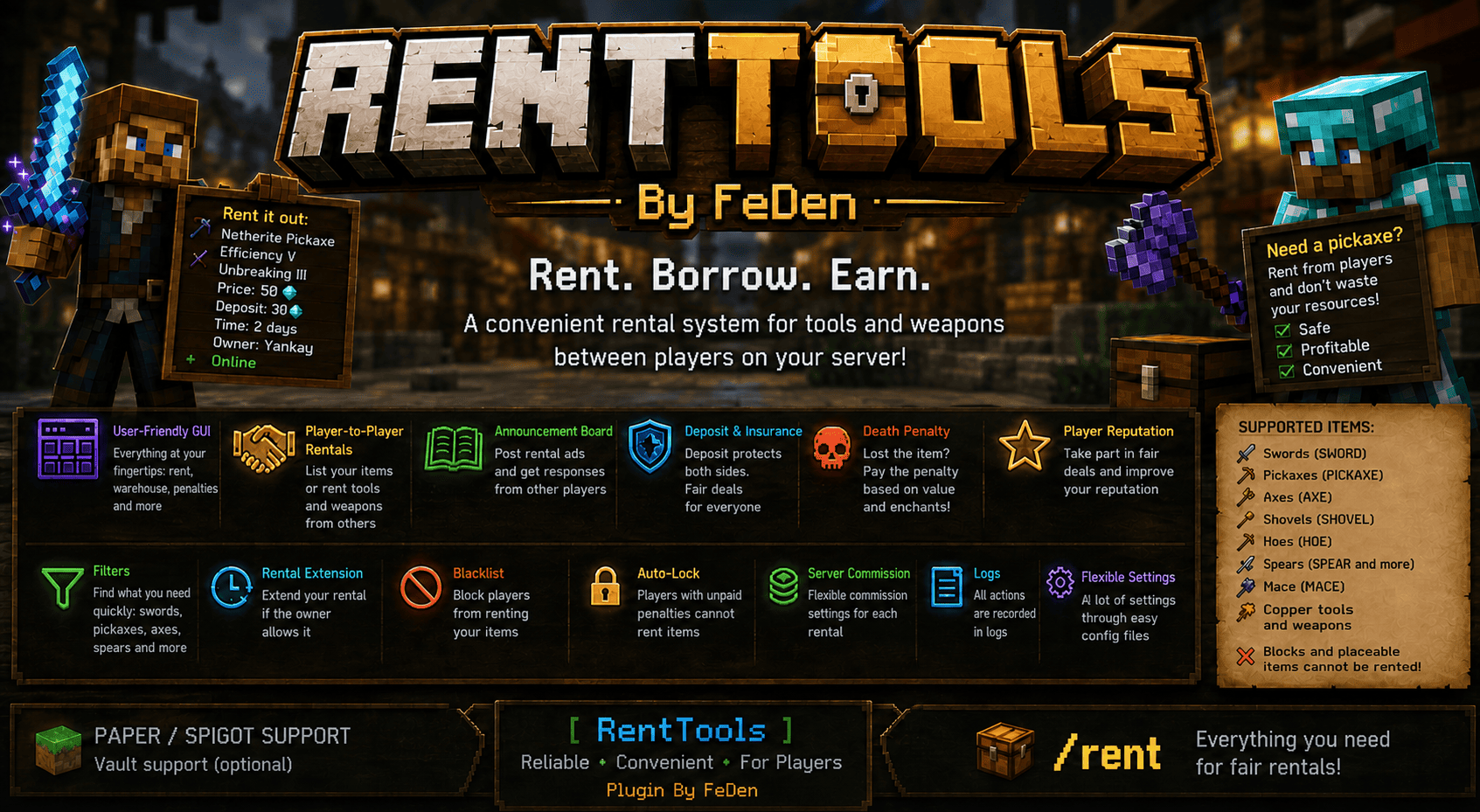</p>
<p>## 📦 RentTools – Tool & Weapon Rental System for Minecraft</p>
<p>**RentTools** is a powerful plugin for **Paper / Spigot** servers that introduces a complete item rental system between players: via commands, an intuitive GUI, and a bulletin board.</p>
<p>—</p>
<p>## ⚙️ Core Features</p>
<p>### 🔄 Item Rental</p>
<p>* Players can rent out any tool or weapon<br />
* Other players can borrow items for a set period<br />
* When the rental expires, the item is automatically returned to the owner<br />
* If the inventory is full, the item is sent to the warehouse</p>
<p>—</p>
<p>### 🛠 Supported Items</p>
<p>✔ Swords (SWORD)<br />
✔ Pickaxes (PICKAXE)<br />
✔ Axes (AXE)<br />
✔ Shovels (SHOVEL)<br />
✔ Hoes (HOE)<br />
✔ Spears (SPEAR, including custom ones – WOODEN, COPPER, etc.)<br />
✔ Mace (MACE)<br />
✔ Copper tools and weapons</p>
<p>❌ Blocks and placeable items cannot be rented</p>
<p>—</p>
<p>### 💾 Full Item Preservation</p>
<p>The plugin saves EVERYTHING:</p>
<p>* enchantments<br />
* durability<br />
* name<br />
* lore<br />
* NBT / PDC data<br />
* custom items</p>
<p>—</p>
<p>## 🧭 User-Friendly GUI</p>
<p>Command: `/rent`</p>
<p>Menu includes:</p>
<p>* rent out item<br />
* rental list<br />
* bulletin board<br />
* my rentals<br />
* warehouse<br />
* penalties</p>
<p>—</p>
<p>## 📋 Bulletin Board</p>
<p>Players can publish “for rent” listings.</p>
<p>Displays:</p>
<p>* item<br />
* owner<br />
* price and deposit<br />
* rental duration<br />
* online status<br />
* extension availability</p>
<p>—</p>
<p>### 📩 Requests</p>
<p>* Online — owner receives a clickable notification<br />
* Offline — notification is delivered on login</p>
<p>—</p>
<p>## 📦 Warehouse (`/rent warehouse`)</p>
<p>If there’s no inventory space:</p>
<p>* rented items<br />
* returned items<br />
* payments</p>
<p>➡️ everything is stored in the warehouse</p>
<p>—</p>
<p>## 💰 Currency</p>
<p>Default:</p>
<p>* DIAMOND_ORE<br />
* DEEPSLATE_DIAMOND_ORE</p>
<p>Can be changed in `config.yml`<br />
**Vault** support (optional)</p>
<p>—</p>
<p>## ☠️ Death Penalties</p>
<p>If a renter dies:</p>
<p>* the item is deleted<br />
* not returned to the owner (anti-duplication protection)<br />
* the renter receives a penalty<br />
* the owner is notified</p>
<p>### 📊 Penalty Calculation</p>
<p>Penalty depends on:</p>
<p>* material (WOOD, IRON, DIAMOND, etc.)<br />
* item type<br />
* enchantments</p>
<p>Formula:<br />
**penalty = item value + enchantment value**</p>
<p>—</p>
<p>## ✨ Enchantments</p>
<p>* Automatic enchantment detection<br />
* Fully configurable in `enchant-penalties.yml`</p>
<p>—</p>
<p>## 🛡 Deposit (Insurance)</p>
<p>* Returned after a successful rental<br />
* Kept by the owner if the item is lost</p>
<p>—</p>
<p>## ⭐ Player Reputation</p>
<p>Statistics system:</p>
<p>* successful rentals<br />
* lost items</p>
<p>File: `reputation.yml`</p>
<p>—</p>
<p>## 🚫 Blacklist</p>
<p>Restrict specific players from renting:</p>
<p>“`<br />
/rent blacklist add <player>
/rent blacklist remove <player>
“`</p>
<p>—</p>
<p>## 🔒 Restrictions</p>
<p>* Players with unpaid penalties cannot rent items<br />
* Configurable in `config.yml`</p>
<p>—</p>
<p>## ⏳ Rental Extension</p>
<p>If allowed by the owner:</p>
<p>“`<br />
/rent extend <id><br />
“`</p>
<p>—</p>
<p>## 💸 Server Commission</p>
<p>* Can be enabled/disabled<br />
* Adjustable percentage</p>
<p>—</p>
<p>## 🔍 Filters</p>
<p>Board filtering:</p>
<p>* by item type<br />
* online owners only</p>
<p>—</p>
<p>## 📝 Logs</p>
<p>File `logs.yml` records:</p>
<p>* rental creation<br />
* start and completion<br />
* item losses<br />
* penalties<br />
* extensions</p>
<p>—</p>
<p>## 🛠 Admin Commands</p>
<p>Permission: `renttools.admin`</p>
<p>“`<br />
/rent admin delete <id><br />
/rent admin fine <player> <amount><br />
/rent admin unfine <penaltyId>
/rent admin warehouse<br />
/rent admin logs<br />
“`</p>
<p>—</p>
<p>## 🎮 Player Commands</p>
<p>“`<br />
/rent<br />
/rent create <price> <time><br />
/rent list<br />
/rent board<br />
/rent my<br />
/rent warehouse<br />
/rent penalties<br />
/rent cancel <id><br />
/rent extend <id><br />
“`</p>
<p>—</p>
<p>## 📁 Config Files</p>
<p>* config.yml<br />
* rentals.yml<br />
* announcements.yml<br />
* warehouse.yml<br />
* penalties.yml<br />
* item-penalties.yml<br />
* enchant-penalties.yml<br />
* reputation.yml<br />
* blacklist.yml<br />
* logs.yml</p>
<p>—</p>
<p>## 📢 Additional</p>
<p>* Messages use prefix: **[RentTools]**<br />
* On startup: *Plugin By FeDen*</p>
<p>—</p>
<p>## 🚀 Summary</p>
<p>**RentTools** is a complete rental system featuring:<br />
✔ security<br />
✔ high configurability<br />
✔ integrated economy<br />
✔ GUI interface</p>
<p>Perfect for **vanilla+** style servers 🔥</p>
</article>
<article>
<h1>Rent-A-Girlfriend Custom GUI Pack</h1>
<p>****</p>
<p>**It’s GUI ONLY Resource pack so you can freely use it with other resource packs. Just place it on top of resource pack you use.** </p>
<p>**This is a GUI packed themed towards the show “Rent-A-Girlfriend”. Don’t hesitate to comment down below, I have even changed hot bar as well hope you enjoy. I have taken the opportunity to experiment with adding different pictures to each container. The palette that I choose is Dark Blue & Red but maybe in the future, If you guys want other colors like White & Black or any colors else.**</p>
<p>****Check out the Discord server. where you can suggest and vote for the next pack , as well as participate in anime discussion. I will also being doing Discord nitro giveaways every** **month, You** **can find a link down below**** </p>
<p>**please tell me I will think about it!**<br />
**If you found any bugs please report to me I will fix it as soon as I can.**</p>
<p>**Updated for 1.20.1**</p>
<p>**Visual Updates Includes:**</p>
<p>– Adding pink boarders<br />
– New Pictures to containers<br />
– Coloring the Minecraft Logo</p>
<p>[<br />
<img decoding="async" src="https://i.imgur.com/5uXVdKj.gif" width="500"/>](https://listar-mc.net/)</p>
<p>[<br />
<img decoding="async" src="https://i.imgur.com/bYZtcXk.png" width="500"/>](https://listar-mc.net/)</p>
<p>**Images**</p>
<p>[****](https://legacy.curseforge.com/linkout?remoteUrl=https%253a%252f%252flistarmc.com%252fpacks%252fDoki-Doki-Literature-Club!-Custom-GUI-Pack)</p>
<p>**Hud**<br />
</p>
<p>**Settings**</p>
<p>****</p>
<p>**Creative Menu**</p>
<p>****</p>
<p>**Anvil**</p>
<p>****</p>
<p>**Crafting Table**</p>
<p>****</p>
<p>**Smithing Table**</p>
<p>****</p>
<p>**Furnace**</p>
<p>****</p>
<p>**Brewing Stand**</p>
<p>****</p>
<p>****Enchantment** Table**</p>
<p>****</p>
<p>**Shulker Box**</p>
<p>****</p>
<p>****Cartography** Table**</p>
<p>****</p>
<p>****Dispenser****</p>
<p>****</p>
<p>**Loom**</p>
<p>****</p>
<p>**Grinding Stone**</p>
<p>****</p>
<p>**Beacon Menu**</p>
<p>****</p>
<p>**Villager Trading Menu**</p>
<p></p>
<p>[****](https://legacy.curseforge.com/linkout?remoteUrl=https://listarmc.com/)</p>
<p>**Check Out Our Relaunched Website For More Content By Clicking The Image Above !!**</p>
<p>[****](https://discord.gg/RvScgzj3Ph)</p>
<p>****Join the discord by clicking the image****</p>
<p>[](https://legacy.curseforge.com/linkout?remoteUrl=https://www.buymeacoffee.com/listarMc)</p>
<p>**Thank you for your support ! ❤**</p>
</article>
</main>
<script type="speculationrules">
{"prefetch":[{"source":"document","where":{"and":[{"href_matches":"/*"},{"not":{"href_matches":["/wp-*.php","/wp-admin/*","/wp-content/uploads/*","/wp-content/*","/wp-content/plugins/*","/wp-content/themes/minecraft/*","/*\\?(.+)"]}},{"not":{"selector_matches":"a[rel~=\"nofollow\"]"}},{"not":{"selector_matches":".no-prefetch, .no-prefetch a"}}]},"eagerness":"conservative"}]}
</script>
<script id="wp-emoji-settings" type="application/json">
{"baseUrl":"https://s.w.org/images/core/emoji/17.0.2/72x72/","ext":".png","svgUrl":"https://s.w.org/images/core/emoji/17.0.2/svg/","svgExt":".svg","source":{"concatemoji":"https://minecraft-files.ru/wp-includes/js/wp-emoji-release.min.js?ver=7.0"}}
</script>
<script type="module">
/*! This file is auto-generated */
const a=JSON.parse(document.getElementById("wp-emoji-settings").textContent),o=(window._wpemojiSettings=a,"wpEmojiSettingsSupports"),s=["flag","emoji"];function i(e){try{var t={supportTests:e,timestamp:(new Date).valueOf()};sessionStorage.setItem(o,JSON.stringify(t))}catch(e){}}function c(e,t,n){e.clearRect(0,0,e.canvas.width,e.canvas.height),e.fillText(t,0,0);t=new Uint32Array(e.getImageData(0,0,e.canvas.width,e.canvas.height).data);e.clearRect(0,0,e.canvas.width,e.canvas.height),e.fillText(n,0,0);const a=new Uint32Array(e.getImageData(0,0,e.canvas.width,e.canvas.height).data);return t.every((e,t)=>e===a[t])}function p(e,t){e.clearRect(0,0,e.canvas.width,e.canvas.height),e.fillText(t,0,0);var n=e.getImageData(16,16,1,1);for(let e=0;e<n.data.length;e++)if(0!==n.data[e])return!1;return!0}function u(e,t,n,a){switch(t){case"flag":return n(e,"\ud83c\udff3\ufe0f\u200d\u26a7\ufe0f","\ud83c\udff3\ufe0f\u200b\u26a7\ufe0f")?!1:!n(e,"\ud83c\udde8\ud83c\uddf6","\ud83c\udde8\u200b\ud83c\uddf6")&&!n(e,"\ud83c\udff4\udb40\udc67\udb40\udc62\udb40\udc65\udb40\udc6e\udb40\udc67\udb40\udc7f","\ud83c\udff4\u200b\udb40\udc67\u200b\udb40\udc62\u200b\udb40\udc65\u200b\udb40\udc6e\u200b\udb40\udc67\u200b\udb40\udc7f");case"emoji":return!a(e,"\ud83e\u1fac8")}return!1}function f(e,t,n,a){let r;const o=(r="undefined"!=typeof WorkerGlobalScope&&self instanceof WorkerGlobalScope?new OffscreenCanvas(300,150):document.createElement("canvas")).getContext("2d",{willReadFrequently:!0}),s=(o.textBaseline="top",o.font="600 32px Arial",{});return e.forEach(e=>{s[e]=t(o,e,n,a)}),s}function r(e){var t=document.createElement("script");t.src=e,t.defer=!0,document.head.appendChild(t)}a.supports={everything:!0,everythingExceptFlag:!0},new Promise(t=>{let n=function(){try{var e=JSON.parse(sessionStorage.getItem(o));if("object"==typeof e&&"number"==typeof e.timestamp&&(new Date).valueOf()<e.timestamp+604800&&"object"==typeof e.supportTests)return e.supportTests}catch(e){}return null}();if(!n){if("undefined"!=typeof Worker&&"undefined"!=typeof OffscreenCanvas&&"undefined"!=typeof URL&&URL.createObjectURL&&"undefined"!=typeof Blob)try{var e="postMessage("+f.toString()+"("+[JSON.stringify(s),u.toString(),c.toString(),p.toString()].join(",")+"));",a=new Blob([e],{type:"text/javascript"});const r=new Worker(URL.createObjectURL(a),{name:"wpTestEmojiSupports"});return void(r.onmessage=e=>{i(n=e.data),r.terminate(),t(n)})}catch(e){}i(n=f(s,u,c,p))}t(n)}).then(e=>{for(const n in e)a.supports[n]=e[n],a.supports.everything=a.supports.everything&&a.supports[n],"flag"!==n&&(a.supports.everythingExceptFlag=a.supports.everythingExceptFlag&&a.supports[n]);var t;a.supports.everythingExceptFlag=a.supports.everythingExceptFlag&&!a.supports.flag,a.supports.everything||((t=a.source||{}).concatemoji?r(t.concatemoji):t.wpemoji&&t.twemoji&&(r(t.twemoji),r(t.wpemoji)))});
//# sourceURL=https://minecraft-files.ru/wp-includes/js/wp-emoji-loader.min.js
</script>
</body>
</html>
<!--
Performance optimized by Redis Object Cache. Learn more: https://wprediscache.com
Retrieved 743 objects (125 KB) from Redis using Predis (v2.4.0).
-->