Retextured LU 1972 Stock
This resourcepack adds the LU 1972 Stock into Minecraft Transit Railway.
The LU 1972 stock is a retexture of the LU 1995 stock which comes with the Minecraft Transit Railway mod.
Disclaimers:
This resourcepack does not come with sound.
This resourcepack does not have pocket doors on the train since this is just a retexture.
Retextured Fire
# Retextured fire
This resource pack changes the texture of fire and soul fire, by making it more similar to the texture of a campfire.
Lower fire version included.
Retextured Dyes
This pack retextures and adding different shape to each dye.

## Currently this pack contain retextures of:
– Red dye
– Orange dye
– White dye
– Light gray dye
– Gray dye
– Pink dye
– Purple dye
– Lime dye
– Cyan dye
Retextured Copper
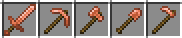
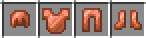
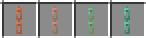
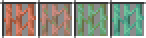
This resource pack changes the texture of copper gear, by giving it more unique shapes and texture.
Currently changes:
– Copper Sword, Pickaxe, Axe, Shovel and Hoe
> 
– Copper Helmet, Chestplate, Leggings and Boots
> 
– Copper Chains
> 
– Copper Lanterns
> 
– Copper Bars
> 
Retexture «davdeo’s Item Magnet»
I didn’t like the texture in [davdeo’s Item Magnet](https://modrinth.com/mod/davdeos-item-magnet) mod, so I decided to make a resource pack that changes the Magnet, Broken Magnet, and Magnet Core.
ReterPack
A texture pack for PvP, featuring a built-in armor durability indicator when broken, reworked background plates, and the ability to rename a totem into a variety of beautiful textures using an anvil.The texture pack features pleasant textures, some items have been scaled down for better PvP performance, and almost all items have been redesigned, though most retain their vanilla style. Custom sounds for impacts, totem destruction, and many others have also been added. All discs have received new background music, several songs per disc.
The list of renames is located in the resource pack folder.
ReTechnoCraft
Step into the future of Minecraft with ReTechnoCraft, a modpack designed for players who love automation, industry, and cutting-edge technology! Build massive factories, design complex production lines, and harness the power of advanced machinery to revolutionize your world.
With mods like Applied Energistics 2 and Create, you’ll have access to high-tech tools, powerful energy systems, and intricate automation setups. Master nuclear power, dive into digital storage solutions, and push the limits of engineering with modular machines.
Whether you’re constructing massive assembly lines, launching rockets into space, or creating self-sustaining cities, TechnoCraft offers endless possibilities. Are you ready to embrace the future and dominate the world of technology?
Features:
⚙️ Advanced automation and engineering
⚡ Multiple power generation systems
🖥️ High-tech storage and logistics solutions
🚀 Space exploration and high-speed transport
🏭 Customizable factories and industrial machines
Get ready to engineer, automate, and innovate like never before! 🚀🔧
ReTargetato
## **ReTargetato**
ReTargetato is a simple yet powerful Minecraft mod that modifies the targeting logic within the game, providing players with more flexible control over hostile entity behaviors.
### Key Features:
* Supports blacklist and whitelist modes to control which entities can attack each other.
* Advanced filtering allows special handling of specific entities, such as preventing Wither Skeletons from targeting Piglins.
Original mod source link: [Targetato](https://www.curseforge.com/minecraft/mc-mods/targetato)
RetainXP
Are you annoyed to lose all your XP just because you didn’t heard a Creeper behind you?
RetainXP allows you to keep a part of your XP after you die. For example, you can configure it to keep 50% of your XP on death instead of losing all of it.
## Permissions
Currently, there is only one permission available: `retainxp.retain` (Default: everyone)
## How does it work?
On player death (and if the player has the `retainxp.retain` permission) the current XP level gets multiplied with the `multiplier` value specified in the config file (which defaults to 1.0). On respawn, the new player level will be the calculated value.
Examples:
* If the multiplier is set to 1.0 and you die on XP level 60, you will be respawned with XP level 60 (i.e. just like you set the `keepInventory` game rule but without keeping the inventory content).
* If the multiplier is set to 0.5 and you die on XP level 60, you will be respawned with XP level 30.
# My other plugins
You can find them on [my website](https://selfcoders.com/projects/minecraft-plugins).
Retail
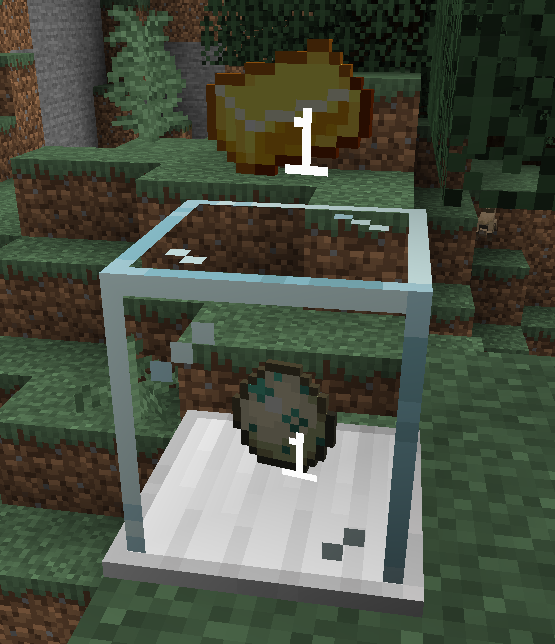
The Vending Block allows players to easily accept item trades.
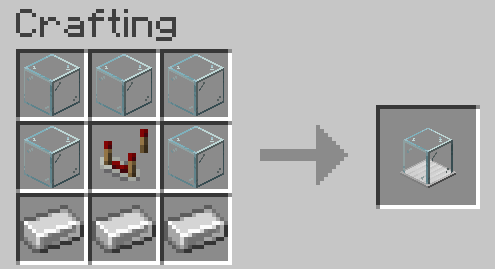
## Crafting
## How to Use
To set up a Vending Block, place it on the ground and right-click to open a menu. The player that placed it is the only player that can open the configuration/inventory.
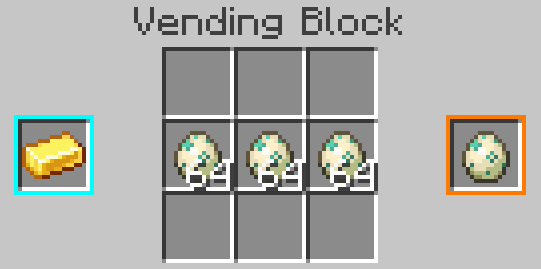
The blue slot on the left is the stack accepted for trade, and the orange slot on the right is the stack that will be returned to the customer. These slots don’t consume items, but can be clicked with a stack to set them.
In the center is the inventory of the block, which should contain the stock of items to distribute. Items paid by users will also appear here, so make sure to leave space for them.
Once configured, players can exchange items by right-clicking on the block with the required item in hand.