Scheduler




Text Transcript
Scheduler – Create timed events easily with a highly optimized plugin!
FREE Discord Support | Full Documented Plugin
Features:
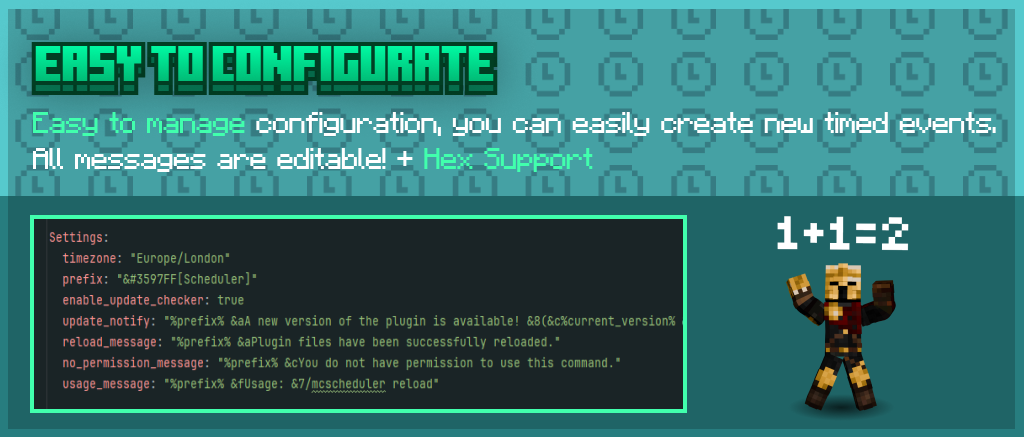
– Hex Support
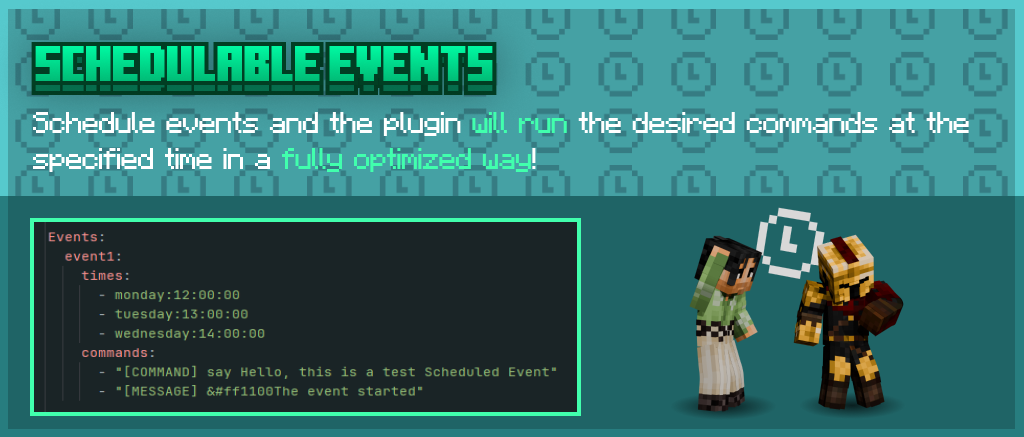
– Optimized Plugin, events
– Fully customizable messages, config
– Customizable timezone
– 0/24 Discord Support
– 1.18-1.21.x Version Support
ScheduledTickVisualizer
# What is this?
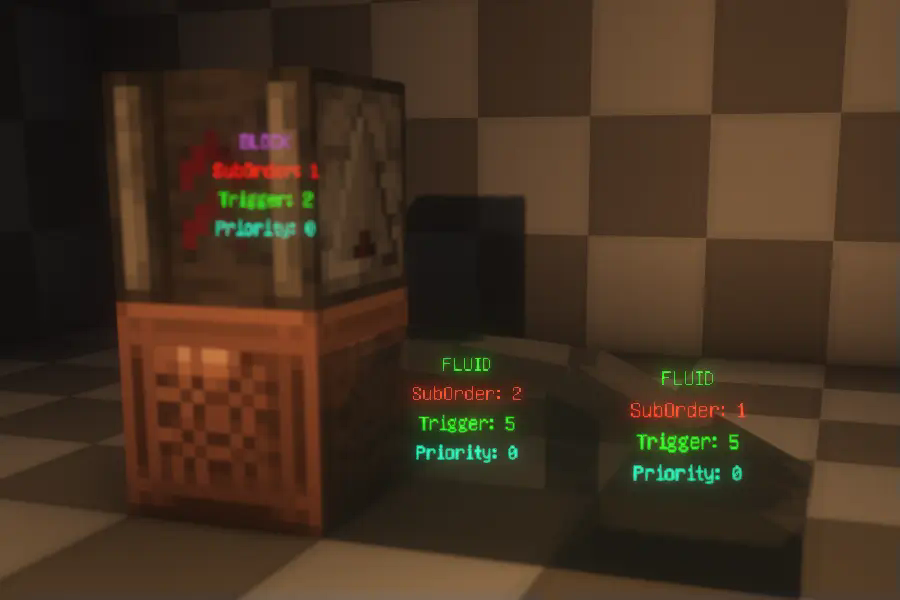
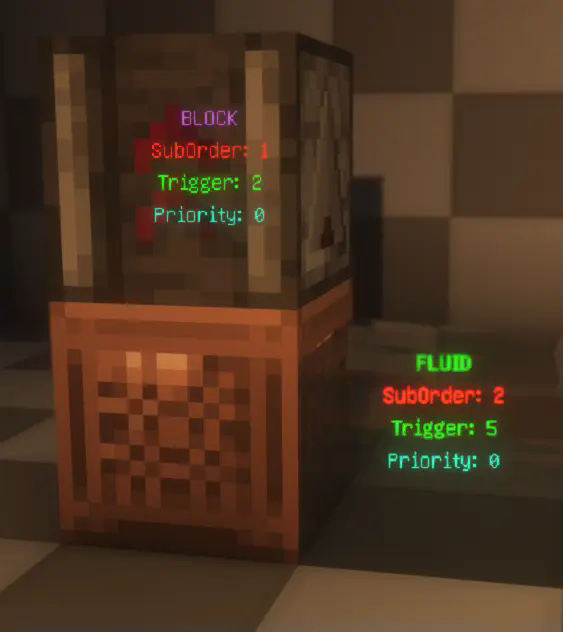
This is a visualization mod that renders detailed information about ScheduledTicks in the world, including their type, trigger time, order, and priority.
# How to Use?
First, make sure to install YACL and Mod Menu, and ensure this mod is installed on both the server and the client.
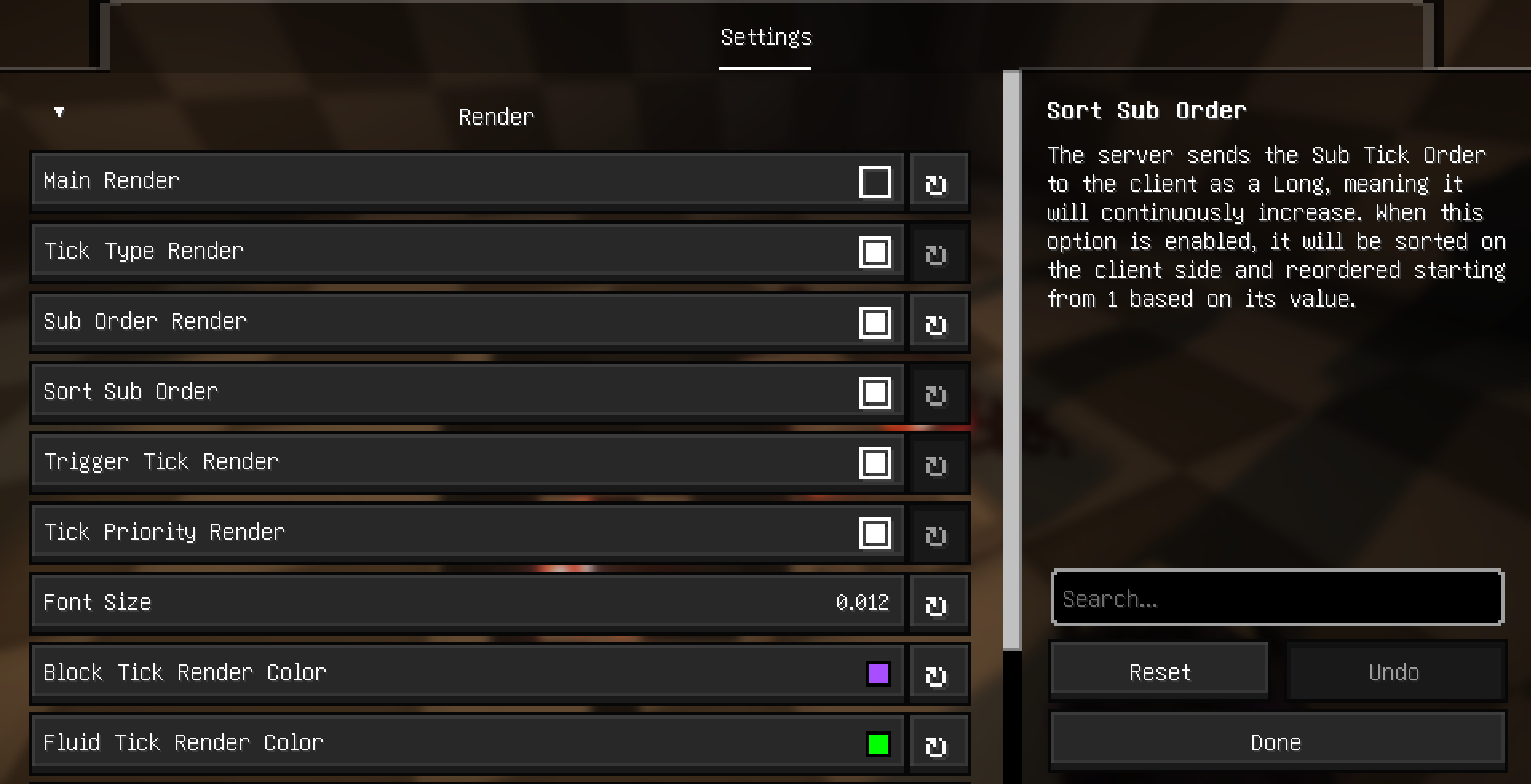
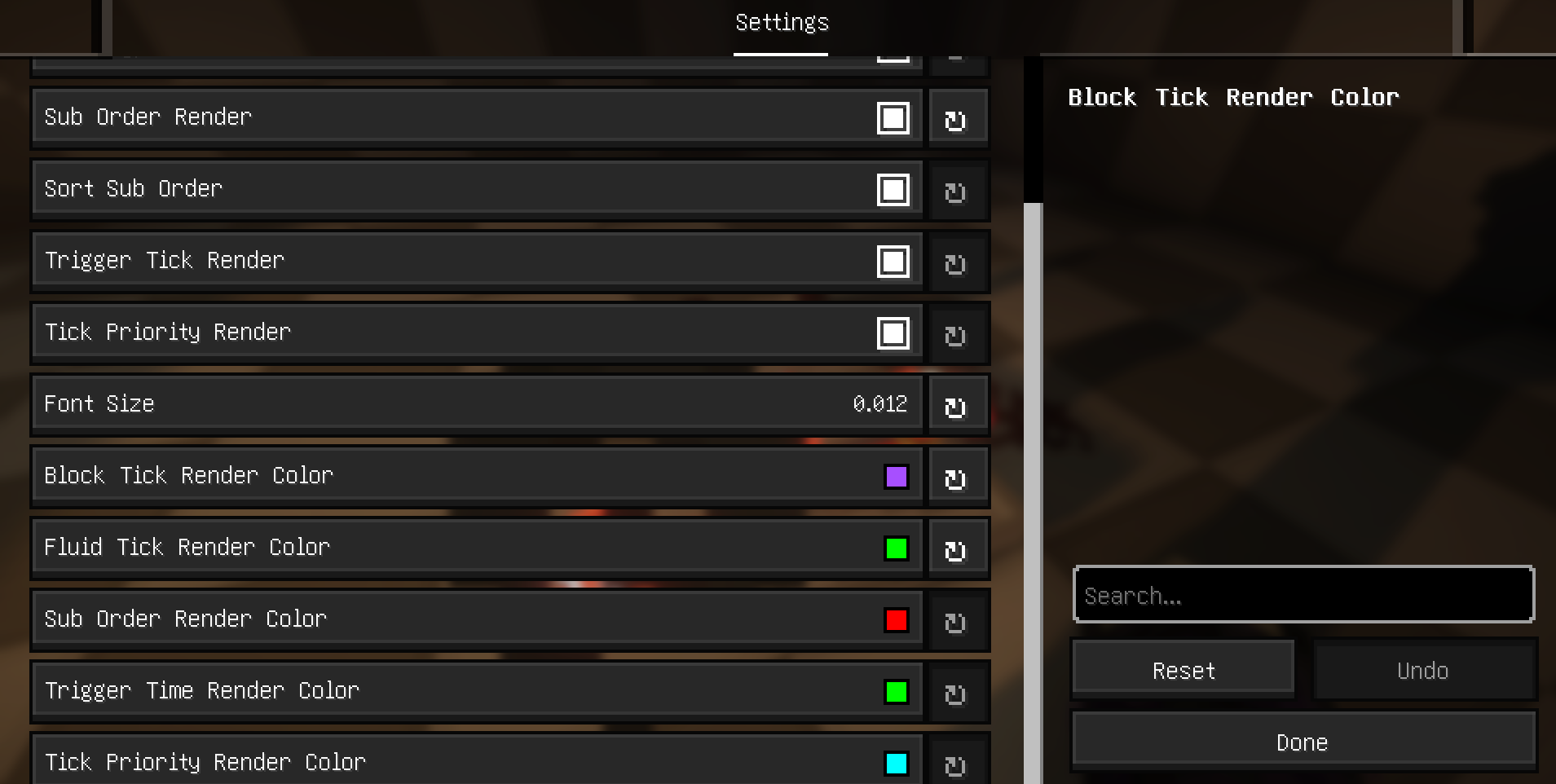
Then, enter the world, open the settings menu, navigate to Mod Menu, find this mod, and click on its settings. Enable “Main Render” to start visualizing ScheduledTicks.

# Related Commands and Settings
Settings are already explained in the configuration menu and won’t be elaborated on here. However, it’s worth noting that to prevent the server from sending ScheduledTick data for distant areas (very far away) to the client, the server will check whether any players are within range (default is 20 blocks). This range can be adjusted using the command:
“`
/gamerule scheduledTickInformationRange
“`
# Additional Explanation and Supported Languages
### Explanation
– Type: Displays the type of the ScheduledTick, indicating whether it’s a block tick or a fluid tick.
– SubOrder: Shows the execution order of the ScheduledTick within the current tick, i.e., the sequence among multiple ScheduledTicks.
– Trigger: Indicates how many ticks remain until the ScheduledTick is triggered.
– Priority: Displays the priority level of the ScheduledTick. For more details, refer to this [](https://technical-minecraft.fandom.com/wiki/Tile_Tick_Block).
### Supported Languages:
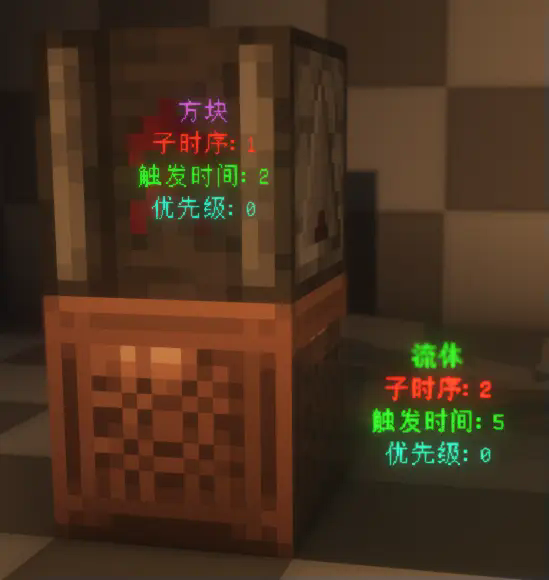
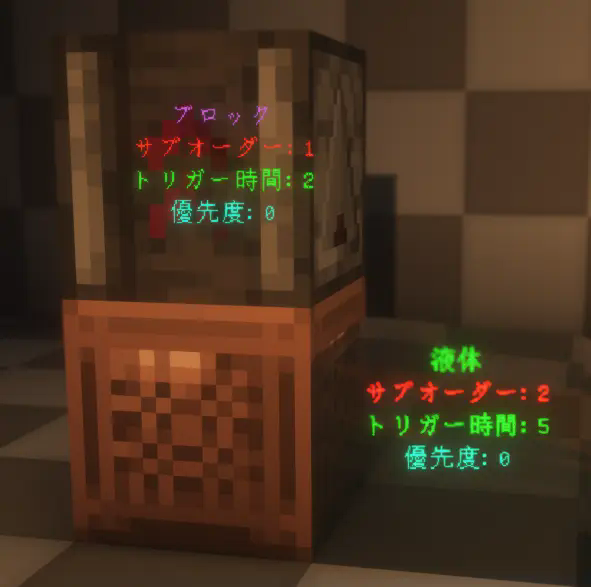
The mod currently supports multiple languages, including English, Simplified Chinese, Traditional
(Taiwan and Hong Kong), and Japanese.
ScheduledShutdown
—
# How to Use
1. Set the shutdown time in the configuration.
2. Set your timezone using this [list of timezones](https://docs.oracle.com/cd/E72987_01/wcs/tag-ref/MISC/TimeZones.html).
# Config Example
“`yml
shutdown-time: “23:30” # Format: HH:mm
timezone: “Europe/Stockholm” # See TimeZones.md for valid timezone IDs
“`
# How Does It Work?
The server will automatically shut down **every day** at the time you specify in the configuration.
This allows you to schedule recurring shutdowns without manual intervention.
Scheduled Restart
Minecraft servers, if left running constantly, will continually increase their RAM usage. Regularly restarting your server is incredibly important to avoid this, and the Scheduled Restart mod allows you to easily automate the process.
This mod is based on ruin9999’s Simple Server Restart mod, with some small improvements.
## How to use
In order to allow the mod to restart the server, the config setting **startScriptPath** must be set to the name of the server’s startup script. The startup script will be a `.bat` file on Windows systems, or a `.sh` file on Unix systems, and will likely be named “start”, “entrypoint” or something similar.
If your server does not have a startup script, you will need to make one yourself. Make sure the contents of the startup script are the same as the command used to run the server. It should look something like this: `java -Xmx128M -Xms1024M -jar server.jar nogui`. Do not use this command, use the one that is used to start your server.
The schedule of automatic restarts is fully configurable in the config file. By default, the server will restart at midnight every day, with a warning in chat 5 minutes in advance, and another 30 seconds in advance. The server will also by default restart if no players are online for an hour.
Schedule Shutdown
# Schedule Shutdown
A Minecraft data pack containing functions that will stop the server after a duration of time.
**Important**: To use this datapack, you need to be running a dedicated server with `function-permission-level` in `server.properties` to `4`. This datapack **will not function** (get it? :D) in a singleplayer world.
**Important**: Except for `NO_AUTO_SHUTDOWN.zip`, all versions will automatically shut down the server after the specified length of time. See [Auto-Shutdown](#auto-shutdown) for an explanation of what this means and why I did it like that.
Below is a list of available delays. Each one triggers the one below it. (I did this in a not dumb way, with 5hrs triggering 1hr after 4hrs, 1hr trigger 15min after 45min, etc.)
– 5hrs
– 1hr
– 15min
– 5min
– 1min
Any scheduled shutdowns are cancelled upon starting the server.
## Examples
“`mcfunction
# Shut down the server in 5hrs. See src/data/schedule_shutdown/functions/delay/* for function names.
function schedule_shutdown:delay/five_hours
# Cancel a scheduled shutdown.
function schedule_shutdown:clear_all
“`
## Auto-Shutdown
I originally made this datapack because I had figured out how to host a Minecraft server in GitHub Actions, but needed the server to automatically close with enough time left to save the server state to the repo. That’s why there is a 5 hour version (max GitHub workflow run time is 6 hours). The files with a name like `length_of_time.zip` will automatically run the function `schedule_shutdown:delay/length_of_time` when the server loads (using Minecraft’s `load.json`). Unless you want your server to automatically shut down after a length of time, use `NO_AUTO_SHUTDOWN.zip`.
## FAQ/Troubleshooting
Failed to load function schedule_shutdown:shutdown
Same as `Couldn’t load tag schedule_shutdown:all_shutdown as it is missing following references: schedule_shutdown:shutdown`.
Couldn’t load tag schedule_shutdown:all_shutdown as it is missing following references: schedule_shutdown:shutdown
Make sure you set the `function-permission-level` in `server.properties` to `4` and try starting the server again. If you still have this error, please open an issue in the GitHub repo.
sCheckPlayer
**> Contact me via discord snon_s**


!(https://cdn.modrinth.com/data/cached_images/b8b29b3c1bcbeb89255d7f78eb505a82ec61e545.png)
Plugin languages:
EN – English
RU – Русский
UA – Українська
PL – Polish
DE – German
FI – Suomalainen

✔ Execution of commands when a player leaves the server.
✔ Execution of commands when checking a player starts.
✔ Execution of commands when a player confesses to using cheats.
✔ Execution of commands when a player is declared innocent.
✔ Execution of commands when a player’s time runs out.
✔ Messages to bossbar.
✔ Action bar messages.
✔ Messages on the screen.
✔ Clickable messages.
✔ Logging of commands.
✔ Setting up sounds.
✔ Possibility to prohibit breaking or placing blocks (etc).
✔ Ability to specify a list of allowed commands.
✔ Protection from calling a player for verification.
✔ Ability to teleport a player to the command executor.
✔ Ability to teleport a player to their previous location before teleportation.
✔ Ability to disable command arguments.
✔ Automatic check for new plugin version.
✔ RGB color support 𞉀
✔ And much more!

%scheckplayer_on_check% – Displays the current player being checked.
%scheckplayer_on_check_Nickname% – Displays the specified player on check.
%scheckplayer_checks_count% – Displays the number of times the player has been checked.
%scheckplayer_finished_checks_count% – Displays the number of times the player was found not guilty during verification.
%scheckplayer_confirm_checks_count% – Displays the number of times a player was banned for cheating during verification.

/scheck – Main command.
/scheck start [nickname] – Call a player for a check.
/scheck stop – Declare a player clean in the check.
/scheck confess – Confess to using cheats.
/scheck reload – Reload all files.
/scheck list – View all players currently under check.
/scheck confirm – Confirm that the player has cheats.
/scheck stopall – Stop checking for all players.
/scheck timer continue – Start a timer for the player.
/scheck timer stop – Stop the player’s timer.
/scheck timer add [time] – Extend timer for player.
/scheck timer set [time] – Set a timer for a player.
/scheck version – Check the new version of the plugin.
/scheck offline –remove – Removes a player who is on offline check.
/scheck offline –info – Allows you to view the player who is on offline check.
/scheck offline –start [nickname] – Allows the use of verification in offline mode.
/scheck info [nickname] – View information about a player under review.
/scheck knockback [nickname] – Checking a player for anti-kickbacks.
/scheck spec [nickname] – Tracking a player.
/scheck brand [nickname] – View player brand(client).
/scheck troll [nickname] crash – Crash Crash the player.
/scheck troll [nickname] invclear – Invclear Clear the player’s inventory.
/scheck troll [nickname] pumpkin – Pumpkin Put a pumpkin on the player’s head.
/scheck troll [nickname] randomtp – Randomtp Randomly teleport the player.
/scheck troll [nickname] rotatemouse – Rotatemouse Randomly rotate the player’s mouse.
/scheck troll [nickname] spam – Spam Spam the player’s chat.
/scheck troll [nickname] launch – Launch Launch the player into the sky.
/scheck troll [nickname] down – Down Push the player underground.
/scheck troll [nickname] nearby – Nearby Teleport the player to a random player nearby.
/scheck troll [nickname] invdirt – Invdirt Replace the player’s entire inventory with dirt.
/scheck troll [nickname] apple – Apple Give the player a deadly apple.
/scheck troll [nickname] dropitems – Force the player to drop all items.

scheckplayer.start – Call a player for a check.
scheckplayer.stop – Declare a player clean in the check.
scheckplayer.confess – Confess to using cheats.
scheckplayer.reload – Reload all files.
scheckplayer.list – View all players currently under check.
scheckplayer.confirm – Confirm that the player has cheats.
scheckplayer.stopall – Stop checking for all players.
scheckplayer.timer – /scheck timer
scheckplayer.timer.continue – Start a timer for the player.
scheckplayer.timer.stop – Stop the player’s timer.
scheckplayer.timer.add – Extend timer for player.
scheckplayer.timer.set – Set a timer for a player.
scheckplayer.version – Check the new version of the plugin.
scheckplayer.bypass – Protection against calling a player for verification.
scheckplayer.joinviewnewversion – Get the new version of the plugin when you log in.
scheckplayer.autoviewnewversion – Get the new plugin version automatically.
scheckplayer.afkremoveclick – Allows you to remove a player from AFK checking.
scheckplayer.bypassblockingcommandsinitiator – Allows the initiator to bypass blocked commands.
scheckplayer.bypassblockingcommandstarget – Allows the player to bypass blocked commands.
scheckplayer.offline /scheck offline
scheckplayer.offline.remove – Removes a player who is on offline check.
scheckplayer.offline.info – Allows you to view the player who is on offline check.
scheckplayer.offline.start – Allows the use of verification in offline mode.
scheckplayer.notifyadmin.chatinitiator – Sends a message to admins when the initiator types in chat.
scheckplayer.notifyadmin.chatplayer – Sends a message to admins when a player types in chat.
scheckplayer.notifyadmin.confess – Sends a message to admins when a player confesses to using cheats.
scheckplayer.notifyadmin.confirm – Sends a message to admins when the initiator confirms a player is using cheats.
scheckplayer.notifyadmin.start – Sends a message to admins when a check starts.
scheckplayer.notifyadmin.stopall – Sends a message to admins when the check is stopped for all players.
scheckplayer.notifyadmin.stop – Sends a message to admins when the check is stopped for a player.
scheckplayer.notifyadmin.timeradd – Sends a message to admins when a timer is added for a player.
scheckplayer.notifyadmin.timercontinue – Sends a message to admins when a timer is resumed for a player.
scheckplayer.notifyadmin.timerset – Sends a message to admins when a timer is set for a player.
scheckplayer.notifyadmin.timerstop – Sends a message to admins when a timer is stopped for a player.
scheckplayer.notifyadmin.* – Sends all of the above messages to admins.
scheckplayer.bypass.limit.timerset – Allows you to bypass the time setting limit.
scheckplayer.bypass.limit.timeradd – Allows you to bypass the time addition limit.
scheckplayer.info – View information about a player under review.
scheckplayer.knockback – Checking a player for anti-kickbacks.
scheckplayer.spec – Tracking a player.
scheckplayer.brand – View player brand(client).
scheckplayer.troll.crash – Crash Crash the player.
scheckplayer.troll.invclear – Invclear Clear the player’s inventory.
scheckplayer.troll.pumpkin – Pumpkin Put a pumpkin on the player’s head.
scheckplayer.troll.randomtp – Randomtp Randomly teleport the player.
scheckplayer.troll.rotatemouse – Rotatemouse Randomly rotate the player’s mouse.
scheckplayer.troll.spam – Spam Spam the player’s chat.
scheckplayer.troll.launch – Launch Launch the player into the sky.
scheckplayer.troll.down – Down Push the player underground.
scheckplayer.troll.nearby – Nearby Teleport the player to a random player nearby.
scheckplayer.troll.invdirt – Invdirt Replace the player’s entire inventory with dirt.
scheckplayer.troll.apple – Apple Give the player a deadly apple.
scheckplayer.troll.dropitems – Force the player to drop all items.

Simple Chat
# SimpleChat – Smart and Customizable Chat Plugin for Minecraft
SimpleChat is a lightweight and powerful plugin for organizing chat on your Minecraft server. With support for local and global communication, Discord integration, and beautiful formatting.
## ✨ Key Features
### 🗣️ Smart Chat System
– **Local Chat** – messages can be heard only within a 100 block radius
– **Global Chat** – use `!` before your message to communicate with the entire server
– **Private Messages** – `/msg` command for personal communication
### 🎨 Rich Formatting
– Support for HEX colors (`&#FFFFFF`) in messages
– Automatic integration with Vault for prefixes and suffixes
– Fully customizable message formats
### 🔌 Integrations
– **DiscordSRV** support – chat synchronization with Discord
– **Vault** compatibility – works with any permission plugins
– **LuckPerms** and others – automatic prefix detection
### ⚙️ Flexible Configuration
– All messages and formats are configured through config.yml
– Customizable local chat radius
– Multi-language messages (easy to adapt to any language)
## 🚀 Installation
1. Download the latest version from Modrinth
2. Place the `.jar` file in the `plugins/` folder
3. Restart the server
4. Configure according to your needs in `plugins/SimpleChat/config.yml`
## 📋 Commands
– `/msg ` – send a private message
– `/schat reload` – reload configuration (requires permissions)
## 🎯 Permissions
– `simplechat.global` – access to global chat (default: true)
– `simplechat.admin` – administrative rights (default: op)
Scorched Guns 2 Reanimations
Animation reworks for Scorched Guns 2 by Ribs498, this is a resource pack that adds cleaner and smoother animations.
More and more animation reworks for guns will be added slowly (Like holy hell that’s a lot of guns..).
Currently has animations for 89 guns
Updates will be very slow because I don’t have motivation :v
Sceptile Overhaul (Cobblemon)
A rebalance addon for the Sceptile evolution line in hopes of bringing it closer in viability to Blaziken and Swampert.
**Included Features:**
– New Walking, Idle, Battle Idle and Sleeping animations for Sceptile
– New typing, learnset & stat redistribution for Grovyle and Sceptile
– New hidden abilities for Grovyle and Sceptile
**Planned Features:**
– New animations for Treecko and Grovyle
– Rebalance for Treecko
**Remember to put the pack in both your Resourcepack folder and your world’s Datapack folder!**
Scenic

The cental focus of Scenic is to expand on what Minecraft has to offer. Better biomes, new structures, Quality of Life changes, and better interactability. The plan is to build off that clasic Minecraft nostalgia, and reinvent it. Hopefully this can make the two week phase last a little longer!
## **ATTENTION:**
– This pack requires roughly 6GB of RAM to run smoothly, please make sure to manuelly allocate 6144MB of ram in the pack settings
## **MAIN FEATURES:**
– Over 100+ new vanilla style biomes _(William Wythers & Terralith)_
– 40+ new structures _(Dungeons and Taverns)_
– Reworked sounds _(Cool Rain, Presence Footsteps, AmbientSounds, and more!)_
– QoL mods _(Just Zoom, Dynamic Lights, Leaves Be Gone, etc.)_
– Visual Enhancments _(Iris, Particle Rain, Particular, plus many more.)_
– Plus many MANY more mods!
This is an expanding project, which I’ll update as much as possible. It’s possible that there maybe frequent updates or tweaks, as well a plenty of bugs, but I’ll work my hardest to keep it a fun and usable as possible. I’m currently experimenting with the introduction of some non vanilla expansion mods such as Create, but depending on how that changes the game I may or may not continue to make additions of that varity.