Shikimori’s Not Just a Cutie Custom GUI Pack
****
**Introduction:**
This GUI-only resource pack is themed after the show “Shikimori’s Not Just a Cutie.” You can use it alongside other resource packs by placing it on top of your existing pack. I’ve customized various UI elements and experimented with different images for each container. The palette features blue, pink, and orange. If you have color suggestions for future updates, such as red and white or other combinations, let me know!
**Community Feedback:**
Feel free to leave comments below or report any bugs you encounter so I can address them promptly.
[
 ](https://listar-mc.net/)
[
 ](https://listar-mc.net/)
**Feature Highlights:**
– **Hud:** 
– **Settings:** 
– **Anvil:** 
– **Crafting Table:** 
– **Furnace:** 
– **Chest:** 
– **Shulker Box:** 
– **Loom:** 
– **Cartography Table:** 
– **Beacon Menu:** 
**Additional Resources:**
– Check out our relaunch on [ListarMC](https://listarmc.com/)
– [Join our Discord](https://discord.gg/RvScgzj3Ph) to suggest and vote for future packs or participate in discussions
**Thank you for your support! ❤️**
Shiftly
**Shiftly** is a lightweight and high-performance proxy plugin designed for server networks running on **Velocity**. It allows administrators to smoothly move players between servers using the /move command with advanced tab completion and flexible message broadcasting.
The plugin is optimized for minimal resource usage while maintaining fast execution paths, making it suitable for large-scale networks.
– Smart tab completion
– MiniMessage formatting support
– Configurable message system
– Broadcast scope options (GLOBAL, TARGET_ONLY, TARGET_AND_ADMINS)
– Lightweight architecture for high-performance proxies
– Permission-based administration control
– LuckPerms compatibility support
# Performance
**Shiftly** is built with efficiency in mind, ensuring minimal impact on proxy tick performance while handling player transfers reliably.
## Configuration
All messages and settings can be customized inside the configuration files, allowing full control over plugin behavior.
### Commands
“`
/move
/move @a
/move -group
“`
shiftism
## 🌀 About Shiftism 🌀
**Shiftism** is a small mod made as a passion project. It includes most basic minecraft modding features, as well as custom ones. I plan to go in depth and include more in this all in one mod.
—
### 🌀 What’s in the Mod 🌀
Shiftism adds a variety of new items and gear centered around a multi-stage progression system.
* **Shifted Equipment:** A suite of tools and armor above the level of netherite.
* **Purification Mechanics:** A system not using basic crafting with selecting blocks
* **The Mystic Apple:** An infused golden apple that grants incredible agility, giving you the Speed and Jump Boost needed to navigate the world effortlessly.
* **Specialized Gadgets:** As of now, there is the **Shrink Device** that does exactly as it says! It shrinks you. :3 make sure to carry more then one, as they are set to 1 time use!
—
### 🌀 Getting Started 🌀
To begin your journey with Shiftism, you must first obtain **Impure Shifted Dust**. This raw material is volatile and unusable in its natural state. (Pssst. It’s in the end :3)
To purify it, you must **Right Click On Glowstone** while holding the dust. The light of the Glowstone will react with the impurities, transforming them into **Pure Shifted Dust**. Once purified, the dust can be smelted down into nuggets and eventually forged into the powerful **Shifted Ingots** used for shiftisms crafting.
—
### 🌀 Works in Progress 🌀
* Custom abilties on tools and armor.
* different gadgets.
* guidebook on the mechanics of forming materials.
* move away from standard crafting for certain items
Shifting-Wares: VillagerConfig Addon
# Shifting-Wares: VillagerConfig Addon
Compatibility addon that enables [ShiftingWares](https://modrinth.com/mod/shifting-wares) rerolls to use the custom trades and layouts defined by [VillagerConfig](https://modrinth.com/mod/villagerconfig/).
## Shifting Wares v2
In order for Shifting Ware’s map caching to work properly, **Exploration Map trades must use the same item-naming convention as vanilla trades.** Behaviour is undefined otherwise.
## Shifting Wares v3
With this addon, map persistence can be defined in the trade themselves, alongside to the costs and result:
– `shiftingwares:isPersistent`: *(boolean)* Forcibly marks the trade as persistent. This trade’s rerollability will be limited to the same conditions as for map trades.
– `shiftingwares:tradeId`: *(Identifier)* When defined, this allows ShiftingWares to associate an existing trade to its source in the datapack, and prevent duplicates of that trade from being generated.
### Example:
“`json
{
“shiftingwares:isPersistent”: true,
“shiftingwares:tradeId”: “minecraft:on_ocean_explorer_maps”,
“cost_a”: { “type”: “minecraft:item”, “name”: “minecraft:emerald” },
“cost_b”: { “type”: “minecraft:item”, “name”: “minecraft:compass” },
“result”: {
“type”: “minecraft:item”,
“name”: “minecraft:map”,
“functions”: [
{
“decoration”: “minecraft:monument”,
“destination”: “minecraft:on_ocean_explorer_maps”,
“function”: “minecraft:exploration_map”,
“search_radius”: 100
}
],
}
}
“`
This data will **not** be present by default when VillagerConfig generates data from vanilla trades, but map trades will still be made persistent even without it. Setting the trade Id is still recommended to avoid duplicatas.
The trade Id is not required to match the map’s destination; this example is just how ShiftingWares handles them without villager config.
## Versions Coverage
Minecraft | VC | SW | Addon | Status
:——————– | :— | :- | :———- | ——
**1.21.11
1.21.5** | v4.4 | v3 | v2.1+1.21.5 | Maintained
**1.21.4** | v4.4 | v3 | v2.1+1.21.4 | Maintained
**1.21.3
1.21.2** | v4.3 | v3 | v2.0+1.21.3 | _Discontinued_
**1.21.1
1.21.0** | v4.4 | v3 | v2.1+1.21.4 | Maintained
**1.20.6
1.20.5** | v4.1 | v2 | v1.0+1.20.6 | _Discontinued_
**1.20.4
1.20.0** | v4.1 | v2 | v1.0+1.20.2 | _Discontinued_
Shifting World Spawn Point
As a nomad, continuous exploration is your way to life… But respawn is a problem. Once you die, you will back to the previous respawn point, if you don’t set the respawn point in time, your exploration will be wasted; But in exploring, you can’t guarantee that there will always be enough wools and planks to craft a bed.
This data pack will shift the world spawn point to the player’s location at the beginning of new days. This saves the trouble of creating respawn points.
Shifting Wares
# Shifting Wares
Causes villager to re-roll their trade offers on their own accord, up to three times a day.
This effect will be most noticeable on professions who can sell enchanted or coloured items; a single one of these villagers will be able to offer a much greater variety of wares over time.
This aims to reduce the benefits of exploitative playstyle, while making serendipitous playstyles more viable. Villagers with perfect trades will not keep those trades forever, and villagers with bad trades will get better eventually. Even though a single villager can potentially provide everything you need, having multiple villagers of the same profession is still useful to increase the odds of getting a specific trade.
Because all trades eventually expire, villagers become much easier to replace if they die, so you don’t need to care as much about their safety. You can let them roam around freely with little risk to your economy.
## Reroll Triggers
There are two gamerules that control when trades can be re-rolled. Both are enabled by default.
Disabling all rules effectively disables the mod.
– `shifting-wares:daily_reroll` :
Causes villagers to re-roll **all** their offers once per day, the first time they restock at their job station.
– `shifting-wares:deplete_reroll` :
Causes villagers to re-roll any **fully depleted** trade offer, whenever they restock at their job station.
This also prevents offers from being refilled, if they have a remaining uses.
## Exploration Maps and Persitent trades
Minecraft permanently saves all created maps, and lock their structures from appearing on other exploration maps. To prevent daily rerolls from throwing away endless amounts of unsold maps, these trades are treated as persistent.
Persistent trades can only be rerolled if they have been used at least once, and if the gamerule `shifting-wares:allow_persistent_reroll` is enabled. This gamerule is disabled by default.
Datapacks can mark any trade as persistent by adding this field to the trade:
“`json
{
“shiftingwares:isPersistent”: true,
“wants”: “…”,
“gives”: “…”,
“…”: “…”
}
“`
## Workstation protection
Breaking and replacing a villager’s workstation no longer forces the villager to reroll its trades. The initial trades are generated deterministically, using the villager’s UUID as the seed.
This is controlled by the gamerule `shifting-wares:workstation_protection`.
## Miscellani technical details
– If a villager is unable to generate a trade for a slot, it will be replaced with an empty trade. In vanilla, this should only ever happen to cartographers, who are unable to generate explorer maps in worlds with no structures.
These empty paddings are required to ensure trades are rerolled with ones of equivalent level, because a trade’s position in the list is the only indication to its level.
Placeholder trades will never take the place of a valid trade; they will only show up if all other options are exhausted.
– As a side effect of this mod, the “Demand Bonus” mechanic has its effect greatly diminished, because the demand bonus data is deleted along with the offers that are rerolled.
## For developpers (Pre MC 26.1 only)
By default, shifting-Wares assumes 2 trades per level, and pulls its trade pools from the same place as Vanilla. Other mods can override this by using the `shifting-wares` entry-point, and implementing [ITradeLayoutProvider](https://github.com/Estecka/mc-Shifting-Wares/blob/1.21.11/src/main/java/fr/estecka/shiftingwares/api/ITradeLayoutProvider.java).
If your mod contains custom implementation of map trade factories, or produces other items attached with permanent data, you can communicate to Shifting-Wares that they should be persistent, by implementing the same methods defined in [IShiftingTradeFactory](https://github.com/Estecka/mc-Shifting-Wares/blob/1.21.11/src/main/java/fr/estecka/shiftingwares/api/IShiftingTradeFactory.java).
No dependency on Shifting-Wares is required for this, you only need to provide methods with matching names and prototypes.
## Related Mods
### [ **VillagerConfig Addon**](https://modrinth.com/mod/shiftingwares-villagerconfig-addon)
Compatibility Addon to use trades defined in VillagerConfig.
### [ **Gamerule Menu**](https://modrinth.com/mod/packrule-menus)
Makes the Gamerule menu accessible from singleplayer worlds
ShiftFCmd
[](https://discord.gg/297Rg5RF8P)
# ShiftFCmd
Open server menu in a flash with Shift + F

## Introduction
—
ShiftFCmd is a simple, practical Minecraft server plugin.
It allows players to quickly execute pre-configured commands when pressing `Shift + F`.
Suitable for opening menus, using common features, or handling simple but frequent interactions.
## Quick Start:
—
> This example uses the “zMenu” menu plugin as a demonstration.
>
> In actual use, please replace the command part with the command players use to open menus on your server.
### First-time setup:
1. Download the latest version of ShiftFCmd
2. Place it in the server’s `plugins` folder
3. Restart the server (use `stop` then start, do not use `reload`)
4. Run the command `sfcmd command player zm open basic_inventory`
5. Done
### Updating from an older version:
1. Download the latest version of ShiftFCmd
2. Place it in the server’s `plugins` folder
3. Delete the old ShiftFCmd plugin
4. Restart the server (use `stop` then start, do not use `reload`)
5. Done (configuration files will be updated automatically)
## Features
—
– Execute one or more commands by pressing `Shift + F`
– Supports running commands as either `console` or `player`
– Most configuration options can be modified via commands — no need to edit config files directly
– Supports English, Simplified Chinese, and Traditional Chinese
– Built-in automatic update checking
– Automatic configuration file updates — no need to manually replace config files when upgrading from an older version
– Separate permission nodes for commands, making it easy to use with permission plugins such as LuckPerms
## Commands
| Command | Permission | Description |
|——|——|——|
| `/sfcmd reload` | `sfcmd.reload` | Reload language files and configuration files |
| `/sfcmd update` | `sfcmd.update` | Manually check for plugin updates |
| `/sfcmd language ` | `sfcmd.language` | Switch the plugin language |
| `/sfcmd command ` | `sfcmd.command` | Set the command executor and command content |
| `/sfcmd switchhand` | `sfcmd.switchhand` | Toggle whether the offhand swap action is preserved |
## Permissions
| Permission Node | Default | Description |
|——|——|——|
| `sfcmd.admin` | OP | Grants all management-related permissions |
| `sfcmd.reload` | OP | Allows use of `/sfcmd reload` |
| `sfcmd.update` | OP | Allows use of `/sfcmd update` |
| `sfcmd.update.notify` | OP | Allows receiving update notifications |
| `sfcmd.language` | OP | Allows use of `/sfcmd language` |
| `sfcmd.command` | OP | Allows use of `/sfcmd command` |
| `sfcmd.switchhand` | OP | Allows use of `/sfcmd switchhand` |
Notes:
– `sfcmd.admin` automatically includes `sfcmd.reload`, `sfcmd.update`, `sfcmd.update.notify`, `sfcmd.language`, `sfcmd.command`, and `sfcmd.switchhand`
– Administrators can use permission management plugins such as LuckPerms to assign these permissions to specific players
## Notes
—
This plugin detects `Shift + F` by listening for player sneaking and offhand-swap actions.
If a player changes their client key bindings, the trigger will change accordingly and may no longer be the default `Shift + F`.
## bStats
—
[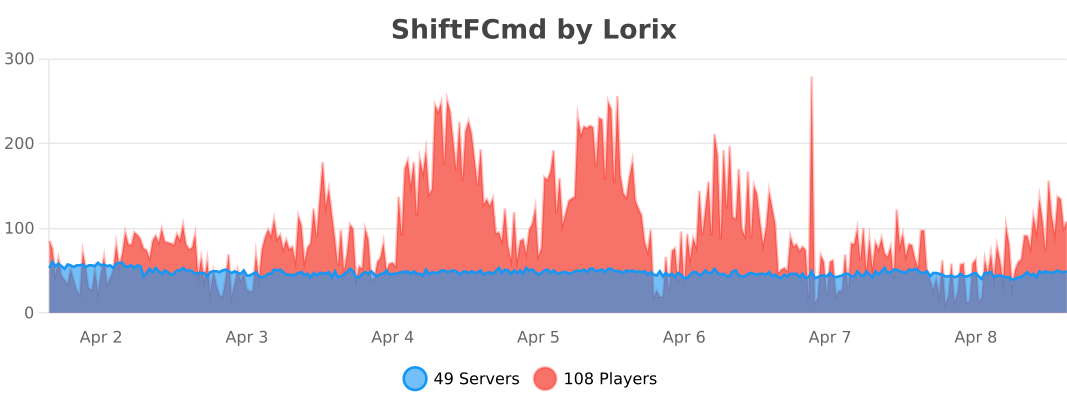](https://bstats.org/plugin/bukkit/ShiftFCmd/21563)
Shifted Lens

## About Shifted Lens
Shifted Lens aims to improve many of Minecraft’s mobs with new mechanics and features.
## Mod Loader and Version
This mod is currently being developed for Forge 1.20.1. No backports are planned. We will port the mod to newer versions when we feel the time is right. For 1.21.1 and beyond, the mod will use NeoForge.
Shiftable Spawners
A simple plugin that introduces an alternative to the classic idea of picking up a mob spawner as an item using silk touch. With Shiftable Spawners you can shift a mob spawner a single block from it’s current location using a golden pickaxe enchanted with silk touch and a small amount of experience points. Simultaneously adding a use for at least one of the gold tools and a large cost to moving the spawner any large distance.
When a mob spawner is broken with a silk touch golden pickaxe, it will shift to one of the blocks directly next to it as long as the block is air and has a solid block below it. This means that in order to move a spawner you need to block every location where the spawner could go within a 1 block square radius around the spawner, think a 3×3 cube centered on the spawner, except for the one spot where you want it to go.
The spawner will never shift on top of itself.
It will only shift to air blocks.
It needs a solid block below it, IE one you can walk on.
If it can’t find a block that meets these requirements the spawner will not break, but the xp cost will still be taken.
The XP cost is configurable, but by default it will use the amount of xp that the spawner would have given if it had broken normally, a value between 15 and 43 xp points.
If the golden pickaxe has mending, you will consume 1 experience point to mend the golden tool instead of consuming durability. This is affected by unbreaking and is also configurable.
Shift to Disable Wind Burst
## DESCRIPTION
This datapack lets you disable wind burst by shifting, allowing you to avoid being launched after the last hit so you don’t die of fall damage!
## DP INSTALLATION
– go to your saves folder located here on Windows:
“`
C:Users(your name)AppDataRoaming.minecraftsaves
“`
put the zipped file in the data packs folder, and either restart your world or execute /reload
## OTHER THINGS TO NOTE
– for feedback, bug reports or assistance, join the [support server](https://discord.gg/kk3j3ct6xk)!