Refresh your PvP experience with Sky PvP Pack, a sleek 16x resource pack made for Crystal PvPers who prefer a clean, modern aesthetic with smooth performance. Inspired by cool mint tones and soft green highlights, this pack brings a crisp and polished look while keeping gameplay sharp and responsive.
✨ Features
🩵 Mint-Themed Visuals Cool green and mint accents give classic textures a fresh, minimalistic style that feels modern and easy on the eyes.
⚔️ Crystal PvP Focused Optimized textures enhance clarity during fast-paced crystal fights, helping you react quickly and stay in control.
🚀 FPS Friendly Lightweight 16x resolution ensures stable performance across all systems, perfect for competitive gameplay.
🔊 Clean Sound Design Subtle and refined sound effects make combat feel smooth without being overwhelming.
🔥 Low Fire Included Reduced fire overlay keeps your screen clear, so nothing blocks your vision during intense battles.
The Sky Blox map is a brand new way to play Skyblock. It is an update on the concept of a really old command block powered skyblock, this one being powered by a bunch of datapacks. It features a custom advancement tree that guides you through the content, as well as loads of new gameplay mechanics to allow you to obtain and automate nearly any material in the game.
It utilizes quite a few of my other datapacks, so make sure to install those. The datapack will prompt you to install any datapacks that are missing, as well as suggest other optional datapacks.
What to expect
Starting from a single tree and a chest containing only lava and water, you can beat the game in Skyblock.
– Use hammers to obtain gravel, sand, and dirt from your cobblestone generator.
– Make a Sifter to sift through these resources, obtaining ingots, crops, redstone, and more.
– Progress through the resource collection to eventually automate most any resource.
– Upgrade to various machines and devices to help with this process.
Learn more about how the datapack plays from this video series:
How to Install
You must install the datapack at world creation, otherwise the world won’t generate as a void world. Learn how to do that from this installation video:
NOTES TO YOUTUBERS:
You may use this datapack in whatever video you like, free of charge. My only request: YOU MUST CREDIT ME for my work. Simply link to this page in your video’s description, pinned comment, or both AND verbally mention during the intro of your video that the pack can be downloaded using the link. “Download in the description” would suffice.
To install, follow the instructions contained in the “instructions.txt” file included in the download. If you are still having issues installing or want help knowing how to do something with the pack, ask for help on our discord.
Fully Multiplayer compatible!
Sky Artifacts (Change Weather & Time)
Sky Artifacts adds powerful Artifacts that will allow you and your Friends to change Weather & Time!
## 💧Rainstone
The Rainstone is crafted with Lapis Lazuli and a Water Bucket:
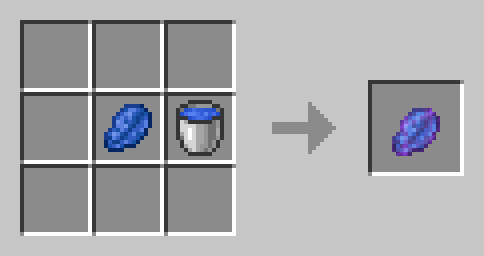
It can be used to Toggle the rain. Use it to stop the Rain if its Raining, or to make it rain for 5 Minutes when its not Raining. It will be consumed upon use. Perfect for building in clear Weather or powering up your Trident with Rain!
## ⚡Thunderstone
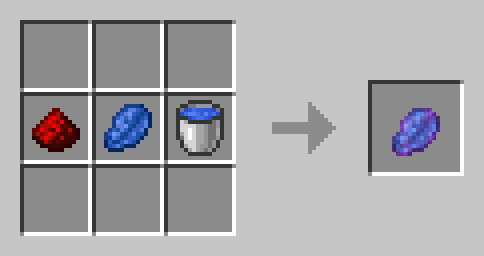
A Thunderstone is a Rainstone that has been infused with the Energy of Redstone. It has the same Functionality as the Rainstone, but instead of starting Rain it will start Thunder!
## 🧊Frozen Clock
Craft the Frozen Clock with a Clock and an Ice Block:
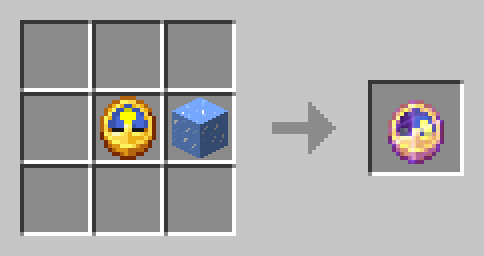
Use the Frozen Watch to Stop the passage of Time (The Day and Night cycle) for 10 minutes (it will be consumed). You can use this to extend the Night or to take Screenshots in the same Setting.
## ⌛Timestones
An empty Timestone is crafted with a Clock and a piece of Clay:
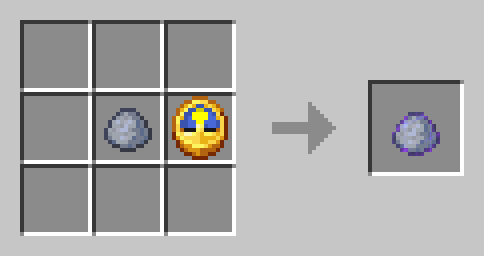
Use an Empty Timestone to funnel time Energy into it. It will save the exact current time and turn from an Gray, Empty Timestone into a colored one. Rightclick a colored Timestone to set the time to the time of the right click. Meaning, if you use a Empty Timestone at Night and then use the resulting Timestone at day, the time will be set to the time of Night when you funneled Energy into it and the Timestone will be consumed. The color of a Timestone indicates which Time it has saved:
– Purple = Early Sunrise
– Lightblue = Morning
– Yellow = Day
– Orange = Early Sunset
– Red = Sunset
– Black = Night
### How to copy Timestones
To copy a Timestone, put it in your Offhand. Use an Empty Timestone and it will become an exact copy of the Timestone you are holding in your Offhand.
## 🛠️Installation
### Datapack Installation Guide
Copy the .zip archive into the “.minecraft/saves/__yourworldname__/datapacks” folder, where __yourworldname__ is the name of your world.
### Mod installation Guide
Copy the .jar archive into the folder your Mod Loader of choice provides.
## ⚙️Compatibility
Do not use an “Unlock all achievements” datapack after having installed this datapack!
## ❕Issues & Suggestions
If you encounter any Issues with this Datapack/Mod, please report them on [my Discord](https://discord.gg/R2G6EMW42H)
Sky Archipelago
Sky Archipelago adds a new floating-islands world generation type for Minecraft 1.21.1, with configurable island shapes, height distribution, ocean layer options, and structure placement rules and much more!
While intended for sky island world generation, it is more than capable of creating ocean worlds with islands spanning far from each other. What world you create, is all up to you!
The mod currently only support **NeoForge for 1.21.1**, as it was built towards Create Aeronautics airship gameplay.
———————————————————————————————
**What can you currently do with the mod?**
As of the 1.0.0 release update you can do the following;
– A new world generation type **Sky Island** + Customize configuration
– Set the island spawning density
– Set the spacing of cluster islands
– Set island sizing mode
– **RANDOM** = Give min/max value and the terrain generator will roll the dice for each island
– **SPECIFIC** = Allows setting of small, medium and large island sizes (each min/max and % weight to spawn)
– Island Y spawning range (min/max for where islands are allowed to spawn)
– Island Y spawning brackets
– Low/mid/high bands that you assign the weights for where islands should spawn more or less
– Set whether ocean is enabled or void enabled
– Set ocean block type _water_ or _lava_
**Some advanced configurations available**
– Island archetype toggles and weighting
– Classic islands (A default island shape)
– Bowl/Crater
– Terrace
– A toggle to relax the structure spawning rules. (As the mod provides its own structure spawning logic, to try and place structures better on islands)
**Preset management – What are presets?**
Presets is the makeup of all the configuration that you can save and share with others. If you found your perfect configuration and you want to share it with others, a preset lets you do exactly that.
– Dedicated Preset Menu
– Save/Load/Delete Presets
– Sharing of presets with others via pure-text (JSON)
And finally 3 in-game commands that can only be currently used by OP users.
– `/skyarchipelago preset create [description]` Description is optional
– `/skyarchipelago preset overwrite [description]`
– `/skyarchipelago preset export` (gives you that configuration text you can paste)
And the plan is to add more configuration in the future as well.
—————–
**What does this not provide just now?**
Currently the mod does not have any fancy ocean biome logic, so its just a fill of water. Islands do not come with rivers/lakes currently but are planned in the next update to come.
While survival is possible, this was intended for creative-mode for now as of 1.0.0 and will be tailored towards survival-mode as a follow-up release later.
Underground biomes are not fully supported, they will spawn as normal islands with biome data applied to them. (Plans are in place for a cool way to integrate them)
Sky ages
*This project is in pre-alpha game breaking update and many bugs can happen*
### Story :
You’re trapped on a dirt island by an “evil” dev (me) and you cannot escape (I think)
———————————————————————————————–
### Type of mod :
This modpack is a progression based skyblock with many usefull tool and mechanism along the way to full automation and future tech. If you like progession based mod it’s made for you. A wiki will be created soon.
##
## This is the starting island :
If you’re stuck use JEI, REI or EMI and if this doesn’t work try asking in comment. I will try to respond as soon as possible. I will create a modpack later to use FTB quest and other mods to help in the progression, but for now you are alone.
You goal (not achievable now) is to get out of the void to rejoin the overworld and escape the “evil” dev.
###
### Future updates :
For now there’s only the beggining of the first stage of the game called “Root” (this can help for early game) but many are to come. This mean that this mod will be huge soon with lots of advancement and items. If you don’t want to have this mod enable every time I will had this option soon.
Planning for next updates :
-Finishing stage root + fixing multiplayer
-Adding more stages for progression
-Adding more advancement and items to the stages
-Fix more bugs and add QOL
This is not fixed and it may change with time
Good luck and don’t play this mod with many others this could result in bug or crash because of the new dimension.
Sky Aesthetics
# Sky Aesthetics
***
***

## What is Sky Aesthetics
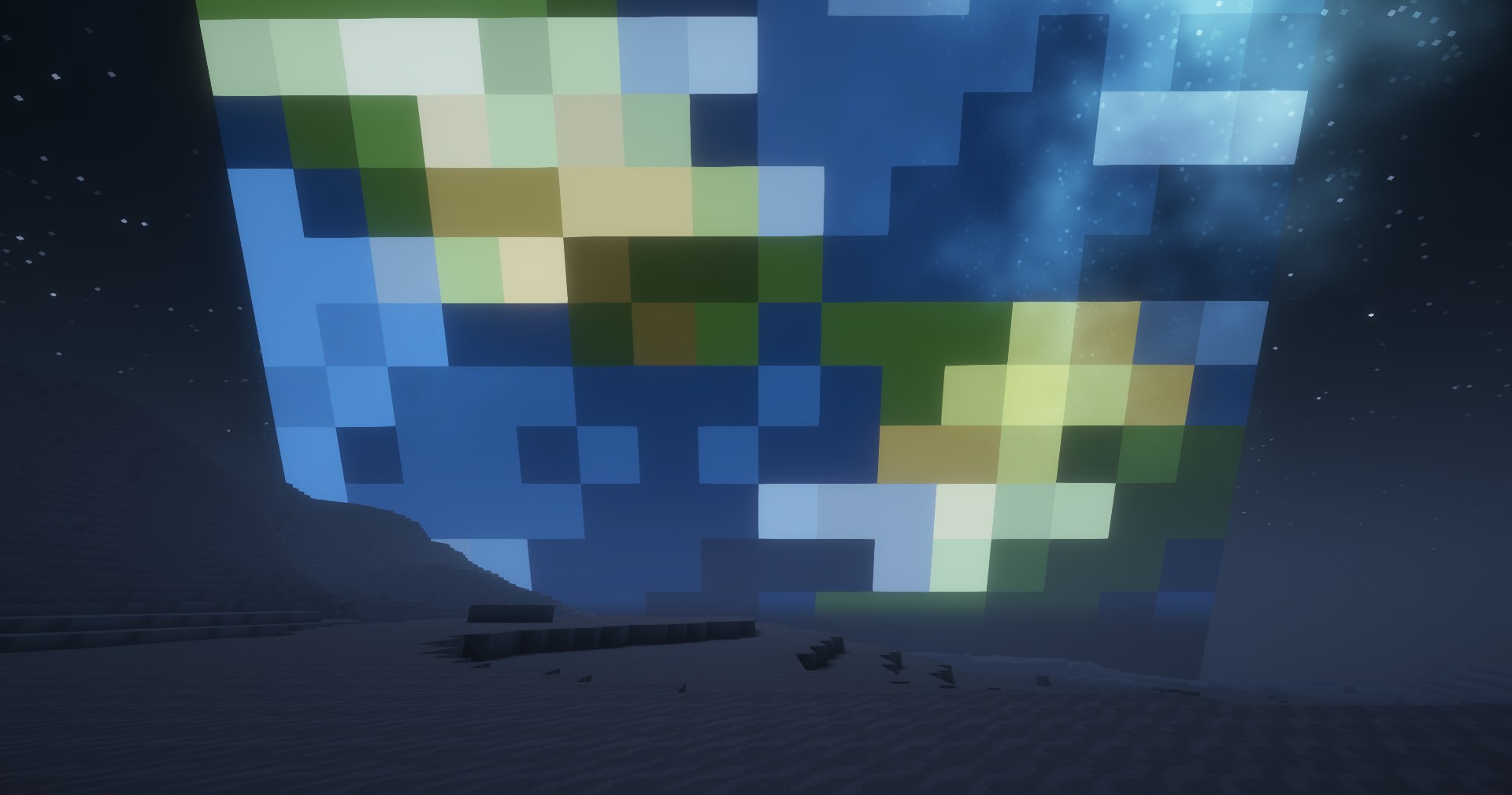
Sky Aesthetics is an API that aim to makes change to the minecraft sky easier. All you need to do is configure a file in your resourcepack. This means that even resource packs maker can change the sky !
## What can be made
Here you can find a list of possible things you can do with this mod
– Add any object in the sky
– Change sun/moon texture (or remove them)
– Change sun/moon size
– Add more colorful stars
– Add moving stars
– Remove clouds
– Remove Rain
– Change the color of the sky/sunset
– Add End sky to your world
– Shootings Stars (new)
– Constellations (new)
Check our wiki to have all the informations needed for changing the sky : [click here](https://github.com/TathanDev/SkyAesthetics/wiki)
## Shader compatibility
Shader test : Rethinking Voxel.
This mod is mostly compatible with shaders.
Adding object in the sky works, changing moon/sun textures and changing the color of the sky also work (require to change the skytype to “END” or “NONE”).
All the stars and clouds are handled by the shader so theses features wont work with shaders.
You can find all the shaders infos by [clicking here](https://github.com/TathanDev/SkyAesthetics/wiki/Shaders-Compatibility)

## Need Help ?
If you have trouble with Sky Aesthetic, you can use [misode.github.io](https://misode.github.io/sky-aesthetics/sky/), visit our [wiki](https://github.com/TathanDev/SkyAesthetics/wiki) or you can join our [discord](https://discord.gg/Xb2nPmN) !
## FAQ
I installed this mod but nothing changed ?
> This is normal. This mod is only an API. It change nothing to the game. You need to install other mods that use this mod
Damn, I found a bug!
> Join our discord server to report it : https://discord.gg/Xb2nPmN
Sky’s 3D Enchanting Table
# ⭐ Sky’s 3D Enchanting Table
## 🤔 What is this
This incredible resource pack add a beautiful new look to the vanilla friendly enchanting table. Meet this awesome new model and texture for this very usefull minecraft block.
Sky’s 3D Barrel
# ⭐ Sky’s 3D Barrel
## 🤔 What is this
A new model for the vanilla minecraft barrel.
## 🔧 Supported textures
This pack does not add any new texture, all of your barrel texture should be compatible with this new model!
Sky: Origins
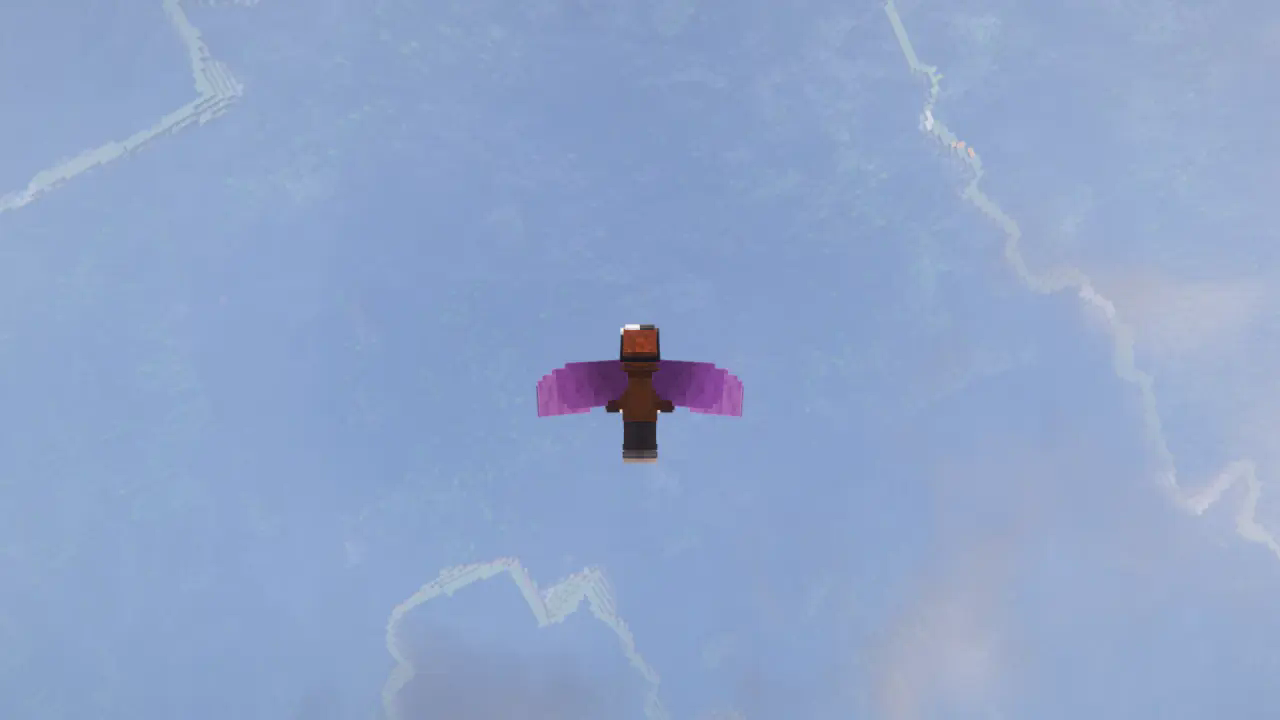
This FABRIC mod adds the opportunity to be a Child of The Light from Sky: COTL.
Please keep in mind that this mod is still in early development, meaning anything is subject to change or break, and that I am still open for suggestions and ideas.
Origin:
The Sky Kid origin works similarly to how it does in the original game, with the powers being as follows:
Born of the Light
You store Light inside of yourself, which can be recharged from certain Light sources, with candles on cakes being the most efficient. Light can only be recharged by three sources at a time, with more efficient light sources taking priority.
Divine Protection
Your Light serves as a shield from damage, using up Light whenever it has to protect you. The amount used varies by the amount of damage taken. If your Light runs out, you will be able to take actual damage.
Light Cape
With the power of your Light, you can glide with a special cape. While gliding, you can press the space bar to use a portion of your light to boost yourself forward a small amount.
Sky’s Call
Your primary ability will make a calling sound, which briefly makes you glow unless you’re crouching. As your secondary ability, you can spend a considerable portion of your Light in order to heal allies around you!
Childish Aspects
As the Origin, you are a child. Therefore, you are delicate and petite, having only four hearts if your Light runs out. Also, you are just short enough to fit in one block gaps when crouching.
Free Spirit
Your flight is hindered by chest and leg pieces, so you’ve instead done away with them. Besides, physical armor doesn’t protect your Light.
Bulky and Unwieldy
Due to your small hands and short stature, shields are too bulky and unwieldy for you to actually use.
SkWorldGuard
# Skworldguard: Advanced WorldGuard Integration for Skript
_Skworldguard is a Skript addon designed to extend the capabilities of WorldGuard within your Minecraft server. This plugin allows you to interact with WorldGuard regions directly through Skript, offering more control and flexibility in managing your server’s protected areas._
Key Features:
1. Region Management: Create and delete WorldGuard regions directly from Skript commands.
Member and Owner Control: Easily add or remove members and owners from specific regions.
2. Flag Manipulation: Set and modify WorldGuard region flags, such as build permissions, directly through Skript.
3. Efficient Integration: Designed to work seamlessly with existing Skript setups, making it easier than ever to automate and customize region management.
**Whether you’re looking to automate region protection or integrate region-based features into your custom scripts, Skworldguard provides the tools you need to enhance your server’s WorldGuard capabilities.**
## **Effects Added:**
“`html
Create Region:
– create region %string% from %location% to %location%
Delete Region:
delete region %string%
“`
“`html
Add Member to Region:
– add %string% as member to region %string%
Remove Member from Region:
– remove %string% from region %string%
Add Owner to Region:
– add %string% as owner to region %string%
Remove Owner from Region:
– remove %string% as owner from region %string%
“`
“`html
Set Region Flag:
– set flag %string% of region %string% to %string%
“`
**-Template.sk**
“`html
# Use a gold axe as WorldGuard tool
on rightclick with a gold axe:
set {regionselect.%player%.loc2} to location of event-block
send “Second Position set to: %clicked block%” to player
cancel event
on leftclick with a gold axe:
set {regionselect.%player%.loc1} to location of event-block
send “First Position set to: %clicked block%” to player
cancel event
# Create or delete a region using the selected positions
command /regionskript :
permission: op
trigger:
if arg-1 is “create”:
if arg-2 is set:
if {regionselect.%player%.loc1} or {regionselect.%player%.loc2} is not set:
send “You need to set 2 location with your Axe” to player
stop
create region “%arg 2%” from {regionselect.%player%.loc1} to {regionselect.%player%.loc2}
send “Region ‘%arg 2%’ got created at %{regionselect.%player%.loc1}% to %{regionselect.%player%.loc2}%!” to player
delete {regionselect.%player%.loc1}
delete {regionselect.%player%.loc2}
if arg-1 is “delete”:
if arg-2 is set:
delete region “%arg-2%”
“`
“`html
# Add or remove players as members or owners of a region
command /addregionowner :
trigger:
add “%arg-1%” as owner to region “%arg-2%”
send “%arg-1% got set as Owner from %arg-2% ” to player
command /removeregionowner :
trigger:
remove “%arg-1%” as owner from region “%arg-2%”
send “%arg-1% got removed from owner position from %arg-2% ” to player
command /addregionuser :
trigger:
add “%arg-1%” as member to region “%arg-2%”
send “%arg-1% got added as member to %arg-2%” to player
command /removeregionuser :
trigger:
remove “%arg-1%” from region “%arg-2%”
send “member %arg-1% got removed from %arg-2% region” to player
# Set flags for a specific region
command /setregionflag :
trigger:
set flag “%arg-1%” of region “%arg-2%” to “%arg-3%”
send “Flag ‘%arg-1%’ got set in the region %arg-2% to %arg-3%” to player