OpenComputers
This mod adds computers that can be programmed in Lua 5.2 and 5.3. Computers persist across saves (i.e. execution resumes where the computer was saved when it is loaded again), they are highly modular (there are graphics cards, network cards, redstone cards, …). If a compatible power generating mod is present, by default they will need power to run – however, like pretty much everything else about the mod, this can be changed in the config.
To get a quick overview, you can watch the trailer here!
OpenComputers is designed to fit well with survival gameplay, and is played best in combination with other mods, which allow automating ore processing, and ideally crafting to some extent! Computers are not cheap to craft, so don’t expect to build your first computer early when starting a new game. If you want an extra challenge, try the hard mode recipe set (see .minecraft/config/opencomputers/user.recipes for more information).
There are a lot of components in the mod that can be used to extend computers, such as motion sensors, holograms and there are also robots.
Inter-operation with many other mods is provided via the Adapter block (for example reading power information from energy cells and so on).
For more information, please visit the Wiki at http://ocdoc.cil.li/ where, aside from blocks and items in the mod, the built-in Lua APIs are documented as well, so you can read up what you can actually do with the computers. If you need additional support, browse the forums at http://oc.cil.li/ or drop by the IRC, channel #oc on esper.net, or join us on Discord.
Modpacks
You are free to use this mod in public and private modpacks alike, no questions asked.
So what’s in the mod?
Computers

The name may have given it away: the main feature this mod adds are programmable computers. OpenComputers itself allows writing programs using the Lua programming language, specifically Lua 5.2. Computers can be programmed at a very low level, but the built-in operating system emulates a Lua environment as close to “vanilla” Lua as possible within the restraints of the sandbox it is running in.
To make your life easier, computers persist their script state across saves; this means they’ll continue executing where they left off when the chunk they are in was unloaded. If a compatible power mod is installed alongside OpenComputers, computers will require energy to run, and numerous components will require energy for certain operations.
Robots and Drones

Aside from the stationary computers and components, OpenComputers also provides robots and drones, computers that can move around the world and interact with it similar to how players can. Robots are more powerful than drones, they can use tools and contain a much larger number of components. Drones are much more mobile than robots and can perform a few actions robots cannot, such as leashing animals.
There are also several other computer devices in the mod, such as servers, essentially allowing for four computers in one block, microcontrollers, cheaper but more limited computers, as well as tablets, which are basically portable computers.
Components

To have something to do with your computers, OpenComputers also comes with a bunch of interesting components, such as the hologram projector, which allows projecting a voxel-based 3D image into the world, and the 3D printer, which allows “printing” decorative blocks. These printed blocks have a completely user-defined shape. You can easily share models with other players, even when they’re playing on another server!
Modularity

A key focus of OpenComputers is modularity, allowing you to choose very dynamically from which parts to build your computers, robot and other devices. There are multiple tiers of computer cases, screens, graphics cards, network cards and so on. In that way there is also a certain level of progression in the mod, as you work towards building better, faster and more powerful computers.
Integration

OpenComputers provides integration with many other mods: support for bundled redstone (Project Red, Redlogic, BluePower and MineFactory Reloaded), covering cables (FMP and Immibis Microblocks), and obviously accepting power from several mods (RF, EU, Factorization Charge, Mekanism Joules, AE2 energy).
More interestingly however, OpenComputers provides a block that allows more in-depth interaction with other mods’ blocks, the Adapter. For supported blocks, the adapter will make those blocks available as components to connected computers, allowing them to read information such as energy levels and possible issue commands, such as playing notes on a note block. Many mods also provide built-in support for OpenComputers, meaning you can just hook up their blocks to a cable without needing an Adapter.
Configurability

Most things in OpenComputers are configurable. Don’t like the power requirements? Change them or disabled them entirely. Screens not rendering from far enough away? Increase the render distance. The config file is heavily documented, so it should be pretty clear from each config entry’s comment what it does.
Aside from general configuration, it is also possible to adjust each of the item recipes in OpenComputers via recipe files – no need for Minetweaker! There are also a few different recipes set available, have a look in the config/opencomputers directory.
Newer Minecraft Versions (aka “port to 1.16.5 plz”)
There are currently no active plans for porting this mod to newer Minecraft versions. With the size of this mod and how it has grown over previous updates, this is a massive undertaking. The maintainers currently simply do not have the time for that. Some community driven attempts have been started, but none have made any progress recently.
If you’re interested in a more low-tech approach to computers, maybe give TIS-3D a shot. Otherwise you’ll want to look at CC:Tweaked.
There’s also a spiritual successor in the making, but progress comes in bursts, and I cannot in good conscience give a timeline on when that might be released.
Thanks for your understanding.
OpenCombatUtility (OpenCU)
## Open Combat Utility
#### Current features:
– Repulsor – can pull, push, move and slow entities in pulses. API available on github
– Modular Dispenser – like vanilla dispenser or dropper but better!
#### Coming in 2.0.0
– No more Modular Dispenser, welcome Modular Frame!
Overhauled Modular Frame can now hold more types of devices including: eye of ender?
– Repulsor no longer can use Vector Pulse by default however can be inserted into the Modular Frame
– CC: Tweaked is now optional, devices can now also be used with redstone or manually
– Support for both **Forge** (in future **NeoForge**) and **Fabric** on MC 1.19.4 and beyond
– And even more
Some of these features are already available in preview versions
#### Compats
– Valkyrien Skies 2 (since 1.3.1, 1.18.2 only)
#### I am open to suggestions!
If you have any suggestions open an [issue on github](https://github.com/LubieKakao1212/OpenCombatUtility/issues) or ask on [Discord](https://discord.com/invite/3dDJwBBYTk)
—
#### 1.12.2 version of this mod requires OpenComputers
#### 1.18.2 versions require CC: Tweaked
—
OpenBucket
# OpenBucket
**Allows for almost infinite space in buckets for lava and water!**
## Features:
– Bucket can hold a **configurable** amount of water:
– Water can be collected and placed in the world, cauldrons and waterlogged blocks.
– Permission: openbucket.use.waterbucket
– Bucket can hold a **configurable** amount of lava:
– Lava can be collected and placed in the world and cauldrons.
– Permission: openbucket.use.lavabucket
– The use as lava bucket and water bucket can be individually disabled in the config all together or by giving players the permissions above.
– Currently you **can’t** use the lava bucket as fuel in furnaces, the bucket to collect water after smelting a wet sponge, milk cows or capture fish and axolotls.
* All texts can be customized in the config file!
* Command: /openbucket
* Gives you an open bucket
* Permission: openbucket.admin.give
[Default config.yml](https://github.com/ttryy/OpenBucket/blob/master/src/main/resources/config.yml)
## More to come… (you got any ideas? let me know!)
OpenBoatUtils
# OpenBoatUtils
OpenBoatUtils is a client mod that gives server plugins an interface to modify boat physics. If you want to play with modified physics, you can join servers that support OpenBoatUtils (like `frosthex.com` and `mc.boatlabs.net`, where certain tracks have modified physics), or you can test the mod with commands in singleplayer.
## Feature showcase:
There is more information about the features and how they work on the [wiki](https://openboatutils.github.io).
For plugin developers, the wiki also includes [documentation for the packet api](https://openboatutils.github.io/developers/protocol).
Requires [Fabric API](https://modrinth.com/mod/fabric-api).
# Credits:
– BoatHub, for creating the original BoatUtils
– Pigalala, for help with porting to 1.21
– Kikugie, for maintaining [stonecutter](https://stonecutter.kikugie.dev/)
OpenBlocks Trophies

OpenBlocks Trophies; a recreation and expansion on the trophies from [OpenBlocks](https://www.curseforge.com/minecraft/mc-mods/openblocks) from the 1.12.2 days!
**This mod is currently NeoForge only**
## A SIMPLE MOD WITH A SIMPLE CONCEPT
* Mobs have a 0.1% chance of dropping their trophy (tip: Looting helps)!
* Right-clicking a placed trophy will play the mob’s ambient sound. Some mobs have special interactions!
* Besides placing them down they can also be worn on your head!
One major difference between what I do and what OpenBlocks did was that you can add your own trophies through datapacks! Learn how to register your own trophies [here](https://github.com/GizmoTheMoonPig/OpenBlocksTrophies/wiki).
## CURRENTLY SUPPORTED MODS
Show List
Note: if a mod is on this list and you don’t see trophies for it, it’s most likely because they’re in a newer version. I only keep the latest version updated, so make sure you use the latest version for the newest content!
The mod currently supports ***2,570*** entities across these mods:
1. [Ad Astra](https://www.curseforge.com/minecraft/mc-mods/ad-astra)
1. [Aether: Lost Content Addon](https://www.curseforge.com/minecraft/mc-mods/aether-lost-content)
1. [Alex’s Caves](https://www.curseforge.com/minecraft/mc-mods/alexs-caves)
1. [Alex’s Mobs](https://www.curseforge.com/minecraft/mc-mods/alexs-mobs)
1. [Allthemodium](https://www.curseforge.com/minecraft/mc-mods/allthemodium)
2. [All Bark, All Bite](https://www.curseforge.com/minecraft/mc-mods/all-bark-all-bite)
1. [Ambient Additions](https://www.curseforge.com/minecraft/mc-mods/ambient-additions)
2. [Animalium](https://www.curseforge.com/minecraft/mc-mods/animalium)
1. [Aquaculture 2](https://www.curseforge.com/minecraft/mc-mods/aquaculture)
1. [Aquamirae](https://www.curseforge.com/minecraft/mc-mods/ob-aquamirae)
1. [Ars Elemental](https://www.curseforge.com/minecraft/mc-mods/ars-elemental)
1. [Ars Nouveau](https://www.curseforge.com/minecraft/mc-mods/ars-nouveau)
1. [Artifacts](https://www.curseforge.com/minecraft/mc-mods/artifacts)
1. [Better Animals Plus](https://www.curseforge.com/minecraft/mc-mods/betteranimalsplus)
1. [Biome Makeover](https://www.curseforge.com/minecraft/mc-mods/biome-makeover)
1. [Blue Skies](https://www.curseforge.com/minecraft/mc-mods/blue-skies)
2. [Born in Chaos](https://www.curseforge.com/minecraft/mc-mods/born-in-chaos)
1. [Bosses of Mass Destruction](https://www.curseforge.com/minecraft/mc-mods/bosses-of-mass-destruction-forge)
1. [Botania](https://www.curseforge.com/minecraft/mc-mods/botania)
1. [Buzzier Bees](https://www.curseforge.com/minecraft/mc-mods/buzzier-bees)
1. [Bygone Nether](https://www.curseforge.com/minecraft/mc-mods/bygone-nether)
1. [Caracal Mod](https://www.curseforge.com/minecraft/mc-mods/caracal-mod)
1. [ChocoCraft](https://www.curseforge.com/minecraft/mc-mods/chococraft)
1. [Cloud Storage](https://www.curseforge.com/minecraft/mc-mods/alexs-cloud-storage)
1. [Corail Tombstone](https://www.curseforge.com/minecraft/mc-mods/corail-tombstone)
1. [Crabber’s Delight](https://www.curseforge.com/minecraft/mc-mods/crabbers-delight)
1. [Cracker’s Wither Storm Mod](https://www.curseforge.com/minecraft/mc-mods/crackers-wither-storm-mod)
1. [Creatures and Beasts](https://www.curseforge.com/minecraft/mc-mods/creatures-and-beasts)
1. [Critters and Companions](https://www.curseforge.com/minecraft/mc-mods/critters-and-companions)
1. [Creeper Overhaul](https://www.curseforge.com/minecraft/mc-mods/creeper-overhaul)
1. [Darker Depths](https://www.curseforge.com/minecraft/mc-mods/darker-depths)
1. [Deep Aether](https://www.curseforge.com/minecraft/mc-mods/deep-aether)
2. [Deep Dark: Regrowth](https://www.curseforge.com/minecraft/mc-mods/deep-dark-regrowth)
1. [Deeper and Darker](https://www.curseforge.com/minecraft/mc-mods/deeperdarker)
1. [DivineRPG](https://www.curseforge.com/minecraft/mc-mods/official-divinerpg)
1. [Duckling](https://www.curseforge.com/minecraft/mc-mods/duckling)
1. [Dungeon Now Loading](https://www.curseforge.com/minecraft/mc-mods/dungeon-now-loading)
1. [Earth 2 Java](https://www.curseforge.com/minecraft/mc-mods/earth2java)
1. [Earth Mobs](https://www.curseforge.com/minecraft/mc-mods/earth-mobs)
1. [Ecologics](https://www.curseforge.com/minecraft/mc-mods/ecologics)
1. [Embers](https://www.curseforge.com/minecraft/mc-mods/embers)
1. [Enchant With Mob](https://www.curseforge.com/minecraft/mc-mods/enchant-with-mob)
1. [Enderman Overhaul](https://www.curseforge.com/minecraft/mc-mods/enderman-overhaul)
1. [Ender Zoology](https://www.curseforge.com/minecraft/mc-mods/ender-zoology)
1. [Endless Biomes](https://www.curseforge.com/minecraft/mc-mods/endless-biomes)
1. [Enemy Expansion](https://www.curseforge.com/minecraft/mc-mods/enemy-expansion)
1. [EnergeticSheep](https://www.curseforge.com/minecraft/mc-mods/energeticsheep)
1. [Enlightend](https://www.curseforge.com/minecraft/mc-mods/enlightend)
2. [Environmental](https://www.curseforge.com/minecraft/mc-mods/environmental)
2. [Eternal Starlight](https://www.curseforge.com/minecraft/mc-mods/eternal-starlight)
1. [EvilCraft](https://www.curseforge.com/minecraft/mc-mods/evilcraft)
1. [Exotic Birds](https://www.curseforge.com/minecraft/mc-mods/exotic-birds)
1. [Extended Mushrooms](https://www.curseforge.com/minecraft/mc-mods/extended-mushrooms)
2. [Fazcraft](https://www.curseforge.com/minecraft/mc-mods/fazcraft-mod)
1. [Feywild](https://www.curseforge.com/minecraft/mc-mods/feywild)
2. [Fins and Tails](https://www.curseforge.com/minecraft/mc-mods/fins-and-tails)
1. [Fish of Thieves](https://www.curseforge.com/minecraft/mc-mods/fish-of-thieves)
1. [FNAF Management Wanted](https://www.curseforge.com/minecraft/mc-mods/management-wanted)
2. [Friends & Foes](https://www.curseforge.com/minecraft/mc-mods/friends-and-foes-forge)
1. [Gaia Dimension](https://www.curseforge.com/minecraft/mc-mods/gaia-dimension)
1. [Galosphere](https://www.curseforge.com/minecraft/mc-mods/galosphere)
1. [GeOre Nouveau](https://www.curseforge.com/minecraft/mc-mods/geore-nouveau)
1. [Goblin Traders](https://www.curseforge.com/minecraft/mc-mods/goblin-traders)
1. [Goodall](https://www.curseforge.com/minecraft/mc-mods/goodall)
1. [Grimoire of Gaia](https://www.curseforge.com/minecraft/mc-mods/grimoire-of-gaia)
1. [Guard Villagers](https://www.curseforge.com/minecraft/mc-mods/guard-villagers)
1. [Habitat](https://www.curseforge.com/minecraft/mc-mods/habitat)
1. [Hamsters Plus](https://www.curseforge.com/minecraft/mc-mods/hamsters)
2. [Hexerei](https://www.curseforge.com/minecraft/mc-mods/hexerei)
1. [Hunter Illager](https://www.curseforge.com/minecraft/mc-mods/hunterillager)
1. [Ice and Fire: Dragons](https://www.curseforge.com/minecraft/mc-mods/ice-and-fire-dragons)
1. [Illager Invasion](https://www.curseforge.com/minecraft/mc-mods/illager-invasion)
1. [Immersive Engineering](https://www.curseforge.com/minecraft/mc-mods/immersive-engineering)
1. [Infernal Expansion](https://www.curseforge.com/minecraft/mc-mods/infernal-expansion)
1. [Iron’s Spells ‘n Spellbooks](https://www.curseforge.com/minecraft/mc-mods/irons-spells-n-spellbooks)
1. [It Takes a Pillage](https://www.curseforge.com/minecraft/mc-mods/it-takes-a-pillage)
1. [I Wanna Skate](https://www.curseforge.com/minecraft/mc-mods/i-wanna-skate)
2. [Jaden’s Nether Expansion](https://www.curseforge.com/minecraft/mc-mods/jadens-nether-expansion)
1. [Jagm’s Kiwis](https://www.curseforge.com/minecraft/mc-mods/jagms-kiwis)
2. [Kiwi Boi](https://www.curseforge.com/minecraft/mc-mods/kiwi-boi)
1. [Knight Quest](https://www.curseforge.com/minecraft/mc-mods/knight-quest)
1. [Kobolds!](https://www.curseforge.com/minecraft/mc-mods/kobolds)
1. [K9](https://www.curseforge.com/minecraft/mc-mods/k9)
1. [Lava Monsters](https://www.curseforge.com/minecraft/mc-mods/lava-monsters)
2. [Living Things](https://www.curseforge.com/minecraft/mc-mods/living-things)
1. [L_Ender’s Cataclysm](https://www.curseforge.com/minecraft/mc-mods/l_ender-s-cataclysm)
1. [Magma Monsters](https://www.curseforge.com/minecraft/mc-mods/magma-monsters)
1. [Mana and Artifice](https://www.curseforge.com/minecraft/mc-mods/mana-and-artifice)
1. [MCA Reborn](https://www.curseforge.com/minecraft/mc-mods/minecraft-comes-alive-reborn)
1. [Minecolonies](https://www.curseforge.com/minecraft/mc-mods/minecolonies)
1. [Mekanism Additions](https://www.curseforge.com/minecraft/mc-mods/mekanism-additions)
1. [Melon Golem](https://www.curseforge.com/minecraft/mc-mods/melon-golem)
2. [Moolands](https://www.curseforge.com/minecraft/mc-mods/moolands)
1. [Monster Plus](https://www.curseforge.com/minecraft/mc-mods/monster-plus)
1. [More Axolotl Variants Mod](https://www.curseforge.com/minecraft/mc-mods/mavm)
1. [Mowzie’s Mobs](https://www.curseforge.com/minecraft/mc-mods/mowzies-mobs)
1. [Mutant Monsters](https://www.curseforge.com/minecraft/mc-mods/mutant-monsters)
1. [MythicBotany](https://www.curseforge.com/minecraft/mc-mods/mythicbotany)
1. [Naturalist](https://www.curseforge.com/minecraft/mc-mods/naturalist)
1. [Neapolitan](https://www.curseforge.com/minecraft/mc-mods/neapolitan)
1. [Nether Depths Upgrade](https://www.curseforge.com/minecraft/mc-mods/nether-depths-upgrade)
1. [Nether Skeletons](https://www.curseforge.com/minecraft/mc-mods/nether-skeletons)
1. [Nether’s Overhaul](https://www.curseforge.com/minecraft/mc-mods/nethers-overhaul)
1. [Occultism](https://www.curseforge.com/minecraft/mc-mods/occultism)
2. [Oh The Biomes We’ve Gone](https://www.curseforge.com/minecraft/mc-mods/oh-the-biomes-weve-gone)
1. [Ornamental](https://www.curseforge.com/minecraft/mc-mods/ornamental)
1. [Petrock](https://www.curseforge.com/minecraft/mc-mods/petrock-mod)
2. [Pet Cemetery](https://www.curseforge.com/minecraft/mc-mods/pet-cemetery)
1. [Piglin Proliferation](https://www.curseforge.com/minecraft/mc-mods/piglin-proliferation)
1. [Productive Bees](https://www.curseforge.com/minecraft/mc-mods/productivebees)
1. [Quark](https://www.curseforge.com/minecraft/mc-mods/quark)
2. [Queen Bee](https://www.curseforge.com/minecraft/mc-mods/queen-bee)
1. [Raided](https://www.curseforge.com/minecraft/mc-mods/raided)
1. [Rats](https://www.curseforge.com/minecraft/mc-mods/rats)
1. [Realm RPG: Pots & Mimics](https://www.curseforge.com/minecraft/mc-mods/pots-and-mimics-rpg)
2. [Rediscovered](https://www.curseforge.com/minecraft/mc-mods/rediscovered)
1. [Resource Ghouls](https://www.curseforge.com/minecraft/mc-mods/resource-ghouls)
2. [Ribbits](https://www.curseforge.com/minecraft/mc-mods/ribbits)
3. [Risus – The Joyplague](https://www.curseforge.com/minecraft/mc-mods/risus)
1. [Rotten Creatures](https://www.curseforge.com/minecraft/mc-mods/rotten-creatures)
1. [Savage & Ravage](https://www.curseforge.com/minecraft/mc-mods/savage-and-ravage)
1. [Server Friendly Looting](https://www.curseforge.com/minecraft/mc-mods/server-friendly-looting)
1. [Sleep Tight](https://www.curseforge.com/minecraft/mc-mods/sleep-tight)
1. [Snow Pig](https://www.curseforge.com/minecraft/mc-mods/snow-pig)
1. [Snuffles](https://www.curseforge.com/minecraft/mc-mods/snuffles)
1. [Sons Of Sins](https://www.curseforge.com/minecraft/mc-mods/sons-of-sins)
2. [Species](https://www.curseforge.com/minecraft/mc-mods/species)
1. [Stalwart Dungeons](https://www.curseforge.com/minecraft/mc-mods/stalwart-dungeons)
1. [Statues](https://www.curseforge.com/minecraft/mc-mods/statues)
1. [Sullys Mod](https://www.curseforge.com/minecraft/mc-mods/sullys-mod)
2. [Super Block World](https://www.curseforge.com/minecraft/mc-mods/super-block-world)
1. [Supplementaries](https://www.curseforge.com/minecraft/mc-mods/supplementaries)
1. [Sushi Go Crafting](https://www.curseforge.com/minecraft/mc-mods/sushigocrafting)
1. [Suspicious Zombification](https://www.curseforge.com/minecraft/mc-mods/suspicious-zombification)
1. [Teletubbies Mod](https://www.curseforge.com/minecraft/mc-mods/teletubbies-mod)
1. [Thermal Series](https://www.curseforge.com/minecraft/mc-mods/thermal-foundation)
1. [The Aether](https://www.curseforge.com/minecraft/mc-mods/aether)
1. [The Bumblezone](https://www.curseforge.com/minecraft/mc-mods/the-bumblezone-forge)
1. [The Conjurer](https://www.curseforge.com/minecraft/mc-mods/the-conjurer)
2. [The Endergetic Expansion](https://www.curseforge.com/minecraft/mc-mods/endergetic)
1. [The Farlanders](https://www.curseforge.com/minecraft/mc-mods/farlanders)
1. [The Ghast Cow](https://www.curseforge.com/minecraft/mc-mods/the-ghast-cow)
1. [The Graveyard](https://www.curseforge.com/minecraft/mc-mods/the-graveyard-forge)
1. [The John Reborn](https://www.curseforge.com/minecraft/mc-mods/the-john-mod-reborn)
2. [The Midnight](https://www.curseforge.com/minecraft/mc-mods/the-midnight)
1. [The Outer End](https://www.curseforge.com/minecraft/mc-mods/the-outer-end)
1. [The Twilight Forest](https://www.curseforge.com/minecraft/mc-mods/the-twilight-forest)
2. [The Undead Revamped](https://www.curseforge.com/minecraft/mc-mods/theundead)
1. [The Undergarden](https://www.curseforge.com/minecraft/mc-mods/the-undergarden)
2. [Tide](https://www.curseforge.com/minecraft/mc-mods/tide)
2. [Tinkers Construct](https://www.curseforge.com/minecraft/mc-mods/tinkers-construct)
1. [Tiny Skeletons](https://www.curseforge.com/minecraft/mc-mods/tiny-skeletons-forge)
1. [TofuCraftReload](https://www.curseforge.com/minecraft/mc-mods/tofucraftreload)
1. [Touhou Little Maid](https://www.curseforge.com/minecraft/mc-mods/touhou-little-maid)
1. [Tropicraft](https://www.curseforge.com/minecraft/mc-mods/tropicraft)
1. [Underground Jungle](https://www.curseforge.com/minecraft/mc-mods/underground-jungle)
1. [Untamed Wilds](https://www.curseforge.com/minecraft/mc-mods/untamedwilds)
2. [Untitled Duck Mod](https://www.curseforge.com/minecraft/mc-mods/untitled-duck-mod-forge)
3. [Unusual End](https://www.curseforge.com/minecraft/mc-mods/unusual-end)
1. [Upgrade Aquatic](https://www.curseforge.com/minecraft/mc-mods/upgrade-aquatic)
1. [Vampirism](https://www.curseforge.com/minecraft/mc-mods/vampirism-become-a-vampire)
1. [Vanilla Degus](https://www.curseforge.com/minecraft/mc-mods/vanilla-degus)
2. [Variants&Ventures](https://www.curseforge.com/minecraft/mc-mods/variants-and-ventures)
1. [Voidscape](https://www.curseforge.com/minecraft/mc-mods/voidscape)
1. [Waddles](https://www.curseforge.com/minecraft/mc-mods/waddles)
1. [Wandering Trapper](https://www.curseforge.com/minecraft/mc-mods/wandering-trapper)
1. [Wesley’s Roguelike Dungeons](https://www.curseforge.com/minecraft/mc-mods/wrd)
1. [You’ve Goat to be Kidding Me!](https://www.curseforge.com/minecraft/mc-mods/goated)
1. [[Let’s Do] Bakery](https://www.curseforge.com/minecraft/mc-mods/lets-do-bakery)
1. [[Let’s Do] Beachparty](https://www.curseforge.com/minecraft/mc-mods/beachparty)
1. [[Let’s Do] BloomingNature](https://www.curseforge.com/minecraft/mc-mods/bloomingnature)
1. [[Let’s Do] Meadow](https://www.curseforge.com/minecraft/mc-mods/welcome-to-meadow)
1. [[Let’s Do] Vinery](https://www.curseforge.com/minecraft/mc-mods/vinery)
Want to see more mods supported by default? Be sure to leave me a compat suggestion on my [Github](https://github.com/GizmoTheMoonPig/OpenBlocksTrophies/issues)!
Please report any problems you may find to the [issue tracker](https://github.com/GizmoTheMoonPig/OpenBlocksTrophies/issues). Thank you!
OpenBlocks Elevator (Fabric)
# About
** **NOW WITH CAMOUFLAGE AND CONFIG !!!** **
Simple port of the **OpenBlocks Elevator** mod to Fabric
This mod adds the famous 1.12.2 Elevator block, fully functional so you can teleport up and down in your world. Right click any block to camouflage the elevator.
Crafting is the same.
**Config:**
To edit the range of blocks you must edit the config manually.
Go to your minecraft folder and open up the config folder. Edit the file “openblocksconfig.properties” and change the value 20 for what you want.
If you are hosting a server go to your server folder and edit the config file.
**Requires Fabric API**
**Made only to fabric**
Install this mod both on Client and Server to work
Download the most recent version so you don’t have any bugs in your game
If you want me to port this mod to a specific version of minecraft just leave a comment 🙂
Feel free to use this mod in your modpack
OpenAuthMod
# OpenAuthMod
**Open source minecraft authentication protocol for proxies**
Modrinth releases will always have only the latest version uploaded. Older versions can be found on the projects GitHub.
## What does this mod
This mod provides an easy and secure interface for proxies to authenticate to an online mode server. This works by forwarding the authentication request to the client and letting it do the authentication.
**When using this mod, your session or private keys WILL NOT be sent to the server at any point. Everything is done clientside and with your confirmation.**
## Compatibility
* Fabric 1.14 – 1.19.3
* Forge 1.14 – 1.19.3
* Forge 1.8 – 1.12.2
## Projects where this mod can be used
* [ViaProxy](https://github.com/RaphiMC/ViaProxy): ViaProxy lets players join on every classic, alpha, beta and release server. To try it out join *viaproxy.raphimc.net* with a minecraft 1.8 – latest client. OpenAuthMod allows you to join online mode servers over that proxy.
* [VIAaaS](https://github.com/ViaVersion/VIAaaS): VIAaaS is a standalone ViaVersion proxy.
Open Armor
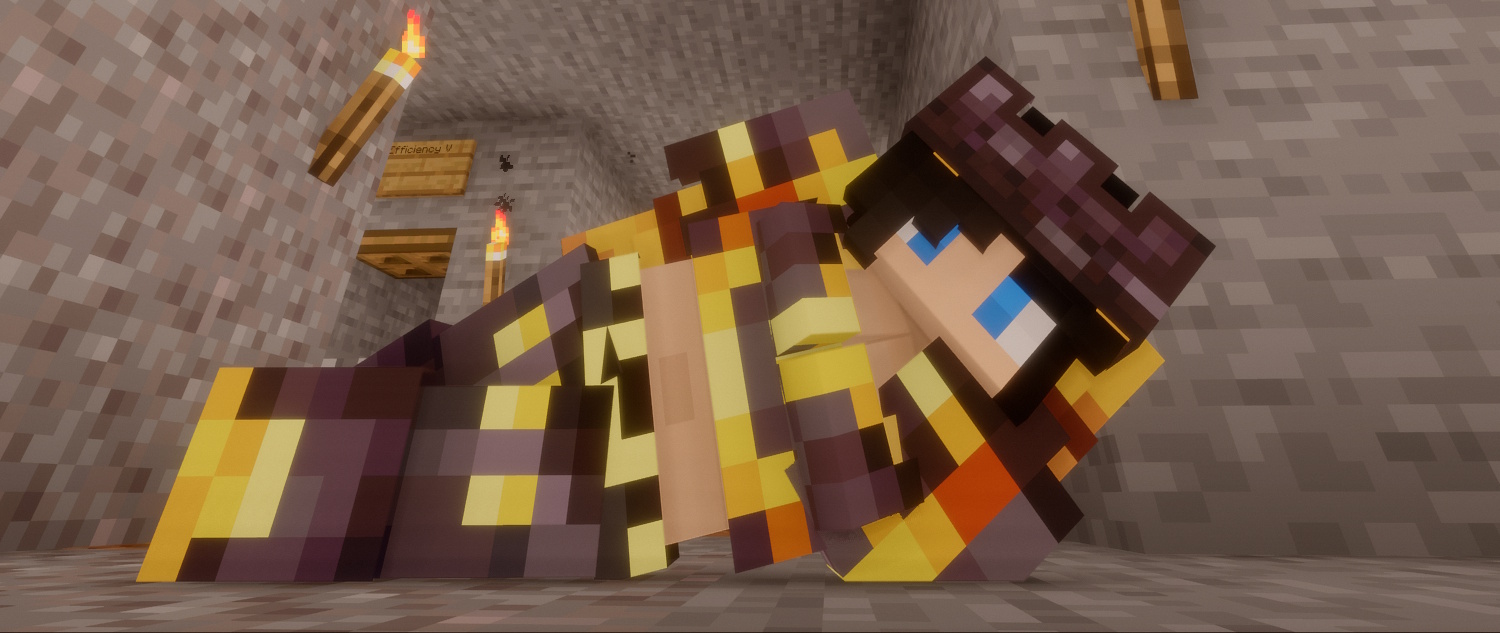
## About
This resource pack modifies armor textures to show more of the player’s skin. This covers all vanilla armor sets. Armor trims are cut as well to fit the new style, but are otherwise not further modified. Helmets are changed to look like crowns to show a bit more of the head as well.
## Features
– Crop-top styled chestplates for all armor sets
– Helmets that are crown shaped
– Modified armor trims to fit the new armor style
Openable
## 🚪 Openable
Open and close doors, trapdoors and fence gates quickly. This is a pretty useful replacement for pressure plates and now, you also have it as a datapack!
[](https://ko-fi.com/H2H118OP6T)
## Showcase

Open4ES Renewed
# ABOUT
Open4ES Renewed Shader Are Simple Shaders For Minecraft: Java Edition and Pojav Launcher.
These Shaders Have Several Features, One of Which is Shadow, SSAO, Reflection, Clouds, RainBow, and More
# LINKS
– Join My Discord Sever to Discuss, Bug Reports, Etc. [Open4ES Renewed Discord](https://discord.com/invite/eVsYRwn4ey)
# INSTALL THE SHADERS
– Download Client Which Supports Installing Shaders Such as Optifine and Iris
– Download The Shaders
– Copy Shaders to /.minecraft/shaderpacks
– Launch Minecraft, Go to Options –> Video Settings –> Shaders
– Choose Open4ES Renewed Shader