Patchwork | Building Blocks


**Description:** Patchwork is a building blocks mod that expands on every type of stone, wood, terracotta, and others. While it mainly focuses on adding block variants that are missing from the game such as Andesite Bricks and Polished Calcite, but it also adds plenty of others such as Cracked Bricks, Packed Snow, as well as new shingle blocks. It also fills some of the odd gaps left by vanilla in blocksets like walls for stone, polished stone types, and smooth sandstone. The mod also adds new paintings!
It is highly recommended to use JEI or a similar mod to view recipes for the new blocks.

**Current Features:** As of latest release (1.3) this mod contains:
Spoiler
– Stone Wall, Polished Stone, Stone Tiles, Stone Shingles, and Stone Pillar
– Deepslate Shingles, and Deepslate Pillar
– Granite Bricks, Chiseled Granite, Granite Tiles, Granite Shingles, and Granite Pillar
– Diorite Bricks, Chiseled Diorite, Diorite Tiles, Diorite Shingles, and Diorite Pillar
– Andesite Bricks, Chiseled Andesite, Andesite Tiles, Andesite Shingles, and Andesite Pillar
– Polished Granite Wall, Polished Diorite Wall, and Polished Andesite Wall
– Polished Calcite, Calcite Bricks, Chiseled Calcite, Calcite Tiles, Calcite Shingles, and Calcite Pillar
– Polished Tuff, Tuff Bricks, Chiseled Tuff, Tuff Tiles, Tuff Shingles, and Tuff Pillar
– Polished Dripstone, Dripstone Bricks, Chiseled Dripstone, Dripstone Tiles, Dripstone Shingles, and Dripstone Pillar
– Blackstone Tiles, Blackstone Shingles, and Blackstone Pillar
– Basalt Bricks, Chiseled Basalt, Basalt Tiles, Basalt Shingles, and Basalt Pillar
– Polished End Stone, Chiseled End Stone, End Stone Tiles, End Stone Shingles, and End Stone Pillar
– Smooth Basalt Bricks and Smooth Basalt Slab
– Smooth Stone Bricks
– Mosaics, Shakes, and Columns for all regular wood types
– Bamboo Slats, and Bamboo Column
– Bricks and Shingles for all Terracotta colors
– Cracked Bricks, Weathered Bricks, Mossy Bricks, Brick Mosaic, and Chiseled Bricks
– Nether Brick Mosaic and Red Nether Brick Mosaic
– Cracked Red Nether Bricks and Chiseled Red Nether Bricks
– Packed Snow and Snow Bricks
– Packed Dirt and Dirt Bricks
– Smooth Sandstone Wall and Smooth Red Sandstone Wall
– Smooth Sandstone Bricks and Smooth Red Sandstone Bricks
– Sandstone Bricks, Sandstone Pillar, and Weathered Sandstone Bricks
– Red Sandstone Bricks, Red Sandstone Pillar, and Weathered Red Sandstone Bricks
– Wooden Lantern and Wooden Soul Lantern
– New painting: window

**Info and Planned Features:**
– Feel free to include this mod in modpacks as long as it is credited – Let me know if you do and I’ll promote it 🙂
– Tweaks to some textures to make them more distinct
– New blocksets and variants for sets that don’t have any yet
**DO NOT REPOST OR REUPLOAD**

**Check Out My Other Projects:**
[](https://cdn.modrinth.com/data/cached_images/0d8131390282e4997d1011a47d75fa63a35e0ef8.png)](https://modrinth.com/resourcepack/bibliophilia)
[](https://modrinth.com/mod/lapidarist)
[](https://modrinth.com/mod/spare-change)
Patch’s Extra Eevees [Cobblemon]
# Welcome to Patch’s Extra Eevees!
This is a mod for Cobblemon that adds in 10 Eeveelutions so there is an Eeveelution for all types. There are also edits to the Eevee species file to allow for these evolutions.
### This project is both a data pack and a resource pack, and needs to be loaded into both locations!
# Features
– 10 extra evolutions for Eevee, that can either be evolved or found naturally in the world
– Movepools include support for egg moves, TMs, and move tutors
– Animations for idle, faint, sleeping, blinking, walking, and swimming/flying (if applicable)
– Normal and Shiny textures
– Cry sounds when they are sent out
– Pokedex functionality; the Eeveelutions should show up as entries 9990 to 9999 under their own regional dex entry.
– To make thematic use of all the available Evolution Stones, Umbreon and Espeon have been modified starting with version 2.0 to evolve with Moon Stones and Sun Stones respectively. If you’d prefer that Umbreon and Espeon retain their original evolution method, please download the NoEVO version.
– Minimap icons (If you use Xaeros Minimap). Note that if you also use E19 – Cobblemon Minimap Icons, this resource pack needs to be ABOVE E19 in order for the icons to show up properly.
# Mod Dependencies, Conflicts, and Integrations
– Requires whatever you need to run Cobblemon, as well as the Cobblemon mod itself
– It should work with mods that add breeding, TMs, and move tutors
– These Eeveelutions use Pokedex entries 9990 to 9999. Mods that use these entries too may cause conflicts.
– The mod was made and tested for the following versions. Use in other versions/setups at your own risk:
– 1.0 – Cobblemon 1.5.2 Fabric and Minecraft 1.20.1
– 2.0 – Cobblemon 1.6.1 Fabric and Minecraft 1.21.1
– 3.0 – Cobblemon 1.7.1 Fabric and Minecraft 1.21.1.
# Feedback
This is my first attempt at Minecraft modding. If you find any bugs or issues with the mod, please leave feedback in the corresponding support thread of the Cobblemon Discord.
# Meet the Eeveelutions!
### —–Antenneon (Bug)—–
**Pokedex**
“`
Antenneon was first documented by an insect scientist studying the Bug type.
An Eevee he was watching for a friend had been morphed by the silvery Venomoth
scales that got stuck in its thick fur.
“`
**Stats**
“`
HP: 110
Attack: 65
Defence: 60
Special Attack: 95
Special Defence: 130
Speed: 65
Ability: Shield Dust
Hidden Ability: Intimidate
“`
**Spawn Location/Evolution Method**
Spoiler
– Spawn Locations: Jungle/Forest Biomes (night only, ultra rare)
– Evolution Method: Trade Evolution (While holding Honey Bottle or Honeycomb)
### —–Battaleon (Fighting)—–
**Pokedex**
“`
Legend has it the first Battaleon was an Eevee that practiced its Double Kick constantly,
doing 100 kicks a day until it awakened its fighting spirit. Battaleon seek out places
of conflict to train.
“`
**Stats**
“`
HP: 65
Attack: 130
Defence: 95
Special Attack: 65
Special Defence: 60
Speed: 110
Ability: Vital Spirit
Hidden Ability: Defiant
“`
**Spawn Location/Evolution Method**
Spoiler
– Spawn Locations: Highlands Biomes (ultra rare), Illager Structures (rare)
– Evolution Method: Move Evolution (Use Double Kick 50 times) — _NOTE: Until they are integrated into Cobblemon, Eevee’s Learnset has been modified to learn Double Kick naturally to accomodate this evolution without needing Egg Move or Move Tutor access._
### —–Bouldeon (Rock)—–
**Pokedex**
“`
Crystal growths on its tail and head are used for defense. Eevee that venture deep
underground are sometimes changed by the latent energies of buried evolution stones,
their skin becoming hard as diamond.
“`
**Stats**
“`
HP: 110
Attack: 95
Defence: 130
Special Attack: 65
Special Defence: 60
Speed: 65
Ability: Solid Rock
Hidden Ability: Rough Skin
“`
**Spawn Location/Evolution Method**
Spoiler
– Spawn Locations: Cave and Deep Dark biomes (ultra rare, or rare if near gemstones)
– Evolution Method: Shiny Stone
### —–Duneon (Ground)—–
**Pokedex**
“`
Eevee who live in dry, desert environments will Dig into the ground during
the day to avoid the heat. The sand escaping their thick fur makes them seem
like a walking sandstorm, which they eventually evolve into.
“`
**Stats**
“`
HP: 130
Attack: 110
Defence: 95
Special Attack: 65
Special Defence: 60
Speed: 65
Ability: Levitate
Hidden Ability: Sand Spit
“`
**Spawn Location/Evolution Method**
Spoiler
– Spawn Locations: Desert, Savanna, and Sandy biomes (ultra rare, or rare at night)
– Evolution Method: Move Evolution (Use Dig 25 times) — _NOTE: Until they are integrated into Cobblemon, Eevee’s Learnset has been modified to learn Dig naturally to accomodate this evolution without needing TM or Move Tutor access._
### —–Kamileon (Normal)—–
**Pokedex**
“`
Some Eevee who reach maturity without evolving lose the ability to evolve
as their unstable DNA settles. They can still temporarily shift their type.
Rarely found in urban environments where there is little adapation.
“`
**Stats**
“`
HP: 130
Attack: 65
Defence: 60
Special Attack: 95
Special Defence: 65
Speed: 110
Ability: Color Change
Hidden Ability: Protean
“`
**Spawn Location/Evolution Method**
Spoiler
– Spawn Locations: Urban biomes (ultra rare)
– Evolution Method: Level 30
### —–Magneon (Steel)—–
**Pokedex**
“`
Eevee that live near deposits of metal can develop magnetic fields of their own,
attracting metal particles from their surroundings. Magneon then roll around in
lava to form the metal into armored skin.
“`
**Stats**
“`
HP: 95
Attack: 65
Defence: 130
Special Attack: 65
Special Defence: 110
Speed: 60
Ability: Oblivious
Hidden Ability: Analytic
“`
**Spawn Location/Evolution Method**
Spoiler
– Spawn Locations: Volcanic biomes (ultra rare, or rare near lava), Cave and Deep Dark biomes near lava (rare)
– Evolution Method: Trade Evolution (While holding Metal Coat)
### —–Mytheon (Dragon)—–
**Pokedex**
“`
Prolonged exposure to mystical scales and intense emotion has been documented
to unlock frightening power in some Eevee. Mytheon tend to make lairs in
isolated locations far from humans.
“`
**Stats**
“`
HP: 65
Attack: 130
Defence: 65
Special Attack: 110
Special Defence: 60
Speed: 95
Ability: Multiscale
Hidden Ability: Rivalry
“`
**Spawn Location/Evolution Method**
Spoiler
– Spawn Locations: Island biomes (ultra rare)
– Evolution Method: Friendship Evolution (While holding Dragon Scale)
### —–Pineon (Flying)—–
**Pokedex**
“`
Pineon cannot truly fly, but instead leap off of peaks and glide to their
destination, using their ears and tail to expertly ride the wind. The tribe
that first discovered Pineon befriended them and trained them as messengers.
“`
**Stats**
“`
HP: 65
Attack: 110
Defence: 95
Special Attack: 65
Special Defence: 60
Speed: 130
Ability: Limber
Hidden Ability: Cloud Nine
“`
**Spawn Location/Evolution Method**
Spoiler
– Spawn Locations: Peak biomes (ultra rare) and Sky Island biomes (rare)
– Evolution Method: Dawn Stone**
### —–Pompeon (Ghost)—–
**Pokedex**
“`
When saturated by the spiritual energy of Dusk Stones, Eevee is known to
evolve into a new form. They are drawn to spooky locations, their bodies a
glowing beacon in the night for wayward spirits.
“`
**Stats**
“`
HP: 95
Attack: 60
Defence: 65
Special Attack: 110
Special Defence: 65
Speed: 130
Ability: Cursed Body
Hidden Ability: Unnerve
“`
**Spawn Location/Evolution Method**
Spoiler
– Spawn Locations: Spooky biomes (ultra rare, night only)
– Evolution Method: Dusk Stone at night**
### —–Quilleon (Poison)—–
**Pokedex**
“`
Known to extract toxins from the mushrooms they eat, Quilleon will
sometimes be found around alchemists. Wild Quilleon are often aggressive,
so trainers are advised to ensure they have a strong bond before evolving.
“`
**Stats**
“`
HP: 65
Attack: 95
Defence: 110
Special Attack: 130
Special Defence: 60
Speed: 65
Ability: Toxic Debris
Hidden Ability: Anger Point
“`
**Spawn Location/Evolution Method**
Spoiler
– Spawn Locations: Swamp and Mushroom biomes (ultra rare) and Swamp Huts (rare)
– Evolution Method: Friendship Evolution (While holding a Red/Brown Mushroom or Crimson/Warped Fungus)
PolyPatcher
# PolyPatcher
 

PolyPatcher is a Forge mod for 1.8.9 & 1.12.2 created to improve your all-around Minecraft experience, bringing tons of Quality of Life additions, performance improvements, and tons of Vanilla bug fixes.
This work, “PolyPatcher”, is adapted from [“Patcher”](https://sk1er.club/mods/patcher) by [Sk1erLLC](https://sk1er.club), used under CC BY-NC-SA 4.0. “PolyPatcher” is licensed under CC BY-NC-SA 4.0 by Polyfrost. This is a fork of Sk1erLLC’s original mod, adding various changes and improvements as well as using OneConfig instead of Essential. For the original, please go [here](https://sk1er.club/mods/patcher) to download the mod.
## Feature List
Bug Fixes
# Bug Fixes
– **Keep Shaders on Perspective Change** – Resolve Vanilla shaders being cleared when changing perspective. *default
– **Parallax Fix** – Resolve the camera being too far back, seemingly making your eyes be in the back of your head. (Currently makes the F3 crosshair disappear.) **[MC-1846](https://bugs.mojang.com/browse/MC-1846)**.
– **Culling Fix** – Resolve false negatives in frustum culling, creating invisible chunks in some cases. (Can negatively impact performance.) **[MC-63020](https://bugs.mojang.com/browse/MC-63020)** & **[MC-70850](https://bugs.mojang.com/browse/MC-70850)**
– **Layers In Tab** – Resolve players sometimes not having a hat layer in Tab. *default
– **Player Void Rendering** – Resolve the black box around the player while in the void. *default
– **Alex Arm Position** – Resolve Alex-model arms being shifted down further than Steve-model arms. *default
– **Add Background to Book GUI** *(not in original)* – Adds the dark background to the book GUI like all other containers/menus.
– **Resource Exploit Fix** – Resolve an exploit in 1.8 allowing servers to look through directories. *default
– **Forge Chest Behavior** – Resolve forge changing vanilla chest behavior. *default
– **Vanilla Held Item Lighting** *(not in original)* – Amends a Forge bug causing item sides to have incorrect lighting compared to Vanilla 1.8. *default
– **OptiFine Custom Sky Fix** *(toggle not in original)* – Resolve OptiFine creating a “black box” effect at the bottom of the sky when using custom skies. Changes the rendering of the normal sky. *default
Experimental
# Experimental
– **Entrypoint Caching** *(not in original)* – Cache Forge mod entry points, improving startup time as Forge no longer needs to walk through every class to find the @Mod annotation. Requires two restarts to take full effect. *default
– **Improved Skin Rendering** *(not in original)* – Remove transparent pixels on skins instead of turning them black.
– **HUD Caching** – Reuse frames from the HUD instead of constantly recreating them every frame, as most HUD elements will stay the same for a long amount of time. (This may cause stuff with animations to feel “choppy”.)
– **Cache FPS** *(not in original)* – The amount of frames to cache for the HUD.
Miscellaneous
# Miscellaneous
– **Remove Ground Foliage** – Stop plants/flower from rendering.
– **1.12 Farm Selection Boxes** – Replace the selection box for crops with the 1.12 variant. (Only works on Hypixel & Singleplayer) *default
– **Exclude Cacti from 1.12 Boxes** *(not in original)* – Exclude cacti from the 1.12 selection box changes, as it would actually shrink rather than increase in size. *default
– **Remove Water FOV** *(not in original)* – Remove FOV change when underwater. *default
– **FOV Modifier** – Allow for modifying FOV change states.
– **Sprinting FOV** – Modify your FOV when sprinting.
– **Flying FOV** *(not in original)* – Modify your FOV when flying.
– **Bow FOV** – Modify your FOV when pulling back a bow.
– **Speed FOV** – Modify your FOV when having the speed effect.
– **Slowness FOV** – Modify Your FOV when having the slowness effect.
– **Better Keybind Handling** – Makes keys re-register when closing a GUI, like in 1.12+. (Does not work on macOS due to LWJGL issues) *default
– **Separate Sound & Texture Reloading** – Separate reloading resources into reloading sounds (F3+S) and reloading textures (F3+T).
– **Disable Hotbar Scrolling** – Remove the ability to scroll through your hotbar.
– **Invert Hotbar Scrolling** *(not in original)* – Change the direction of scrolling in your hotbar.
– **Prevent Overflow Hotbar Scrolling** *(not in original)* – Prevent from directly scrolling between the first and last hotbar slot.
– ~~**Crosshair Perspective** – Remove the crosshair when in third person.~~ (replaced by [PolyCrosshair](https://modrinth.com/mod/crosshair))
– **Unfocused Sounds** – Change the volume of sounds when you’re not tabbed into the window.
– **Unfocused FPS** – Toggle changing your FPS to whatever Unfocused FPS is set to when not tabbed into the window.**
– **Unfocused FPS Amount** – Change the maximum FPS when you’re not tabbed into the window, saving resources.
– **Log Optimizer** – Delete all files in the logs folder, as these can usually take up a lot of space. (These files are not recoverable once deleted)
– **Log Optimizer Amount** – Choose how many days old a file must be before being deleted.
– **Better Camera** – Stop tall grass, plants, reeds, etc. from affecting your FOV as done in 1.14+. *default
– **Better F1** – Hide nametags when in F1 mode. *default
– **Remove Screen Bobbing** – While using View Bobbing, only remove the view aspect but have the hand still bounce around.
– **Remove Map Bobbing** – While using View Bobbing, remove the hand bobbing when holding a map.
– **Static Items** – Stop items from bobbing up and down when dropped on the ground.
– **Modify Every Sound** – Open a separate GUI allowing you to mute or amplify individual sounds.
– **Natural Capes** *(not in original)* – Changes some physics in capes to fix rotation bugs and look more natural.
– **Smooth Scrolling** *(not in original)* – Smoothly scrolls through vanilla Minecraft GUIs.
– **Zoom Adjustment** – Scroll when using OptiFine’s zoom to adjust the zoom level. *default
– **Remove Smooth Camera While Zoomed** – Remove the smooth camera effect when using zoom.
– **Render Hand While Zoomed** – Keep your hand on screen when you zoom in.
– **Zoom Sensitivity** – Use a custom mouse sensitivity value when zoomed in. This is a percentage of your normal sensitivity.
– **Dynamic Zoom Sensitivity** – Reduce your mouse sensitivity the more you zoom in.
– **Smooth Zoom Animation** – Add a smooth animation when you zoom in and out.
– **Smooth Scroll-to-Zoom Animation** – Add a smooth animation when you scroll in and out while zoomed.
– **Smooth Zoom Function** – Change the smoothing function used in the smooth zooming animation.
– **Toggle to Zoom** – Make OptiFine’s zoom key a toggle instead of requiring you to hold it.
– **Simplify FPS Counter** – Remove the additions OptiFine L5 and above makes to the debug screen fps counter. *default
– **Use Vanilla Metrics Renderer** – Replace OptiFine’s ALT+F3 metrics renderer with the Vanilla renderer. *default
– **Distortion Effects** *(not in original)* – Changes the distortion effects (e.g. Nausea and nether portal distortion).
– **Disable Achievements** – Remove achievement notification.
– **Fire Overlay Height** – Change the height of the fire overlay.
– **Fire Overlay Opacity** – Change the opacity of the fire overlay.
– **Hide Fire Overlay with Fire Resistance** – Hide the fire overlay when you have fire resistance active. The overlay will blink 5 seconds before your fire resistance is about to run out.
– **Pumpkin Overlay Opacity** *(not in original)* – Change the opacity of the pumpkin overlay.
– **Remove Water Overlay** – Remove the water texture overlay when underwater.
– ~~**Remove Inverted Colors from Crosshair** – Remove the inverted color effect on the crosshair.~~ (replaced by [PolyCrosshair](https://modrinth.com/mod/crosshair))
– **Fullbright** – Remove lighting updates, increasing visibility. (Can positively impact performance. May conflict with minimaps) *default
– **Smart Fullbright** – Automatically Disable the Fullbright Effect when using OptiFine Shaders. (Requires Fullbright) *default
– **Disable Night Vision** *(not in original)* – Completely disables the effects of night vision.
– **Cleaner Night Vision** *(not in original)* – Makes the night vision effect fade out instead of a flashing effect.
– ~~**Show Own Nametag** – See your nametag in third person.~~ (replaced by [PolyNametag](https://modrinth.com/mod/polynametag))
– **Clean Projectiles** – Show projectiles 2 ticks after they’re shot up to stop them from obstructing your view. (Includes eggs, snowballs, and fishing hooks)
– **Ridden Horse Opacity** – Change the opacity of the horse you’re currently riding for visibility.
– **Water Fog Density** *(not in original)* – Changes the fog density in water to improve visibility.
– **Hide Aura on Invisible Withers** – Don’t render the aura around a wither when it is invisible.
– **Numerical Enchantments** – Use readable numbers instead of Roman numerals on enchants.
– **Translate Unknown Roman Numerals** – Generate Roman Numeral from enchantment/potion level instead of using language file. *default
– ~~**Clean View** – Stop rendering your potion effect particles.~~ (replaced by [OverflowParticles](https://modrinth.com/mod/overflowparticles))
– ~~**Disable Breaking Particles** – Remove block-breaking particles for visibility.~~ (replaced by [OverflowParticles](https://modrinth.com/mod/overflowparticles))
– **Disable Lightning Bolts** – Stop lightning bolts from rendering.
– **Alternate Text Shadow** – Change the text-shadow to only move down rather than move to the side.
– ~~**Add Text Shadow to Nametags** – Render nametag with shadowed text.~~ (replaced by [PolyNametag](https://modrinth.com/mod/polynametag))
– ~~**Add Text Shadow to Actionbar** – Render actionbar messages with shadowed text.~~ (replaced by [VanillaHUD](https://modrinth.com/mod/vanillahud))
– ~~**Add Background to Actionbar** – Render a background behind the actionbar.~~ (replaced by [VanillaHUD](https://modrinth.com/mod/vanillahud))
– **Disable Text Shadow** – Remove shadows from text. (Can positively impact performance).
– **Left Hand in First Person** – Render the first-person hand on the left of the screen.
– ~~**Toggle Tab** – Hold tab open without needing to hold down the tab key.~~ (replaced by [VanillaHUD](https://modrinth.com/mod/vanillahud))
– ~~**Number Ping** – Show a readable ping number in tab instead of bars.~~ (replaced by [VanillaHUD](https://modrinth.com/mod/vanillahud))
– ~~**Disable Titles** – Stop titles from appearing.~~ (replaced by [VanillaHUD](https://modrinth.com/mod/vanillahud))
– ~~**Title Scale** – Set the scale for titles.~~ (replaced by [VanillaHUD](https://modrinth.com/mod/vanillahud))
– **Automatically Scale Title** – Automatically scale titles if the title goes over the screen.
– ~~**Title Opacity** – Change the opacity of titles.~~ (replaced by [VanillaHUD](https://modrinth.com/mod/vanillahud))
– **Windowed Fullscreen** – Implement Windowed Fullscreen in Minecraft, allowing you to drag your mouse outside the window.
– **Instant Fullscreen** – Instant switching between fullscreen and non-fullscreen modes.
– ~~**Fix Action Bar Overlap** – Prevents action bar text from overlapping with armor or health bars.~~ (replaced by [VanillaHUD](https://modrinth.com/mod/vanillahud))
Performance
# Performance
– **Entity Culling** – Check to see if an entity is visible to the player before attempting to render them. *default
– **Entity Culling Interval** – The amount of time in ms between occlusion checks for entities. Shorter periods are more costly toward performance but provide the most accurate information. Lower values are recommended in competitive environments.
– **Smart Entity Culling** – Disable Entity Culling effect when using OptiFine shaders. (Due to the way OptiFine shaders work, we are unable to make Entity Culling compatible). *default
– **Don’t Cull Ender Dragons** *(not in original)* – Continue to render Ender Dragons when the entity is being occluded.
– **Don’t Cull Withers** *(not in original)* – Continue to render Withers when the entity is being occluded.
– **Don’t Cull Player Nametags** – Continue to render Player Nametags when the entity is being occluded. *default
– **Don’t Cull Entity Nametags** – Continue to render Entity Nametags when the entity is being occluded. *default
– **Don’t Cull Armorstand Nametags** – Continue to render Armorstand Nametags when the entity is being occluded. *default
– **Check Armorstand Rules** – Don’t cull armor stands that have a specific rule assigned to them. This will result in a lot of non-occluded armor stands in places like Hypixel Skyblock, but will resolve special entities being occluded when they typically shouldn’t be.
– **Entity Back-face Culling** – Stop rendering sides of entities that you cannot see. Being inside an entity will cause that body part to be invisible. (Some models may have a transparent face and will cause the back face to not show, such as Wither Skeletons.)
– **Player Back-face Culling** – Stop rendering sides of players that you cannot see. Being inside a player will cause that body part to be invisible.
– **Disable Armorstands** – Stop armor stands from rendering. (Armor stands are commonly used for NPC nametag rendering. Enabling this will stop those from rendering as well)
– **Disable Semitransparent Players** – Stop semitransparent players from rendering.
– **Disable Enchantment Books** – Stop enchantment table books from rendering.
– **Disable Item Frames** – Stop item frames from rendering.
– **Disable Mapped Item frames** – Stop item frames only with maps as their item from rendering.
– **Disable Grounded Arrows** – Stop arrows that are in the ground from rendering.
– **Disable Attached Arrows** – Stop arrows that are attached to a player from rendering.
– **Disable Skulls** – Stop skulls from rendering.
– **Disable Falling Blocks** *(not in original)* – Stops falling blocks from rendering.
– ~~**Disable Nametags Boxes** – Remove the transparent box around the nametag.~~ (replaced by [PolyNametag](https://modrinth.com/mod/polynametag))
– **Unstacked Items** – Render stacks of items on the ground as just one instead of having up to 5 copies in one stack.
– **Entity Render Distance Toggle** – Toggle allowing a custom entity render distance.
– **Tile Entity Render Distance** *(not in original)* – Stop rendering tile entities outside of a specified radius.
– **Hostile Entity Render Distance** – Stop rendering hostile entities outside a specified radius.
– **Passive Entity Render Distance** – Stop rendering passive entities outside a specified radius.
– **Player Entity Render Distance** – Stop rendering player entities outside a specified radius.
– **Global Entity Render Distance** – Stop rendering all entities outside a specified radius. This will ignore the distance of other entity render distances if smaller.
– **Disable End Portals** – Stop end portals from rendering.
– **Disable Enchantment Glint** – Disable the enchantment glint.
– ~~**Static Particle Color** – Disable particle lighting checks each frame. *default~~ (replaced by [OverflowParticles](https://modrinth.com/mod/overflowparticles))
– ~~**Max Particle Limit** – Stop additional particles from appearing when there are too many at once.~~ (replaced by [OverflowParticles](https://modrinth.com/mod/overflowparticles))
– **Downscale Pack Images** – Change all pack icons to 64×64 to reduce memory usage. *default
– **Optimized Font Renderer** – Use modern rendering techniques to improve font renderer performance. *default ([Optimization Test](https://streamable.com/0oype9))
– **Cache Font Data** – Cache font data, allowing for it to be reused multiple times before needing recalculation. *default ([Optimization Test](https://streamable.com/0oype9))
– **Optimized World Swapping** – Remove unnecessary garbage collection & screen displaying to make world swapping feel nearly instant. *default
– **Limit Chunk Updates** – Limit the number of chunk updates that happen a second.
– **Chunk Update Limit** – Specify the number of updates that can happen a second.
– **Low Animation Tick** – Lowers the number of animations that happen a second from 1000 to 500. *default
– **Batch Model Rendering** – Render models in a single draw call. *default
Screens
# Screens
– **1.11 Chat Length** – Extend the number of characters you can type from 100 to 256 on supported servers. (Supported servers are servers that support 1.11 or above. Some servers may kick you for this despite supporting 1.11 or above) *default
– **Remove Chat Message Limit** *(not in original)* – Remove the limit on how many messages can show up in chat. *default
– ~~**Transparent Chat** – Remove the background from chat. (Can positively impact performance).~~ (replaced by [Chatting](https://modrinth.com/mod/chatting))
– ~~**Transparent Chat Input Field** – Remove the background from chat’s input field. (Can positively impact performance).~~ (replaced by [Chatting](https://modrinth.com/mod/chatting))
– ~~**Extend Chat Background** – Extend the chat background all the way to the left of the screen. *default~~ (replaced by [Chatting](https://modrinth.com/mod/chatting))
– **Compact Chat** – Clean up the chat by stacking duplicate messages (Does not work with Labymod) *default
– **Consecutive Compact Chat** – Only compact messages if they’re consecutive.
– **Compact Chat Time** – Change the amount of time old messages take to stop being compacted. (Measured in seconds)
– **Remove Blank Messages** – Stop messages with no content from showing up in chat.
– **Shift Chat** – Keep chat open while sending a message if Shift is held while pressing Enter.
– **Chat Delay** – Delay chat messages if they’re sent within the selected timeframe after the previous message. (Measured in seconds)
– ~~**Chat Position** – Move the chat up 12 pixels to stop it from overlapping the health bar, as done in 1.12+. *default~~ (replaced by [Chatting](https://modrinth.com/mod/chatting))
– **Chat Timestamps** – Add timestamps before a message.
– **Chat Timestamps Style** – Choose how Chat Timestamps should appear.
– **Chat Timestamps Format** – Change the time format of Chat Timestamps.
– **Show Seconds on Timestamps** – Show the seconds on a timestamped message.
– **Safe Chat Clicks** – Show the command or link that is run/opened on click.
– **Damage Glance** – View the damage value of the currently held item above your hotbar.
– **Item Count Glance** – View the total amount of the currently held item above your hotbar.
– **Enchantment Glance** – View the enchantments of the currently held item above your hotbar.
– **Protection Percentage** – View how much total armor protection you have inside your inventory.
– **Projectile Protection Percentage** – View how much total projectile protection you have inside your inventory.
– **Container Background Opacity** *(not in original)* – Change the opacity of the dark background inside a container, or remove it completely.
– **Container Opacity** – Change the opacity of supported containers. Includes Chests & Survival inventory.
– ~~**GUI Crosshair** – Stop rendering the crosshair when in a GUI.~~ (replaced by [PolyCrosshair](https://modrinth.com/mod/crosshair))
– **Startup Notification** – Notify how long the game took to start. *default
– **Clean Main Menu** – Remove the Realms button on the main menu as it’s useless on 1.8.9. *default
– **Open to LAN Replacement** – Modify the Open to LAN button to either redirect to the server list or be removed.
– **Smart Disconnect -** Choose between disconnecting or relogging when clicking the disconnect button. (Only works on multiplayer servers)
– **Image Preview** – Preview image links when hovering over a supported URL. Press shift to use fullscreen and Control to render in native image resolution. (Currently supported: Imgur, Discord, Badlion screenshots)
– **Image Preview Width** – The % of screen width to be used for image preview.
– **Inventory Position** – Stop potion effects from shifting your inventory to the right. *default
– **Click Out of Containers** – Click outside a container to close the menu.
– **Inventory Scale** – Change the scale of your inventory independent of your GUI scale.
– ~~**Tab Opacity** – Change the tab list opacity.~~ (replaced by [VanillaHUD](https://modrinth.com/mod/vanillahud))
– ~~**Tab Height** – Move the tab overlay down the selected amount of pixels when there’s an active bossbar.~~ (replaced by [VanillaHUD](https://modrinth.com/mod/vanillahud))
– ~~**Set Tab Height** – Choose how many pixels tab will move down when there’s an active bossbar~~ (replaced by [VanillaHUD](https://modrinth.com/mod/vanillahud))
Screenshots
# Screenshots
– **No Feedback** – Remove the messages from screenshots entirely.
– **Compact Response** – Compact the message given when screenshotting.
– **Favorite Screenshot** – Show a text component that allows you to delete a screenshot. *default
– **Delete Screenshot** – Show a text component that allows you to delete. *default
– **Upload Screenshot** – Show a text component that allows you to upload a screenshot to Imgur. *default
– **Copy Screenshot** – Show a text component that allows you to copy a screenshot. *default
– **Open Screenshots Folder** – Show a text component that allows you to open the screenshots folder. *default
– **Screenshot Manager** – Change the way screenshotting works as a whole, creating a whole new process to screenshotting such as uploading to Imgur, copying to clipboard, etc. *default
– **Auto Copy Screenshot** – Automatically copy screenshots to the clipboard when taken.
– **Screenshot Preview** – Preview the look of your screenshot when taken in the bottom right corner.
– **Preview Time** – Adjust how long the preview should stay on the screen before sliding out. time is measured in seconds.
– **Preview Animation** – Select an animation style for the screenshot preview.
– **Preview Scale** – Change the scale of the preview.
Changes from original mod
# Changes from original mod
PolyPatcher 1.10.1:
– Add toggle for “OptiFine Custom Sky Fix”
– Fix compatibility with NormalASM
– Fix alpha not being set when rendering container slots
PolyPatcher 1.10.0:
– Boost performance by only rendering special tile entities once instead of twice per frame (e.g beacons)
– Boost performance by unloading tile entities quicker
– Boost performance by optimizing adding normals to vertex formats
– Boost performance by reducing allocations in EnumFacing
– Fix vanilla log spam with Util class
– Fix vanilla texture manager memory leak
– Fix vanilla enchantment memory leak
– Fix vanilla server list from buffering
– Fix vanilla light initializing too early
– Fix vanilla bug where invalid tile entities try to render
– Fix vanilla bug where entities don’t render at certain camera angles below Y=0 and above Y=255
– Fix vanilla bug where spaces are not trimmed in server address fields
– Fix vanilla bug where the pumpkin overlay shows in spectator mode
– Decrease startup time significantly by computing part of FML mod loading asynchronously
– Decrease startup time by replacing unnecessary regexes during mod loading
– Decrease startup time by skipping first baking in ModelLoader
– Boost performance by switching some Forge internals over to FastUtil
– Boost performance by improving insertion into Forge’s inventory wrappers
– Boost performance of Forge’s block state implementation
– Add micro-optimization in the FML registry
– Reduce memory usage of Forge model transformations
– Fix OBJModel-related Forge memory leaks
– Fix Forge bug by skipping fatal models
– “Entrypoint Caching” feature
– Cache Forge mod entry points, improving startup time as Forge no longer needs to walk through every class to find the @Mod annotation.
– This will only work after your second launch with PolyPatcher 1.10.0, because it needs to cache this data first.
– This decreases startup time significantly
– Compact LUT Tables / Fast Math (replaces BetterFPS / OptiFine Fast Math)
– Add toggle for cacti in “1.12 Farm Selection Boxes”
– This fixes cacti farming in SkyBlock.
– New experimental option to improve head rendering by removing black pixels (“Improved Skin Rendering”)
– Add “Background to Book GUI”
– Add “Flying FOV” to “FOV Modifier”
– Fix compatibility with CensoredASM
– Make “Resource Exploit Fix” not do any extra validation other than detecting the exploit
– Fix “Compact Chat” scrolling
– Fix entity outline compatibility with “Entity Culling”
– Fix “HUDCaching” issues with vignette and crosshair color
– Fix “FOV Modifier” with high speed or slowness
PolyPatcher 1.9.2:
None
PolyPatcher 1.9.1:
– Reload language-related managers only when selecting a new language in vanilla Minecraft
– Fix parallax fix making debug crosshair disappear
– Try-catch sound menu to prevent crashes
PolyPatcher 1.9.0:
– Replace Essential with OneConfig
– Boost performance by batch-drawing tile entities
– Boost performance by reducing quad counts in item models
– Fix Forge held item lighting to match vanilla
– Fix vanilla bug where entering an entity in spectator mode while in third person applies shaders
– Fix vanilla bug where enchantment glint takes up the whole slot
– Fix vanilla bug where items glitch out when using negative scale
– Fix vanilla sky lighting calculation
– Add ability to change HUD Caching FPS
– Add “Natural Capes” feature
– Add “Pumpkin Overlay Opacity”
– Add “Cleaner Night Vision” and “Disable Night Vision”
– Add Invert Hotbar Scrolling
– Add Prevent Overflow Hotbar Scrolling
– Add “Disable Falling Blocks”
– Replace “Remove Container Background” with “Container Background Opacity”
– Replace “Nausea Effect” toggle to “Distortion Effects” slider
– Add ability to change tile entity render distance
– Add ability not to cull ender dragons and withers from Entity Culling
– Fix very rare crash on Minecraft’s main menu
– Re-add “Remove Water FOV”
– Re-add “Remove Chat Message Limit” feature
– Remove features replaced by various Polyfrost mods
– Please install VanillaHUD for any title-related, actionbar-related, or tablist-related features
– Please install PolyCrosshair for any crosshair-related features
– Please install PolyNametag for any nametag-related features
– Please install OverflowParticles for any particle-related features (“Clean View,” “Disable Breaking Particles,” “Static Particle Color,” “Max Particle Limit”)
– Please install OverflowAnimations for “Remove Vertical Bobbing”
– Change all opacity options to percentages
– Remove Patcher version info from debug HUD
Replacement Mods
# Replacement Mods
PolyPatcher reproduces the functionality of these mods and as such, they are no longer needed.
This list may not always be up-to-date. To view an updated list, click [here](https://static.sk1er.club/patcher/duplicate_mods.json)
– **Case Commands**
– **Command Patcher**
– **Compact Chat**
– **Cross Chat**
– **Item Optimizations**
– **MouseBindFix**
– **Resource Exploit Fix**
– **Windowed Fullscreen** (sk1er_fullscreen)
– ~~**Clean View**~~ Replaced by [OverflowParticles](https://modrinth.com/mod/overflowparticles) instead
– **MemoryFix**
– **MouseDelayFix**
– **NoCloseMyChat**
– **Vanilla Enhancements**
– **PortalInputFix**
– **BetterScaledGUI**
– **Void Chat**
– **Fullbright**
– **InputFix**
– **HUDCaching**
– **NoScroll**
## License
How we comply with Patcher’s original license
NOTE: This is in no way legal advice or legally-binding text, and is purely intended as a brief explanation of how we follow Patcher’s license.
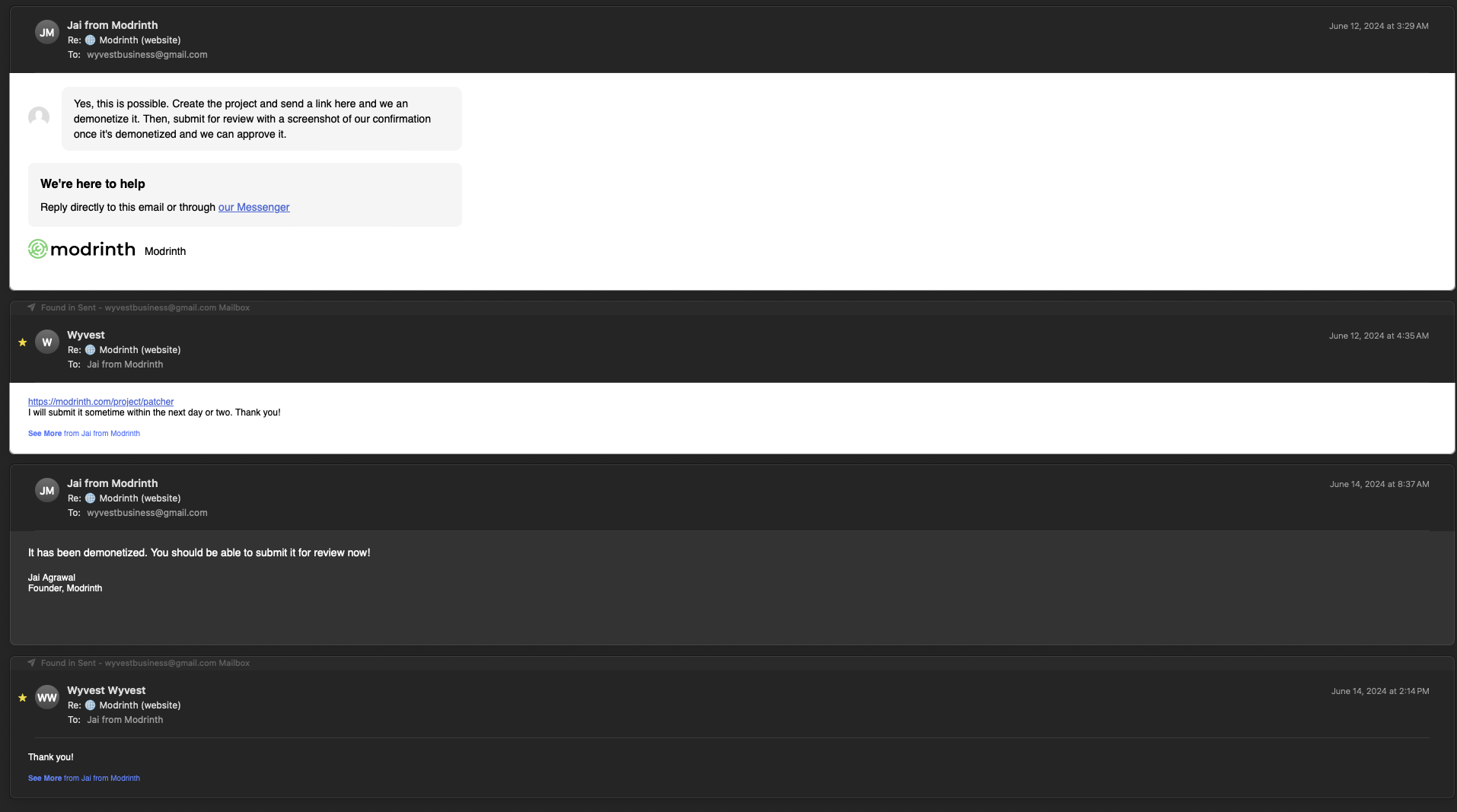
The original Patcher mod, as well as “PolyPatcher” (our fork), is licensed under the Creative Commons Attribution-NonCommercial-ShareAlike 4.0 International license (aka, the CC BY-NC-SA 4.0). Therefore, we are not allowed to earn monetary compensation from this mod. PolyPatcher is hosted on three different websites, GitHub, Modrinth, and CurseForge: there are no ads on the GitHub and we have asked Modrinth / CurseForge to disable monetization on this project manually. The Modrinth correspondence is below, and the CurseForge support thread is shown on the CurseForge description.
 ](https://discord.gg/cV4cJyGXqF)
 ](https://globox1997.github.io/wiki/mods/PatchouliButton/)
 ](https://github.com/Globox1997/PatchouliButton/issues)

 ](https://modrinth.com/mod/fabric-api)
 ](https://modrinth.com/mod/cloth-config)