

1.0.0
release

Pandora Holograms
A high-performance, packet-based hologram plugin designed for modern paper/spigot minecraft servers.
 266
266
Pandora Holograms

---
About
PandoraHolograms is a modern, feature-rich hologram plugin designed for Paper/Spigot servers. It provides an intuitive command system, seamless PlaceholderAPI integration, and a beautiful web-based editor for creating holograms visually.
Features
Core Features
- Configurable Spacing - Create holograms with a single command - Configurable Spacing - Support for unlimited lines per hologram - Configurable Spacing - Full Minecraft color and formatting support - Configurable Spacing - Add, insert, set, and remove lines easily - Configurable Spacing - YAML-based storage (easily extensible to MySQL) - Configurable Spacing - Per-hologram permissions support - Configurable Spacing - Customizable line height per hologram
Advanced Features
- Info Display - Automatic placeholder parsing and updates - Info Display - Web-based editor with live preview - Info Display - Export holograms from the editor to in-game commands - Info Display - Easily duplicate holograms - Info Display - Teleport to hologram locations - Info Display - View detailed hologram information
---
Commands
Basic Commands
| Command | Description | Permission | |---------|-------------|------------| | `/holo create <name> [lines...]` | Create a new hologram | `pandoraholograms.create` | | `/holo addline <name> <text>` | Add a line to the bottom | `pandoraholograms.edit` | | `/holo insertline <name> <index> <text>` | Insert a line at position | `pandoraholograms.edit` | | `/holo setline <name> <index> <text>` | Set a specific line | `pandoraholograms.edit` | | `/holo removeline <name> <index>` | Remove a line | `pandoraholograms.edit` | | `/holo movehere <name>` | Move hologram to you | `pandoraholograms.edit` | | `/holo delete <name>` | Delete a hologram | `pandoraholograms.delete` | | `/holo list` | List all holograms | `pandoraholograms.use` |
Utility Commands
| Command | Description | Permission | |---------|-------------|------------| | `/holo teleport <name>` | Teleport to hologram | `pandoraholograms.use` | | `/holo clone <source> <newName>` | Clone a hologram | `pandoraholograms.create` | | `/holo info <name>` | Show hologram info | `pandoraholograms.use` | | `/holo update <name>` | Update hologram display | `pandoraholograms.edit` | | `/holo live` | Open visual editor | `pandoraholograms.use` | | `/holo version` | Show version info | `pandoraholograms.use` | | `/holo reload` | Reload plugin | `pandoraholograms.admin` |
Command Examples
```bash
Create a simple hologram
/holo create welcome "&e&lWelcome!" "&7To our server"
Create with multiple lines
/holo create spawn "&e&lSpawn" "" "&7Welcome to spawn!" "&7Enjoy your stay!"
Add a line
/holo addline welcome "&7Player count: &e%server_online%"
Insert a line at position 2
/holo insertline welcome 2 "&7New line here"
Move hologram to your location
/holo movehere welcome
Clone a hologram
/holo clone welcome welcome2
View hologram information
/holo info welcome ```
---
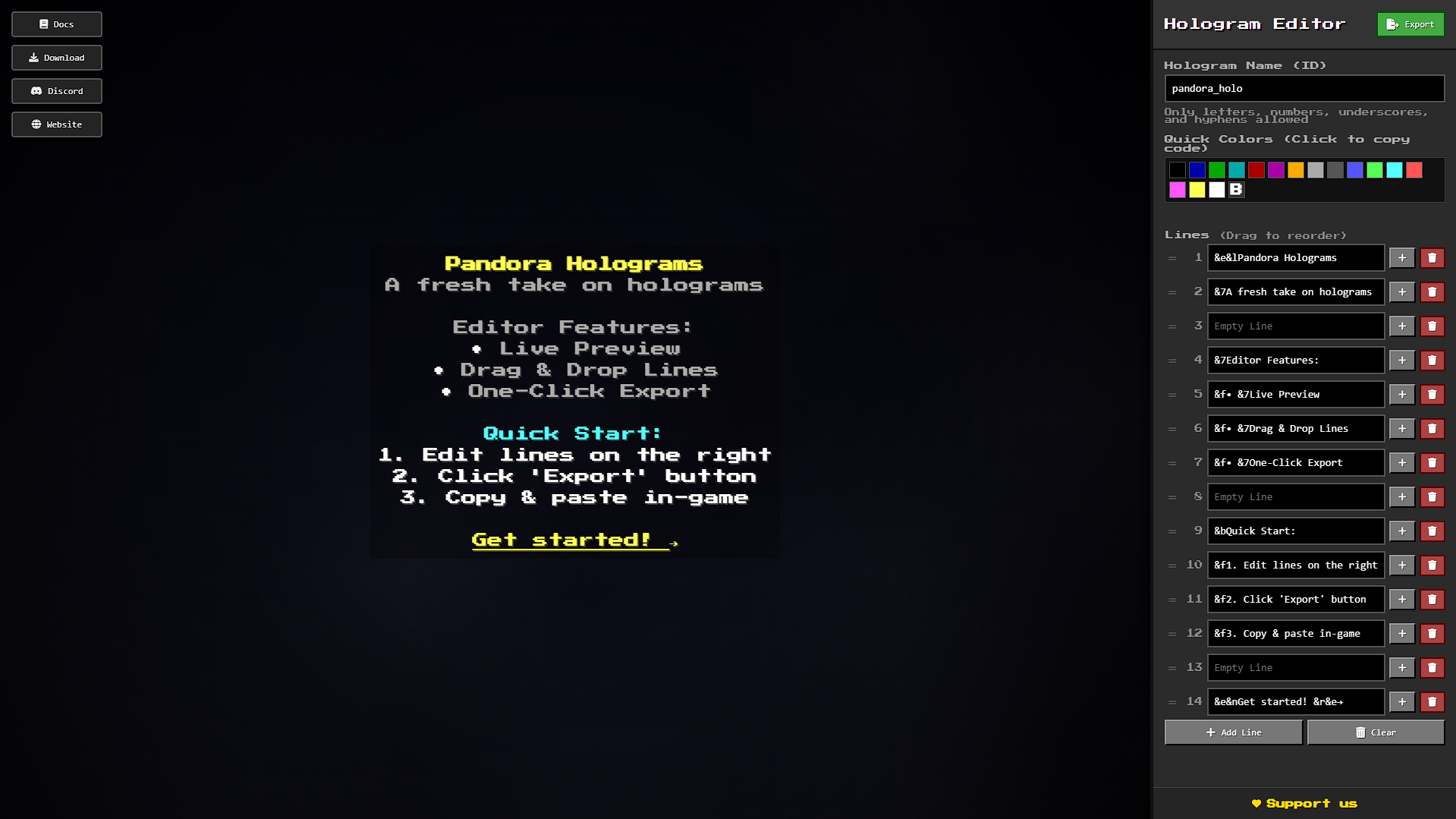
Visual Editor
PandoraHolograms includes a beautiful web-based visual editor!
Using the Editor
1. Export: Run `/holo live` to open the editor in your browser 2. Export: Open `plugins/PandoraHolograms/editor.html` in your browser 3. Export: Create and edit holograms visually with live preview 4. Export: Click "Export" to get commands ready to paste in-game
Editor Features
- One-Click Export - See your hologram as you type - One-Click Export - Reorder lines by dragging - One-Click Export - Click to copy color codes - One-Click Export - See line positions - One-Click Export - Add lines anywhere - One-Click Export - Copy commands instantly
---
API
PandoraHolograms provides a clean, developer-friendly API.
Basic Usage
```java import com.pandora.holograms.api.PandoraAPI; import com.pandora.holograms.hologram.Hologram; import org.bukkit.Location;
// Create a hologram Hologram holo = PandoraAPI.createHologram("my_holo", location); holo.addLine("&aHello World!");
// Create with initial lines List<String> lines = Arrays.asList("Line 1", "Line 2", "Line 3"); Hologram holo2 = PandoraAPI.createHologram("my_holo2", location, lines);
// Get a hologram Hologram holo = PandoraAPI.getHologram("my_holo");
// Clone a hologram Hologram clone = holo.clone("clone_name", newLocation);
// Update lines (for PlaceholderAPI) holo.updateLines(player);
// Delete a hologram PandoraAPI.deleteHologram("my_holo"); ```
API Methods
PandoraAPI
| Method | Description | |--------|-------------| | `createHologram(String, Location)` | Create empty hologram | | `createHologram(String, Location, List<String>)` | Create with lines | | `getHologram(String)` | Get hologram by name | | `deleteHologram(String)` | Delete hologram | | `hologramExists(String)` | Check if exists | | `getAllHolograms()` | Get all holograms | | `moveHologram(String, Location)` | Move hologram |
Permissions
| Permission | Description | Default | |------------|-------------|---------| | `pandoraholograms.use` | Use basic commands | OP | | `pandoraholograms.create` | Create holograms | OP | | `pandoraholograms.edit` | Edit hologram lines | OP | | `pandoraholograms.delete` | Delete holograms | OP | | `pandoraholograms.admin` | Admin commands (reload) | OP | | `pandoraholograms.*` | All permissions | OP |
---