1.0.4
release

Photon & EpicFight
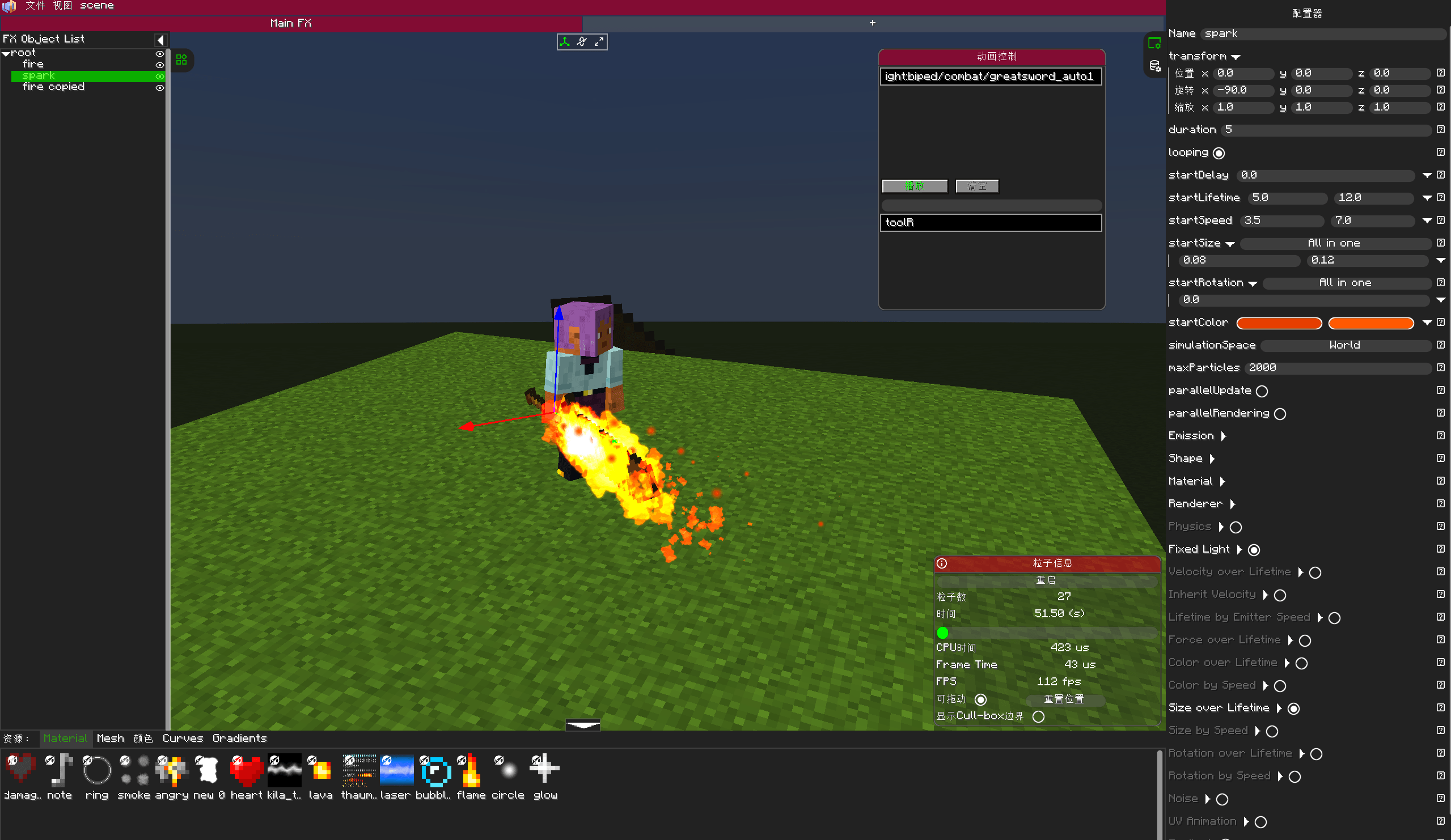
In the Photon particle editor, preview the skeletal animation of EpicFight and bind the effects to specific bones.
 42
42
Photon & EpicFight
Photon & EpicFight Integration
This is a tool for integrating Forge , designed to preview EpicFight skeletal animations within the Photon particle editor and bind visual effects to specific bones.
🎯 Purpose This module adds support for EpicFight skeletal animations to the Photon VFX Editor, enabling VFX creators to: Load a player clone into the particle editor and preview EpicFight animations in real-time. Bind the effect currently being edited to a specified bone (with real-time position and rotation updates). Bind effects to player or entity bones in-game via commands.
🛠️ Features Editor Integration Animation Control Panel - Enable "Animation Control" in the editor's "View" menu to search for and play EpicFight animations. Bone Binding Input Field - Enter a bone name (e.g., Root, Chest, Head), and the effect in the editor will update in real-time based on that bone's position and rotation. Bone Name Autocomplete - When typing, all bone names in the Armature are reflected, providing fuzzy-matching dropdown suggestions with support for page scrolling. Real-time Player Sync - The clone syncs the player's equipment, health, and absorption values every frame. Preview Toggle - Control whether EpicFight preview is enabled via the /photon_preview command. In-Game Commands /bone play <namespace> <path> [bone_name] - Play an effect on the specified bone (defaults to Tool_R). /bone stop [bone_name] [namespace] [path] - Stop effects on the specified bone. /bone list - List all available effects. /photon_EpicFight_Editor - Toggle the editor's EpicFight preview mode. Note: All commands support Tab completion (namespace, path, bone name).
⚙️ Animation Driving Uses AnimationPlayer.tick() to naturally advance animation time and sets setHardPause(true) to prevent interference from ClientAnimator. Avoids using modifyPose() / correctRootJoint(), directly reading getRawPose() to preserve Root bone displacement. Automatically resets entity position after animation ends.
📖 Usage Instructions Editor Preview To enable preview, enter /photon_preview in-game (enter again to disable). Open the Photon particle editor (/pe). Open the "Animation Control" floating window from the "View" menu. Enter the "Animation Resource Path" and click play. Enter a bone name (e.g., Root, Chest) in the bone input field; the effect will follow the bone's movement.
Command Binding
Play the "test" effect from the "epicfight" namespace on the Tool_R bone
/bone play epicfight test Tool_R
Play on the Chest bone
/bone play epicfight test Chest
Stop all effects on the Chest
/bone stop Chest
Stop a specific effect on the Chest
/bone stop Chest epicfight test
Stop all bone effects
/bone stop
List available effects
/bone list
📦 Dependencies Photon - VFX Editor EpicFight - 20.14.X LDLib - UI Library (dependency of Photon) Minecraft Forge 1.20.1
Photon & EpicFight
📚 概述
这是一个用于整合 Forge 模组的工具,旨在 Photon 粒子编辑器中预览 EpicFight 的骨骼动画,并将特效绑定到特定的骨骼上。
🎯 目的
该模块为 Photon VFX 编辑器添加了对 EpicFight 骨骼动画的支持,使特效创作者能够:
在粒子编辑器中加载玩家克隆体,并实时预览 EpicFight 动画。
将正在编辑的特效绑定到指定的骨骼上(位置和旋转会实时更新)。
通过指令在游戏中将特效绑定到玩家或实体的骨骼上。
🛠️ 功能
编辑器整合
动画控制面板 - 在编辑器的“视图”菜单中启用“动画控制”,即可搜索并播放 EpicFight 动画;
骨骼绑定输入框 - 输入骨骼名称(如 Root, Chest, Head),编辑器中的特效将根据该骨骼的位置和旋转实时更新;
骨骼名称自动补全 - 输入时,会反射 Armature(骨架)中的所有骨骼名称,提供模糊匹配的下拉建议,并支持页面滚动;
实时玩家同步 - 克隆体会每帧同步玩家的装备、生命值和吸收值;
预览开关 - 通过指令 /photon_preview 控制是否启用 EpicFight 预览。
游戏内指令
/bone play <命名空间> <路径> [骨骼名称] - 在指定骨骼上播放特效(默认为 Tool_R);
/bone stop [骨骼名称] [命名空间] [路径] - 停止指定骨骼上的特效;
/bone list - 列出所有可用的特效;
/photon_EpicFight - 切换编辑器的 EpicFight 预览模式。
注:所有指令均支持 Tab 键自动补全(命名空间、路径、骨骼名称)。
⚙️ 动画驱动
使用 AnimationPlayer.tick() 自然推进动画时间,并设置 setHardPause(true) 以防止 ClientAnimator 干扰。
避免使用 modifyPose() / correctRootJoint(),直接读取 getRawPose() 以保留 Root 骨骼的位移。
动画结束后自动重置实体位置。
📖 使用说明
编辑器预览
要启用预览,请在游戏中输入 /photon_EpicFight(再次输入可禁用);
打开 Photon 粒子编辑器(/photon_editor);
在“视图”菜单中打开“动画控制”浮动窗口;
输入“动画资源路径”并点击播放;
在骨骼输入框中输入骨骼名称(如 Root, Chest),特效将跟随骨骼移动。
指令绑定
在 Tool_R 骨骼上播放来自 "epicfight" 命名空间的 "test" 特效。
/bone play epicfight test Tool_R
在 Chest 骨骼上播放。
/bone play epicfight test Chest
停止 Chest 上的所有特效。
/bone stop Chest
停止 Chest 上指定的特效。
/bone stop Chest epicfight test
停止所有骨骼特效。
/bone stop
列出可用的特效。
/bone list
📦 依赖
Photon - VFX 编辑器;
EpicFight - 20.14.X;
LDLib - UI 库( Photon前置库);
Minecraft Forge 1.20.1。