

3.0.0
release

ResourceWorldResetter
ResourceWorldResetter is a Minecraft plugin designed to automate the resetting of a resource world at scheduled intervals.
 406
406
ResourceWorldResetter
ResourceWorldResetter v4.0.0

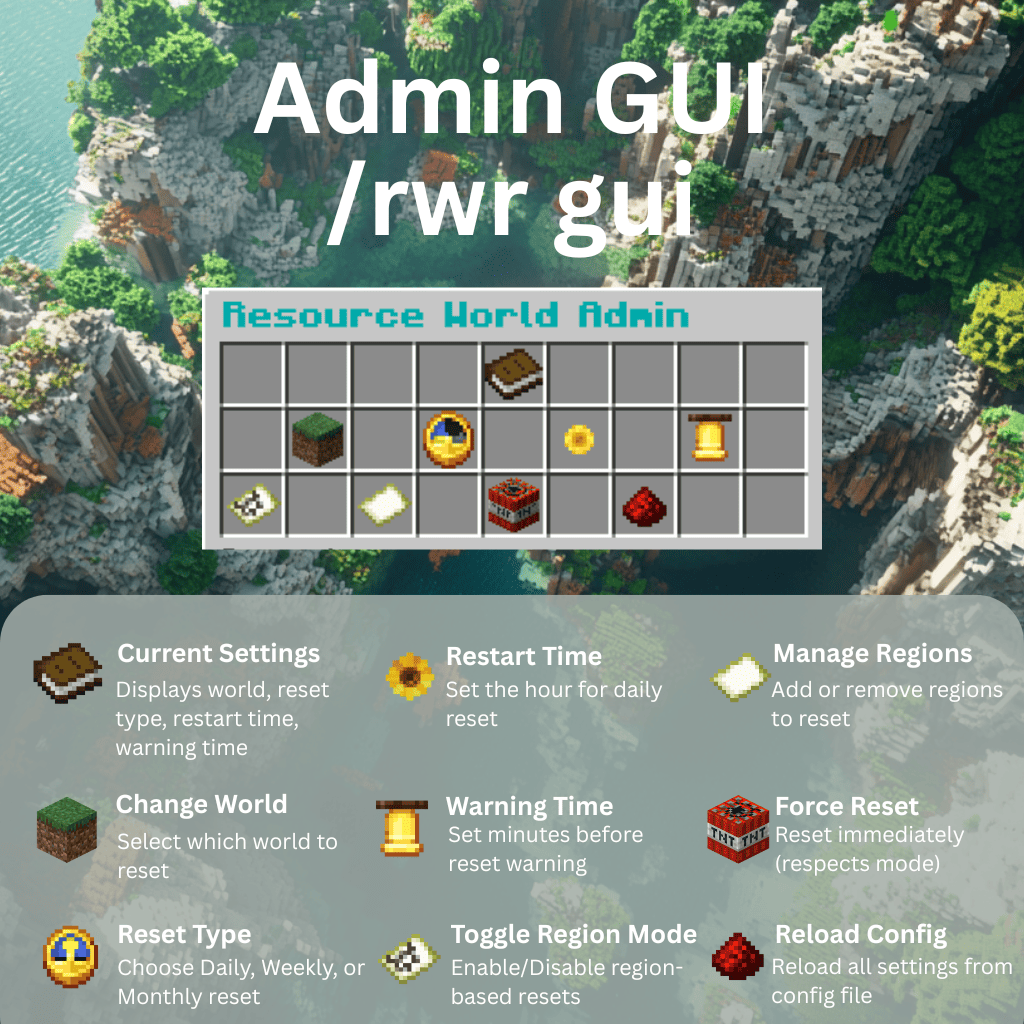
Admin GUI — `/rwr gui`
Click the icons in-game to change world, schedule, warnings, region settings, force resets, or reload config.
Automated Resource World Resets with Phase-Aware Status and Unified /rwr Commands
ResourceWorldResetter v4 is the next generation of automatic resource world resets. It introduces an explicit phase-based reset model, a unified /rwr command tree, and improved operator visibility into reset progress and failures.
⚠️ BREAKING CHANGE: v4 introduces a new unified `/rwr` command structure. Old commands (`/rwrgui`, `/resetworld`, `/rwrregion`, `/rwrresume`, etc.) no longer exist. Server owners must update scripts and permissions. Auto-migration is provided for configs.
What's New in v4
✓ Explicit Reset Phases - Reset progress is tracked using phases: IDLE → PRECHECK → TELEPORT → UNLOAD → DELETE → RECREATE → VERIFY → COMPLETE (or FAILED on error) - `/rwr status` reports the exact phase for in-progress or failed resets - Reset state metadata is persisted for better operational visibility
✓ Unified Command Structure - All functionality is grouped under `/rwr` subcommands - Built-in help: `/rwr` or `/rwr help` - Legacy command aliases are intentionally removed in v4
Built-in help: `/rwr help` now shows a complete, command-by-command help page with usage examples and permission notes for every subcommand.
✓ Full Operator Visibility - `/rwr status` — shows exact phase, next reset time, resume phase, and last failure reason - `/rwr next` — displays next reset timestamp, warning timestamp, and countdown in server timezone - No more guessing whether a reset is stuck, blocked, or progressing
Key Features
Core Features: - Automatic Resource World Resets — daily, weekly, monthly schedules - Selective Region Resets — reset specific areas without deleting the entire world - GUI-Based Configuration — no manual YAML editing needed - Multiverse-Core Integration — handles world deletion and recreation
Safety & Reliability: - State Machine Foundation — explicit phases and persisted state tracking - Failure Recovery Controls — resume and cancel controls for incomplete reset handling - Failure Visibility — phase and failure details exposed in status output - Safe Player Teleportation — guarantees solid ground; automatic fallback if no safe spot exists - Graceful Shutdown Handling — incomplete reset state is detected and can be managed with `/rwr resume`
Operator Experience: - Phase-Level Status Reporting — `/rwr status` shows exact phase, not just "IN_PROGRESS" - Reset Scheduling Transparency — `/rwr next` shows countdown to next reset - Recovery Options — `/rwr resume` and `/rwr resume cancel` for interrupted resets
Player Experience: - World Teleport GUI — `/rwr tp` for easy world navigation; `/rwr back` to return - Configurable Warnings — countdown broadcasts before scheduled resets - Region Throttling — batch chunk unloading prevents lag spikes - Custom Events — plugin integration via PreResetEvent, PostResetEvent, RegionPreResetEvent, RegionPostResetEvent
v4.0.0 Breaking Changes
Old commands no longer exist: - `/rwrgui` → use `/rwr gui` - `/reloadrwr` → use `/rwr reload` - `/resetworld` → use `/rwr reset now` - `/rwrregion` → use `/rwr region <enable|disable|list|add|remove|addhere>` - `/rwrresume` → use `/rwr resume [cancel]`
What is automatic: - Config is auto-migrated from v3 schema to v4 on first startup - A backup is created as `config.v3.backup.yml` - Old reset-state format is archived
What admins must do: 1. Update all scripts and automation to `/rwr` subcommands 2. Update permission nodes in your permission plugin 3. Run `/rwr status` to verify setup 4. Test with `/rwr reset now` during low activity
See MIGRATION.md for the full upgrade guide.
Commands & Permissions
| Command | Description | Permission | |---|---|---| | /rwr help | Show all supported `/rwr` subcommands | resourceworldresetter.admin | | /rwr gui | Open the admin configuration GUI | resourceworldresetter.admin | | /rwr reload | Reload config from file | resourceworldresetter.admin | | /rwr status | Show current phase, next reset, and failure/resume details | resourceworldresetter.admin | | /rwr next | Show next reset timestamp, warning timestamp, and countdown | resourceworldresetter.admin | | /rwr reset now | Force an immediate reset | resourceworldresetter.admin | | /rwr resume [cancel] | Resume or cancel incomplete reset recovery | resourceworldresetter.admin | | /rwr region <enable|disable|list|add|remove|addhere> | Manage region-based resets | resourceworldresetter.admin | | /rwr tp | Open world teleport menu | resourceworldresetter.admin | | /rwr back | Teleport back to previous location | resourceworldresetter.admin |
Permissions
The plugin exposes granular permission nodes for player-facing teleport commands so servers can allow them to non-admin players while keeping admin operations restricted.
Player-Facing Commands (available to all by default): - `resourceworldresetter.tp` — Allows `/rwr tp` to open the world selection GUI. Default: `true` (all players). - `resourceworldresetter.back` — Allows `/rwr back` to teleport back to your last recorded location. Default: `true` (all players).
Admin-Only Commands: - All other subcommands (`gui`, `reload`, `reset`, `resume`, `region`, `status`, `next`) are protected by `resourceworldresetter.admin` (default: `op` only).
The root `/rwr` command has no permission gate; Spigot allows all users to execute it, and permission checks happen per subcommand. This enables non-admins to use player-facing commands while keeping administration features restricted.
Supported Versions - Minecraft: 1.20.5+ (Spigot API 26.1+) - Java: 25 or newer - Multiverse-Core: 4.3.1+ (fully compatible with v5) - Tested on: Spigot 26.1, 26.1.1, 26.1.2
Installation 1. Download the latest v4 release from GitHub Releases 2. Back up your plugin folder and worlds 3. Place ResourceWorldResetter.jar into `plugins/` 4. Ensure Multiverse-Core 4.3.1+ is installed 5. Restart your server (auto-migration will run if upgrading from v3) 6. Create your resource world (e.g., `/mv create Resources normal`) 7. Run `/rwr gui` and click Change World to select it 8. Configure schedule and preflight gates via GUI or `config.yml`
How It Works 1. Admin configures target world and reset schedule via `/rwr gui` 2. On scheduled reset, plugin enters phase-based flow: PRECHECK → TELEPORT → UNLOAD → DELETE → RECREATE → VERIFY → COMPLETE 4. Players are safely teleported to a fallback world with visual warnings 5. World is deleted and regenerated by Multiverse-Core 6. Status is visible at any time via `/rwr status` (exact phase reported) 7. If reset fails, admins can inspect failure reason and control recovery with `/rwr resume`
Important Information
Time Zone Awareness: The plugin schedules resets based on the server's local system time.
Data Loss Warning: Once a world is reset, all data within it is permanently deleted, including player structures and inventories. Back up your world files before configuring and using this plugin.
Preflight Gates: v4.0.0 includes preflight configuration keys (TPS, players, disk) in the schema for forward compatibility. Full gate enforcement and policy controls are targeted for v4.1+.
Reset Phases: Monitor `/rwr status` to see which phase the current or last reset reached. Phase information is essential for troubleshooting reset failures.
Issues & Support: - Report bugs: Issues - Contributions welcome: Pull requests accepted
Author & License Author: TamaWish License: MIT License
Download v4.0.0 Now — Breaking Change Release with Better Commands and Phase Visibility