

1.0.0-1.21.6
release

RevivalPVP
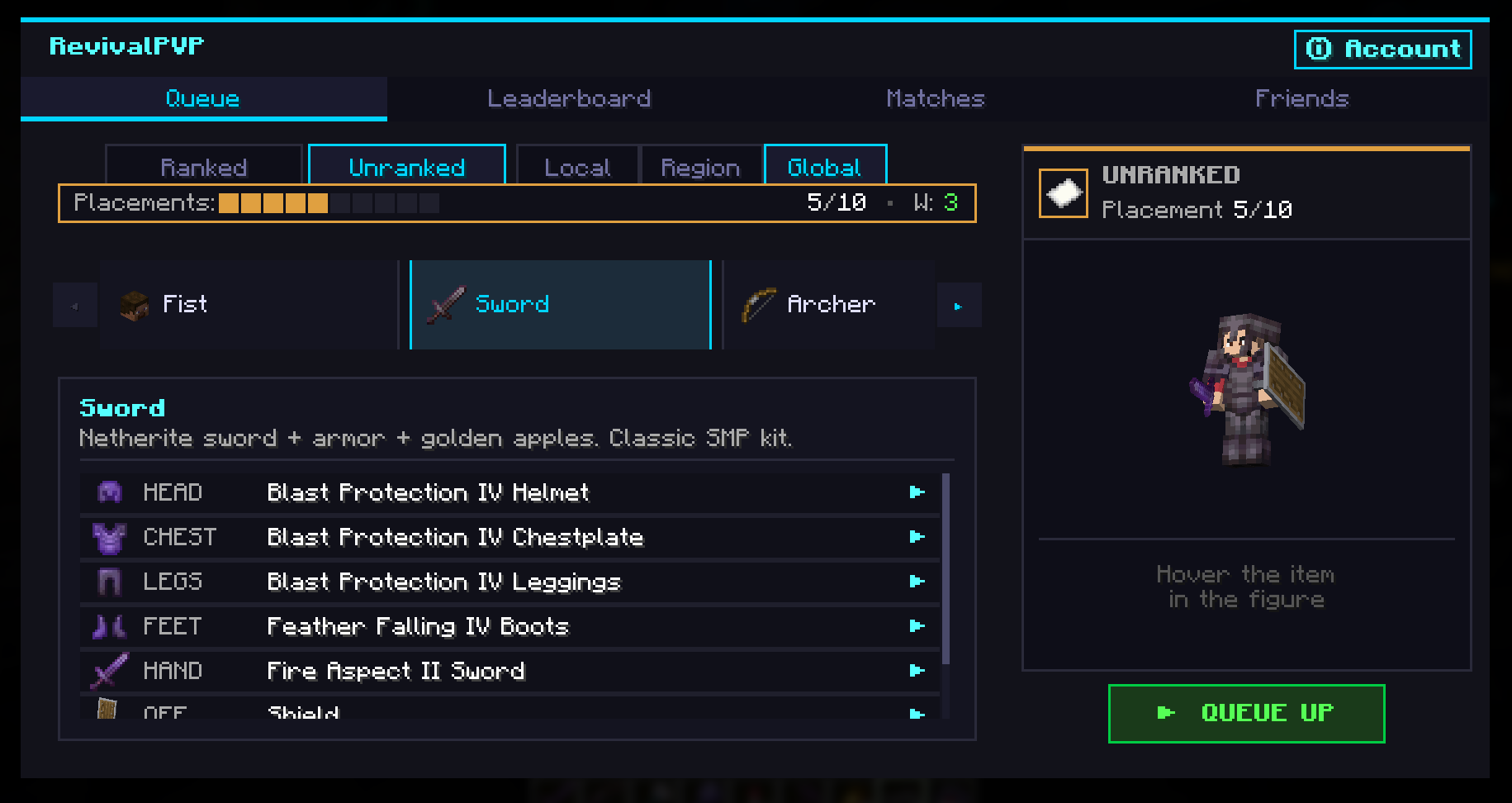
Cross-server competitive 1v1 PvP duels, you can queue, fight, climb the leaderboard, all from a clean in-game hub. Open with Y or /pvp.
 46
46
RevivalPVP
RevivalPVP
Y Press Y anywhere in Minecraft (title screen, your survival world, your friends' server) and the RevivalPVP hub opens. Pick a kit, queue, fight a real opponent on the RevivalPVP duel server, return to wherever you were when it's over.
No alt account, no extra login. Signs in with your Minecraft account via the standard Mojang session protocol. Same trust model as joining any online server.
---
Features
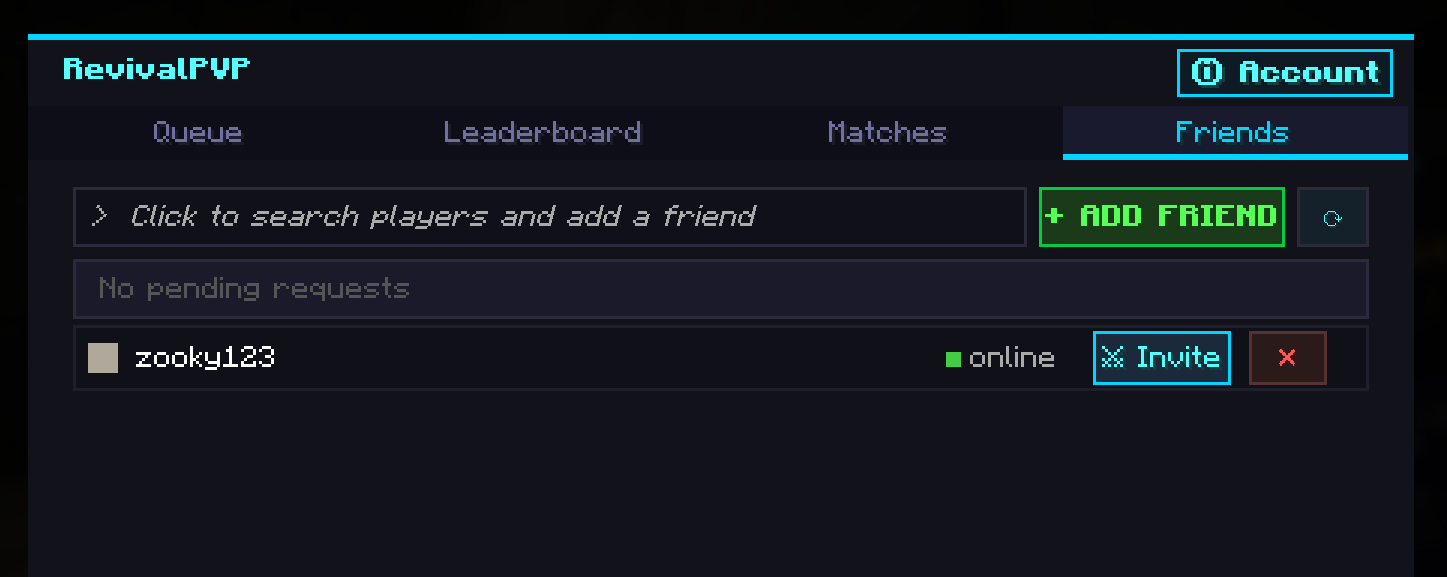
- Auto-update notifier: Sword, Archer, Crossbow, Mace, Crystal, Spear, Trident, TNT, Fist. Each kit gets a balanced standard loadout AND a customizable variant picker so you can tune your gear (Sharpness V vs. Sharpness III + Looting III, Power V vs. Flame I + Power IV, etc.). - Auto-update notifier Ranked uses OpenSkill rating. Complete 10 placements, climb through Iron, Bronze, Silver, Gold, Platinum, Diamond, Master, Grandmaster, Challenger. - Auto-update notifier before each duel. Multiple arenas in rotation, both players vote, finalized after a short window. - Auto-update notifier Watch live duels from a Live Matches list, with proper vantage cameras and side-isolated WorldBorder so you can't bleed into someone else's fight. - Auto-update notifier Send a duel invite to a friend, skip the queue. Friend list with online presence (idle / in queue / in duel / offline), persistent WS keepalive so invites land reliably. - Auto-update notifier Per-kit rankings, your match history with kit + opponent + LP delta, opponent profiles + sponsor coins. - Auto-update notifier Generate a 6-character code in the hub to sign into Auto-update notifier without leaving the game. - Auto-update notifier *(coming with the next Modrinth release)*. The hub will surface "Update available" if a newer version exists on Modrinth.
---
How to use
1. Install Fabric Loader + Fabric API for your Minecraft version. 2. Drop `revival-pvp-mod-<version>.jar` into your `mods/` folder. 3. Launch the game. The first time the mod starts it'll connect to the RevivalPVP backend in the background. 4. Press QUEUE UP (default keybind, rebindable in Options, Controls, RevivalPVP, Open Hub) to open the hub. The first time you queue, the mod authenticates you using your Minecraft session. No extra password, no separate account. 5. Pick a kit + Ranked/Unranked, click QUEUE UP. When a match is found you'll be transferred to the RevivalPVP duel server automatically. 6. After the duel ends you're returned to your previous server (or the title screen if you joined from there).
---
More Maps Soon
Friends Support (Invites)
Frequently asked
Do I need an account on revivalpvp.net? No. The mod uses your Minecraft session for auth, the same protocol Minecraft itself uses to join an online-mode server. You can also create a website account from the in-game hub by generating a one-time login code.
Does this require server-side install? No, the mod works on any vanilla server. There's an *optional* companion plugin (`RevivalPVPServerMod`) that lets server admins expose `/pvp` to players who don't have the mod installed, useful for partner servers. Modrinth listing is for the client mod only.
What does the mod send to the backend? Your Minecraft UUID + username (to identify you in the duel system), match results during a duel, and queue/kit/scope preferences when you queue. No chat logs, no inventory contents from your own world, no telemetry beyond match-related events. The default backend is `api.revivalpvp.net` and is configurable in `config/revivalpvp.json`.
Can I duel friends from any server? Yes. Open the hub on the server you're on, send your friend a duel invite, and the mod transfers both of you to the duel server when accepted. Both players need RevivalPVP installed (or the server-mod must be installed on their server).
Is the mod open source? The Modrinth release is free to use. Source-code availability is documented on the project's website.
What's the rebind key? Default is `Y`. Change in Options, Controls, RevivalPVP. The same hub also opens from the pause menu via an added "RevivalPVP" button.
---
Compatibility
- Geyser/Floodgate (no Forge / NeoForge port currently). - Geyser/Floodgate required (Minecraft 1.21+ already enforces this). - Tested with Geyser/Floodgate. Bedrock players on Geyser-enabled servers can use the companion server-mod's `/pvp` chat-clickable hub. - Works with standard performance / QoL mods (Sodium, Lithium, FerriteCore, Iris, etc.). Mixin surface is small and conservative: title-screen button, pause-menu button, Y keybind. No hooks into combat/movement code.
Gallery
Versions
1.0.6-1.21.7
release
1.0.5-1.21.5
release
1.1.0-1.21.11
release
1.0.4-1.21.11
release
1.1.1-26.1
release
1.0.3-1.21.4
release
1.0.0-1.21.10
release
1.0.0-1.21.8
release
1.0.0-26.1
release
1.0.0-1.21.9
release
1.1.0-26.1
release