

1.1
release

ServerAlarmClock
This plugin gives your Minecraft server a wake-up call, automatically restarting it when it decides to snooze.
 650
650
ServerAlarmClock
ServerAlarmClock
ServerAlarmClock is the perfect wake-up call for your Minecraft server! Ever tried to join a server that's still fast asleep? With ServerAlarmClock, your server will automatically start up when someone attempts to join, ensuring no one has to wait too long for the fun to begin.
Features
- 🚀 Easy Configuration: Your server will automatically boot up when a player attempts to join a stopped or sleeping server. - 💬 Easy Configuration: Send players fun and customizable messages while they wait for the server to start. - 🔧 Easy Configuration: Simple setup with a lightweight, no-hassle config.
Principle
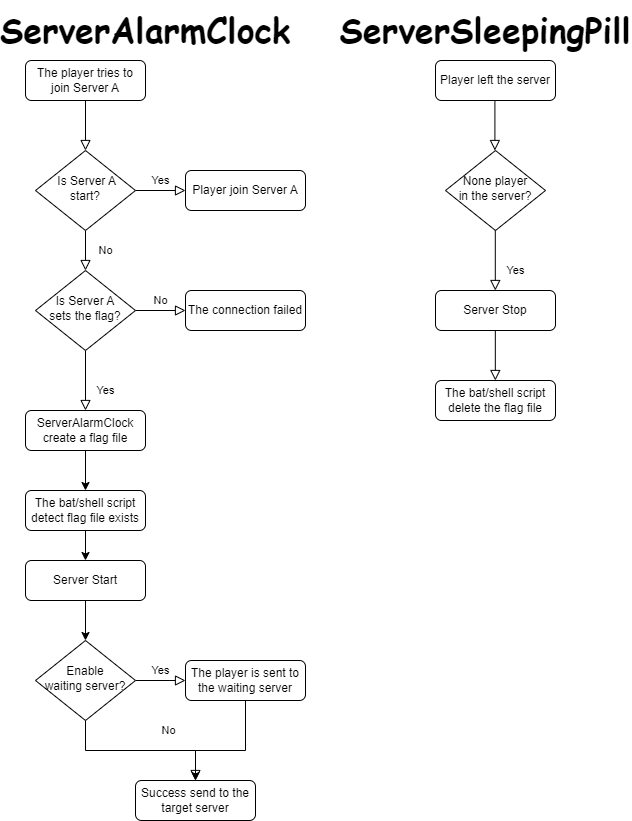
Command
```
reload your plugin config(serveralarmclock.reload)
/sac reload ```
How to Use
1. Install the Plugin: - Download the `ServerAlarmClock.jar` file and place it in your BungeeCord plugins folder.
2. Configure the Flags: - Open the `config.yml` file located in the `ServerAlarmClock` folder. - Under the `flags` section, specify the paths to the flag files for each of your servers. These flags will be used to trigger the server startup.
3. Enjoy! - You need to create or modify your server startup script to include the logic for checking the flag file. The example of a Linux shell script is provided at the end of this passage. 4. Enjoy! - Once everything is configured, reload the plugin using /sac reload. The plugin will now monitor server connections and start the target server when a player attempts to join a server that is currently stopped. 5. Enjoy!
Example of a Linux shell script
``` #!/bin/bash
Server directory
SERVER_DIR="your/server/path"
Path to the flag file
FLAG_FILE="your/flag/file/path/example.flag"
Change to the server directory
cd "$SERVER_DIR" || { echo "Failed to change directory to $SERVER_DIR"; exit 1; } while true do
Check if the flag file exists
if [ -f "$FLAG_FILE" ]; then echo "Minecraft Server is Starting"
Start the server
java -jar server.jar
Remove the flag file
rm -f "$FLAG_FILE"
echo "Minecraft Server has Stopped" else sleep 1 fi done ```
Example of a Windows bat script(generate by gpt)
``` @echo off
REM Server directory set SERVER_DIR=yourserverpath
REM Path to the flag file set FLAG_FILE=yourflagfilepathexample.flag
REM Change to the server directory cd /d "%SERVER_DIR%" if %errorlevel% neq 0 ( echo Failed to change directory to %SERVER_DIR% exit /b 1 )
:loop REM Check if the flag file exists if exist "%FLAG_FILE%" ( echo Minecraft Server is Starting
REM Start the server java -jar server.jar
REM Remove the flag file del /f "%FLAG_FILE%"
echo Minecraft Server has Stopped ) else ( timeout /t 1 /nobreak >nul )
goto loop
```
Keep your players happy and your server ready with ServerAlarmClock—no more unexpected downtime!