

1.0.0
release

smart-fps-booster
Smart FPS Booster is a client-side Minecraft utility mod that helps manage performance by applying configurable optimization profiles and dynamically adjusting selected settings.
 37,40k
smart-fps-booster
Smart FPS Booster
A client-side Minecraft performance utility mod that dynamically manages selected video and performance settings, provides real-time performance monitoring, and offers configurable optimization profiles.
Smart FPS Booster does not guarantee specific FPS increases and does not guarantee specific FPS increases. Performance results depend on hardware, installed mods, and game settings.
Keybinds
| Key | Action | |-----|--------| | F8 | Open performance dashboard | | F9 | Toggle dynamic optimization | | F10 | Cycle profiles |
---
---
Why Smart FPS Booster?
Minecraft performance tuning often requires manual configuration and frequent adjustments depending on gameplay situations. Smart FPS Booster simplifies this process by:
- Applying predefined optimization profiles - Dynamically adjusting supported client settings (optional) - Displaying live performance data - Integrating with popular optimization mods
The goal is to stabilize performance, reduce stuttering, and simplify configuration, especially on low-end or mid-range systems.
---
Intended For
- Players on low-end or mid-range PCs and laptops - PvP players who prefer consistent frame timing - Players experiencing FPS drops or stuttering - Anyone who wants automated client-side performance management
---
Features
Optimization Profiles

Four configurable profiles are included:
- Battery Saver – prioritizes performance-oriented settings - Battery Saver – default mix of visuals and performance - Battery Saver – higher visual settings with moderate optimization - Battery Saver – reduces GPU/CPU load for laptops
Profiles modify only supported client-side video and performance settings.
---
Live Performance Dashboard
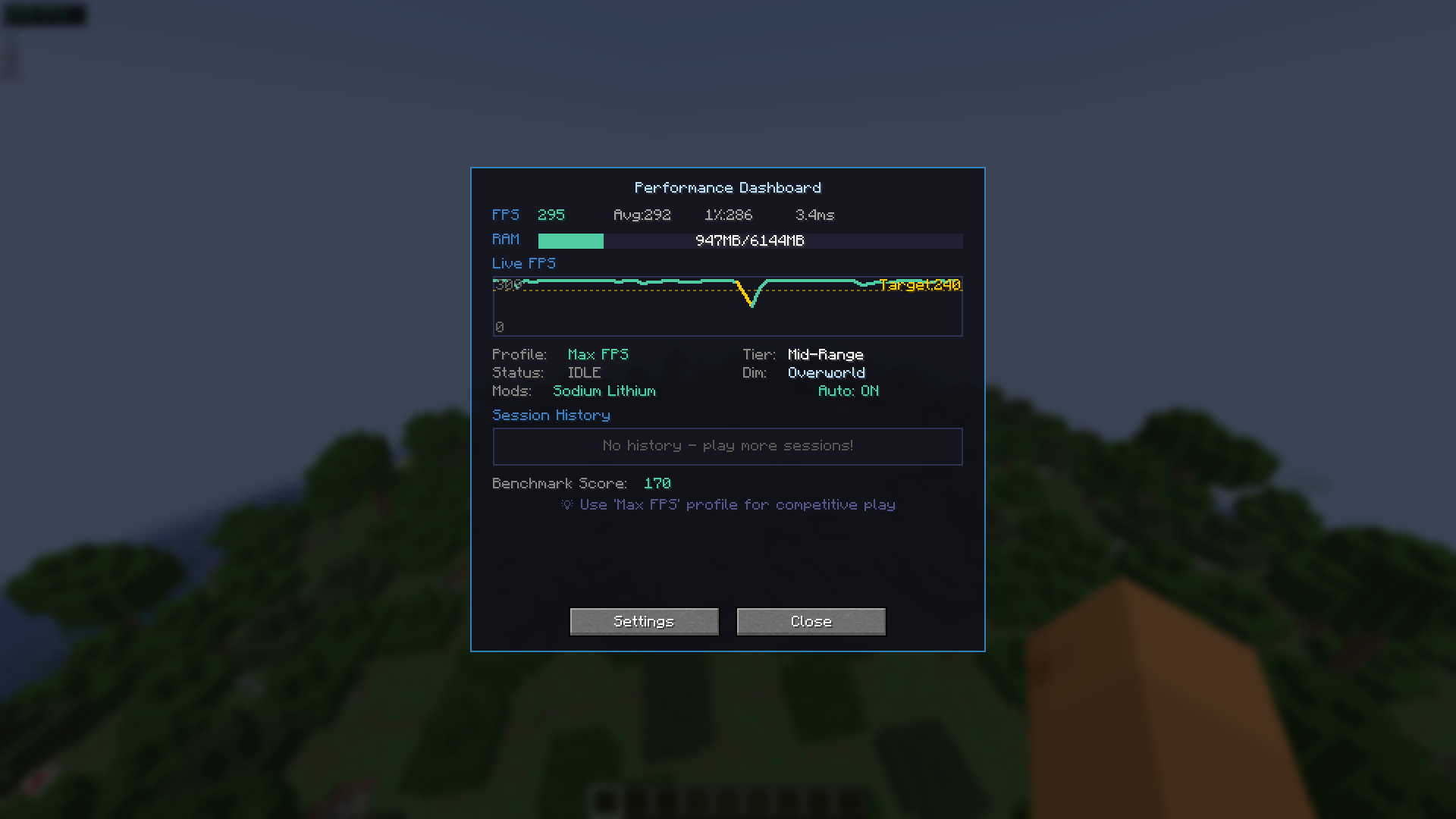
Accessible via F8:
- Current FPS display - FPS history graph (last 60 seconds) - Memory usage indicator - Session history (up to 10 sessions) - Hardware tier estimation - Built-in benchmark tool
---
Dynamic Optimization (Optional)
When enabled, the mod can adjust selected settings based on:
- Player movement - Combat situations - Heavy visual scenes (particles, explosions, large farms) - Current dimension (Overworld / Nether / End)
All changes remain within normal Minecraft client configuration options.
---
Setting Locks
You may prevent the mod from changing specific settings:
- Render Distance - Graphics Mode
This allows optimization while preserving your preferred visual configuration.
---
Lag Spike Indicator
Optional visual alert when a sudden FPS drop is detected (brief red screen flash). This is informational only and does not affect gameplay mechanics.
---
Mod Compatibility
Smart FPS Booster detects and adapts behavior when used with:
- Sodium - Lithium - Iris Shaders - Mod Menu
Compatibility is automatic when these mods are present.
---
Installation
1. Install Fabric Loader 2. Install Fabric API 3. Place the mod `.jar` into the `mods` folder 4. Launch the game
---
Important Notes
- Client-side only - Safe to use on servers - Does not bypass hardware limitations - Does not guarantee FPS improvements - Designed to assist configuration and performance monitoring
---
License
MIT License
---
Developer
Created by devxkamlesh
Source code, issue tracker, and donation links are available on the project page.